Solidworks Automation Skill
Reliable AI Skill + MCP toolkit for agent-driven desktop CAD automation.
Install Solidworks Automation Skill
Pick your client, then add it in one click or paste the config.
~/Library/Application Support/Claude/claude_desktop_config.json{
"mcpServers": {
"solidworks-automation-skill": {
"command": "npx",
"args": [
"-y",
"github:wzyn20051216/solidworks-automation-skill"
]
}
}
}
Settings → Developer → Edit Config, merge this into mcpServers, then fully quit and reopen Claude Desktop.
We couldn’t confirm it starts correctly
We ran the install command but it didn't respond within our test window — this can mean a slow first-time install rather than a real problem.
npx -y github:wzyn20051216/solidworks-automation-skillNo response to initialize.
This is an experimental automated check and can have false negatives — missing environment variables, a slow cold install, etc. It doesn’t necessarily mean something’s wrong. Last checked Today.
Overview
Security & health
What it can reach and how reliably it runs — from our own checks, not the maintainer’s claims.
Recent health check succeeded.
Supply-chain signal
No high-severity advisories surfaced by our automated scan.
Scanned 18h ago via OSV.dev · github:wzyn20051216/solidworks-automation-skill (npm)
Adoption & maintenance
Factual signals from GitHub, npm, and our automated checks — not a rating.
From the project README
SolidWorks Automation Skill
AI Skill + MCP toolkit for reliable desktop CAD automation.
让 Codex、Claude、Cursor 等 Agent 通过自然语言调用真实 CAD 软件,并对执行结果进行验证与追踪。
Tool success is not treated as task success.
工具调用成功,不代表任务真的完成;需要 Review 的任务会经过结果验证后再交付。




User → Agent (Codex / Claude / Cursor) → Skill / MCP → Execution Core → CAD → Artifacts + Evidence
AI 负责理解意图、查证 API、规划步骤;Execution Core 保证执行过程可追踪、可验证、失败可恢复。
See It In Action
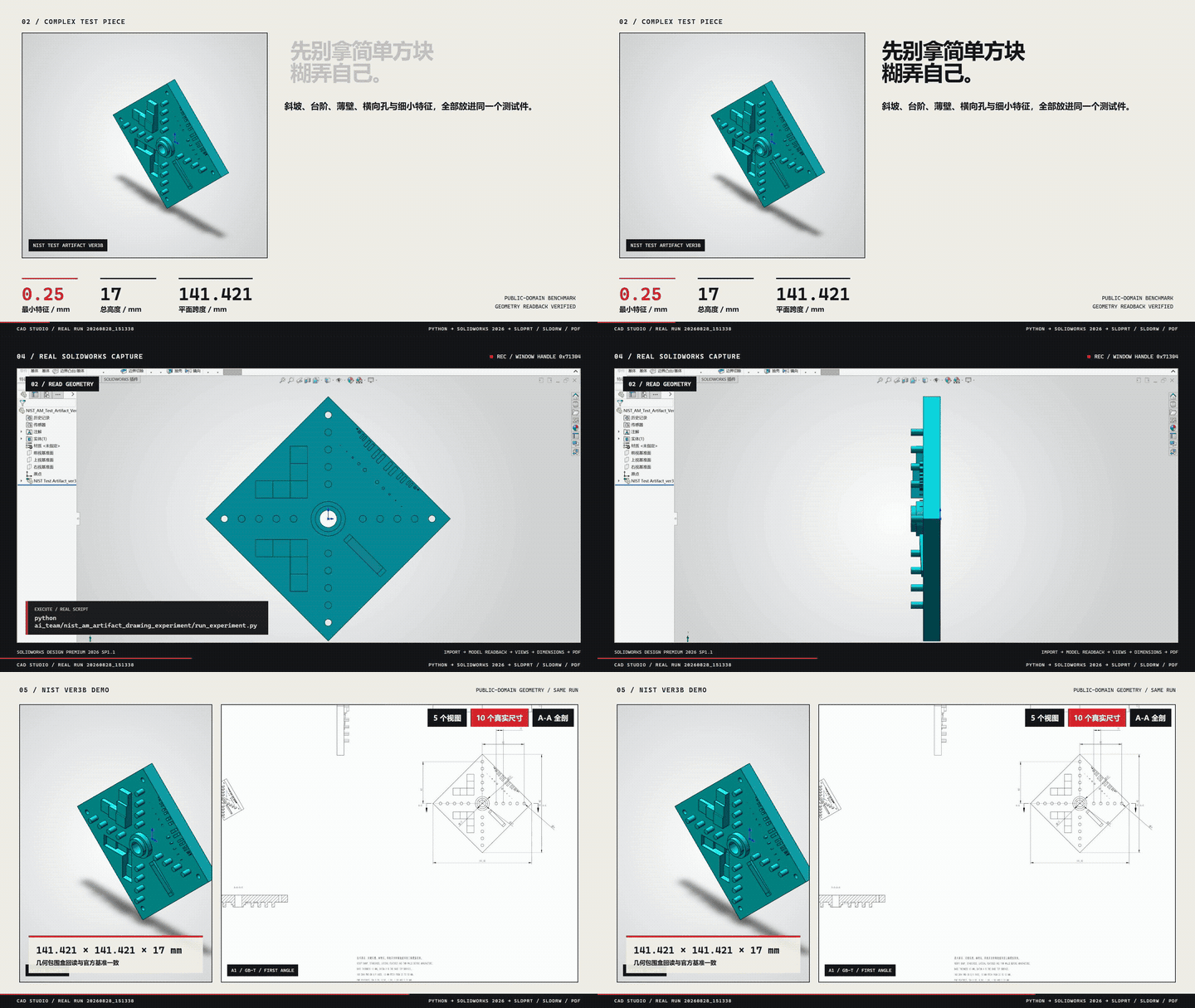
一个真实流程:自然语言需求 → Agent 调用 Skill → SolidWorks 生成原生 SLDPRT + SLDDRW → 导出 PDF → 自动复核尺寸与证据。
| 案例 | 能力 | 状态 |
|---|---|---|
| M6×1 真实螺纹孔 | Metric Tap Thread,重建后回读 | verified |
| CNC 多圆角/倒角安装座 | 语义选边、可变半径、face/full-round/setback | stable |
| 标准渐开线直齿轮 | 模数/齿数/压力角驱动实体 | pilot |
Prerequisites
| 项 | 要求 | 检查方法 |
|---|---|---|
| 操作系统 | Windows 10/11 x64 | 原生 SLDPRT / SLDASM / SLDDRW 依赖 SolidWorks COM,其他系统仅可用开放格式能力 |
| Python | 3.10+(本机真机验收使用 3.12) | python -V |
| Node.js | 20+(工作台、MCP 注册与 Skill 安装器) | node -v |
| Git | 任意较新版本(安装器通过 git clone / git pull 获取与更新仓库) | git --version |
| SolidWorks | 2024 或 2026,需合法许可 | python scripts/cad_doctor.py |
| AutoCAD | 可选,仅 DWG/DXF 子技能需要 | — |
安装 Python 依赖:
python -m pip install -r requirements.txt
# 只有开放格式(OCCT)能力才需要:
python -m pip install -r requirements-occt.txt
只读环境自检(不会打开或关闭 CAD):
python scripts/cad_doctor.py           # 发现的安装路径、版本、COM 注册状态
python scripts/sw_capability_probe.py  # 类型库与能力清单
模板与材料库默认自动探测,不需要写死路径。只有非标准安装位置才需要
config/runtime.example.json 与 SOLIDWORKS_TYPELIB_DIRS,
见 config/README.md。
Quick Start
三种入口任选其一即可,不需要同时启动。
Option 1 — Skill
npx github:wzyn20051216/solidworks-automation-skill --target claude
该命令获取本仓库并执行根目录的 install.js(package.json 的 bin 入口)。
默认行为(安全优先,2026-10-28 起):
- 只装到已经存在 skills 目录的客户端(
.agents/.claude/.codex/.cursor/.openclaw); 一个都没检测到时不会替你创建目录,而是提示改用--target显式指定。 - 目标目录已存在但不是本仓库的 git 检出(手动放置、解压、或其他来源)时, 拒绝安装且不删除任何文件。
- 由本仓库安装的目录用
git pull --ff-only更新;无法快进时只报告,不删除。 - Python 依赖默认不自动安装,只打印命令;加
--install-deps才执行。 - 非 Windows 平台默认拒绝(SolidWorks COM 不可用);确需使用开放格式能力加
--allow-non-windows。
| 参数 | 作用 |
|---|---|
--target claude,codex | 装到指定客户端;all 表示全部支持项 |
--dry-run | 只打印将要执行的动作,不写盘 |
--install-deps | 安装 requirements.txt + mcp-server/requirements.txt |
--no-register-mcp | 跳过 MCP 配置注册(默认注册,覆盖前自动备份 .bak-<时间戳>) |
--force-reinstall | 旧目录先改名为 .bak-<时间戳> 再重装(不删除) |
安装使用 git clone --depth 1,只取工作树、不拉完整历史。仓库完整工作树约 13 MB,
其中 apps/(桌面端源码,约 6 MB)与 Skill 运行无关。
若 npx 在当前网络环境不可用,改用下方 Option 2 的克隆方式,再执行 node install.js。
Option 2 — MCP
git clone https://github.com/wzyn20051216/solidworks-automation-skill.git
cd solidworks-automation-skill
python -m pip install -r requirements.txt -r mcp-server/requirements.txt
node mcp-server/register_all_ai_mcp.js --help          # 查看全部参数
node mcp-server/register_all_ai_mcp.js --clients codex,claude-code,cursor
注册脚本会写入对应客户端的 MCP 配置,并在写入前生成 .bak 备份;加 --strict 可让任一客户端失败时非零退出。
Option 3 — CAD Studio 桌面版
从 GitHub Releases 下载 Windows 安装包。
Choose one entry point. You do not need to run all three.
| 入口 | 适合谁 | 需要 GUI | 典型用法 |
|---|---|---|---|
| Skill | 支持 skill 导入的 Agent 客户端 | 否 | 自然语言驱动 SolidWorks |
| MCP | Codex / Claude / Cursor / Windsurf 等 MCP 客户端 | 否 | Agent 自动 Tool Calling |
| CAD Studio | 需要图形界面管理项目/任务/预览/交付 | 是 | 桌面端提交任务 |
三者是平级入口,共用同一套能力清单(capabilities.yaml)、脚本与证据系统。安装后可用 python scripts/cad_doctor.py 做环境诊断;详细安装与 CLI 见 docs/CAD_STUDIO_USER_MANUAL.md。
Why This Project
LLM 会规划,但常见的 AI CAD 自动化有几个真实问题:
- LLM 会规划,但不会真正操作桌面 CAD 软件
- Tool 返回
success不代表任务真的完成 - CAD API 版本、环境、Backend 差异复杂
- 固定 Tool 集合覆盖不完所有工程需求
- Agent 执行过程通常不可追踪、不可审计
本项目的解法:
| 问题 | 方案 |
|---|---|
| 自然语言 → 真实操作 | Skill / MCP 接入真实 COM 与后端 |
| Tool success ≠ Task success | Verification-first completion |
| Backend 失败 | Backend Router + Recovery Decision |
| 能力缺失 | Capability Gap → 交还 Agent 查证 |
| 执行不可追踪 | 结构化 Trace |
| 是否可靠 | Golden Workflow Eval |
Architecture
User / Agent
  ↓
Skill / MCP
  ↓
Execution Core(Capability · Verification · Recovery Decision · Trace)
  ↓
Backend Router
  ↓
Python COM / C# / OCCT
  ↓
CAD Software
  ↓
Artifacts + Evidence
-
Root Skill = 通用能力、规则与执行基础设施(连接、建模、审查、MCP)。
-
Subskills = 专项领域工作流(工程图、螺纹孔、CNC 圆角、VibeCAD、AutoCAD),由 Root Skill 按需调用,不需要用户手动启动。
-
Execution Core = 内部可靠执行层:统一状态、结果验证、失败恢复决策与执行追踪。它是内部实现,不是独立服务、不需要用户启动。
-
Capability Gap = 找不到能力时结构化返回
CAPABILITY_GAP,交还 Agent 查证,而不是「做不了」:Existing Tools → Tool Composition → Backend Fallback → Capability Gap → Agent 查 references / 官方 API / SDK → 最小实现 → VerificationExecution Core 自身不会自动联网执行未知代码。
详细:docs/architecture/execution-core.md
Reliability
当前附带 43 个 deterministic reliability scenarios(12 nominal + 31 robustness),
覆盖正常执行、故障注入、后端回退、能力缺口与策略门禁;由 golden-workflows.yaml 的 12 个 workflow 派生。
| Metric | Current baseline |
|---|---|
| Nominal workflow | 12/12 first-pass(baseline v4,warning 归 guardrail,等待人工复核) |
| Injected false-completion cases | all detected |
| Escaped false completion | 0 in current deterministic benchmark |
| Regression suite | 当前方案 B 验证记录见 可靠性修复与验收 |
这是 deterministic engineering benchmark(Fake Handler/Reviewer + 故障注入), 不是生产 SLA 或真实用户成功率。详见
docs/architecture/v2-evaluation.md。
验证边界(Verification Boundary)
本项目的验证分三层,结论不能跨层套用:
| 层 | 在哪里跑 | 覆盖什么 | 不覆盖什么 |
|---|---|---|---|
| L1 离线回归 | 任意机器 | pytest(全量,当前 1045 项)、evals/runner.py(12 workflow / 43 scenario)、治理单测(当前 93 项) | 需要 SolidWorks / AutoCAD 进程的一切 |
| L2 托管 CI | GitHub 托管 windows-2022 | 与 L1 相同,外加前端/ Rust 构建与发布契约检查;作业名 test-and-build,是 main 的唯一必需状态检查 | 真实 CAD 执行 |
| L3 真实 CAD 验收 | 仅维护者本机(Windows 11 + SolidWorks 2026 SP01.1) | Golden 五轮真机、装配/工程图/运动算例等真机回归 | 其它机器、其它版本 |
必须明确的三点:
- 远端不存在 CAD 真机执行证据。 仓库没有自托管 Runner,
Windows CAD Regression工作流为手动触发、 不是必需检查,当前无法执行。任何"远程 CAD CI 已通过"的表述都是错的。 - 本机通过 ≠ 跨机器通过。 换一台机器请按
Prerequisites与docs/CAD_STUDIO_USER_MANUAL.md重新自检, 不要直接引用维护者的验收结论。 - L2 通过 ≠ 治理闭环。 必需检查只保护
main;指向特性分支的 PR(含 stacked PR)不受该规则约束。
原生 SolidWorks 操作当前以 2026 为支持与验收目标。方案 B 保留现有执行架构,修复失败状态、原生阵列、草图可编辑性和文档归属,并提供可选 HTTP 与可验证的产物取回。
MCP 工具数为 61(实际清点:mcp-server/server.py 中 61 个 @mcp.tool(),名称去重后仍为 61)。
其中原有 60 个的名称与输入 Schema 保持兼容,另新增 1 个只读产物工具 cadstudio_read_artifact。
Capabilities & Status
| Category | 你能做什么 | 状态 |
|---|---|---|
| Modeling | 零件建模、草图/拉伸/旋转、齿轮、钣金、焊件 | verified + pilot |
| Assembly | 装配、Mate、干涉检查、爆炸视图 | verified |
| Drawing | GB/T 工程图、尺寸链、孔表、BOM | verified + pilot |
| Export | STEP / STL / IGES / PDF / DXF / DWG | verified |
| Motion | 运动算例、旋转马达、结果门禁 | pilot |
| FEA | CalculiX 线性/非线性求解编排与审计 | pilot |
| DFM / Routing | 制造复核、路由复核 | pilot |
| Surface / Mold | 受限 Loft/Sweep/Thicken、模具计划 | pilot |
| AutoCAD | DWG/DXF 二维绘图、图层/标注/预览 | verified / pilot / blocked |
| Open-format | OCCT 无头写入 STEP/BREP/STL/OBJ/GLB 等 | verified |
状态等级(capabilities.yaml 定义):
| Status | 含义 |
|---|---|
verified | 真机验证完成,可按已知范围使用 |
stable | 长期回归覆盖 |
pilot | 已实现但仍需人工复核 |
blocked | 当前环境或能力不允许自动交付 |
真机基线:SolidWorks 2024 / 2026、AutoCAD 2024。未验证能力不会被包装成无人值守交付。
- 完整能力矩阵(每个能力的精确等级/版本/限制)→
capabilities.yaml - 领域工作流 →
subskills/·SUBSKILLS.md
No SolidWorks Installed?
没有 SolidWorks 时,部分开放格式任务仍可完成:
STEP · IGES · BREP · STL · OBJ · GLB · DXF · SVG · PDF · PNG
(通过 OCCT/OCP 隔离进程真实写入。)
但原生 SLDPRT / SLDASM / SLDDRW 仍需要合法 SolidWorks 环境。
Examples
examples/ 目录包含从基础零件到装配、工程图、Motion、FEA 的可运行示例。
Documentation
| Topic | Link |
|---|---|
| MCP Setup | mcp-server/README.md |
| CAD Studio | docs/CAD_STUDIO_USER_MANUAL.md |
| Architecture | docs/architecture/execution-core.md |
| Reliability Eval | docs/architecture/v2-evaluation.md |
| Capability Matrix | capabilities.yaml |
| Subskills | SUBSKILLS.md |
| API / Backend | references/ |
| Troubleshooting | references/troubleshooting.md |
Roadmap & Contributing
Roadmap:更广的真机验证 · 更可靠的能力路由 · 更好的 CAD Studio 可观测性 · 更多 verified 子技能 · 社区贡献工作流。
Reviews
No reviews yet — be the first to share how it worked for you.
Frequently Asked Questions about Solidworks Automation Skill
Related MCP servers
Add a badge to your READMEShow it’s listed — live SVG, Markdown or HTML.
AllMCPs Directory Badge
Showcase your server listing on GitHub or your project documentation. Embed this dynamic SVG badge to highlight official listing status and live engagement.
[](https://allmcps.com/mcp/solidworks-automation-skill)<a href="https://allmcps.com/mcp/solidworks-automation-skill"><img src="https://allmcps.com/api/badge/solidworks-automation-skill?style=directory" alt="Solidworks Automation Skill on AllMCPs" /></a>