AllMCPs
BrowseBestCategoriesStackCompareToolsGuidesBlog Log in Submit MCP

Stay in the loop

Get new MCP servers and top picks in your inbox.

AllMCPs

The open directory for discovering and installing Model Context Protocol servers.

Explore

  • Browse servers
  • Best MCP servers
  • Categories
  • MCP clients
  • Agent prompts
  • Stack Builder
  • Compare servers
  • Tags index
  • Submit a server
  • Pricing

Learn

  • Guides hub
  • What is MCP?
  • Install guide
  • Troubleshooting
  • Security
  • Blog
  • Blog RSS

Tools

  • All tools
  • Config generator
  • Config validator
  • MCP playground
  • OpenAPI → MCP
  • Badge generator

For agents

  • API docs
  • Trust & traffic
  • llms.txt ↗ (opens in a new tab)
  • Catalog JSON ↗ (opens in a new tab)
  • Remote MCP ↗ (opens in a new tab)

Company

  • About
  • Contact
  • X (@AllMCPs) ↗ (opens in a new tab)
  • GitHub ↗ (opens in a new tab)
  • Terms
  • Privacy
AllMCPs VerifiedAllMCPs VerifiedFeatured on Nick LaunchesFeatured on Nick LaunchesLaunch Llama NewsletterLaunch Llama NewsletterVerified DR - allmcps.comVerified DR - allmcps.comFeatured on SaaSGrowFeatured on SaaSGrowFeatured on Twelve ToolsFeatured on Twelve ToolsFeatured on Saaspa.geFeatured on Saaspa.geFeatured on Findly.toolsFeatured on Findly.toolsFeatured on Startup FameFeatured on Startup FameFeatured on LaunchKiwiFeatured on LaunchKiwiFeatured on ScrollLaunchFeatured on ScrollLaunchFeatured on DailyPingsFeatured on DailyPingsFazier badgeFazier badgeFeatured on NewTool.siteFeatured on NewTool.siteFeatured on saasfame.comFeatured on saasfame.comDR Checker - Domain RatingDR Checker - Domain RatingListed on Turbo0Listed on Turbo0Launched on LaunchBoard - Product Launch PlatformLaunched on LaunchBoard - Product Launch PlatformList on SimilarlabsList on Similarlabshttps://codetrendy.comhttps://codetrendy.comListed on DevTool.ioFeatured on BuildlistFeatured on BuildlistAllMCPs VerifiedAllMCPs VerifiedFeatured on Nick LaunchesFeatured on Nick LaunchesLaunch Llama NewsletterLaunch Llama NewsletterVerified DR - allmcps.comVerified DR - allmcps.comFeatured on SaaSGrowFeatured on SaaSGrowFeatured on Twelve ToolsFeatured on Twelve ToolsFeatured on Saaspa.geFeatured on Saaspa.geFeatured on Findly.toolsFeatured on Findly.toolsFeatured on Startup FameFeatured on Startup FameFeatured on LaunchKiwiFeatured on LaunchKiwiFeatured on ScrollLaunchFeatured on ScrollLaunchFeatured on DailyPingsFeatured on DailyPingsFazier badgeFazier badgeFeatured on NewTool.siteFeatured on NewTool.siteFeatured on saasfame.comFeatured on saasfame.comDR Checker - Domain RatingDR Checker - Domain RatingListed on Turbo0Listed on Turbo0Launched on LaunchBoard - Product Launch PlatformLaunched on LaunchBoard - Product Launch PlatformList on SimilarlabsList on Similarlabshttps://codetrendy.comhttps://codetrendy.comListed on DevTool.ioFeatured on BuildlistFeatured on Buildlist
© 2026 Jackalope Digital LLC. All rights reserved.
  1. Home
  2. 📂 Browser Automation
  3. Sniff
S
Health: Not checked yetWe have not completed a health check for this listing yet.Last checked 8/10/2026, 11:44:55 PM

Sniff

Enrichment pendingWe haven’t run our AI enrichment pass on this listing yet, so the overview, use cases, and FAQ below may be sparse or missing. We work through the catalog over time — check back soon.
View Repository

QA + a11y scanner: walks your running app's real user flows and reports what's broken.

Quick Install

Automated & IDE Setup

Copy the AI prompt to install this server into Claude Code, Cursor, or another agent — or use 1-click editor setup below.

Add to CursorAdd to VS Code
Manual Client & Custom JSON ConfigExpand JSON â–¾

Install Config Generator

Choose your client
claude_desktop_config.json
{
  "mcpServers": {
    "sniff": {
      "command": "npx",
      "args": [
        "-y",
        "sniff"
      ]
    }
  }
}

💡 Paste into ~/Library/Application Support/Claude/claude_desktop_config.json (macOS) or %APPDATA%\Claude\claude_desktop_config.json (Windows)

Install Directory Badge Claim listing Alternatives📂 More in Browser Automation

Documentation Overview

Sniff

npm npm downloads License CI Node 10x marketplace Stars

English · 简体中文 · 日本語 · Español · Français

Point it at your running app. It walks your real user flows in a real browser and tells you what's actually broken, with proof.

Get started · What it finds · Why trust it · How it works · Demo · FAQ

sniff demo

Sniff flow: your running app -> headless browser walk -> findings with proof

What is this?

Sniff is an autonomous QA scanner. You point it at a running web app and it walks your app's real user flows in a real (headless) browser (clicking buttons, filling forms, following links) and reports what's actually broken.

It is not a linter and not a static scanner. It opens your pages, interacts with them like a user would, and watches what happens.

Every bug it reports comes with proof: the exact page, the ordered steps to reproduce it, a screenshot, and the console or network excerpt that caught it. A finding without reproduction proof is not a finding.

Terminal
npx sniff-qa --url http://localhost:3000

One command, no config, no API key, no Playwright setup. Point it at your running app, or just run npx sniff-qa from your project and it auto-detects a dev server on common ports.

Sniff walks a running app. If no dev server is running, it falls back to a source-code scan and tells you exactly how to start the real walk. See Get started.


Get started

You need Node.js 22+ and a web app you can run locally (or a URL).

Naming: the npm package is sniff-qa, so use npx sniff-qa or npm install -D sniff-qa. Once installed, the binary is sniff (the sniff-qa binary works too). Don't run npx sniff, that's a different package.

1. Start your app

Terminal
npm run dev        # or however you start your app

2. Walk it

In another terminal:

Terminal
npx sniff-qa --url http://localhost:3000     # point it at your running app

That's the reliable one-liner. Sniff also auto-detects a dev server on common ports, so from your project folder you can often just run npx sniff-qa with no flags. If your app is on a non-standard port (or auto-detect misses it), pass --url (that always works). It also walks a deployed URL:

Terminal
npx sniff-qa --url https://staging.myapp.com

Found bugs? It exits non-zero, on purpose. A walk that finds issues exits with code 1 so CI fails the build; it is not a crash (you'll see a ✓ Scan complete line). Pass --fail-on none to always exit 0.

First run downloads a browser. The first time Sniff opens a browser it downloads a Chromium build (~165 MB, one-time). You'll see the progress. You need internet access for that first run; after that it's cached.

3. Read the report

Findings print to your terminal, grouped by severity, each with steps to reproduce. Want a shareable page?

Terminal
npx sniff-qa --url http://localhost:3000 --report   # runs a walk, then writes sniff-reports/sniff-report.html (self-contained)

No app running? Sniff doesn't fail silently. It runs a source-only scan and prints a clear next step (start your dev server or pass --url) so you can get to the real flow-walk. You can also run the source scan on purpose:

Terminal
npx sniff-qa scan         # source-only scan, no browser

Stuck? Run npx sniff-qa doctor to check your environment (Node, browser, dev server).


What it finds

Sniff walks your app and looks for 12 classes of real bugs:

#ClassExamples
1Broken pages / routes4xx/5xx responses, blank renders, crash screens
2Broken linksDead internal and external links
3Console & network errorsUncaught exceptions and failed requests during interaction
4Empty & fake dataMissing data, plus placeholders like lorem ipsum, TODO, test@test.com
5Broken formsDead submit buttons, validation that never fires
6State lossFill a form, hit back, and it's wiped
7Flow regressions / dead-endsA journey that can't be completed
8Bad loading & error statesInfinite spinners, missing error states
9Broken async outcomesSubmitted but no success feedback (flagged "needs out-of-band verification")
10Responsive issuesOverflow and tiny tap targets (a 375px mobile pass)
11AccessibilityMissing alt text and labels, contrast, via axe-core
12Unclear primary actionsThe main call-to-action is buried or ambiguous

Each finding ships with:

  • Reproduction proof: the exact route, the ordered steps, a screenshot, and the console/network excerpt.
  • A severity, so you fix the right thing first.
  • A confidence: confirmed, likely, or uncertain. Uncertain findings are hidden by default; add --all to see them.
  • A suggested fix.
The bug classes Sniff finds

Why you can trust it

Most scanners drown you in false positives until you stop reading them. Sniff is built the opposite way.

We measured it on a fixture app planted with 21 bugs across all 12 classes, plus a clean control page that should produce zero findings:

Old engineNew engine
Bugs found9 / 21 (43%)21 / 21 (100%)
Precision~13%100%
False positives1250
Findings on the clean pagen/a0
Flagship commandcrashedworks

Those numbers are locked as a regression test. The full suite is 441 tests.

How it keeps false positives near zero:

  • A first-party noise filter drops the junk that isn't your bug: favicons, analytics, hot-module-reload chatter, expected auth redirects, engine aborts.
  • Accessibility findings are backed by axe-core, which is zero-false-positive by design.
  • Uncertain findings are suppressed by default (use --all to see them).
  • A broken page is reported once, not re-flagged on every link that points to it.

If Sniff can't prove a bug, it doesn't claim one.


How is it different?

Linters read your source. End-to-end frameworks make you write the tests. Link checkers only check links. Sniff drives your real app and judges the result.

Snifflinkinatorpa11yPlaywright codegenQA-Wolf-style services
Walks real user flows in a browserYesNoNoYou script itYes
Zero setup, zero test-writingYesYesYesNo (you write tests)No (onboarding)
Broken linksYesYesNoManualManual
Accessibility (axe-core)YesNoYesManualSome
Empty / placeholder / fake dataYesNoNoNoNo
State-loss (back-button wipes a form)YesNoNoManualManual
One-shot reproduction proof per findingYesNoPartialNoVaries
Self-contained HTML reportYesNoPartialNoDashboard
Runs locally, no account, no API keyYesYesYesYesNo (service)

What Sniff uniquely does in one command: catch empty/placeholder data, state-loss, and broken async outcomes, and hand you a single proof report, with no scripts to write and no service to sign up for.


Commands

Code
sniff                  Walk your app (auto-detects the dev server). The default.
sniff --url <url>      Walk a specific URL
sniff scan             Source-only scan, no browser (placeholders, TODOs, dead links, etc.)
sniff report           Show the results from the last run
sniff doctor           Check your environment (Node, browser, config, dev server)
sniff ci               Generate a GitHub Actions workflow
sniff fix              Auto-fix safe issues (console.log, debugger, etc.)
sniff --help           Show every command and flag
sniff --version        Show the version

Useful flags

FlagWhat it does
--url <url>Walk this URL instead of auto-detecting
--reportWrite a self-contained HTML report to sniff-reports/sniff-report.html
--allAlso show low-confidence (uncertain) findings
--max-pages <n>Cap how many pages to walk (default: 25)
--no-mobileSkip the 375px responsive pass
--headedShow the browser window while it walks
--jsonMachine-readable JSON output
--ciCI mode (stable output, non-interactive)
--fail-on <sev>Exit non-zero on findings at or above this severity

Demo

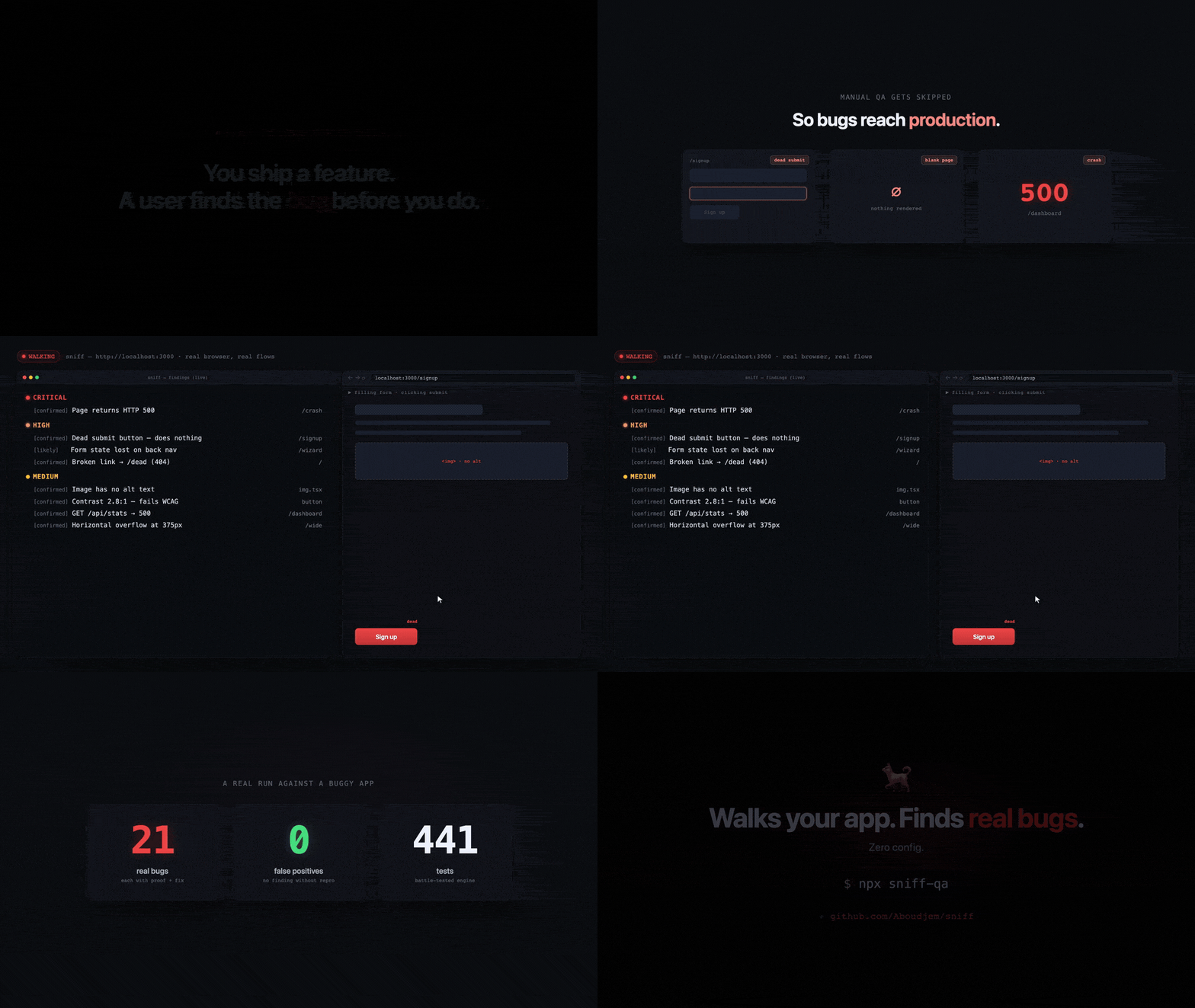
A real run against a buggy app: 21 real issues, zero false positives, every finding with severity, confidence, reproduction steps, and a fix. Watch Sniff walk the app and stream findings in (the animated demo plays at the top of this README, .github/assets/demo.gif).

Below is the same run as a stylized terminal still:

Sniff walking a buggy app and reporting 21 real issues with zero false positives

Use it from your AI editor

Sniff ships as an MCP server too. Add it once, then just ask your assistant "scan this project for bugs" or "walk my app." If your app is running, Sniff auto-detects it, so you don't have to pass a URL.

One unified sniff tool, three modes:

  • walk: recommended. Walks your running app's real flows (the flow-walk above).
  • scan: source-only scan, no browser.
  • report: show the last run's results.

(run and discover are legacy modes kept for back-compat.)

Slash commands and MCP tools

As a Claude Code plugin, Sniff adds three slash commands:

Slash commandWhat it does
/sniffWalk your running app and find real bugs (the flow-walk).
/sniff-fixScan and auto-fix safe issues (stray console.log, debugger, etc.).
/sniff-reportShow the results from the last run.

As an MCP server, the surface is one unified sniff tool that takes { mode, rootDir, baseUrl? }. The three modes above (walk / scan / report) are how you drive it, and the unified tool is what you should use. Narrow, single-purpose tools (sniff_scan, sniff_run, sniff_report, plus sniff_discover and sniff_install) stay registered for back-compat and scoped capabilities, but new work should go through the unified sniff tool.

Install the skills into any AI CLI

The MCP server above works in every MCP-capable client. To also load the /sniff skills directly into another CLI, run the one-line installer. It symlinks the three skills into that CLI's skills directory; --update pulls the latest and relinks, --uninstall removes them.

Terminal
curl -fsSL https://raw.githubusercontent.com/Aboudjem/sniff/main/install.sh | bash -s codex

On Windows, run install.ps1 <platform> from a checkout (Developer Mode or an elevated shell is needed for symlinks).

PlatformSkills directoryOne-liner
Claude Code(plugin)claude plugin install sniff@10x
Codex / Gemini / OpenCode / Pi~/.agents/skillsinstall.sh codex
VS Code (Copilot)~/.copilot/skillsinstall.sh copilot
Trae~/.trae/skillsinstall.sh trae
Vibe~/.vibe/skillsinstall.sh vibe
OpenClaw~/.openclaw/skillsinstall.sh openclaw
Antigravity~/.gemini/antigravity/skillsinstall.sh antigravity
Hermes / Cline / Kimi~/.<cli>/skillsinstall.sh hermes

Skill-directory conventions change between CLI releases. If a link does not resolve, fall back to the MCP server (it works everywhere). Run install.sh all to link every platform at once.

Claude Code

One-command plugin install from the 10x marketplace:

Terminal
claude plugin marketplace add Aboudjem/10x
claude plugin install sniff@10x

Or add just the MCP server:

Terminal
claude mcp add sniff-qa npx -- -y sniff-qa --mcp
Cursor

Add to ~/.cursor/mcp.json:

config.json
{ "mcpServers": { "sniff-qa": { "command": "npx", "args": ["-y", "sniff-qa", "--mcp"] } } }
VS Code (Copilot)

Add to .vscode/mcp.json:

config.json
{ "servers": { "sniff-qa": { "type": "stdio", "command": "npx", "args": ["-y", "sniff-qa", "--mcp"] } } }
Codex CLI
bash
codex mcp add sniff-qa -- npx -y sniff-qa --mcp
Gemini CLI

Add to ~/.gemini/mcp_config.json:

config.json
{ "mcpServers": { "sniff-qa": { "command": "npx", "args": ["-y", "sniff-qa", "--mcp"] } } }
Windsurf

Add to ~/.codeium/windsurf/mcp_config.json:

config.json
{ "mcpServers": { "sniff-qa": { "command": "npx", "args": ["-y", "sniff-qa", "--mcp"] } } }
Continue.dev

Add to .continue/mcpServers/sniff-qa.yaml:

yaml
mcpServers:
  sniff-qa: { command: npx, args: ["-y", "sniff-qa", "--mcp"], type: stdio }

The first browser-based walk downloads Chromium (~165 MB). Over MCP, Sniff returns a structured needsSetup payload instead of blocking the editor on a long download: run the install it shows you, then ask again.


How it works

  1. Find the app. Sniff auto-detects your running dev server (or you pass --url).
  2. Walk the flows. It opens pages in a headless browser and interacts with them like a user (clicking, filling forms, following links) across desktop and a 375px mobile pass.
  3. Watch everything. It records console errors, failed network requests, broken renders, missing feedback, and accessibility issues as it goes.
  4. Filter the noise. The first-party noise filter and axe-core drop the false positives; uncertain findings are held back.
  5. Report with proof. Each surviving finding gets a severity, a confidence, reproduction steps, a screenshot, and a suggested fix, in the terminal and an optional HTML report.
How sniff works: crawl, act, assert, prove, report

CI integration

Run Sniff in your pipeline and fail the build on real bugs:

Terminal
npx sniff-qa --ci --fail-on high

Generate a ready-to-commit GitHub Actions workflow:

Terminal
npx sniff-qa ci

This writes .github/workflows/sniff.yml with browser caching and report artifacts.


FAQ

Does it work without a dev server? Sniff is built to walk a running app, so that's where it shines. If no server is running, it doesn't fail silently: it runs a source-only scan and tells you exactly how to start the real walk (start your dev server or pass --url). You can also run npx sniff-qa scan to get the source scan on purpose.

What gets downloaded on first run? The first time Sniff opens a browser, it downloads a Chromium build (~165 MB, one-time, then cached). You'll see the progress, and you need internet access for that first run. Nothing else is installed and no account is created.

Do I need an API key? No. Sniff runs entirely on your machine with no API key and no signup. Your code and your app never leave your computer.

How is it different from a linter? A linter reads your source files and never runs your app, so it can't see a dead submit button, an infinite spinner, a wiped form, or a 500 page. Sniff opens your real app, interacts with it, and reports what actually broke, with a screenshot and steps to reproduce.

How is it different from Playwright codegen (or writing E2E tests)? Playwright codegen records a script that you author and maintain; it tests only the path you clicked. Sniff writes nothing for you to maintain: it explores your flows on its own and judges the outcome, catching things a recorded happy-path never checks (empty/placeholder data, state-loss, missing success feedback).

Will it change my code? No, not during a walk. Walking and scanning are read-only. The separate sniff fix command applies safe auto-fixes (like stray console.log/debugger) and only when you run it.

What stacks does it work with? Any web app you can open in a browser: React, Next.js, Vue, Svelte, Angular, Remix, SvelteKit, Astro, plain HTML, and more. It walks the rendered app, so the framework doesn't matter for the browser checks.


Works first-class in

Claude Code · Cursor · VS Code (Copilot) · Codex · Gemini CLI · Windsurf · Continue.dev, via the MCP server (command npx, args ["-y", "sniff-qa", "--mcp"]) or the CLI directly.


Star History

Star history chart for Aboudjem/sniff

Contributing

Issues and PRs welcome. See CONTRIBUTING.md.


Built on Playwright · axe-core · Lighthouse · pixelmatch · Zod · MCP SDK

LinkedIn X Website

Built by Adam Boudjemaa · Apache 2.0

Related MCP Servers

View all in Browser Automation View all alternatives
  • Browser Use logoBrowser Use

    Control a real Chrome browser to complete any task: fill forms, extract data, book flights.

    📂 Browser Automation0 views
    Compare vs Browser Use →
  • Yutu logoYutu

    A fully functional MCP server and CLI for YouTube to automate YouTube operation

    📂 Browser Automation4 views
    Compare vs Yutu →
  • Ios Simulator Mcp logoIos Simulator Mcp

    A Model Context Protocol (MCP) server for interacting with iOS simulators. This server allows you to interact with iOS simulators by getting information about them, controlling UI interactions, and inspecting UI elements.

    📂 Browser Automation2 views
    Compare vs Ios Simulator Mcp →
  • Playwright Plus Python Mcp logoPlaywright Plus Python Mcp

    An MCP python server using Playwright for browser automation,more suitable for llm

    📂 Browser Automation3 views
    Compare vs Playwright Plus Python Mcp →

Frequently Asked Questions about Sniff

Add the following block to your claude_desktop_config.json under mcpServers: "mcpServers": { "sniff": { "command": "npx", "args": ["-y", "sniff"] } }

AllMCPs Directory Badge

Full Badge Customizer

Showcase your server listing on GitHub or your project documentation. Embed this dynamic SVG badge to highlight official listing status and live engagement.

Badge Style:
Live Dynamic SVG PreviewSniff AllMCPs Directory Badge

Markdown (GitHub README)
[![AllMCPs](https://allmcps.com/api/badge/sniff?style=directory)](https://allmcps.com/mcp/sniff)
HTML Embed
<a href="https://allmcps.com/mcp/sniff"><img src="https://allmcps.com/api/badge/sniff?style=directory" alt="Sniff on AllMCPs" /></a>

Technical Specs & Signals

Category📂Browser Automation
More technical detailsExpand â–¾
TransportSTDIO
RuntimeNode.js
0/5 checks healthy over the last 7h
Views0
Unique ViewsTotal visits recorded for this listing page on AllMCPs.
Installs0
Installs & Copy ActionsTotal times users copied install commands or configuration snippets for this server.
27Quality signal: Emerging · 27/100How this signal is calculated ▾
Server availabilityNot measured

Not scored for repo-hosted servers — we can't reach the running server, only its GitHub page. Hosted MCP endpoints are health-checked live.

Verified ownership8/20
Documentation & tools11/30
Adoption & activity1/15
Community engagement0/10

A guidance signal from public completeness & health data — not a user rating. New listings start lower and rise as they add docs, get verified, and grow adoption. Signals we can't observe for a listing are skipped, not counted against it.

★ FeaturedAllMCPs Server logo

AllMCPs Server

The official MCP server for AllMCPs.com - submit and manage tools directly from your AI. The open directory for MCP servers. Connect Claude, Cursor, Windsurf, and AI agents to databases, tools, files, and APIs. Explore 3,181+ servers. AllMCPs is the premier, open directory for discovering, evaluating, and installing Model Context Protocol (MCP) servers to equip AI agents and LLMs with real-world superpowers.

Explore Server →

Own this project?

This directory is pre-filled from public sources. Claim via GitHub README, site badge, or DNS TXT to get the verified badge and attach your website.

Free dofollow backlink: after claiming, verify your product site and place a dofollow AllMCPs badge — we recheck it stays live.

Claim & get free dofollow

Share & Embed

Add our SVG badge (dark/light directory styles) or embeddable widget to your site.

Explore more

More in 📂 Browser Automation →Best MCP servers for Browser Automation →Alternatives to Sniff →Install in Claude DesktopInstall in CursorInstall in VS Code