Always-warm iOS Simulator and Android emulator frames: agents read the screen in ~20ms
Quick Install
Automated & IDE SetupCopy the AI prompt to install this server into Claude Code, Cursor, or another agent — or use 1-click editor setup below.
One-click editor setup isn’t available for this listing yet — we don’t have a confirmed install command, and we’d rather show nothing than point your editor at the wrong package or host. Follow the project’s own setup instructions, linked above.
Manual Client & Custom JSON ConfigExpand JSON ▾
No confirmed setup config for this listing yet. We only publish a config block when the install details come from the project itself — its README, its docs, or a verified owner. We haven’t found those for simframe, and we’d rather show nothing than a guess you’d paste into your client. Follow the project’s own setup instructions for the current steps.
Documentation Overview
simframe


Eyes, hands and memory for a coding agent driving the iOS Simulator or an Android emulator. The agent reads the screen as text with tap points, runs a whole flow in one call, and remembers screens it has seen — so it stops paying a screenshot, a model round trip and a re-read for every single step.
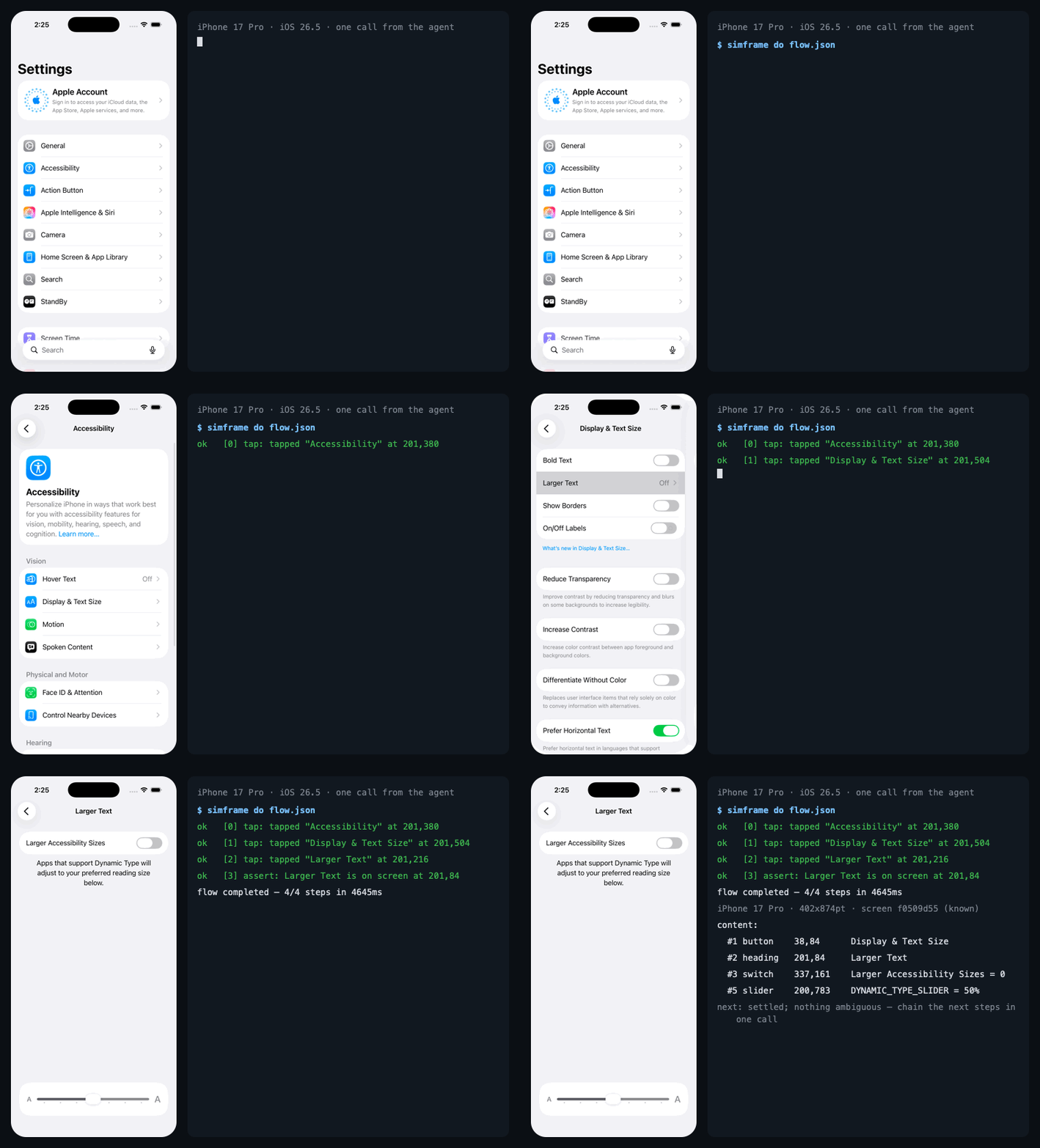
Install in ten seconds
You need a Mac with Xcode (you have one if you have a simulator) and Node 18+. Nothing else — no idb, no Appium, no Python.
Claude Code — as a plugin, which brings the MCP server and the skill that teaches the protocol in one install:
or the MCP server alone:
Pick one, not both: two installs mean two servers driving the same device. If
you added it with claude mcp add before, claude mcp remove simframe first.
Claude Desktop — Settings → Developer → Edit Config, then add:
Cursor —  or add the same
 simframe block to ~/.cursor/mcp.json.
Codex, Windsurf, Zed, VS Code, anything else that speaks MCP — the same
JSON block, wherever that client keeps its mcpServers.
Then boot a simulator and ask the agent for something: "open my app and tap through the signup flow", "is the list on the Orders tab loading?", "why does the Save button do nothing?". The first call builds a small Swift daemon from source — about 15 seconds, once.
The CLI is the same thing without an agent in the loop, and the cheapest way to check the install:
If more than one simulator is booted, name the one you mean with
--device=<udid> or export SIMFRAME_DEVICE=<udid>; simframe refuses to guess,
because the command that would act on the wrong one is a tap.
What it changes
An agent driving a simulator is slow for three reasons, and only the first is
obvious. Every look is a wait (simctl io screenshot costs ~130 ms, paid on
every glance). Every step is a model round trip. And nothing is remembered, so
the same screen is re-read and re-reasoned about each time it appears. There
is a fourth that is pure waste: an image is the most expensive way to ask what
is on screen, and it still does not say what is tappable.
| Without simframe | With simframe | |
|---|---|---|
| Look at the screen | ~130–400 ms screenshot, blocking | ~20 ms, already captured |
| "Did anything change?" | a full image | ~2 ms, text only |
| Reading a screen | an image, ~1,600 tokens, no tap points | ~330 tokens of text, with tap points |
| A 10-step flow | 10 turns, 10 images | 1 turn, 0 images |
| Same flow, again | every run is the first | replayed from memory, every step verified, zero model calls |
Measured on an iPhone 17 Pro simulator, iOS 26.5, Apple Silicon, against a real
production app; the full tables with N, median and p95 are in
docs/BENCHMARKS.md.
This is what the agent gets back instead of a picture:
Region, type, label, contents, a tap point, and a number the next call can use
as a selector. = value is what the accessibility tree says the control
contains; ~ value is what OCR read off the pixels. Where they disagree, that
is the point.
The tools
| Tool | What it does |
|---|---|
sim_ui | Start here. The screen as the numbered text map above. |
sim_do | The main tool. A whole flow in one call — tap, type, scroll, wait, assert — each step settling before the next and verified against what it did last time. Fallback selectors, optional steps, and a bounded seek let a batch survive a surprise instead of handing it back. |
sim_state | Has anything changed since your last look, and which regions moved. |
sim_goto · sim_flow_run | Walk to a screen simframe has been to before; replay a saved flow with zero model calls. |
sim_find · sim_tap · sim_type_into · sim_scroll_to · sim_wait_for · sim_assert | Single actions, for when you genuinely only have one step. |
sim_launch · sim_open_url · sim_permission | Launch (confirmed to have reached the front), open a deep link, grant a privacy permission without tapping the alert. |
sim_look | The only tool that returns an image, capped at 1024 px — for layout, colour and spacing. |
sim_recall · sim_strip · sim_storage | What happened in the last minute, as text or as a contact sheet; what the app saved (UserDefaults, AsyncStorage), even on a device that is shut down. |
sim_wait · sim_capture · sim_devices | Wait for change then settle; manage capture; list simulators and emulators. |
Three ways to name a control, anywhere one is named: "Save" (resolved by
intent — verbs, typos, synonyms, icon-only controls by their common name),
#3 (the number the map gave it, valid for that screen only), or @120,400
(raw points, last resort). A label that matches the destructive vocabulary —
Delete, Pay, Send, Sign out — is never substituted for or guessed at.
A Claude Code skill ships in the package and teaches the CLI path, which is cheaper still: a few lines of output instead of a tool result, and no MCP schema in context until a tool is used.
Android
The second backend drives an Android emulator with the same commands, the same
screen map and the same memory. Frames arrive at ~41 ms through the emulator
console; tap, swipe, text, keys and the clipboard work; simframe devices
lists emulators next to simulators. What Android does not have is an
accessibility tree, so its screens are read by OCR and CV alone — and
simframe doctor says so rather than pretending. Details, costs and the
reasoning are in the guide.
How it works, briefly
One Swift daemon per device reads the simulator's framebuffer straight off its
IOSurface when the display reports damage, runs Apple's Vision OCR on the same
surface, reads the accessibility tree host-side, and sends taps as real
down/move/up sequences over the HID channel — no PNG, no file, no spawned
process. Frames land in ~/.simframe/<udid>/, input goes over a 0600 Unix
socket, and the MCP server and CLI are thin clients over both.
Screen memory keys a merged element map by a structural fingerprint, so a
screen seen before is a file read. A transition graph records which action led
from which screen to which, so sim_goto plans a route and a saved flow
replays with no model in the loop.
Every layer degrades rather than fails, and never quietly: simframe doctor
reports each one and --strict turns any downgrade into a non-zero exit. The
private frameworks the daemon links are documented, with evidence, in
docs/PRIVATE_API.md.
Read on
docs/GUIDE.md | the full guide: recovering without a round trip, screen memory and the two hashes, navigating by memory, the CLI, diagnosing a wedged simulator, keeping a session cheap, the roadmap |
docs/BENCHMARKS.md | every number, with N, median, p95, machine and the measurement traps |
docs/EXPERIMENTS.md | what we believed before measuring, and the fourteen times it was wrong |
docs/DECISIONS.md | the judgements that changed the plan, including a phase cancelled by its own measurement |
docs/DEFERRED.md | every known defect, open or closed, with the evidence |
docs/ARTICLE.md | Agents shouldn't blink — the argument the whole thing adds up to |
Almost everything here was decided by a measurement rather than an argument, and several measurements reversed a decision that had already shipped. Two headline results: a warm transition graph removes about 27% of an agent's model round trips, and a one-line threshold on a number the daemon already computes beat every local model tried as a step supervisor — 95% against 77–91%, at zero latency.
Limitations
Related MCP Servers
Reviews
No reviews yet — be the first to share how this listing worked for you.
Frequently Asked Questions about Simframe
AllMCPs Directory Badge
Showcase your server listing on GitHub or your project documentation. Embed this dynamic SVG badge to highlight official listing status and live engagement.
Badge Style:
Live Dynamic SVG Preview
Markdown (GitHub README)
[](https://allmcps.com/mcp/simframe)HTML Embed
<a href="https://allmcps.com/mcp/simframe"><img src="https://allmcps.com/api/badge/simframe?style=directory" alt="Simframe on AllMCPs" /></a>