Codegraphcontext README
The full upstream README, mirrored here for reference. Install config, tool schemas, adoption signals, and an original overview live on the Codegraphcontext listing page.
🏗️ CodeGraphContext (CGC)
Turn code repositories into a queryable graph for AI agents.
🌐 Languages:
🌍 Help translate CodeGraphContext to your language by raising an issue & PR on GitHub Issues!
Bridge the gap between deep code graphs and AI context.













A powerful MCP server and CLI toolkit that indexes local code into a graph database to provide context to AI assistants and developers. Use it as a standalone CLI for comprehensive code analysis or connect it to your favorite AI IDE via MCP for AI-powered code understanding.
📍 Quick Navigation
- 🚀 Quick Start
- 📋 Prerequisites
- 🏃 How to Run the Project Locally
- 🌐 Supported Programming Languages
- 🛠️ CLI Toolkit
- 🤖 MCP Server
- 🗄️ Database Options
- 🔬 SCIP indexing (optional)
✨ Experience CGC
👨🏻💻 Installation and CLI
Install in seconds with pip and unlock a powerful CLI for code graph analysis.
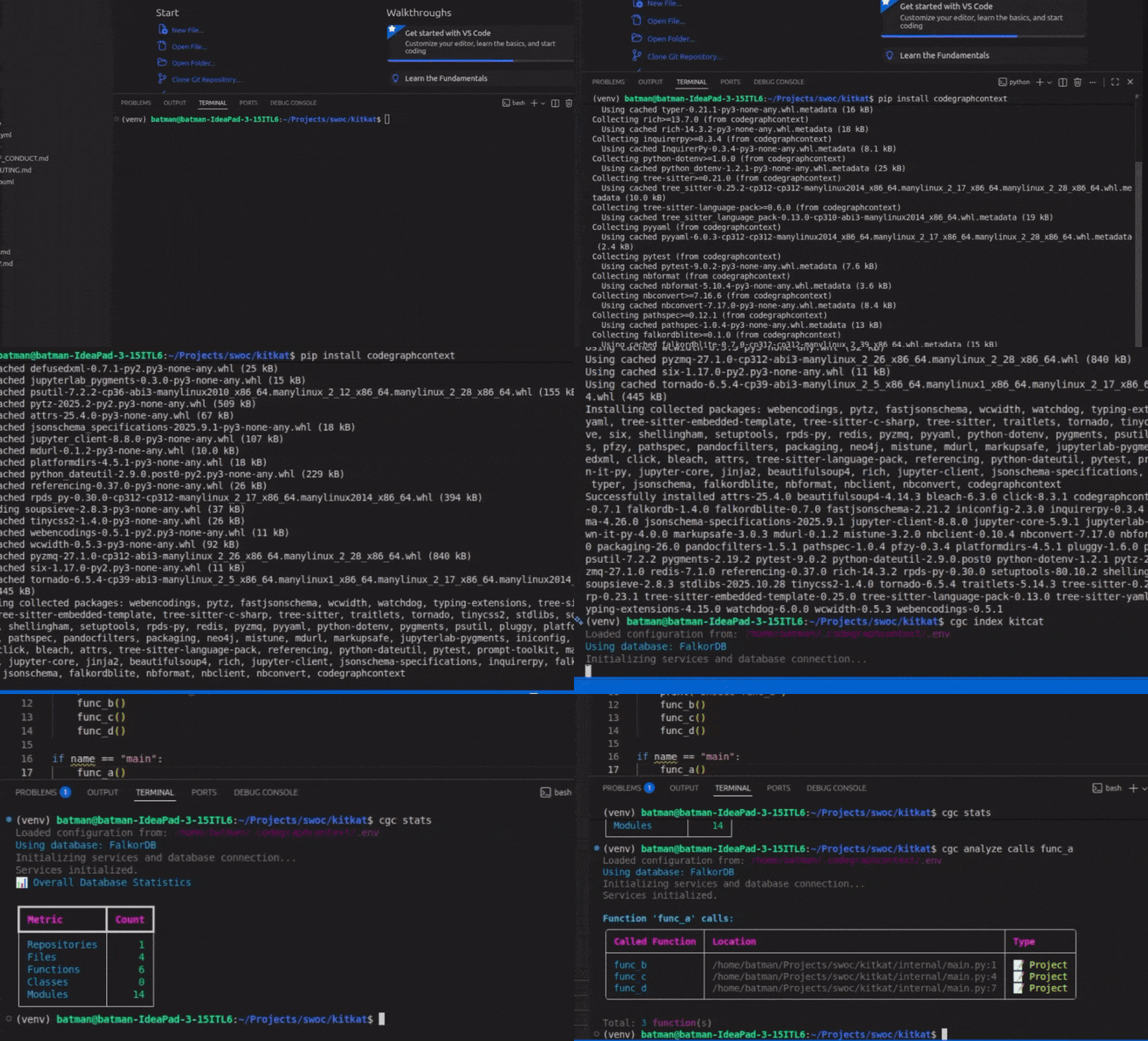
🛠️ Indexing in Seconds
The CLI intelligently parses your tree-sitter nodes to build the graph.
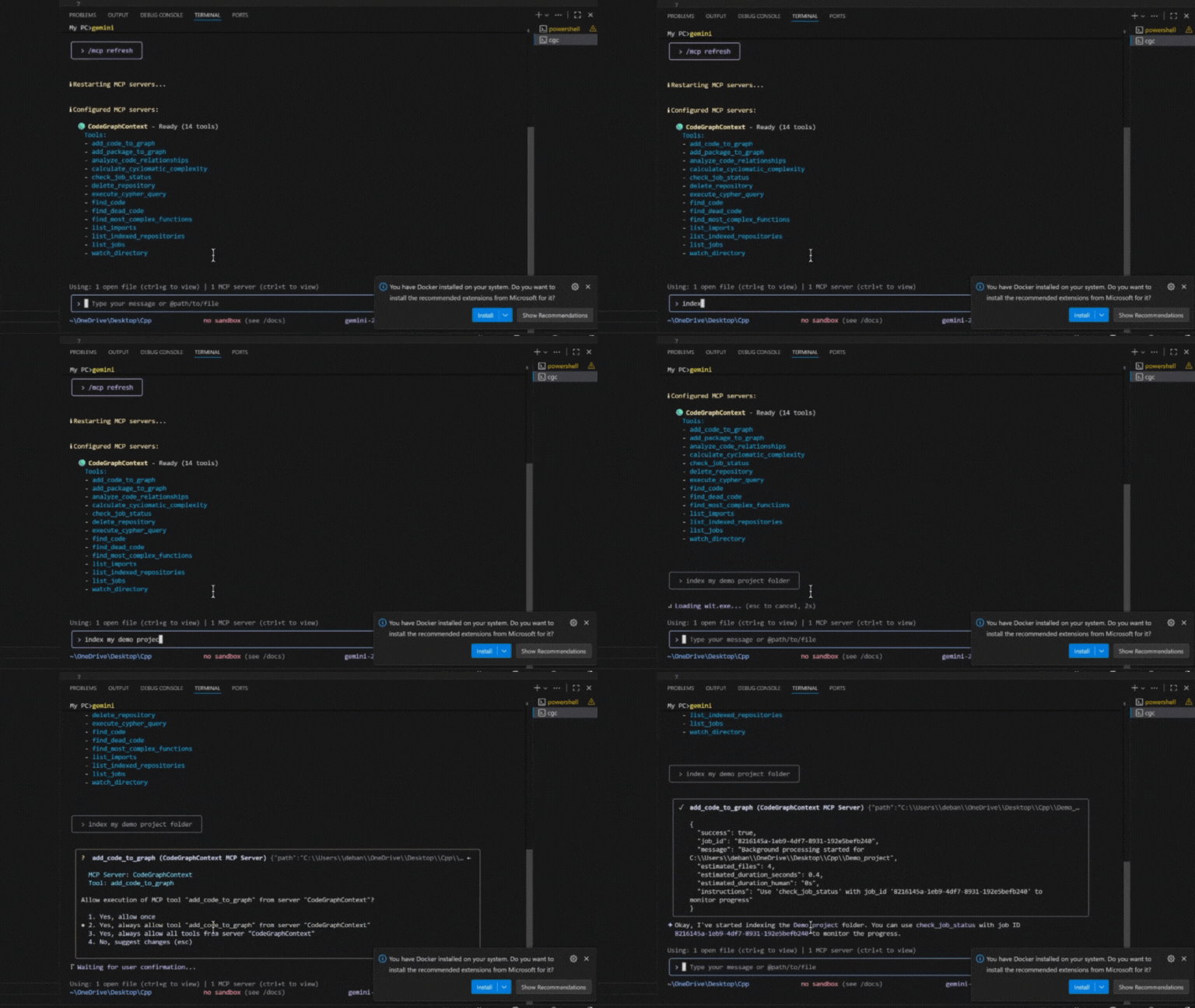
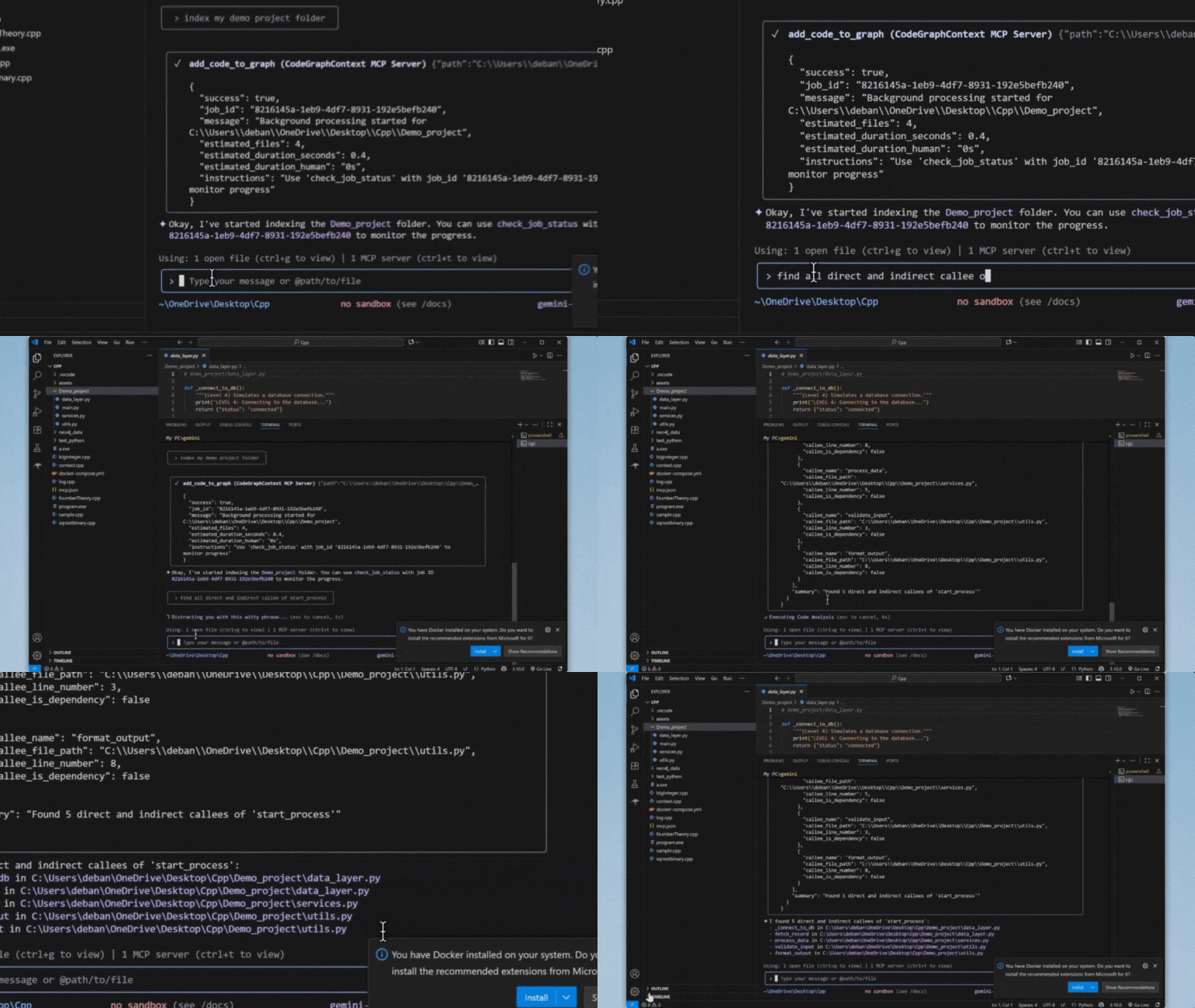
🤖 Powering your AI Assistant
Use natural language to query complex call-chains via MCP.
Why CodeGraphContext?
CodeGraphContext is built for the moment when plain text search stops being enough. It turns a repository into a graph of files, symbols, calls, inheritance, imports, and relationships so you can move from "where is this defined?" to "how does this actually connect?" without jumping between tools.
Comparison at a glance
| Approach | Best for | Tradeoff |
|---|---|---|
grep / file search | Exact string lookup | Misses relationships and code structure |
| RAG over code chunks | Natural-language retrieval | Can lose symbol-level precision |
| CodeGraphContext | Repository-wide reasoning | Requires an indexing step |
Common use cases
- Trace call chains across files and packages.
- Understand class hierarchies, imports, and module boundaries.
- Find dead code, hotspots, and unexpected dependencies.
- Give an AI assistant the same structural context a maintainer would use.
FAQ
- Do I need a remote service? No. CGC works locally with embedded backends or with external graph databases when you want them.
- Is it only for one language? No. It supports a broad mix of mainstream languages and keeps expanding.
- Can I use it with an AI assistant? Yes. That is one of the main reasons the MCP server exists.
Project Details
- Version: 0.5.1
- Authors: Shashank Shekhar Singh shashankshekharsingh1205@gmail.com
- License: MIT License (See LICENSE for details)
- Website: CodeGraphContext
👨💻 Maintainer
CodeGraphContext is created and actively maintained by:
Shashank Shekhar Singh
- 📧 Email: shashankshekharsingh1205@gmail.com
- 🐙 GitHub: @Shashankss1205
- 🔗 LinkedIn: Shashank Shekhar Singh
- 🌐 Website: codegraphcontext.vercel.app
Contributions and feedback are always welcome! Feel free to reach out for questions, suggestions, or collaboration opportunities.
Star History
Features
- Code Indexing: Analyzes code and builds a knowledge graph of its components.
- Relationship Analysis: Query for callers, callees, class hierarchies, call chains and more.
- Pre-indexed Bundles: Load famous repositories instantly with
.cgcbundles - no indexing required! (Learn more) - Live File Watching: Watch directories for changes and automatically update the graph in real-time (
cgc watch). - Interactive Setup: A user-friendly command-line wizard for easy setup.
- Dual Mode: Works as a standalone CLI toolkit for developers and as an MCP server for AI agents.
- Multi-Language Support: Full support for 23 programming languages.
- Flexible Database Backend: FalkorDB Lite (Default), KuzuDB, LadybugDB, FalkorDB Remote, Nornic DB, or Neo4j (all platforms via Docker/native).
Architecture Overview
CodeGraphContext transforms source code into a queryable knowledge graph that can be explored through the CLI or AI assistants via MCP.
Workflow
- Source code is parsed using Tree-sitter or SCIP indexers.
- Relationships between functions, classes, imports, and calls are extracted.
- A knowledge graph is generated and stored in a graph database.
- Users can query the graph through the CLI or AI assistants using MCP.
🏗️ Architecture & Workflow
CodeGraphContext parses your source code and builds a comprehensive knowledge graph. This graph can be queried directly via the CLI toolkit or exposed to AI assistants through the MCP server.
🏗️ Architecture & Workflow
CodeGraphContext parses your source code and builds a comprehensive knowledge graph. This graph can be queried directly via the CLI toolkit or exposed to AI assistants through the MCP server.
Supported Programming Languages
CodeGraphContext provides comprehensive parsing and analysis for the following languages:
| Language | Language | Language | |||
|---|---|---|---|---|---|
| 🐍 | Python | 📜 | JavaScript | 🔷 | TypeScript |
| ☕ | Java | 🔵 | C | ➕ | C++ |
| #️⃣ | C# | 🐹 | Go | 🦀 | Rust |
| 💎 | Ruby | 🐘 | PHP | 🍎 | Swift |
| 🎨 | Kotlin | 🎯 | Dart | 🐪 | Perl |
| 🌙 | Lua | 🚀 | Scala | λ | Haskell |
| 💧 | Elixir | 📜 | Emacs Lisp (elisp) | 🌐 | HTML |
| 🎨 | CSS | ⚛️ | TSX | ⛓️ | Solidity |
Each language parser extracts functions, classes, methods, parameters, inheritance relationships, function calls, and imports to build a comprehensive code graph.
Solidity notes: .sol uses Tree-sitter via tree-sitter-language-pack (no SCIP). Supports Foundry remappings, modifier invocations, using Lib for T, and emit / custom-error revert as CALLS. See docs/docs/contributing_languages.md § Solidity.
Kotlin notes: Annotations are recorded on functions and classes as decorators, retaining
their arguments (@Preview(showBackground = true)). This makes find_dead_code's
exclude_decorated_with usable on Kotlin and Android codebases — for example excluding
Composable, Preview, Test and Provides. That filter matches on functions, so class-level
annotations do not affect it. Annotations on interfaces, objects, constructors, parameters and
properties are not yet recorded.
Database Options
CodeGraphContext supports multiple graph database backends to suit your environment:
| Feature | KuzuDB | LadybugDB | FalkorDB Lite | Neo4j / Nornic DB |
|---|---|---|---|---|
| Typical default | Cross-platform fallback when FalkorDB Lite is unavailable | Optional embedded backend | Default on Unix (Python 3.12+, when falkordblite is installed) | When explicitly configured via cgc config db |
| Setup | Zero-config / Embedded | Zero-config / Embedded | Zero-config / In-process | Docker / External |
| Platform | All (Windows Native, macOS, Linux) | All (Windows Native, macOS, Linux) | Unix-only (Linux/macOS/WSL) | All Platforms |
| Use Case | Desktop, IDE, Local development | Custom research projects | Specialized Unix development | Enterprise, Massive graphs |
| Requirement | pip install kuzu | pip install ladybug | pip install falkordblite | Neo4j Server / Docker / Nornic Cloud |
| Speed | ⚡ Extremely Fast | ⚡ Fast | 🚀 Scalable | 🌐 Network-dependent |
| Persistence | Yes (to disk) | Yes (to disk) | Yes (to disk) | Yes (server-side) |
Embedded KuzuDB/LadybugDB default to a 4 GiB buffer pool (CGC_EMBEDDED_BUFFER_POOL_MB). Set that env var to another MiB value, or 0 for the library default (~80% of system RAM).
SCIP indexing (optional)
When SCIP_INDEXER=true in your CGC config (~/.codegraphcontext/.env), some languages use external SCIP indexers for more accurate calls and inheritance than Tree-sitter heuristics alone.
C and C++ use scip-clang, which requires a compile_commands.json file (a JSON compilation database): one entry per translation unit with the real compiler command (include paths, -D defines, -std, etc.). Without it, scip-clang cannot run; CGC logs a warning and falls back to Tree-sitter for that repo. Typical ways to produce the file: CMake with -DCMAKE_EXPORT_COMPILE_COMMANDS=ON, or wrap your real build with Bear (e.g. bear -- make). CGC also looks under build/ and cmake-build-*/ for that filename.
C# uses scip-dotnet (Roslyn); you need a normal .csproj / .sln and a successful restore—no compile_commands.json.
SCIP is independent of which graph database you use (Kuzu, Neo4j, etc.); the same flag applies to all backends.
Used By
CodeGraphContext is already being explored by developers and projects for:
- Static code analysis in AI assistants
- Graph-based visualization of projects
- Dead code and complexity detection
If you’re using CodeGraphContext in your project, feel free to open a PR and add it here! 🚀
Dependencies
neo4j>=5.15.0watchdog>=3.0.0stdlibs>=2023.11.18typer>=0.9.0rich>=13.7.0inquirerpy>=0.3.4python-dotenv>=1.0.0tree-sitter>=0.24.0,<0.26.0tree-sitter-language-pack>=1.6,<2.0pyyamlpathspec>=0.12.1falkordb>=1.0,<1.6falkordblite>=0.7,<0.10(Unix only, Python 3.12+)kuzu(KuzuDB engine)fastapi>=0.100.0uvicorn>=0.22.0requests>=2.28.0protobuf>=3.20,<3.21
Note: Python 3.10-3.14 is supported.
🚀 Installation & Quick Start
-
Install the toolkit:
-
Troubleshooting (Command not found): If the
codegraphcontextcommand is not found, run this one-line fix: -
Database Setup (Automatic): CodeGraphContext uses an embedded graph database by default.
- FalkorDB Lite: Default backend.
- KuzuDB: Cross-platform embedded backend.
- Neo4j: Run
codegraphcontext neo4j setupto use an external server.
🧪 Local Development Setup
If you want to run CodeGraphContext from a local clone and contribute changes, use an editable install:
Then verify the install and try the local commands:
For MCP server work, finish the setup with:
If you are only installing the published package, pip install codegraphcontext is enough. If you are developing parser-heavy features and want the optional parsing extras too, install with pip install -e ".[dev,parsing]".
🐳 Docker (No Python Required)
Run CodeGraphContext without installing Python — pull the image and start indexing:
Quick Start
Docker Compose
Available Docker Tags
| Tag | Description |
|---|---|
latest | Latest stable release |
edge | Latest from main branch (may be unstable) |
0.4.19 | Specific version |
0.4 | Latest patch in 0.4.x |
For more advanced Docker usage, including running the MCP Server or connecting external databases, see our Comprehensive Docker Guide.
📋 Prerequisites
Before installing CodeGraphContext, ensure you have:
- Python 3.10 or later
- pip package manager
- Git (optional, for cloning repositories)
Verify your Python installation:
🚀 Step-by-Step Setup Guide
Step 1: Install CodeGraphContext
This command installs CodeGraphContext and all required dependencies.
Step 2: Verify Installation
If the command displays the available CLI commands, the installation was successful.
Step 3: Database Setup
CodeGraphContext automatically uses an embedded database by default, so no additional configuration is required for most users.
🏃 How to Run the Project Locally
Index a Repository
This scans the current project and creates a searchable code graph.
View Indexed Repositories
Displays all repositories currently indexed by CodeGraphContext.
Analyze Code
Finds potentially unused code in the indexed repository.
✅ Verify Everything Works
After indexing a repository, run:
If the command executes successfully and displays indexed repositories, your setup is complete and CodeGraphContext is ready to use.
For CLI Toolkit Mode
Start using immediately with CLI commands:
See the full CLI Commands Guide for all available commands and usage scenarios.
🎨 Premium Interactive Visualization
CodeGraphContext can generate stunning, interactive knowledge graphs of your code. Unlike static diagrams, these are premium web-based explorers:
- Premium Aesthetics: Dark mode, glassmorphism, and modern typography (Outfit/JetBrains Mono).
- Interactive Inspection: Click any node to open a detailed side panel with symbol information, file paths, and context.
- Quick Search: Live-search through the graph to find specific symbols instantly.
- Intelligent Layouts: Force-directed and hierarchical layouts that make complex relationships readable.
- Zero-Dependency Viewing: Standalone HTML files that work in any modern browser.
🤖 For MCP Server Mode
Configure your AI assistant to use CodeGraphContext:
-
Setup: Run the MCP setup wizard to configure your IDE/AI assistant:
The wizard can automatically detect and configure:
- VS Code
- Cursor
- Windsurf
- Zed
- Claude
- Gemini CLI
- ChatGPT Codex
- Cline
- RooCode
- Amazon Q Developer
- Kiro
- Goose
- OpenCode
Upon successful configuration,
codegraphcontext mcp setupwill generate and place the necessary configuration files:- It creates an
mcp.jsonfile in your current directory for reference. - It stores your database credentials securely in
~/.codegraphcontext/.env. - It updates the settings file of your chosen IDE/CLI (e.g.,
.claude.jsonor VS Code'ssettings.json).
-
Start: Launch the MCP server:
-
Use: Now interact with your codebase through your AI assistant using natural language! See examples below.
Ignoring Files (.cgcignore)
You can tell CodeGraphContext to ignore specific files and directories by creating a .cgcignore file in the root of your project. This file uses the same syntax as .gitignore.
Example .cgcignore file:
MCP Client Configuration
The codegraphcontext mcp setup command attempts to automatically configure your IDE/CLI. If you choose not to use the automatic setup, or if your tool is not supported, you can configure it manually.
Add the following server configuration to your client's settings file (e.g., VS Code's settings.json or .claude.json):
OpenCode Configuration
For instructions on installing and configuring MCP servers with OpenCode, see the OpenCode MCP Guide.
If installed via pipx
If you installed CodeGraphContext using pipx, use the following configuration instead:
Token-Optimized Output (GCF)
Reduce tool response tokens by ~62% with the opt-in GCF output format:
Or add it to your MCP client config:
GCF encodes structured data with positional fields (keys declared once, values pipe-delimited). Code graph query results (symbols, relationships, callers, complexity) are exactly the data shape where GCF saves the most. 100% LLM comprehension on all frontier models. Falls back to JSON if gcf-python is not installed.
Natural Language Interaction Examples
Once the server is running, you can interact with it through your AI assistant using plain English. Here are some examples of what you can say:
Indexing and Watching Files
-
To index a new project:
- "Please index the code in the
/path/to/my-projectdirectory." OR - "Add the project at
~/dev/my-other-projectto the code graph."
- "Please index the code in the
-
To start watching a directory for live changes:
- "Watch the
/path/to/my-active-projectdirectory for changes." OR - "Keep the code graph updated for the project I'm working on at
~/dev/main-app."
When you ask to watch a directory, the system performs two actions at once:
- It kicks off a full scan to index all the code in that directory. This process runs in the background, and you'll receive a
job_idto track its progress. - It begins watching the directory for any file changes to keep the graph updated in real-time.
This means you can start by simply telling the system to watch a directory, and it will handle both the initial indexing and the continuous updates automatically.
- "Watch the
Querying and Understanding Code
-
Finding where code is defined:
- "Where is the
process_paymentfunction?" - "Find the
Userclass for me." - "Show me any code related to 'database connection'."
- "Where is the
-
Analyzing relationships and impact:
- "What other functions call the
get_user_by_idfunction?" - "If I change the
calculate_taxfunction, what other parts of the code will be affected?" - "Show me the inheritance hierarchy for the
BaseControllerclass." - "What methods does the
Orderclass have?"
- "What other functions call the
-
Exploring dependencies:
- "Which files import the
requestslibrary?" - "Find all implementations of the
rendermethod."
- "Which files import the
-
Advanced Call Chain and Dependency Tracking (Spanning Hundreds of Files): The CodeGraphContext excels at tracing complex execution flows and dependencies across vast codebases. Leveraging the power of graph databases, it can identify direct and indirect callers and callees, even when a function is called through multiple layers of abstraction or across numerous files. This is invaluable for:
-
Impact Analysis: Understand the full ripple effect of a change to a core function.
-
Debugging: Trace the path of execution from an entry point to a specific bug.
-
Code Comprehension: Grasp how different parts of a large system interact.
-
"Show me the full call chain from the
mainfunction toprocess_data." -
"Find all functions that directly or indirectly call
validate_input." -
"What are all the functions that
initialize_systemeventually calls?" -
"Trace the dependencies of the
DatabaseManagermodule."
-
-
Code Quality and Maintenance:
- "Is there any dead or unused code in this project?"
- "Calculate the cyclomatic complexity of the
process_datafunction insrc/utils.py." - "Find the 5 most complex functions in the codebase."
-
Repository Management:
- "List all currently indexed repositories."
- "Delete the indexed repository at
/path/to/old-project."
Troubleshooting
Hitting a lock error, a "never finishes indexing" loop, or a silent feature? See docs/TROUBLESHOOTING.md — every entry maps a real reported issue to its fix or workaround.
Contributing
Contributions are welcome! 🎉
Please see our CONTRIBUTING.md for detailed guidelines.
If you have ideas for new features, integrations, or improvements, open an issue or submit a Pull Request.
Join discussions and help shape the future of CodeGraphContext.