Local gateway for secure, approved credential use by AI coding agents with scoped execution and audit logging.
Quick Install
Automated & IDE SetupCopy the AI prompt to install this server into Claude Code, Cursor, or another agent — or use 1-click editor setup below.
One-click editor setup isn’t available for this listing yet — we don’t have a confirmed install command, and we’d rather show nothing than point your editor at the wrong package or host. Follow the project’s own setup instructions, linked above.
Manual Client & Custom JSON ConfigExpand JSON ▾
No confirmed setup config for this listing yet. We only publish a config block when the install details come from the project itself — its README, its docs, or a verified owner. We haven’t found those for sgateway/s-gw, and we’d rather show nothing than a guess you’d paste into your client. Follow the project’s own setup instructions for the current steps.
Overview
Use cases
Approve scoped credential use for AI coding agents
Inject credentials securely into local child processes
Sanitize command output to prevent secret leakage
Audit credential access and usage locally
Manage credential handles instead of raw secrets
Key features
Typed credential handles instead of raw secrets
Local approval workflow for agent actions
Scoped execution with environment and directory binding
Output sanitization to mask secrets
Local audit trail of requests and approvals
Multi-platform support with native UI and CLI
Capabilities & Tool Schemas
Inspect callable tools, capabilities, and parameters exposed to AI agents by S Gw.
Extracted Tool Capabilities
Typed credential handles instead of raw secrets
Local approval workflow for agent actions
Scoped execution with environment and directory binding
Output sanitization to mask secrets
Local audit trail of requests and approvals
Multi-platform support with native UI and CLI
Documentation Overview

s-gw
Local credential control for coding agents.
Approve bounded actions locally. Keep raw credentials out of model context and tool output.







Demo · Downloads · Quick start · Documentation · Security · Contributing
Stop handing raw credentials to coding agents. s-gw gives agents typed handles, asks you to approve bounded local actions, resolves the credential inside a constrained process on your machine, and returns sanitized output instead of secret values.
[!IMPORTANT] s-gw is an early preview. Storage formats and interfaces may change, Windows and Linux desktop support is still experimental, and the project has not completed an independent security audit. Do not treat it as a replacement for endpoint security or a hardened enterprise secrets platform yet.
The TypeScript broker, clients, and documentation in this repository are Apache-2.0 licensed. Distributed packages also contain a proprietary compiled Rust execution core whose source is maintained separately.
The Short Version
- Agent sees:
s-gw:credential:prod-readonly - You approve: agent, command, handle, environment binding, working directory, and target
- s-gw runs: the command locally with the credential injected only into that child process
- Agent receives: sanitized output, audit evidence, and no raw secret
If s-gw helps your agent workflow, star the project. It makes the preview easier for other developers to find.
See It In Action
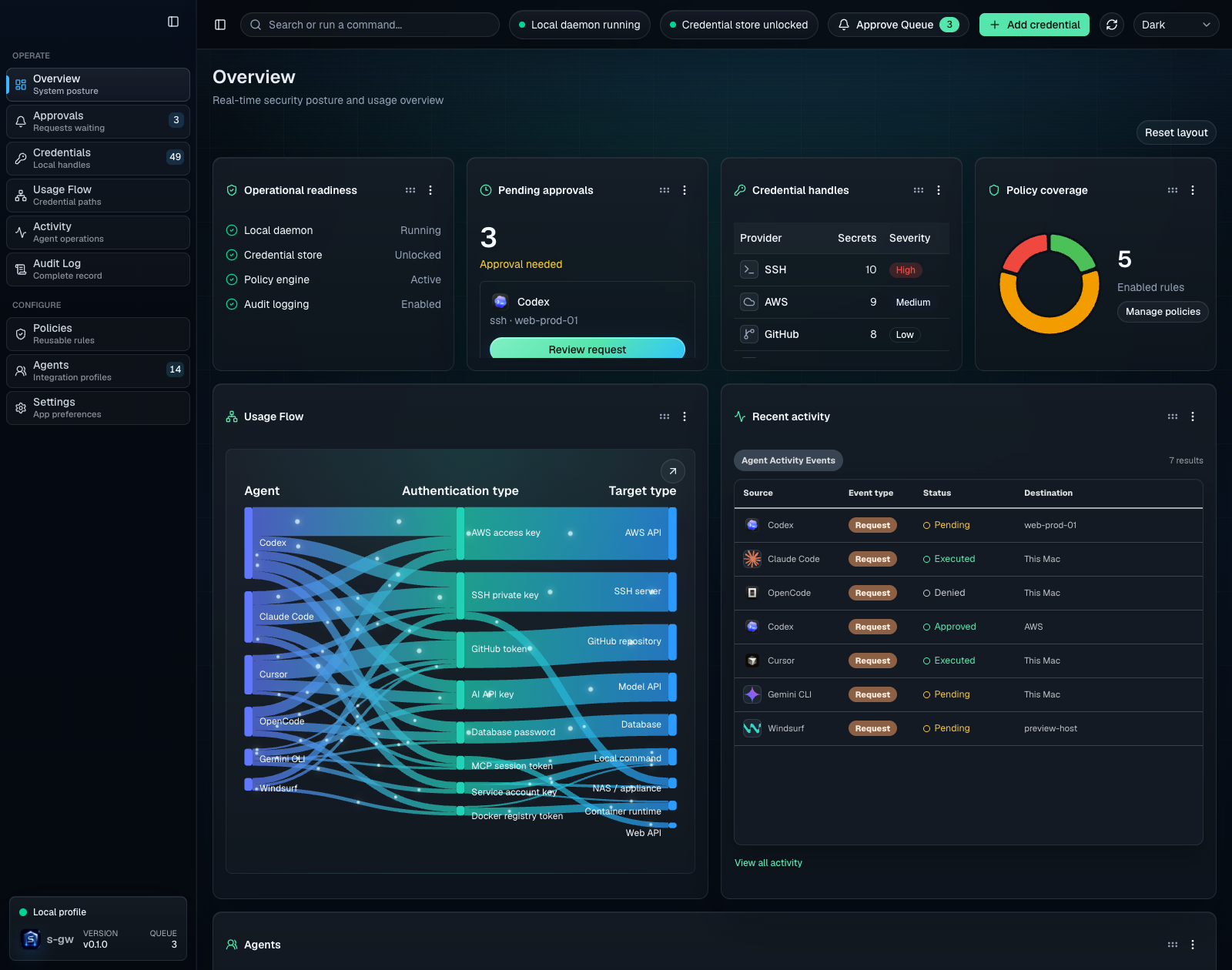
The local console shows the approval queue, credential inventory, policy state, usage flow, and activity history without exposing secret values.
Public demo: s-gw.com.
What It Does
| Govern | Approve | Execute | Audit |
|---|---|---|---|
| Turn secrets into typed local handles that agents can reference safely. | Review the requesting agent, handle, command, environment binding, working directory, and target before access is granted. | Inject the credential only into the approved child process on the same machine. | Record request, approval, execution, policy, and destination evidence without storing returned raw secrets. |
Why Teams Use It
- Local custody: raw values stay in macOS Keychain, Linux Secret Service, Windows Credential Manager, 1Password, or the encrypted local ledger.
- Action-scoped access: grants bind to the agent, handle, command, environment variable, working directory, target, approval mode, and optional time window.
- Useful handles: agents can request real work with stable handle names instead of seeing keys, passwords, tokens, or SSH material.
- Output sanitization: command output is scanned before it returns to the agent, replacing detected credential values with handles.
- Agent-aware setup: Codex, Claude Code, Cursor, OpenCode, Gemini CLI, GitHub Copilot, VS Code, and other MCP clients get profile-specific configuration.
- Local operator UI: native desktop apps, tray or menu helpers, the CLI, and the web console show approvals, credential inventory, policies, usage flow, activity, and audit history.
How It Works
The agent never needs the unlock passphrase or raw credential. Approval is scoped to the requested operation rather than granting general access to the store.
Core Surfaces
| Surface | Purpose |
|---|---|
s-gw CLI | Setup, credential enrollment, approvals, policies, agent snippets, guard mode, and diagnostics. |
s-gw-mcp / s-gw mcp | Stdio MCP server for agent-facing handle discovery and request creation. |
| Native macOS app | Approval queue, credential inventory, policy rules, usage flow, activity, and audit review. |
| Windows and Linux desktop apps | Installed preview apps with a native window, tray controls, and a bundled local runtime. |
| Menu-bar helper | Fast visibility into pending approvals and local daemon status. |
| Local web console | Browser backup bound to 127.0.0.1; it remains available when a desktop app cannot run. |
| Guard mode | Launch agents with credential-looking environment values replaced by s-gw handles. |
Quick Start
The public npm package is the recommended installation path on macOS, Windows 10/11, and Linux. Install Node.js 20 or newer, then run:
On Windows, run the same commands in PowerShell. Windows support is preview software: the npm package uses the TypeScript execution path and includes the PowerShell client, tray helper, and local web console.
On Linux, install secret-tool first (sudo apt install libsecret-tools on Ubuntu/Debian). An unlocked desktop Secret Service is the normal persistent unlock provider; s-gw setup also installs and starts an owner-level systemd --user console service for the graphical session. A headless host without Secret Service can use an explicitly supplied SGW_MASTER_PASSPHRASE with s-gw setup --no-service --no-open-app, but s-gw never copies that value into a unit file or background-service environment.
Windows x64 and Linux x64 also have installable desktop-app builds. The Rust app draws its management interface directly in a native window; it does not embed a browser, WebView, or localhost page. It packages its own pinned Node runtime and s-gw CLI, so the installed app does not require host Node.js or npm. When the native executable is installed, s-gw app open uses it. Use s-gw app open --browser to start and open the separate loopback browser backup explicitly.
These Windows NSIS and Linux Debian packages are currently unsigned CI previews, not supported public release downloads. Windows does not require WebView2. Linux requires a graphical session and an unlocked Secret Service keyring; the Debian package declares its GTK 3, AppIndicator, libxdo, and libsecret-tools runtime dependencies. See deployment and packaging for build and install details.
For an Apple Silicon Mac desktop bundle, GitHub Releases also provides a self-contained s-gw.dmg. Drag s-gw.app to Applications, then open it and complete setup. The app includes its own Node runtime, CLI, MCP server, native helpers, and menu-bar helper; it does not require Node.js or npm on the host. Setup is intentionally blocked until the app is in /Applications or ~/Applications.
An unsigned DMG requires a Gatekeeper override. Use the npm installation above instead if you do not want to use that override.
The public source builds the TypeScript compatibility path and the native-rendered Windows/Linux Rust desktop app. Building the native macOS surfaces also requires a Swift toolchain. Windows and Linux desktop builds require Rust and their ordinary native graphics and tray development libraries. Maintainer release builds additionally require access to the private Rust core checkout.
The Apple Silicon Mac DMG is a self-contained desktop alternative. Published macOS DMGs are either Developer ID signed and notarized or explicitly documented as unsigned; unsigned builds require a Gatekeeper override but retain the standard release tag and update path. Local npm run build:installers output is ad-hoc signed for local verification. The npm package is the primary install and includes the native app, menu helper, Keychain helper, metadata-only Keychain inspector, and Rust core for Apple Silicon Macs. Linux and Windows use the TypeScript execution path when a matching native core is not packaged. Intel Macs must build the native Keychain and desktop surfaces from source for now; packaged arm64-only helpers are rejected before launch.
Related MCP Servers
Adoption & maintenance
Factual signals from GitHub, npm, and our automated checks — not a rating.
GitHub stars
15
Stargazers on the source repository.
Last commit
8d ago
Most recent push to the default branch.
Directory activity
1 views
Config copies, upvotes, and views on AllMCPs.
Reviews
No reviews yet — be the first to share how this listing worked for you.
Frequently Asked Questions about S Gw
AllMCPs Directory Badge
Showcase your server listing on GitHub or your project documentation. Embed this dynamic SVG badge to highlight official listing status and live engagement.
Badge Style:
Live Dynamic SVG Preview
Markdown (GitHub README)
[](https://allmcps.com/mcp/sgateway-s-gw)HTML Embed
<a href="https://allmcps.com/mcp/sgateway-s-gw"><img src="https://allmcps.com/api/badge/sgateway-s-gw?style=directory" alt="S Gw on AllMCPs" /></a>Technical Specs & Signals
CategorySecurity
48Quality signal: Fair · 48/100How this signal is calculated ▾
Server availabilityNot measured
Not scored for repo-hosted servers — we can't reach the running server, only its GitHub page. Hosted MCP endpoints are health-checked live.
Verified ownership10/20
Documentation & tools20/30
Adoption & activity6/15
Community engagement0/10
A guidance signal from public completeness & health data — not a user rating. New listings start lower and rise as they add docs, get verified, and grow adoption. Signals we can't observe for a listing are skipped, not counted against it.
Own this project?
This directory is pre-filled from public sources. Claim via GitHub README, site badge, or DNS TXT to unlock edit access and the Official badge — proof is checked automatically, then reviewed by our team.
Free dofollow backlink: add your website and place the AllMCPs badge on it — no claim needed. We detect it automatically and keep it verified as long as the badge stays live.
Claim & get free dofollowShare & Embed
Add our SVG badge (dark/light directory styles) or embeddable widget to your site.