server-managementsecuritymcplinuxmacos
Manage allowlisted Linux and macOS host operations through MCP with audited actions and an outbound WebSocket connection.
Quick Install
Automated & IDE SetupCopy the AI prompt to install this server into Claude Code, Cursor, or another agent — or use 1-click editor setup below.
One-click editor setup isn’t available for this listing yet — we don’t have a confirmed install command, and we’d rather show nothing than point your editor at the wrong package or host. Follow the project’s own setup instructions, linked above.
Manual Client & Custom JSON ConfigExpand JSON ▾
No confirmed setup config for this listing yet. We only publish a config block when the install details come from the project itself — its README, its docs, or a verified owner. We haven’t found those for SentinelX, and we’d rather show nothing than a guess you’d paste into your client. Follow the project’s own setup instructions for the current steps.
Overview
Use cases
Run approved shell commands on managed hosts
Edit, move, copy, delete, and inspect allowlisted files
Start, stop, restart, reload, and inspect systemd services
Upload files to a host
Search host files using regex and glob filters
Key features
Allowlisted shell and script execution
Per-path filesystem access controls
Structured file operations
Service management through systemctl
Audited action recording
Outbound WebSocket connection without inbound ports
Capabilities & Tool Schemas (18)
Inspect callable tools, capabilities, and parameters exposed to AI agents by SentinelX.
sentinel_execRun an allowlisted shell command
sentinel_script_runRun a one-off bash or python3 script
sentinel_editStructured file edit (replace, regex, replace-block, write, append, prepend)
sentinel_moveMove/rename a file or directory
sentinel_copyCopy a file or directory
sentinel_deleteDelete a file or directory
Documentation Overview
sentinelx-cloud-core
Operate your Linux, macOS, and Windows servers from Claude.ai or ChatGPT — safely. SentinelX gives your LLM an allowlisted, auditable shell: it can only run commands you've explicitly permitted, filesystem access is gated by a per-path allowlist, and every action is recorded. No inbound ports — just a single outbound WebSocket.
The security model is the point. Handing an LLM unrestricted shell on a server you care about is the thing SentinelX is designed to avoid: the allowlist is the real trust boundary, so the agent can't run — or invent — anything you didn't allow. This is the agent you install on the host; structured file edits and service management come with it.
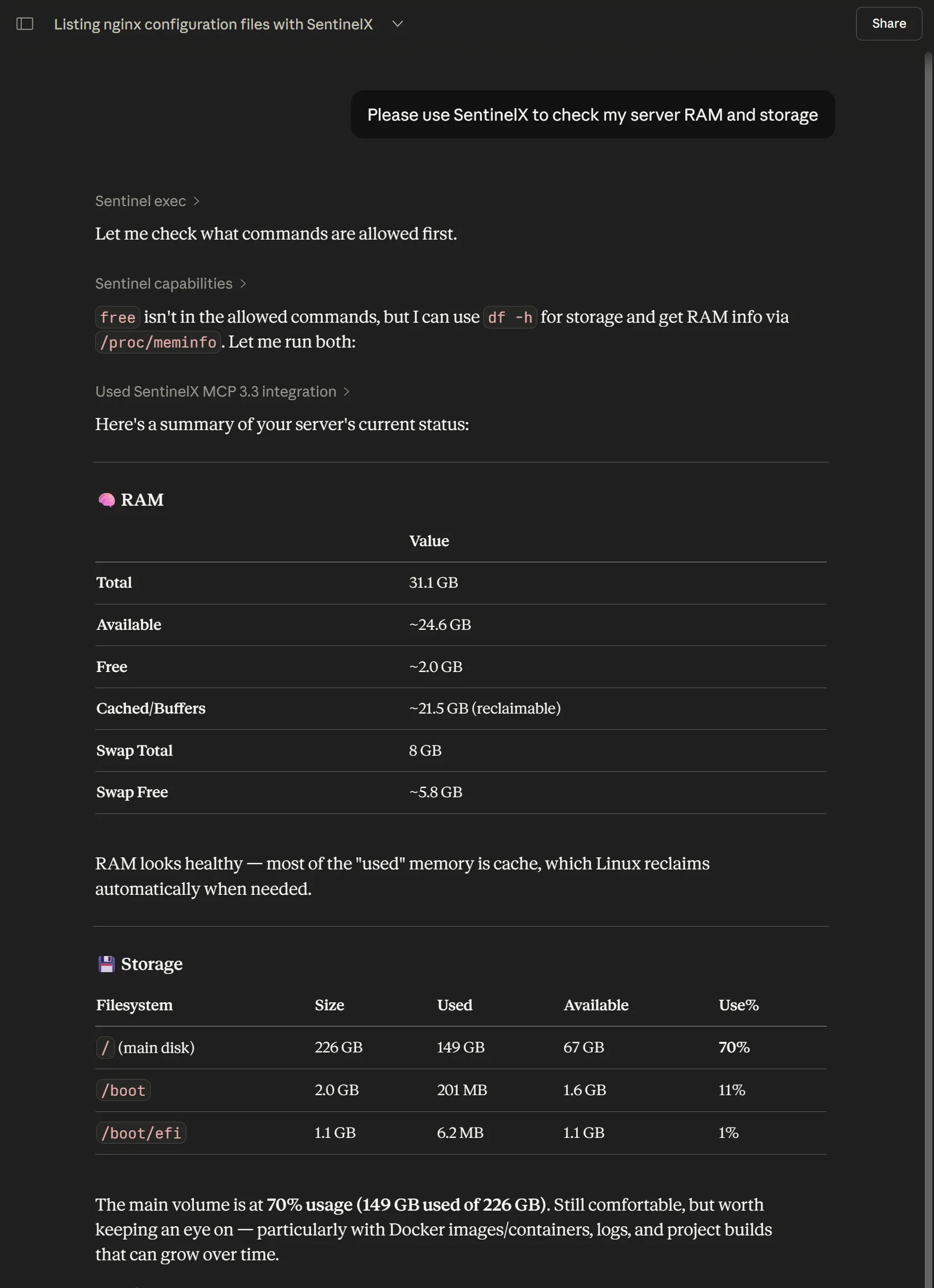
SentinelX in ChatGPT — it reads the allowlist, runs only what's permitted (df -h, /proc/meminfo), and reports back.
Install
Most people start with the one-liner — it auto-detects Linux or macOS:
Windows (PowerShell — needs Python 3.12+ and git on PATH):
Service install — runs as LocalSystem at boot; needs an elevated PowerShell:
Per-user install — no admin; runs as you at logon (locked-down machines):
The installer clones this repo into a virtualenv, registers the agent as a
service (systemd / launchd / Windows service), and walks you through enrollment.
On networks that block PyPI, add -Bundle <zip-or-url> for an offline install
from the wheel bundle on the latest release; the agent uses the OS trust store
(truststore) so a TLS-inspecting proxy's CA is accepted. Full options —
per-user vs service, offline bundle, all flags, uninstall — live in
sentinelx-cloud-installer.
SentinelX is also listed in the ChatGPT app directory — ChatGPT users can connect it in one click, no custom MCP URL required.
This repo is also the agent's source — read on if you want to audit or contribute.
Architecture
The agent is the box on the right. It opens one outbound WebSocket to the hub at install time (after enrollment) and stays connected. No inbound ports, no port-forwarding, no reverse tunnel.
What runs where
| Component | Where | What it does |
|---|---|---|
sentinelx-cloud-core (this repo) | /opt/sentinelx-cloud-core on your host | Receives MCP tool calls from the hub, executes them locally, returns output |
| Hub | mcp.sentinelx.app (operated by Pensa) | Auth, multi-host routing, MCP transport |
| Config | /etc/sentinelx/config.yaml | Allowlist: which commands, services, and paths the agent will accept |
| Identity | /etc/sentinelx/identity.json | The agent's enrollment JWT, used to authenticate the WebSocket handshake |
Supported platforms: any modern Linux distribution with systemd
(tested on Ubuntu 22.04 / 24.04 and Debian 12), macOS with launchd
(Intel and Apple Silicon), and Windows — as a service (WinSW, admin) or
as a no-admin per-user Scheduled Task (-User); see Install on Windows
below. The one-line installer auto-detects Linux and macOS; Windows uses a
PowerShell installer. The agent also runs unmodified inside WSL2.
Tools exposed
The agent exposes its host's operations as MCP tools to your LLM via the hub:
| Tool | What it does |
|---|---|
sentinel_exec | Run an allowlisted shell command |
sentinel_script_run | Run a one-off bash or python3 script |
sentinel_edit | Structured file edit (replace, regex, replace-block, write, append, prepend) |
sentinel_edit_upload_* | Three-step upload for large file edits |
sentinel_move | Move/rename a file or directory |
sentinel_copy | Copy a file or directory |
sentinel_delete | Delete a file or directory |
sentinel_chmod | Change file permissions |
sentinel_chown | Change file owner/group |
sentinel_service | systemctl start/stop/restart/reload/status |
sentinel_restart | Shortcut for sentinel_service with action=restart |
sentinel_upload_file | Single-shot file upload to the host |
sentinel_upload_* | Three-step chunked upload for large files |
sentinel_read | Read a file's contents, with optional line-range slicing |
sentinel_list | Structured directory listing (name, type, size, mtime) |
sentinel_search | Recursive content search with regex and glob filters |
sentinel_capabilities | Host policy/capabilities; optional bounded summary projection |
sentinel_help | Rich orientation/help; optional topic/path/single-playbook projections |
sentinel_state | Internal agent state, for debugging |
sentinel_ping | Cheap connectivity check |
Progressive introspection (agent operation contract)
The agent-side help and capabilities operations also support optional
narrow-response selectors. A Hub/MCP profile may expose these fields through
whatever model-facing tool shape it uses; the selectors are backend-operation
semantics and do not depend on full vs compact tool names.
help({"topic":"index"})— small topic + paged playbook index.help({"topic":"security"})— one broad help section.help({"path":"security_model.permission_errors"})— one exact leaf from the existing help tree.help({"playbook":"update_sentinelx_code"})— one playbook only; optionalpath,offset, andlimitcan select/page a subfield such assteps.capabilities({"detail":"summary"})— host/operation/limit metadata and policy counts without command/service/location/playbook bodies.
Progressive help/playbook responses normalize explicit full-profile
sentinel_* references to op:<name> canonical operation hints so the same
guidance can be routed through compact or full presentation without teaching a
playbook two sets of MCP tool names.
For compatibility, empty help({}) and capabilities({}) requests retain the
legacy full responses. A Hub that wants compact-first behavior should map its
compact help/capabilities branches to the narrow selectors rather than changing
the agent's legacy empty-payload semantics.
sentinel_read, sentinel_list, and sentinel_search are read-only
filesystem primitives. sentinel_edit and the mutating primitives
(sentinel_move, sentinel_copy, sentinel_delete, sentinel_chmod,
sentinel_chown) write. All of them give the LLM structured access to
the filesystem without shelling out to cat/ls/mv/rm through exec,
and all of them are gated by the same path allowlist (file_ops in the
config, see below), not the command allowlist. Each path in that allowlist
declares an access level: r (read-only ops) or rw (read-only ops plus
the writing ops). Destructive operations that overwrite or remove an existing
target make a timestamped backup first.
The hub additionally exposes a handful of hub-side integrations (Cloudflare DNS, Resend email, Telegram) as MCP tools your LLM can use alongside the agent's tools — those live on the hub, not in this repo. See the integrations table on sentinelx.app.
Config (/etc/sentinelx/config.yaml)
A starter config is generated at install time. Editable. Reloaded when the service restarts. Schema:
Related MCP Servers

Adoption & maintenance
Factual signals from GitHub, npm, and our automated checks — not a rating.
GitHub stars
9
Stargazers on the source repository.
Last commit
3d ago
Most recent push to the default branch.
Tools exposed
18
Callable tools this server registers over MCP.
Directory activity
2 views
Config copies, upvotes, and views on AllMCPs.
Reviews
No reviews yet — be the first to share how this listing worked for you.
Frequently Asked Questions about SentinelX
AllMCPs Directory Badge
Showcase your server listing on GitHub or your project documentation. Embed this dynamic SVG badge to highlight official listing status and live engagement.
Badge Style:
Live Dynamic SVG Preview
Markdown (GitHub README)
[](https://allmcps.com/mcp/sentinelx)HTML Embed
<a href="https://allmcps.com/mcp/sentinelx"><img src="https://allmcps.com/api/badge/sentinelx?style=directory" alt="SentinelX on AllMCPs" /></a>Technical Specs & Signals
CategorySecurity
PricingFree
12/12 checks healthy over the last 45d
51Quality signal: Good · 51/100How this signal is calculated ▾
Server availabilityNot measured
Not scored for repo-hosted servers — we can't reach the running server, only its GitHub page. Hosted MCP endpoints are health-checked live.
Verified ownership10/20
Documentation & tools22/30
Adoption & activity6/15
Community engagement0/10
A guidance signal from public completeness & health data — not a user rating. New listings start lower and rise as they add docs, get verified, and grow adoption. Signals we can't observe for a listing are skipped, not counted against it.
Own this project?
This directory is pre-filled from public sources. Claim via GitHub README, site badge, or DNS TXT to unlock edit access and the Official badge — proof is checked automatically, then reviewed by our team.
Free dofollow backlink: add your website and place the AllMCPs badge on it — no claim needed. We detect it automatically and keep it verified as long as the badge stays live.
Claim & get free dofollowShare & Embed
Add our SVG badge (dark/light directory styles) or embeddable widget to your site.