Selenium Tools for MCP
Quick Install
Automated & IDE SetupCopy the AI prompt to install this server into Claude Code, Cursor, or another agent — or use 1-click editor setup below.
Not yet automatically verified
We haven't yet run this listing's install command through our automated sandbox check. This isn't a red flag — we're steadily working through the catalog.
Manual Client & Custom JSON ConfigExpand JSON ▾
Client Config & Setup
Choose your client or environment
Target File:
💡 Paste the JSON block into your client's configuration file under mcpServers, then restart the application.
Documentation Overview






Selenium MCP Server



This is a server implementation that bridges the gap between MCP clients (AI assistants) and Selenium WebDriver. It exposes Selenium WebDriver's functionalities as MCP tools, allowing AI models to utilize them for tasks like:
- Browser management (launching, navigating, closing browsers)
- Element interaction (clicking, typing, finding elements)
- Web scraping and automated testing
- Advanced operations like screenshots, cookie management, and JavaScript execution
In essence, the selenium webdriver mcp setup allows AI assistants to leverage the power of Selenium Webdriver for web automation, by communicating with a dedicated Selenium MCP server via the Model Context Protocol. This facilitates tasks such as automated web interactions, testing, and data extraction, all controlled by AI.
🚀 Overview
A Model Context Protocol (MCP) server for Selenium that provides comprehensive Selenium WebDriver automation tools for AI assistants and applications. This server enables automated web browser interactions, testing, and scraping through a standardized interface.
Built with TypeScript and modern ES modules, it offers type-safe browser automation capabilities through the Model Context Protocol.
✨ Key Features
- Multi-Browser Support: Chrome, Firefox, Safari, and Edge browser automation
- Comprehensive Element Interaction: Click, type, hover, drag & drop, file uploads
- Advanced Navigation: Forward, backward, refresh, window management
- Wait Strategies: Intelligent waiting for elements and page states
- Type Safety: Full TypeScript implementation with Zod validation
🤝 Integration
MCP Client Integration
Configure your MCP client to connect to the Selenium server:
Standard Configuration (applicable to Windsurf, Warp, Gemini CLI etc)
Installation in VS Code
Update your mcp.json in VS Code with below configuration
NOTE: If you're new to MCP servers, follow this link Use MCP servers in VS Code
Example 'stdio' type connection
Example 'http' type connection
After installation, the Selenium MCP server will be available for use with your GitHub Copilot agent in VS Code.
To install the Selenium MCP server using the VS Code CLI
To install the package using either npm, or Smithery
Using npm:
Using Smithery
To install Selenium MCP for Claude Desktop automatically via
Claude Desktop Integration
Add to your Claude Desktop configuration:
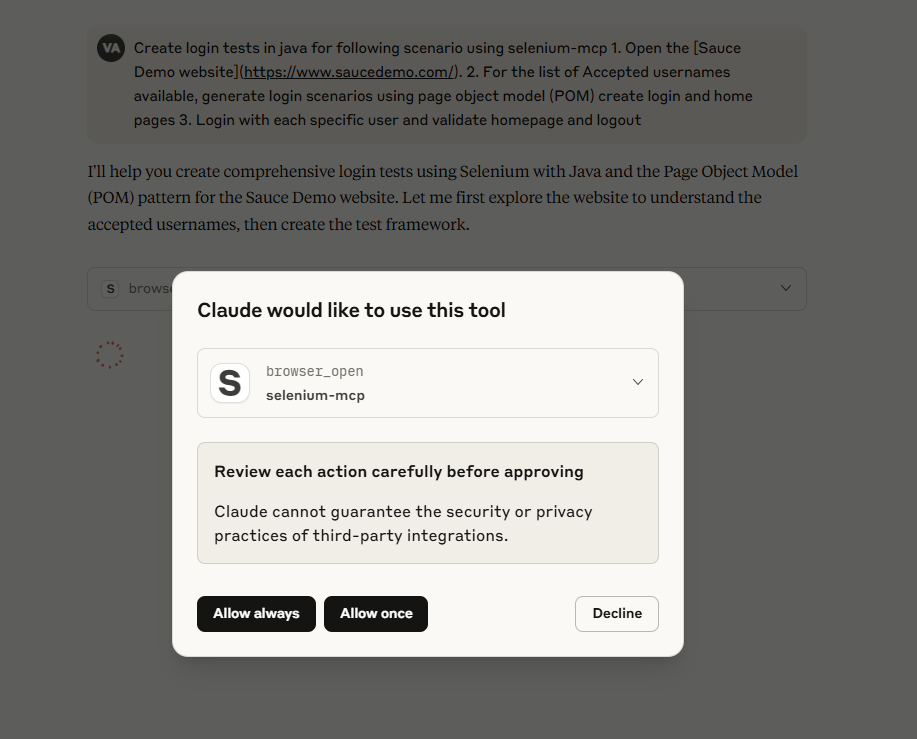
Screenshot
Prompts
An example prompt to start AI Agent interaction:
Using selenium mcp tools, navigate to <https://parabank.parasoft.com/> click the 'Register' link and signup using dynamic test data and click register. Then generate selenium tests in <YOUR_FAVOURITE_PROGRAMMING_LANGUAGE> using pom, create tests using cucumber features, steps and execute the tests.
Note: For more prompts, look at examples directory of the project
🛠️ MCP Available Tools
Browser Management Tools
| Tool | Description | Parameters |
|---|---|---|
browser_open | Open a new browser session | browser, options |
browser_navigate | Navigate to a URL | url |
browser_navigate_back | Navigate back in history | None |
browser_navigate_forward | Navigate forward in history | None |
browser_title | Get the current page title | None |
browser_refresh | Refresh the current page | None |
browser_get_url | Get the current page URL | None |
browser_get_page_source | Get the current page HTML source | None |
browser_maximize | Maximize the browser window | None |
browser_resize | Resize browser window | width, height |
browser_close | Close current browser session | None |
Cookie Management Tools
| Tool | Description | Parameters |
|---|---|---|
browser_get_cookies | Get all cookies from the current browser session | None |
browser_get_cookie_by_name | Get a specific cookie by name | cookie (cookie name) |
browser_add_cookie_by_name | Add a new cookie to the browser | cookie (cookie name), value |
browser_set_cookie_object | Set a cookie object in the browser | cookie (cookie object as string) |
browser_delete_cookie | Delete a specific cookie by name | value (cookie name to delete) |
browser_delete_cookies | Delete all cookies from the current browser session | None |
Window Management Tools
| Tool | Description | Parameters |
|---|---|---|
browser_switch_to_window | Switch to a different browser window by handle | windowHandle |
browser_switch_to_original_window | Switch back to the original browser window | None |
browser_switch_to_window_by_title | Switch to a window by its page title | title |
browser_switch_window_by_index | Switch to a window by its index position | index |
browser_switch_to_window_by_url | Switch to a window by its URL | url |
Element Interaction Tools
| Tool | Description | Parameters |
|---|---|---|
browser_find_element | Find an element on the page | by, value, timeout |
browser_find_elements | Find multiple elements on the page | by, value, timeout |
browser_click | Click on an element | by, value, timeout |
browser_type | Type text into an element | by, value, text, timeout |
browser_get_element_text | Get text content of element | by, value, timeout |
browser_file_upload | Upload file via input element | by, value, filePath, timeout |
browser_clear | Clear text from an element | by, value, timeout |
browser_get_attribute | Get element attribute value | by, value, attribute, timeout |
Element State Validation Tools
| Tool | Description | Parameters |
|---|---|---|
browser_element_is_displayed | Check if an element is visible on the page | by, value, timeout |
browser_element_is_enabled | Check if an element is enabled for interaction | by, value, timeout |
browser_element_is_selected | Check if an element is selected (checkboxes, radio buttons) | by, value, timeout |
Frame Management Tools
| Tool | Description | Parameters |
|---|---|---|
browser_switch_to_frame | Switch to an iframe element | by, value, timeout |
browser_switch_to_parent_frame | Switch to the parent frame (from nested iframe) | None |
browser_switch_to_default_content | Switch back to the main page content | None |
Advanced Action Tools
Related MCP Servers
Adoption & maintenance
Factual signals from GitHub, npm, and our automated checks — not a rating.
GitHub stars
6
Stargazers on the source repository.
npm downloads
36
Package downloads in the last 30 days.
Last commit
11mo ago
Most recent push to the default branch.
Reviews
No reviews yet — be the first to share how this listing worked for you.
Frequently Asked Questions about Selenium MCP
AllMCPs Directory Badge
Showcase your server listing on GitHub or your project documentation. Embed this dynamic SVG badge to highlight official listing status and live engagement.
Badge Style:
Live Dynamic SVG Preview
Markdown (GitHub README)
[](https://allmcps.com/mcp/selenium-mcp-2)HTML Embed
<a href="https://allmcps.com/mcp/selenium-mcp-2"><img src="https://allmcps.com/api/badge/selenium-mcp-2?style=directory" alt="Selenium MCP on AllMCPs" /></a>Technical Specs & Signals
CategoryBrowser Automation
33Quality signal: Emerging · 33/100How this signal is calculated ▾
Server availabilityNot measured
Not scored for repo-hosted servers — we can't reach the running server, only its GitHub page. Hosted MCP endpoints are health-checked live.
Verified ownership10/20
Documentation & tools12/30
Adoption & activity3/15
Community engagement0/10
A guidance signal from public completeness & health data — not a user rating. New listings start lower and rise as they add docs, get verified, and grow adoption. Signals we can't observe for a listing are skipped, not counted against it.
Own this project?
This directory is pre-filled from public sources. Claim via GitHub README, site badge, or DNS TXT to unlock edit access and the Official badge and attach your website — proof is checked automatically, then reviewed by our team.
Free dofollow backlink: add your website and place the AllMCPs badge on it — no claim needed. We detect it automatically and keep it verified as long as the badge stays live.
Claim & get free dofollowShare & Embed
Add our SVG badge (dark/light directory styles) or embeddable widget to your site.