Secret Safe Env README
The full upstream README, mirrored here for reference. Install config, tool schemas, adoption signals, and an original overview live on the Secret Safe Env listing page.
secret-safe-env




A Model Context Protocol server that lets an AI agent put a secret (API key, token, password, connection string) into a project's .env file without the agent ever seeing the value.
The agent calls a tool with only the variable name. A native, masked Windows dialog opens locally; you type the value; a local PowerShell helper writes it straight to .env. The agent receives only a status token (OK / CANCEL / ERR:<CODE>) — never the secret.
繁體中文說明見 README.zh-TW.md.
Demo
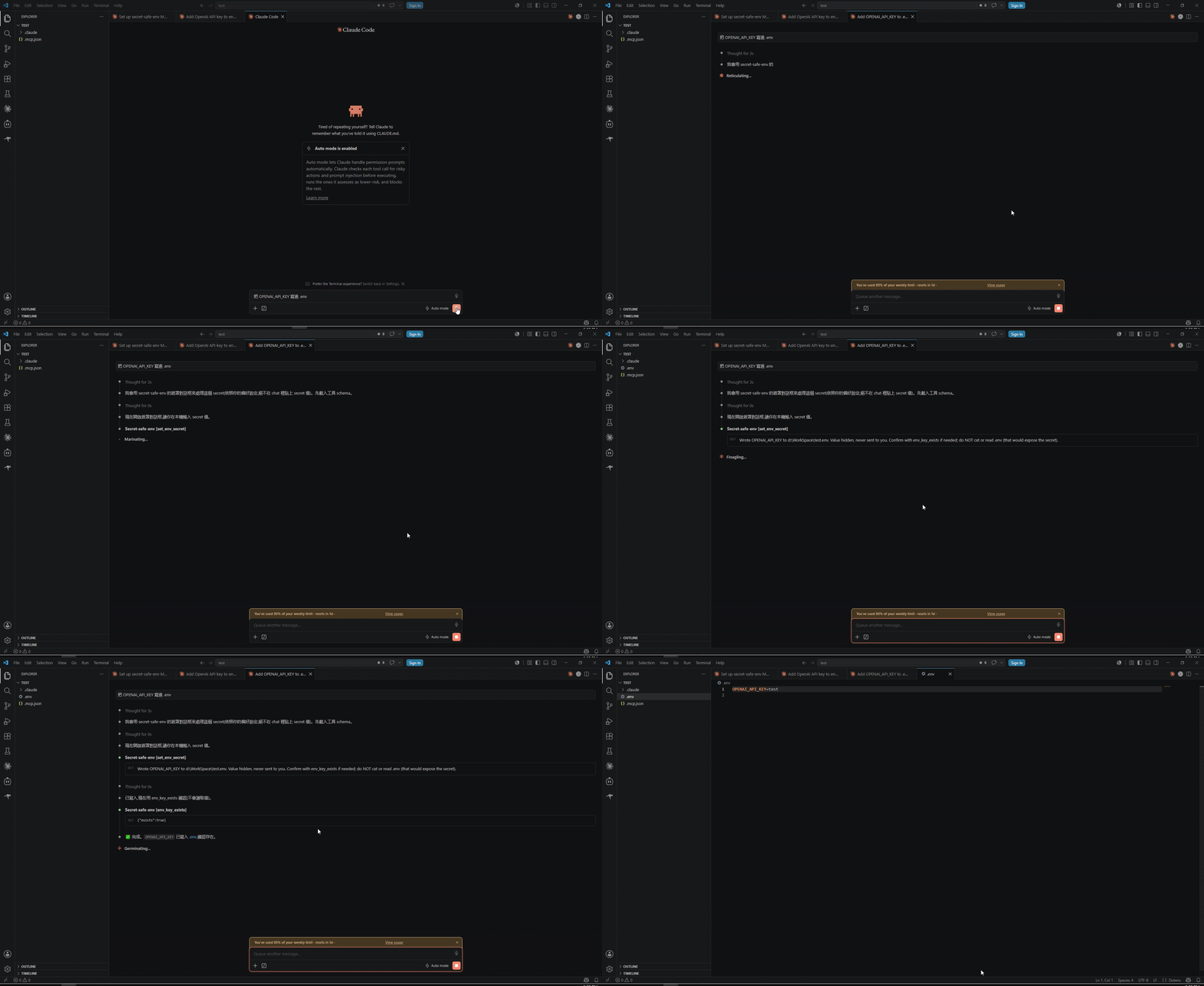
▶︎ Full-quality video (with audio)
Why
When you ask an agent to "add my OpenAI key to .env", the usual paths all leak the secret: pasting it into the chat puts it in the model's context and transcripts; letting the agent write the value means the agent handled it; cat .env to "verify" exposes it again. secret-safe-env removes the secret from every one of those channels — the value travels user → masked dialog → PowerShell → .env and never enters the agent/model context.
"Can't I just edit .env myself?"
Yes — and this doesn't replace that. It removes the repetitive leave the chat → open the file → paste step so the agent handles it inline, with you only typing the value once. It also guards a different surface than .gitignore: keeping .env out of git doesn't help if the value already leaked into the chat / transcript / logs the moment you handed it over. Scope is deliberately just getting the value safely into .env — production secret management (vaults, runtime injection) is out of scope.
Platform support
This tool is Windows-only by design — the trust anchor is a native WinForms masked dialog driven by Windows PowerShell.
| Requirement | Supported | Notes |
|---|---|---|
| Windows 10 / 11 | ✅ Required | The only supported OS. |
| Linux / macOS | ❌ Not supported | The tools return UNSUPPORTED_PLATFORM and refuse; the agent is told the machine is unsupported. (The npm package still installs on any OS, it just won't run there.) |
| Windows PowerShell 5.1 | ✅ Required | Launched from the pinned path %SystemRoot%\System32\WindowsPowerShell\v1.0\powershell.exe. |
PowerShell 7+ (pwsh) | ❌ Not used | Deliberately never PATH-resolved, so a pwsh on PATH can't change the execution/logging surface. |
| Node.js | ✅ 18+ | Runs the MCP server (spawns PowerShell; never touches the value). |
Install
Claude Code
For the most stable setup (no npx cache surprises), install the global bin and point at it:
Updating:
npm i -g secret-safe-env@latest. With unpinnednpx, clear the cache (npx clear-npx-cache) or pin a version (npx -y secret-safe-env@<version>) to avoid running a stale cached copy.
Other MCP clients (.mcp.json)
Reload the client so it picks up the server. If an npx-launched stdio server appears in the list but never connects on Windows, wrap the command as cmd /c npx -y secret-safe-env.
Tools
set_env_secret({ key, env_path? }) → status text
Opens the masked dialog for key; the user types the value; the helper writes key=value to .env. Returns human/agent-readable text plus an error flag — never the value. key must be UPPER_SNAKE_CASE (^[A-Z_][A-Z0-9_]*$). Values are single-line (for multi-line PEM/JSON, ask the user to edit .env manually). destructiveHint: true (it upserts a key in place).
env_key_exists({ key, env_path? }) → { exists: boolean }
Returns only whether key is present in .env — never the value. Use it to confirm a write instead of reading/cat-ing .env. readOnlyHint: true.
env_pathis the absolute path to the project.env. Always pass it explicitly — a runner-launched MCP server's working directory is the runner sandbox, not your workspace. If omitted it defaults to<CLAUDE_PROJECT_DIR or cwd>/.env.
For AI agents
Use set_env_secret whenever a task needs a secret/API key/token/password/credential in a project .env (e.g. "add my OpenAI key", "set DATABASE_URL", "configure my .env"). Rules:
- ✅ Pass only the variable name; the user supplies the value in the local dialog.
- ✅ Confirm a write with
env_key_exists(returnstrue/false, never the value). - ❌ Never ask the user to paste the secret into the chat.
- ❌ Never write the value or a placeholder yourself.
- ❌ Never
cat/read.envto verify — that re-exposes the secret.
These rules are also delivered to the agent via the server's instructions and each tool's description, so a cold agent with zero prior context can use it correctly.
Security scope
In scope — from the moment you type the value until it lands in .env, no audited Windows/agent channel records it: PSReadLine history, 4688/Sysmon process command lines, 4103 Module Logging, 4104 Script Block Logging, PowerShell Transcription, AMSI, the MCP/agent context, OTEL traces, and mcp-debug logs. The value never crosses a PowerShell parameter boundary and is written only via [System.IO.File], never a cmdlet. A static AST lint (npm run lint:ps) and Pester transcript tests enforce this.
Out of scope (your responsibility, once the value is in .env) — cloud sync / OneDrive, VSS / backup snapshots, antivirus scanning, file ACLs, and the agent reading .env afterward.
See docs/SPEC.md for the full threat model and guarantees.
Development
PowerShell tests need Pester 5: Install-Module Pester -MinimumVersion 5.0 -Scope CurrentUser.
Releases are automated: push a vX.Y.Z tag and GitHub Actions publishes to npm (Trusted Publishing / OIDC) and the MCP Registry — no tokens. See docs/DECISIONS.md.
Documentation
- docs/SPEC.md — purpose, guarantees, threat model, scope & non-goals.
- docs/ARCHITECTURE.md — modules and data flow.
- docs/DECISIONS.md — design decisions and rationale.
Contributing
Contributions welcome — see CONTRIBUTING.md. The one rule: keep the no-leak guarantee intact and tested.
License
Disclaimer
secret-safe-env is provided "as is", without warranty of any kind (see LICENSE). It reduces secret exposure within the documented security scope on a best-effort basis; it does not guarantee absolute secrecy. You are responsible for confirming it fits your threat model, and for whatever happens to a value after it is written to .env — cloud sync, backups, antivirus, file permissions, and any tool (including the agent) that later reads .env. For production secrets, prefer a dedicated secrets manager.
This is an independent open-source project. It is not affiliated with, endorsed by, or sponsored by Anthropic, "Claude", or the Model Context Protocol project; those names belong to their respective owners and are used only to describe compatibility.