SEC Intelligence README
The full upstream README, mirrored here for reference. Install config, tool schemas, adoption signals, and an original overview live on the SEC Intelligence listing page.
🔎 SEC Intelligence MCP — Document-Grounded Financial AI
Ask Claude Desktop real questions about SEC filings — 10-Ks, 10-Qs, 8-Ks — and get answers quoted directly from the actual filing text, with a citation to the exact section (and page, where available) on every claim. Not a summary from training data. Not a guess.
Try it now: uvx sec-intelligence-mcp — see Quick install below.
Why this is different
Most finance-related MCP servers are data-API wrappers: they hand back numbers (revenue, EPS, price) from a database. None of the ones we surveyed read the actual filing documents, so none can answer a question that requires understanding what a company's management actually said — e.g. "how did NVIDIA's management explain the datacenter revenue surge?" or "did Amazon's forward guidance tone change between quarters?"
This server retrieves and quotes the real filing text with a citation on every claim, and its answer-generation prompt explicitly refuses to use prior/general knowledge when the retrieved passages don't contain the answer — verified live: asking about NVIDIA's non-existent "Mars operations" correctly returns "not present in the filing" rather than an invented answer. It also ships an automated RAGAS evaluation harness (see Evaluation results) that measures this claim on 50 real questions rather than just asserting it.
🚀 Quick install
Published on PyPI: https://pypi.org/project/sec-intelligence-mcp/. No clone, no build step — uv fetches and runs it on demand:
That's the whole install. Two more things and you're ready to use it in Claude Desktop:
1. Get your free API keys
All four take under 5 minutes total, no credit card anywhere.
| Variable | Where to get it | Required? |
|---|---|---|
GEMINI_API_KEY | https://aistudio.google.com/apikey — sign in with a Google account | Yes |
QDRANT_URL | http://localhost:6333 if you run Qdrant locally via Docker (docker run -p 6333:6333 qdrant/qdrant), or a free cluster URL from https://cloud.qdrant.io | Yes |
LANGFUSE_SECRET_KEY / LANGFUSE_PUBLIC_KEY | https://cloud.langfuse.com — free tier, create a project, copy both keys from Settings → API Keys | Yes |
QDRANT_API_KEY | Only if using Qdrant Cloud instead of local Docker | No |
Don't have Docker or want to skip signing up for Qdrant? See the note in Getting Qdrant running below.
2. Connect Claude Desktop
Add this to your claude_desktop_config.json
(Windows: %APPDATA%\Claude\claude_desktop_config.json, macOS: ~/Library/Application Support/Claude/claude_desktop_config.json):
Restart Claude Desktop, open the tools list (hammer icon), and confirm sec-intelligence-mcp
appears with a ping tool. That confirms the connection works before you rely on it for a
real question.
3. Try it out
Every session starts by ingesting the company you want to ask about — that's what indexes its filings so they can be searched. Then just ask in plain English:
You: Ingest NVIDIA's last 2 annual filings
Claude (calls
ingest_company_filings): Indexed 2 filings for NVIDIA — 312 chunks from FY2024's 10-K, 287 from FY2023's.You: What did they say about risks from export controls?
Claude (calls
analyze_filing): NVIDIA's FY2024 10-K identifies export control regulations as a primary risk: "The U.S. government has imposed, and may in the future impose, controls on the export of our products... restrictions to China, Hong Kong, and Russia have materially impacted our revenue." — [Item 1A — Risk Factors]You: How does that compare to AMD?
Claude (calls
compare_companies): [grounded side-by-side answer, cited to each company's own filing]
No prompt engineering, no special syntax — Claude picks the right tool automatically based on what you ask.
🧰 Available tools
| Tool | What it does | Example question |
|---|---|---|
ingest_company_filings | Fetches, parses, and indexes a company's recent SEC filings | "Ingest NVIDIA's last 3 10-Ks" |
search_filings | Semantic search across ingested filings, returns passages with citations | "Search Apple's 10-K for anything about AI investment" |
analyze_filing | Answers a specific question with a grounded, cited answer (RAG) | "What were Apple's main risk factors in their 2024 10-K?" |
get_filing_summary | Structured executive summary of a full filing (business, financials, MD&A, risks, outlook) | "Summarize NVIDIA's latest 10-K" |
compare_companies | Side-by-side comparison of 2-4 companies on a specific aspect, grounded in each company's own filing | "Compare NVIDIA and AMD's AI chip strategy" |
detect_financial_anomalies | Flags notable year-over-year changes in a company's MD&A/risk disclosures | "Did NVIDIA's risk language around China change between 2023 and 2024?" |
get_earnings_summary | Extracts headline metrics, guidance, and management commentary from a quarterly earnings release (8-K) | "Summarize Apple's Q2 2024 earnings" |
🛠️ Tech stack
Open source and free-tier first — no paid API is required to run this end to end.
| Layer | Tool | Why |
|---|---|---|
| MCP protocol | mcp Python SDK | Official Anthropic SDK |
| SEC data | SEC EDGAR Full-Text & Submissions API | Official, free, no API key |
| Embeddings | sentence-transformers — intfloat/e5-base-v2 | Runs on CPU, no GPU needed |
| Vector store | Qdrant | Free self-host (Docker) or Qdrant Cloud |
| Local cache | DuckDB | Ticker lookups, filing metadata, BM25 text |
| Keyword search | rank-bm25 | Hybrid retrieval alongside dense search |
| Reranking | sentence-transformers CrossEncoder (ms-marco-MiniLM-L-6-v2) | Re-scores top candidates before the LLM sees them |
| HTML/PDF parsing | beautifulsoup4, pdfplumber | Cleans raw filing documents to text |
| LLM | Google Gemini (free tier) | Answer generation |
| Observability | LangFuse | Tracing, spans, faithfulness scores |
| Evaluation | RAGAS | Automated faithfulness/correctness/recall scoring |
| Testing | pytest, pytest-asyncio | 120+ tests, fully mocked, no network calls |
| Linting | Ruff | |
| CI/CD | GitHub Actions | Lint, test, Docker build, eval-gate on every PR |
| Containerization | Docker + Docker Compose | |
| Deployment | Oracle Cloud "Always Free" tier | Real persistent disk, up to 24GB RAM, $0 |
| Packaging | PyPI + uv/uvx, Hatchling | One-command install, no clone needed |
🏗️ Architecture
📊 Evaluation results
Measured with RAGAS on 50 hand-verified
question/ground-truth pairs across 5 companies (full methodology and raw results in
eval/README.md):
| Retrieval strategy | Faithfulness | Correctness | Context Recall |
|---|---|---|---|
| v1: semantic-only (dense embeddings) | 0.92 | 0.67 | 0.84 |
| v2: hybrid (BM25 + semantic via RRF) — production default | 0.95 | 0.78 | 0.99 |
| v3: hybrid + cross-encoder reranking | 0.98 | 0.82 | 1.00 |
CI's eval-gate fails any PR to main that drops faithfulness below 0.75 on a real,
live-ingested subset of these questions — see .github/workflows/ci.yml.
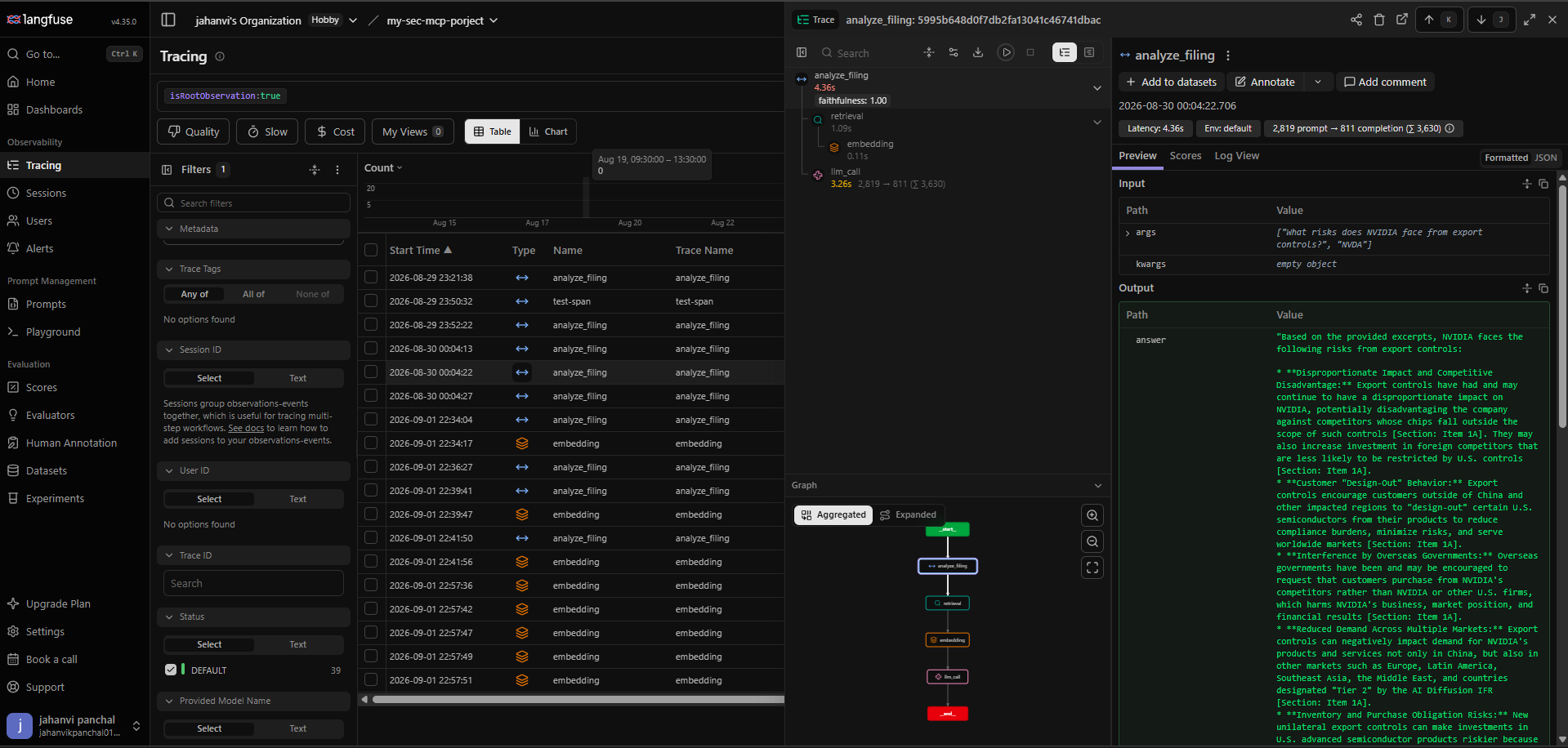
LangFuse dashboard
A real trace of analyze_filing answering "What risks does NVIDIA face from export
controls?" — the span tree shows retrieval and embedding nested under the tool call,
alongside the LLM generation, with a faithfulness: 1.00 score attached automatically:
👩💻 For developers
Want to run from source, contribute, or self-host instead of using the published package?
Getting Qdrant running
The simplest path is Docker: docker run -p 6333:6333 qdrant/qdrant. No Docker? Use a free
Qdrant Cloud cluster instead and set QDRANT_API_KEY too.
Run from a local clone
- Install uv.
- Clone the repo and install dependencies:
- Copy
.env.exampleto.envand fill in the keys from the table above. - Start Qdrant locally:
- Run the server directly: Or with the MCP Inspector (dev UI, requires Node.js):
For Claude Desktop, point it at your clone instead of the published package:
src/config.py fails fast at import time (raises RuntimeError) if any required key is
missing.
Running via Docker
docker compose up -d builds the server image and starts it alongside Qdrant. The app
service reads secrets from your local .env via env_file, and QDRANT_URL is overridden
to http://qdrant:6333 (the in-network service name) since localhost inside the container
would not reach the qdrant container.
Testing locally
Project structure
Deploy your own instance
The published PyPI package is enough for personal use via Claude Desktop — you only need this if you want a standalone, publicly reachable server (e.g. for a remote MCP client).
Deployed on an Oracle Cloud "Always Free" compute VM (Ampere A1, ARM) rather than Render or
Hugging Face Spaces: both of those give the container an ephemeral filesystem (wiped on
every restart/redeploy) and cap free-tier RAM at 512MB, which doesn't comfortably fit the
embedding model (e5-base-v2, CPU-only, ~440MB loaded) alongside the rest of the process. A
real Always Free VM has neither constraint — genuine persistent disk and up to 24GB RAM — so
Qdrant runs locally via the same docker-compose.yml used for local dev, with no separate
Qdrant Cloud account needed.
Setup (one-time):
- Create an Always Free Ampere A1 compute instance (Ubuntu image) in the Oracle Cloud console, and note its public IP.
- In the VCN's Security List (not just the instance's own firewall — both must allow
it), add an ingress rule for TCP port
8000(and22for SSH, usually already open). - SSH in, install Docker + the Compose plugin, then:
QDRANT_URLdoesn't need to be set in.envhere —docker-compose.ymlalready overrides it tohttp://qdrant:6333, the in-network service name, for theappservice. - Also open the instance's own firewall for the port (Ubuntu ships
iptables/ufwrules that block it even after the Security List allows it): - Confirm:
curl http://<instance-public-ip>:8000/healthreturnsok.
Both services have restart: unless-stopped, so a VM reboot brings the whole stack back up
without manual intervention. Plain HTTP (no TLS/domain) is used for now — fine for a demo,
but a real production deployment would put Caddy or Nginx in front for HTTPS.
Alternative: Hugging Face Spaces. Also possible via the Docker SDK, using Qdrant Cloud
instead of a local container (Spaces storage is ephemeral on restart, unlike a real VM).
huggingface.co → New Space → SDK: Docker → add GEMINI_API_KEY, QDRANT_URL,
QDRANT_API_KEY, LANGFUSE_SECRET_KEY, LANGFUSE_PUBLIC_KEY as secrets and
MCP_TRANSPORT=sse as a variable in Space Settings, then git push this repo to the
Space's git remote.
🤝 Contributing
Issues and PRs welcome. See docs/edgar-api.md for EDGAR API quirks
(rate limits, required User-Agent header) and eval/README.md before
changing anything in the retrieval pipeline — a PR that regresses RAGAS faithfulness below
0.75 will fail CI's eval-gate job.