Screenshot any web page, or read it as clean Markdown, with consent banners, ads and popups removed.
Quick Install
Automated & IDE SetupCopy the AI prompt to install this server into Claude Code, Cursor, or another agent — or use 1-click editor setup below.
One-click editor setup isn’t available for this listing yet — we don’t have a confirmed install command, and we’d rather show nothing than point your editor at the wrong package or host. Follow the project’s own setup instructions, linked above.
Manual Client & Custom JSON ConfigExpand JSON ▾
No confirmed setup config for this listing yet. We only publish a config block when the install details come from the project itself — its README, its docs, or a verified owner. We haven’t found those for Screenshotline, and we’d rather show nothing than a guess you’d paste into your client. Follow the project’s own setup instructions for the current steps.
Documentation Overview
Screenshotline
A screenshot API that survives production. URL in, image out.



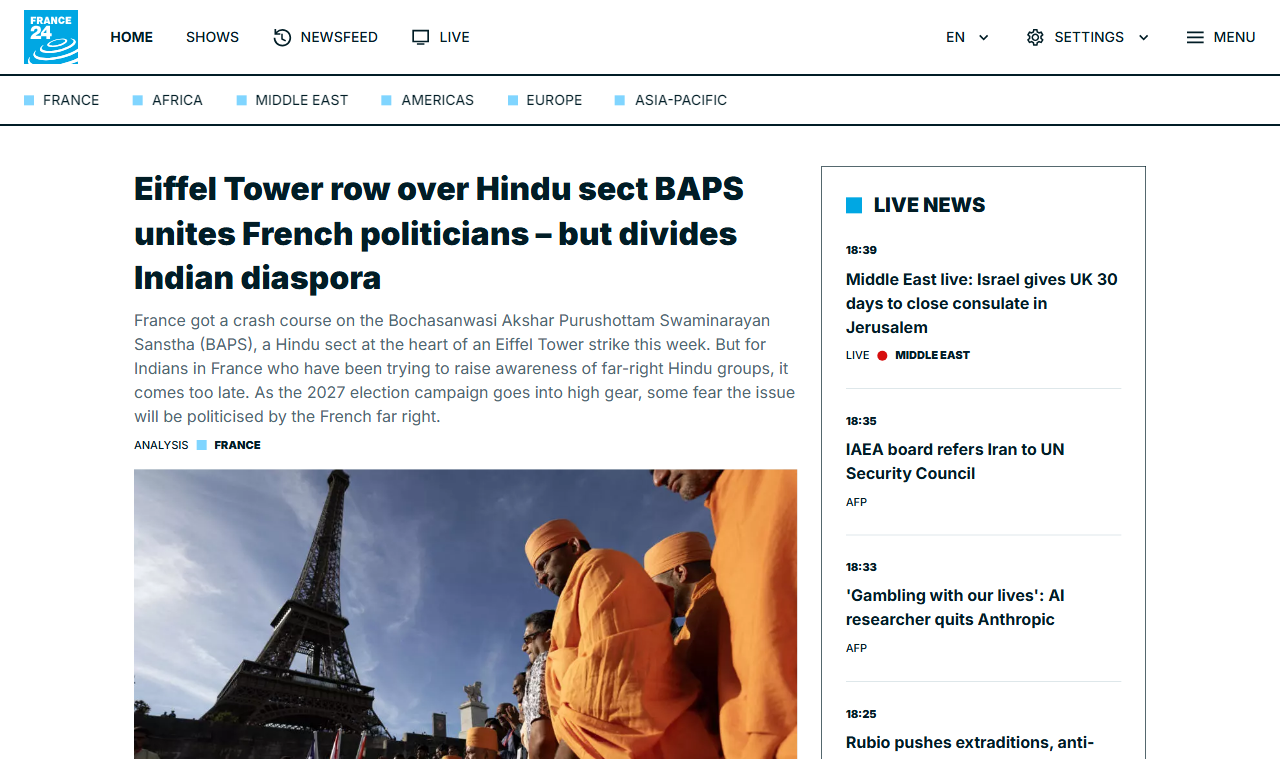
Above: france24.com, captured by this API. The consent wall is gone, the empty ad slot has been collapsed rather than left as a grey hole pushing content below the fold, and the lazy-loaded hero image has actually loaded. Most screenshot failures are not crashes — they are a 200 with the wrong picture.
Two ways to use it
Hosted — screenshotline.com. Free tier, 500 renders a month, no card. Warm browser pool, cache, and someone else's pager.
Self-hosted — docker compose up -d. The same renderer, nothing held back.
See SELF-HOSTING.md, which is honest about what running
headless Chrome at scale actually costs you.
Why this exists
Taking one screenshot with Puppeteer is twenty lines. Taking ten thousand is a different job, and it is the job people pay to avoid:
| Symptom | Cause | What this does about it |
|---|---|---|
| Memory climbs, container OOM-killed | Chrome does not release memory across navigations — 200MB becomes 1GB+ | Recycles each browser after MAX_RENDERS_PER_BROWSER renders |
<defunct> processes, pool slots never free | Chrome crashes mid-render; nothing reaps the orphans when your app is PID 1 | tini as PID 1 in the image, init: true in compose |
| Crashes on image-heavy pages | Docker gives /dev/shm only 64MB | --disable-dev-shm-usage plus shm_size: 1gb |
| p99 latency spikes to 30s+ | One page with a resource that never loads holds a slot | Hard wall-clock timeout, then SIGKILL — not page.close(), which waits on the thing that hung |
| First request after idle takes 3–5s | Chromium cold start | Pool warmed at boot, never scaled to zero |
| Full-page captures miss below-fold images | Lazy loading never fired because nothing scrolled | Scrolls the document, waits, returns to top |
| Server dies mid-sweep | A failed browser launch leaves Puppeteer's temp-profile cleanup to throw EBUSY, unhandled | Launch retries with backoff; background failures can never exit the process |
| 200 OK with a blank white image | Bot wall, or a challenge script we blocked | Two-signal blank detection, reported in X-Blank-Suspected |
Plus the one that is not a performance problem: an endpoint that fetches arbitrary URLs is an SSRF engine by default. Private and reserved ranges are refused, and every redirect hop is re-checked, not just the submitted URL.
Quick start
Docker (recommended)
Node 22+
Open http://localhost:3000 for a demo with no signup.
API
One endpoint. GET or POST /take, returning binary image data — no JSON
envelope, no second round trip. That is deliberate: the URL has to work
directly inside an <img src>.
Parameters
| Parameter | Default | Notes |
|---|---|---|
url | required | http/https only. Private and reserved addresses refused. |
format | png | png, jpeg, webp, pdf |
quality | 80 | jpeg/webp only, 1–100 |
full_page | false | Scrolls first so lazy images load |
selector | — | Capture one element. Mutually exclusive with full_page |
viewport_width / viewport_height | 1280 / 800 | |
device_scale_factor | 1 | 2 for retina |
block_ads | false | Blocks known ad and analytics hosts |
block_cookie_banners | false | Blocks CMP scripts, then sweeps leftover overlays |
omit_background | false | Transparent PNG/WebP |
color_scheme | light | light or dark |
delay | 0 | Extra wait in ms before capture |
wait_until | domcontentloaded | load, domcontentloaded, networkidle0, networkidle2 |
settle | 5000 | Budget after navigation for load, network quiet and image decode |
timeout | 30000 | Wall-clock ceiling in ms |
ignore_tls_errors | false | Accept expired, self-signed and mismatched certificates |
basic_auth | — | user:password for HTTP basic auth |
headers | — | JSON object of extra request headers |
fail_on_http_error | false | Return an error instead of an image when the target returns 4xx/5xx |
fail_on_blank | false | Return an error instead of a blank image when nothing rendered |
cache / cache_ttl | false / 86400 | Serve from the store when warm |
access_key | — | Or the X-Access-Key header |
signature | — | HMAC. See below. |
Response headers
| Header | Meaning |
|---|---|
X-Cache | HIT, MISS or BYPASS |
X-Render-Ms | Server-side render time |
X-Upstream-Status | HTTP status the target page returned |
X-Blocked-Requests | Requests blocked by the ad/consent filters |
X-Wait-Fallback | true if the page never went network-idle and we captured anyway |
X-Blank-Suspected | true if the capture looks blank - see below |
X-Text-Length | Characters of visible text found in the page |
Errors
JSON, with a message that says how to fix it.
The silent failure this API tries hard to avoid
A blank white image returned with HTTP 200 is worse than an error: the customer's pipeline records a success and nobody notices for a month. Bot walls, blocked challenge scripts and pages that render nothing without JavaScript all produce exactly that.
Every response therefore carries X-Blank-Suspected, decided from two
independent signals - an empty DOM, and encoded bytes-per-pixel far below what
a real screenshot produces. Pass fail_on_blank=true to turn it into a 502
instead, and fail_on_http_error=true if an upstream 403 should be your
problem rather than a picture of a bot wall.
Measured on the 202-page suite: 7 pages returned a technically successful but visually empty capture before this existed.
Reading a page instead of photographing it
GET or POST /extract runs the exact same render — JavaScript executed, the
adaptive settle, consent banners swept, ad slots collapsed, lazy images loaded
— and then reads the DOM as Markdown instead of photographing it.
| Parameter | Default | Notes |
|---|---|---|
strip_chrome | true | Drop nav, header, footer and sidebars. Falls back to the whole body if stripping would leave nothing. |
max_chars | 0 | Truncate, for a fixed context budget. 0 means no limit. |
response | markdown | json returns {url, title, chars, upstream_status, markdown} instead. |
Everything from /take still applies — block_ads, basic_auth, headers,
settle, timeout, signed URLs, the SSRF guards.
Why this is not just curl | html2md: by the time we extract, we are holding a
fully rendered, consent-swept DOM. Two things follow from that which a
server-side HTML parser cannot do.
- Client-rendered pages work. A plain fetch of
app.netlify.comyields 121 characters of visible text, and they read "The Netlify dashboard needs JavaScript :(". Rendered first, the same URL extracts the actual login page. - Layout disambiguates the text.
danluu.comwrites<d>09/26</d><a ...>title</a>with no whitespace between them and styles<d>as a 4em flex item. Parsed as markup that concatenates to09/26[title]; read with the computed layout it becomes09/26 [title].
Open shadow roots are walked too, so pages built out of web components extract as text rather than as nothing. Closed roots are unreachable by design.
MCP server
Agents get both halves of this over the Model Context Protocol: the screenshot for when the layout is the answer, the Markdown for when the text is.
Hosted, nothing to install — connect by URL with a free key (500 renders a month, no card):
Self-hosting, it runs locally over stdio from a clone, owning a single browser:
Two tools:
| Tool | Returns |
|---|---|
screenshot | The rendered image, plus an explicit warning if the capture looks blank rather than a silent empty picture. |
read_page | The page as Markdown. |
Point either one at an instance you already run — with its warm pool, cache
and rate limit — by setting SCREENSHOTLINE_BASE_URL, plus
SCREENSHOTLINE_ACCESS_KEY if that instance requires a key.
The SSRF guards apply here too. An agent cannot talk this server into scanning
127.0.0.1 or a cloud metadata endpoint.
Related MCP Servers
Reviews
No reviews yet — be the first to share how this listing worked for you.
Frequently Asked Questions about Screenshotline
AllMCPs Directory Badge
Showcase your server listing on GitHub or your project documentation. Embed this dynamic SVG badge to highlight official listing status and live engagement.
Badge Style:
Live Dynamic SVG Preview
Markdown (GitHub README)
[](https://allmcps.com/mcp/screenshotline)HTML Embed
<a href="https://allmcps.com/mcp/screenshotline"><img src="https://allmcps.com/api/badge/screenshotline?style=directory" alt="Screenshotline on AllMCPs" /></a>