AllMCPs
BrowseBestCategoriesStackCompareToolsGuidesBlog Log in Submit MCP

Stay in the loop

Get new MCP servers and top picks in your inbox.

AllMCPs

The open directory for discovering and installing Model Context Protocol servers.

Explore

  • Browse servers
  • Best MCP servers
  • Categories
  • MCP clients
  • Agent prompts
  • Stack Builder
  • Compare servers
  • Tags index
  • Submit a server
  • Pricing

Learn

  • Guides hub
  • What is MCP?
  • Install guide
  • Troubleshooting
  • Security
  • Blog
  • Blog RSS

Tools

  • All tools
  • Config generator
  • Config validator
  • MCP playground
  • OpenAPI β†’ MCP
  • Badge generator

For agents

  • API docs
  • Trust & traffic
  • llms.txt β†— (opens in a new tab)
  • Catalog JSON β†— (opens in a new tab)
  • Remote MCP β†— (opens in a new tab)

Company

  • About
  • Contact
  • X (@AllMCPs) β†— (opens in a new tab)
  • GitHub β†— (opens in a new tab)
  • Terms
  • Privacy
AllMCPs VerifiedAllMCPs VerifiedFeatured on Nick LaunchesFeatured on Nick LaunchesLaunch Llama NewsletterLaunch Llama NewsletterVerified DR - allmcps.comVerified DR - allmcps.comFeatured on SaaSGrowFeatured on SaaSGrowFeatured on Twelve ToolsFeatured on Twelve ToolsFeatured on Saaspa.geFeatured on Saaspa.geFeatured on Findly.toolsFeatured on Findly.toolsFeatured on Startup FameFeatured on Startup FameFeatured on LaunchKiwiFeatured on LaunchKiwiFeatured on ScrollLaunchFeatured on ScrollLaunchFeatured on DailyPingsFeatured on DailyPingsFazier badgeFazier badgeFeatured on NewTool.siteFeatured on NewTool.siteFeatured on saasfame.comFeatured on saasfame.comDR Checker - Domain RatingDR Checker - Domain RatingListed on Turbo0Listed on Turbo0Launched on LaunchBoard - Product Launch PlatformLaunched on LaunchBoard - Product Launch PlatformList on SimilarlabsList on Similarlabshttps://codetrendy.comhttps://codetrendy.comListed on DevTool.ioFeatured on BuildlistFeatured on BuildlistAllMCPs VerifiedAllMCPs VerifiedFeatured on Nick LaunchesFeatured on Nick LaunchesLaunch Llama NewsletterLaunch Llama NewsletterVerified DR - allmcps.comVerified DR - allmcps.comFeatured on SaaSGrowFeatured on SaaSGrowFeatured on Twelve ToolsFeatured on Twelve ToolsFeatured on Saaspa.geFeatured on Saaspa.geFeatured on Findly.toolsFeatured on Findly.toolsFeatured on Startup FameFeatured on Startup FameFeatured on LaunchKiwiFeatured on LaunchKiwiFeatured on ScrollLaunchFeatured on ScrollLaunchFeatured on DailyPingsFeatured on DailyPingsFazier badgeFazier badgeFeatured on NewTool.siteFeatured on NewTool.siteFeatured on saasfame.comFeatured on saasfame.comDR Checker - Domain RatingDR Checker - Domain RatingListed on Turbo0Listed on Turbo0Launched on LaunchBoard - Product Launch PlatformLaunched on LaunchBoard - Product Launch PlatformList on SimilarlabsList on Similarlabshttps://codetrendy.comhttps://codetrendy.comListed on DevTool.ioFeatured on BuildlistFeatured on Buildlist
Β© 2026 Jackalope Digital LLC. All rights reserved.
  1. Home
  2. πŸ”Ž Search & Data Extraction
  3. Scrapeer
S
Health: Not checked yetWe have not completed a health check for this listing yet.Last checked 8/10/2026, 11:32:09 PM

Scrapeer

Enrichment pendingWe haven’t run our AI enrichment pass on this listing yet, so the overview, use cases, and FAQ below may be sparse or missing. We work through the catalog over time β€” check back soon.
View RepositoryVisit Website

Run Scrapeer visual web-scraping flows from AI agents.

Quick Install

Automated & IDE Setup

Copy the AI prompt to install this server into Claude Code, Cursor, or another agent β€” or use 1-click editor setup below.

Add to CursorAdd to VS Code
Manual Client & Custom JSON ConfigExpand JSON β–Ύ

Install Config Generator

Choose your client
claude_desktop_config.json
{
  "mcpServers": {
    "scrapeer": {
      "command": "npx",
      "args": [
        "-y",
        "scrapeer"
      ]
    }
  }
}

πŸ’‘ Paste into ~/Library/Application Support/Claude/claude_desktop_config.json (macOS) or %APPDATA%\Claude\claude_desktop_config.json (Windows)

Install Directory Badge Claim listing AlternativesπŸ”Ž More in Search & Data Extraction

Documentation Overview

Scrapeer logo

Scrapeer MCP Server

Run Scrapeer visual web-scraping flows from Claude Code, Codex, Cursor, and VS Code Copilot.

Scrapeer is a visual browser automation and web scraping platform for people who do not want to write scrapers from scratch. Build deterministic scraping workflows in a drag-and-drop editor, watch the browser run step by step, then run those same flows locally or in Scrapeer's cloud.

This MCP server connects AI agents to Scrapeer so they can:

  • run saved scraping flows and retrieve structured results
  • inspect flow definitions, block configs, execution steps, and run history
  • create or patch flows using Scrapeer's block catalog and validation APIs
  • check account credits and cancel active cloud runs

The result is a useful split of responsibilities: humans design reliable browser workflows in Scrapeer, and agents can trigger, monitor, debug, and extend those workflows through MCP.
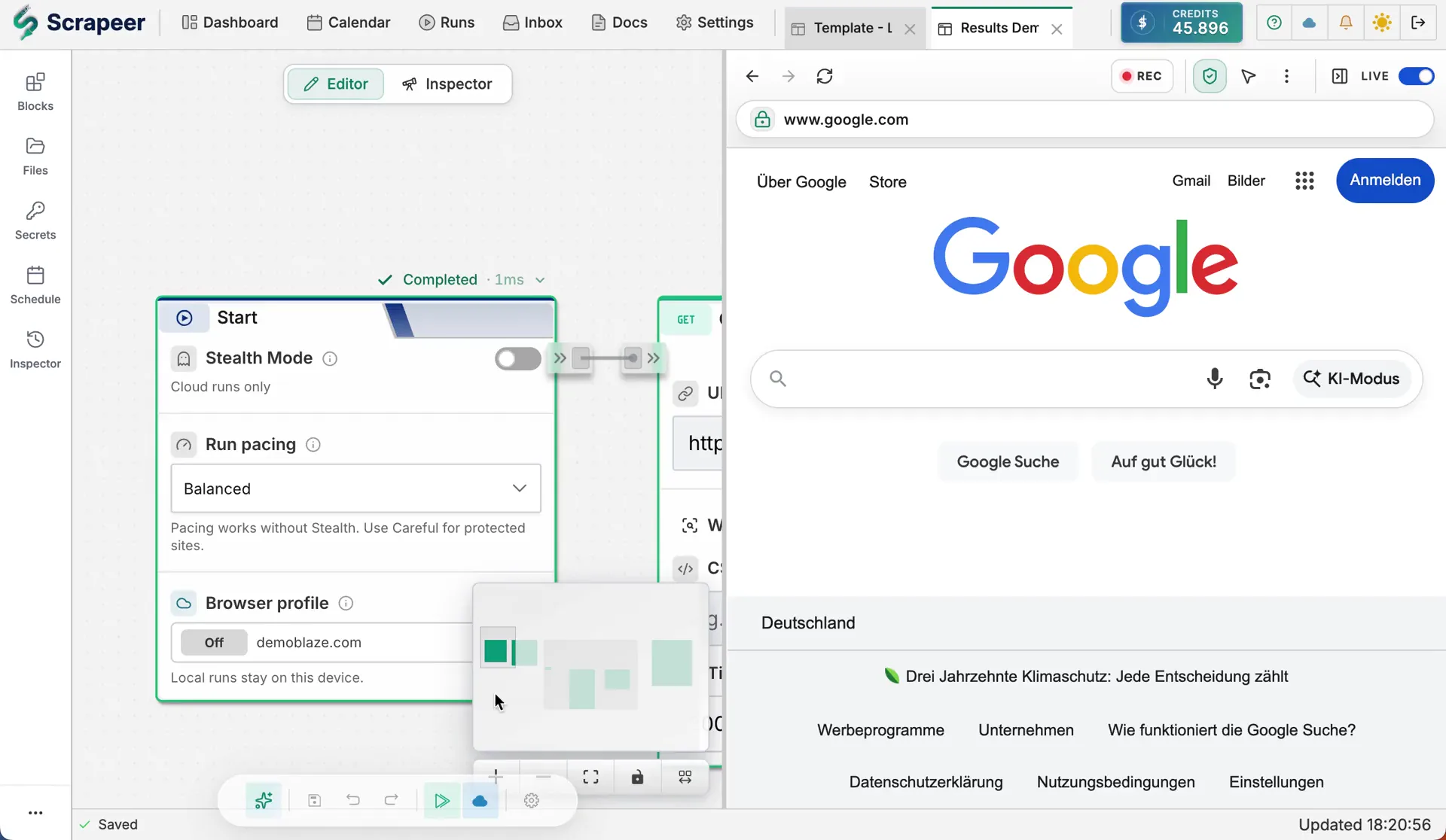
Scrapeer visual flow editor with live browser execution

Why Scrapeer

Scrapeer is built for glass-box scraping: you can see exactly what the scraper does, inspect each block's output, and fix the workflow when a site changes. Instead of asking an agent to improvise browser steps every time, Scrapeer gives agents a reliable set of saved, validated workflows they can run on demand.

Quick Start

Create a Scrapeer API key at https://app.scrapeer.com/settings#security, then add the server to your MCP client. These examples use npx so users do not need to install the package globally.

Claude Code (.mcp.json)

For a project-scoped Claude Code config, create .mcp.json in the project root:

config.json
{
  "mcpServers": {
    "scrapeer": {
      "command": "npx",
      "args": ["-y", "@scrapeer/mcp-server"],
      "env": { "SCRAPEER_API_KEY": "sk_..." }
    }
  }
}

For a private user-scoped config, run claude mcp add --scope user --env SCRAPEER_API_KEY=sk_... scrapeer -- npx -y @scrapeer/mcp-server so Claude writes the correct ~/.claude.json entry for your machine.

Codex CLI and IDE extension (~/.codex/config.toml)

toml
[mcp_servers.scrapeer]
command = "npx"
args = ["-y", "@scrapeer/mcp-server"]

[mcp_servers.scrapeer.env]
SCRAPEER_API_KEY = "sk_..."

Cursor (~/.cursor/mcp.json or .cursor/mcp.json)

config.json
{
  "mcpServers": {
    "scrapeer": {
      "type": "stdio",
      "command": "npx",
      "args": ["-y", "@scrapeer/mcp-server"],
      "env": { "SCRAPEER_API_KEY": "sk_..." }
    }
  }
}

VS Code Copilot (.vscode/mcp.json)

config.json
{
  "servers": {
    "scrapeer": {
      "type": "stdio",
      "command": "npx",
      "args": ["-y", "@scrapeer/mcp-server"],
      "env": { "SCRAPEER_API_KEY": "sk_..." }
    }
  }
}

Available Tools

Read

ToolDescription
scrapeer_list_flowsList your saved scraping flows
scrapeer_get_flowGet details about a specific flow
scrapeer_get_block_catalogList the block types available for use in flows, with their custom-field schemas. Call this before any create/update/patch; guessing types or config keys leads to validation failures
scrapeer_validate_flowDry-run validate a flow JSON without saving
scrapeer_get_accountAccount info: credit balance, subscription plan, cloud-run availability

Run

ToolDescription
scrapeer_run_flowTrigger a cloud run and return immediately with an execution ID
scrapeer_run_flow_and_waitRun a flow and poll until results are ready (recommended)
scrapeer_get_run_statusCheck the status of a running or completed execution
scrapeer_get_run_resultsGet structured output data from a completed run
scrapeer_get_run_stepsGet block-by-block execution breakdown (useful for debugging failures)
scrapeer_list_runsList execution history, with optional filtering by status or flow
scrapeer_cancel_runCancel an active cloud execution

Mutate

ToolDescription
scrapeer_create_flowCreate a new (empty) flow with the given title
scrapeer_update_flowReplace a flow's entire definition (whole-flow overwrite). Prefer scrapeer_patch_flow for incremental edits
scrapeer_patch_flowApply granular patch operations: add_block, update_block_custom, remove_block, add_edge, remove_edge

Building flows: recommended sequence

The mutation tools enforce optimistic concurrency. Every save sends the version stamp the caller saw on its last read, and the gateway rejects stale writes with 409 so concurrent edits from a human in the editor and an LLM via MCP cannot silently overwrite each other. The MCP server tracks this version stamp automatically across calls in the same session, so the LLM does not have to manage it manually.

Typical sequences:

Create from scratch:

Code
scrapeer_get_block_catalog       -> learn valid block types
scrapeer_create_flow             -> returns flow_id (event_id cached)
scrapeer_patch_flow flow_id [...] -> add_block ops; cache -> baseProjectEventID

Modify an existing flow:

Code
scrapeer_get_block_catalog       -> learn valid block types
scrapeer_get_flow flow_id        -> caches the current event_id
scrapeer_validate_flow {...}     -> optional dry-run before commit
scrapeer_patch_flow flow_id [...] -> uses cached event_id automatically

If a 409 fires, the cached event_id is invalidated automatically. Re-call scrapeer_get_flow and retry the mutation.

Configuration

VariableRequiredDefaultDescription
SCRAPEER_API_KEYYes-API key from app.scrapeer.com/settings

Development

bash
pnpm install
pnpm test
pnpm run build

Tests use msw to mock the Scrapeer API. No real credentials are needed.

Related MCP Servers

View all in Search & Data Extraction View all alternatives
  • S
    Scrapling MCP Server

    Web scraping with stealth HTTP, real browsers, and Cloudflare bypass. CSS selectors supported.

    πŸ”Ž Search & Data Extraction0 views
    Compare vs Scrapling MCP Server β†’
  • Web Search logoWeb Search

    Web search for AI agents β€” one tool across 6 engines, routed to the cheapest + cached.

    πŸ”Ž Search & Data Extraction0 views
    Compare vs Web Search β†’
  • N
    Nodebench

    260 MCP tools across 49 domains. AI Flywheel, quality gates, research, web scraping.

    πŸ”Ž Search & Data Extraction0 views
    Compare vs Nodebench β†’
  • Wigolo logoWigolo

    Local-first, keyless web intelligence in one server: search, fetch, crawl, extract, cache, find-similar, and research. Multi-engine search with local ML reranking and a persistent SQLite cache, renders JS-heavy pages, and keeps everything on your machine. Install via npx wigolo init --non-interactive --agents=.

    πŸ”Ž Search & Data Extraction2 views
    Compare vs Wigolo β†’

Frequently Asked Questions about Scrapeer

Add the following block to your claude_desktop_config.json under mcpServers: "mcpServers": { "scrapeer": { "command": "npx", "args": ["-y", "Scrapeer"] } }

AllMCPs Directory Badge

Full Badge Customizer

Showcase your server listing on GitHub or your project documentation. Embed this dynamic SVG badge to highlight official listing status and live engagement.

Badge Style:
Live Dynamic SVG PreviewScrapeer AllMCPs Directory Badge

Markdown (GitHub README)
[![AllMCPs](https://allmcps.com/api/badge/scrapeer?style=directory)](https://allmcps.com/mcp/scrapeer)
HTML Embed
<a href="https://allmcps.com/mcp/scrapeer"><img src="https://allmcps.com/api/badge/scrapeer?style=directory" alt="Scrapeer on AllMCPs" /></a>

Technical Specs & Signals

CategoryπŸ”ŽSearch & Data Extraction
More technical detailsExpand β–Ύ
TransportSTDIO
RuntimeNode.js
Views0
Unique ViewsTotal visits recorded for this listing page on AllMCPs.
Installs0
Installs & Copy ActionsTotal times users copied install commands or configuration snippets for this server.
25Quality signal: Emerging Β· 25/100How this signal is calculated β–Ύ
Server availabilityNot measured

Not scored for repo-hosted servers β€” we can't reach the running server, only its GitHub page. Hosted MCP endpoints are health-checked live.

Verified ownership8/20
Documentation & tools10/30
Adoption & activity1/15
Community engagement0/10

A guidance signal from public completeness & health data β€” not a user rating. New listings start lower and rise as they add docs, get verified, and grow adoption. Signals we can't observe for a listing are skipped, not counted against it.

β˜… FeaturedAllMCPs Server logo

AllMCPs Server

The official MCP server for AllMCPs.com - submit and manage tools directly from your AI. The open directory for MCP servers. Connect Claude, Cursor, Windsurf, and AI agents to databases, tools, files, and APIs. Explore 3,181+ servers. AllMCPs is the premier, open directory for discovering, evaluating, and installing Model Context Protocol (MCP) servers to equip AI agents and LLMs with real-world superpowers.

Explore Server β†’

Own this project?

This directory is pre-filled from public sources. Claim via GitHub README, site badge, or DNS TXT to get the verified badge.

Free dofollow backlink: after claiming, verify your product site and place a dofollow AllMCPs badge β€” we recheck it stays live.

Claim & get free dofollow

Share & Embed

Add our SVG badge (dark/light directory styles) or embeddable widget to your site.

Explore more

More in πŸ”Ž Search & Data Extraction β†’Best MCP servers for Web Search & Scraping β†’Alternatives to Scrapeer β†’Install in Claude DesktopInstall in CursorInstall in VS Code