SCORM Packager (HTML → SCORM 2004)
Turn HTML or Claude Design bundles into LMS-ready SCORM 2004 packages — offline, tracked.
Install SCORM Packager (HTML → SCORM 2004)
Pick your client, then add it in one click or paste the config.
~/Library/Application Support/Claude/claude_desktop_config.json{
"mcpServers": {
"scorm-packager-html-scorm-2004": {
"command": "npx",
"args": [
"-y",
"scorm-mcp-server"
]
}
}
}
Settings → Developer → Edit Config, merge this into mcpServers, then fully quit and reopen Claude Desktop.
We couldn’t confirm it starts correctly
We ran the install command but it didn't respond within our test window — this can mean a slow first-time install rather than a real problem.
npx -y scorm-mcp-serverNo response to initialize.
This is an experimental automated check and can have false negatives — missing environment variables, a slow cold install, etc. It doesn’t necessarily mean something’s wrong. Last checked 7d ago.
Overview
Security & health
What it can reach and how reliably it runs — from our own checks, not the maintainer’s claims.
Recent health check succeeded.
Supply-chain signal
No high-severity advisories surfaced by our automated scan.
Scanned 15d ago via OSV.dev · scorm-mcp-server (npm)
Adoption & maintenance
Factual signals from GitHub, npm, and our automated checks — not a rating.
From the project README
scorm-mcp-server
Turn self-contained HTML, a Claude Design
.dcbundle or a mobile-learning platform content export (Excel activity templates + media) into a SCORM 2004 (or 1.2) package ready to import into any LMS — assets inlined for 100% offline, completion / progress / score tracking injected, ADL schemas bundled.







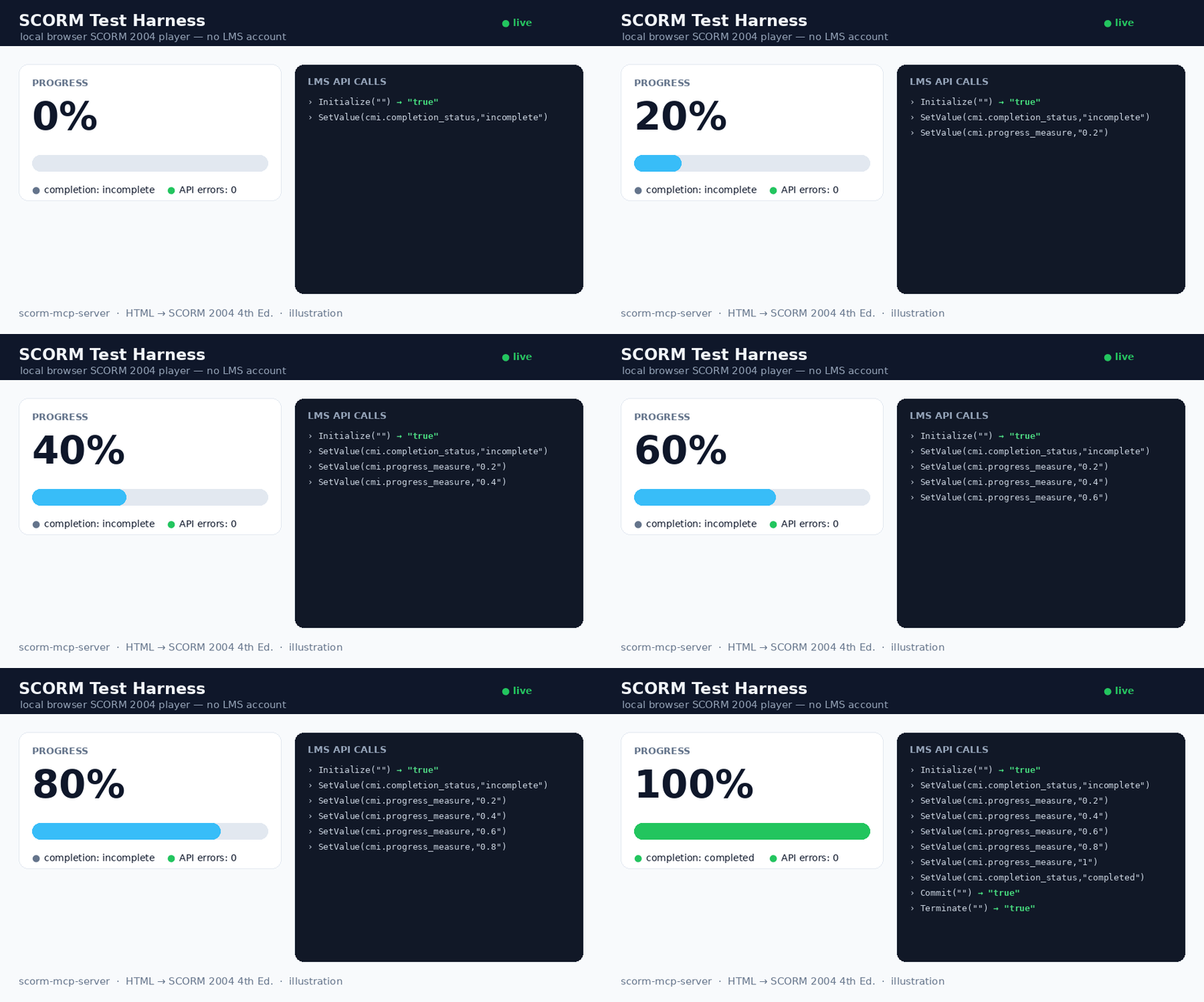
The bundled local harness (scorm-test-harness.html) playing a package: progress 0 → 100%, completion, and the live LMS API-call log (0 errors). Illustration.
An MCP server exposing three tools: scorm_package converts a finished HTML learning module into a .zip (PIF) any SCORM-compliant LMS can import, scorm_validate checks any existing SCORM zip (made by any tool) and explains exactly why an LMS would reject it, and scorm_selftest is a 1-second health check.
Principle: WRAP, don't rewrite. Your HTML is preserved; the tool only:
- Inlines every asset (CSS,
@import, fonts, JS, images,srcset, favicons) as data URIs → runs 100% offline. - Injects a small runtime that reports completion, progress (%) and time spent, with resume across sessions.
- Generates the manifest and bundles the 15 official ADL XSD schemas — the manifest is validated against them (real conformance, not just "well-formed").
✅ Status — validated on a real LMS
- 325/325 automated checks green: 23 converter · 15 runtime · 15 MCP · 1 schema conformance (
xmllint) · 6 security · 11 features · 13 auto-milestones · 21 V2 (bundle /.dc/ score) · 10 output-dir · 9 tracking-signal · 32 hardening · 29 SCORM 1.2 · 12 CLI/batch · 16 web UI · 44 mobile-learning migration · 35 package validation · 33 question-level interactions — plus 6 bonus strict-runtime checks (scorm-again). - SCORM Cloud (real LMS): imports cleanly (recognized as SCORM 2004 4th Ed., "manifest looks great"), and the dashboard reports completion = complete, success = passed, time tracked.
Input formats
Input (input_path or html) | Handling |
|---|---|
A single self-contained .html (e.g. Claude Design "standalone HTML" export) | assets inlined, runtime injected — v1 path |
A folder or .zip (multi-file module) | whole tree preserved; entry HTML inlined; manifest lists every file |
A Claude Design .dc bundle (*.dc.html + support.js + _ds/) | auto-detected; CDN libs (React/Babel…) vendored offline via window.__resources (no source patch); runtime injected before support.js |
A mobile-learning platform content export (Excel activity templates + media/) | auto-detected; an interactive HTML course is rebuilt from the templates — info / transition / flash cards, quiz questions, media codes ([media:…], [H1:…], [quote:…], !!), scored quizzes reporting cmi.score — then packaged. Course title derived from the template names; with --batch, a whole catalogue migrates in one run |
Pass a .dc bundle as its folder or .zip (not the lone .dc.html, which is inert without its siblings).
Scores & quizzes (optional)
Set mastery_score (0..1) to enable score-based success and add sequencing objectives to the manifest. Report the score from your content in one line — no SCORM knowledge required:
window.SCORM2004.score(8, 0, 10);                                   // raw, min, max
window.dispatchEvent(new CustomEvent("scorm:score",    { detail: { raw: 8, min: 0, max: 10 } }));
window.dispatchEvent(new CustomEvent("scorm:progress", { detail: 0.5 }));  // 0..1
window.dispatchEvent(new CustomEvent("scorm:complete"));
The runtime maps these to cmi.score.*, sets success_status = passed/failed against mastery_score, and reports completion/progress. (dc:* event names are accepted as aliases.)
Question-level tracking (v2.3) — report each answer as a cmi.interactions record, so the LMS gradebook shows which questions were missed, not just the total:
window.SCORM2004.interaction({
  id: "quiz1-q3", type: "choice",
  description: "Which colour is the brand?",
  learnerResponse: "Blue", correctResponse: "Red",
  result: false, latencyMs: 12000,
});
// or, without touching the API:
window.dispatchEvent(new CustomEvent("scorm:interaction", { detail: { id: "q3", result: true } }));
Dialect-aware (2004 learner_response/timestamp vs 1.2 student_response/time, incorrect vs wrong) and best-effort by design: an LMS that refuses interaction writes gets a logged warning and the session carries on. Quizzes generated by the mobile-learning migration report their interactions automatically — one record per question, with the question text, the learner's answer, the expected answer and the latency.
SCORM 1.2, batch mode, CLI (v2.1)
SCORM 1.2 — pass scorm_version: "1.2" and you get a 1.2 manifest (validated
against the bundled 1.2 XSDs, with adlcp:masteryscore when mastery_score is
set). The injected runtime is adaptive: it speaks to whichever API the hosting
LMS exposes (API_1484_11 or API), maps the data model (single
lesson_status, 0-100 score, HH:MM:SS session time, 4096-char suspend data)
and never downgrades a passed status.
Batch — batch: true treats input_path as a directory of courses (each
sub-directory, .zip or .html = one course). One package per course, one
consolidated batch-report.json, and a broken course never sinks the others.
CLI — no MCP client required:
npx -y scorm-mcp-server ui            # local drag & drop web UI
npx -y scorm-mcp-server pack course.html --title "My course"
npx -y scorm-mcp-server pack ./courses --batch --scorm-version 1.2
npx -y scorm-mcp-server validate pkg.zip   # conformance-check an existing package
npx -y scorm-mcp-server selftest      # 1-second health check
Web UI — ui opens a localhost page: drop an .html or .zip, pick the SCORM
edition and an optional pass mark, download the package. Runs entirely on your
machine; nothing is uploaded anywhere.
Library — buildPackage() is a public API for pipelines and SaaS backends:
import { buildPackage } from "scorm-mcp-server";
const r = await buildPackage({ html, title: "My course", scormVersion: "1.2", masteryScore: 0.6 });
// r.zip (Buffer) · r.fileName · r.warnings · r.milestoneIds …
Diagnostic — the scorm_selftest MCP tool packages a constant built-in HTML
and reports version, duration and output path: it separates "server broken"
from "input problem" in one second.
Validate any SCORM package (v2.3)
"Why does my LMS reject this zip?" — scorm_validate answers it for any SCORM package, not only those produced here, and the input is never modified:
npx -y scorm-mcp-server validate course.zip          # human-readable report
npx -y scorm-mcp-server validate course.zip --json   # machine-readable
Checks: zip readability, imsmanifest.xml at the ROOT (detects the classic "zipped the folder instead of its contents" mistake and says how to fix it), well-formed manifest, SCORM edition detection (2004/1.2), launchable organization/item/resource chain, launch file and every <file href> present in the archive (case-only mismatches flagged — they work on Windows and fail on Linux LMS servers), and full XSD validation against the official ADL schemas — using the package's own XSDs first and falling back to the embedded copies, so packages that ship without schemas validate too. Exit code 0/1 for CI pipelines; also exposed as the scorm_validate MCP tool and the validatePackage() library API.
Install
Option 0 — try it online, no install
https://scormpackager.vercel.app — drop a course, pick the SCORM edition, download the package. Files are processed in memory and never stored, but they do travel to a server; for real work use the local options below, where nothing leaves your machine (and there is no 4 MB limit).
Option A — one-click (recommended)
Download scorm-mcp-server-x.y.z.mcpb from the Releases, then in Claude Desktop → Settings → Extensions, drag-drop the .mcpb, pick an output folder, and enable it.
Option B — npm (any MCP client)
No install step: add this to your client's MCP config (~/Library/Application Support/Claude/claude_desktop_config.json for Claude Desktop):
{
  "mcpServers": {
    "scorm": {
      "command": "npx",
      "args": ["-y", "scorm-mcp-server"],
      "env": { "SCORM_OUTPUT_DIR": "/ABSOLUTE/PATH/scorm-packages" }
    }
  }
}
Registry name: io.github.giacomomaria81/scorm-mcp-server (MCP registry).
Option C — from source (developer)
git clone <this-repo> && cd scorm-mcp-server
npm install        # dist/ is prebuilt; npm run build is optional
Then point the config at node /ABSOLUTE/PATH/scorm-mcp-server/dist/index.js.
Restart Claude. The scorm_package tool is now available.
Usage
Reviews
No reviews yet — be the first to share how it worked for you.
Frequently Asked Questions about SCORM Packager (HTML → SCORM 2004)
Related MCP servers
Add a badge to your READMEShow it’s listed — live SVG, Markdown or HTML.
AllMCPs Directory Badge
Showcase your server listing on GitHub or your project documentation. Embed this dynamic SVG badge to highlight official listing status and live engagement.
[](https://allmcps.com/mcp/scorm-packager-html-scorm-2004)<a href="https://allmcps.com/mcp/scorm-packager-html-scorm-2004"><img src="https://allmcps.com/api/badge/scorm-packager-html-scorm-2004?style=directory" alt="SCORM Packager (HTML → SCORM 2004) on AllMCPs" /></a>