Scholar MCP
Federated academic search, citation traversal, persistent PDF download, and temporary reading.
Install Scholar MCP
Pick your client, then add it in one click or paste the config.
~/Library/Application Support/Claude/claude_desktop_config.json{
"mcpServers": {
"scholar-mcp": {
"command": "uvx",
"args": [
"scholar-mcp"
]
}
}
}
Settings → Developer → Edit Config, merge this into mcpServers, then fully quit and reopen Claude Desktop.
Install not yet sandbox-tested— we haven't run this command through our automated sandbox yet. Not a red flag; we're working through the catalog.
Overview
Security & health
What it can reach and how reliably it runs — from our own checks, not the maintainer’s claims.
Recent health check succeeded.
Supply-chain signal
No high-severity advisories surfaced by our automated scan.
Scanned 17h ago via OSV.dev · scholar-mcp (PyPI)
Adoption & maintenance
Factual signals from GitHub, npm, and our automated checks — not a rating.
From the project README





Find the paper. Follow the evidence. Build the field.




Scholar MCP finds papers from natural-language questions, follows citations and related work, and opens the primary text. Save selected papers and notes in a local library that carries your research across sessions.
Quick demo
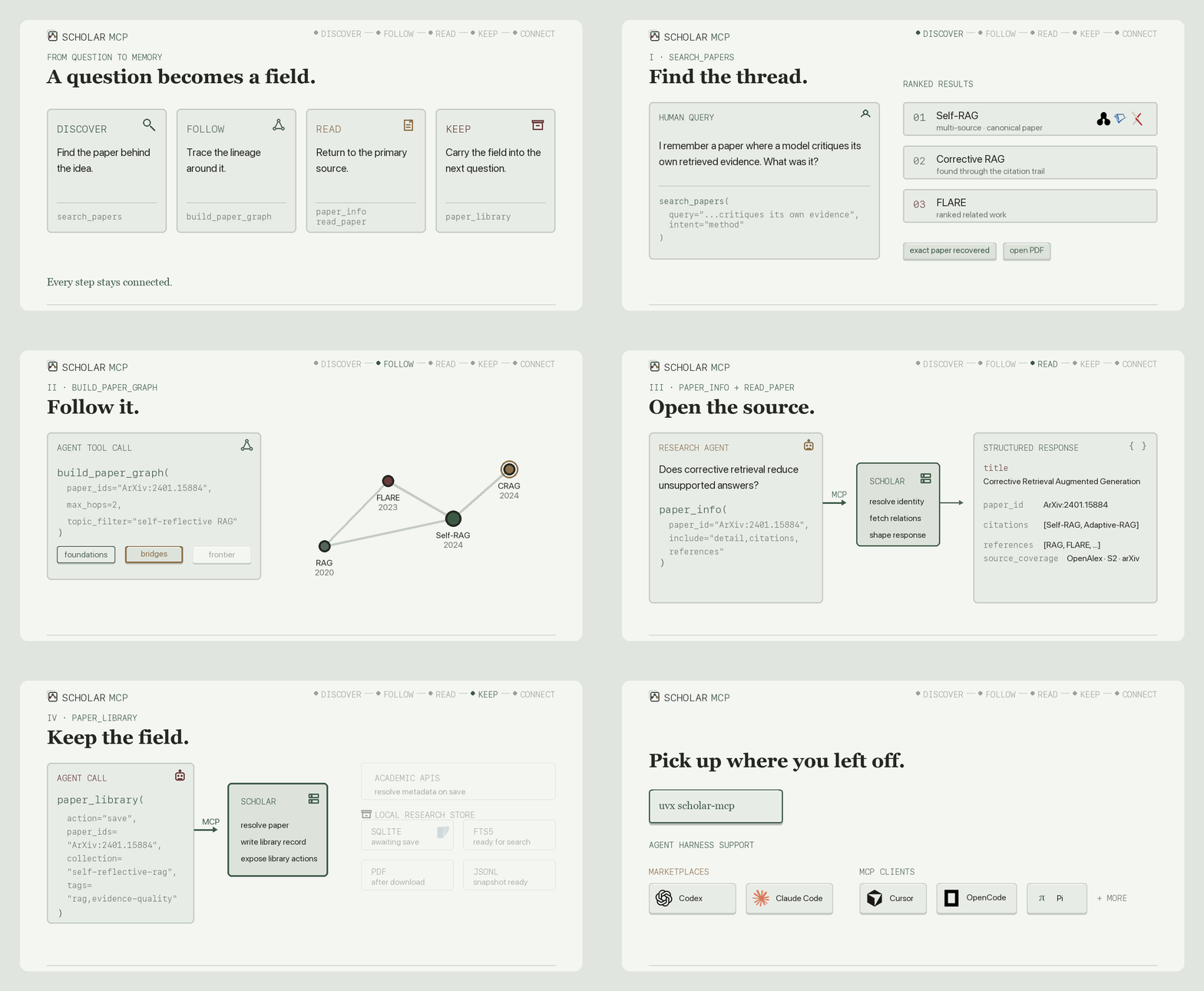
One continuous agent flow: search_papers → build_paper_graph → paper_info + read_paper → paper_library → library connectors.
How it works


Agents call typed MCP tools over stdio or Streamable HTTP. Scholar returns concise text and structured data, while a persistent SQLite library drives FTS5 search, PDF attachments, JSONL snapshots, and Obsidian, Zotero, and Notion connectors.
Quick start
Claude Code:
claude mcp add scholar -- uvx --python 3.12 \
  --find-links https://github.com/Liyux3/scholar-mcp/releases/download/v0.8.5/wheel-index.html \
  --from 'scholar-mcp[rerank]==0.8.5' scholar-mcp
Claude Desktop or any stdio MCP client:
{
  "mcpServers": {
    "scholar": {
      "command": "uvx",
      "args": [
        "--python", "3.12",
        "--find-links", "https://github.com/Liyux3/scholar-mcp/releases/download/v0.8.5/wheel-index.html",
        "--from", "scholar-mcp[rerank]==0.8.5", "scholar-mcp"
      ]
    }
  }
}
The direct server exposes the compact core profile. Install uv; it prepares Python 3.12 and the CPU reranker automatically. Optional source keys unlock deeper coverage and higher throughput. macOS desktop bundles include Python and dependencies; the portable launchers also handle machines without uv.
The repository also ships a research plugin with citation graphs, a local paper library, and the Deep Research skill:
# Codex
codex plugin marketplace add Liyux3/scholar-mcp
codex plugin add scholar-mcp@scholar-mcp

# Claude Code
claude plugin marketplace add Liyux3/scholar-mcp
claude plugin install scholar-mcp@scholar-mcp
The same plugin directory follows the Agent Plugins standard for Cursor, Pi, and compatible harnesses. OpenCode can launch uvx scholar-mcp as a local MCP; Pi can use pi-mcp-adapter.
Release artifacts also include the PyPI package, multi-architecture GHCR image, and macOS MCPB bundles. See the complete distribution matrix.
Tools
| Profile | Tool | Responsibility |
|---|---|---|
| Core | search_papers | Multi-source retrieval, filters, reranking, and citation discovery |
| Core | paper_info | Paper detail, citations, and references through one selective call |
| Core | recommend_papers | Related work through semantic and citation connections |
| Core | search_authors | Author profiles, affiliations, paper counts, and h-index |
| Core | read_paper | Read paper text, tables, and selected figures; pages 1-10 by default |
| Core | download_paper | Persist a PDF and index it in a collection |
| Research | build_paper_graph | Bounded citation graph with PageRank, bridges, nodes, edges, and Mermaid |
| Research | paper_library | Collections, FTS search, notes, tags, PDFs, and Markdown vault export |
scholar://status reports source availability and the actual reranker used without occupying the tool surface. Tool responses retain concise YAML text and also expose structured MCP data.
The bundled Deep Research skill turns search, paper inspection, graph traversal, and selected library writes into a living field map.
Retrieval
| Channel | Sources | Query form and role |
|---|---|---|
| Semantic | OpenAlex semantic, arxiv.gg, optional Exa | Full natural-language question |
| Full text | Semantic Scholar snippet search | Matching passages from open-access papers |
| Broad metadata | OpenAlex, Semantic Scholar, Crossref, optional Scopus | Identity, coverage, citations, and filters |
| Preprints and conferences | arXiv, OpenReview | Recent work and conference records |
| Biomedical | PubMed, Europe PMC | Medicine, biology, and full-text repositories |
| Domain and repository | DBLP, INSPIRE-HEP, DOAJ, CORE, OpenAIRE, HAL | CS, physics, open journals, and repositories |
| Web fallback | Google Scholar | HTTP search with optional automatic session recovery |
Keyword APIs receive measured source-specific query budgets. Semantic endpoints keep the original question. Every source contributes independently to one canonical evidence pool.
Results are canonicalized across DOI, arXiv, Semantic Scholar, OpenAlex, PubMed, and OpenReview identities. Duplicate records contribute complementary metadata and independent source evidence instead of appearing several times.
DashScope qwen3-rerank is the primary reranker when configured. Install the rerank extra for the FlashRank local fallback: uvx --from 'scholar-mcp[rerank]' scholar-mcp. Containers and MCPB bundles include this extra; the local model downloads on first use and stays in the application data directory. Search ranks the initial matches, follows connections from the strongest papers, then reranks the combined set. Metadata completion overlaps source retrieval, and large pools are scored in batches that respect the model service's document and token limits.
Bring your own reranker
For an Alibaba workspace or another region, set DASHSCOPE_HTTP_BASE_URL to the API Host from the console (with https://), or its /api/v1 base. Keep DASHSCOPE_API_KEY from that region. For example:
DASHSCOPE_HTTP_BASE_URL=https://<workspace-id>.cn-beijing.maas.aliyuncs.com/api/v1
SCHOLAR_RERANK_MODEL=qwen3-rerank
The default remains qwen3-rerank. SCHOLAR_RERANK_MODEL can also select qwen3.7-text-rerank, gte-rerank-v2, or the text input of qwen3-vl-rerank, subject to availability in your workspace. Scholar uses the appropriate Alibaba request/response format. Existing installations without a base URL keep the Beijing shared endpoint. Alibaba recommends workspace-dedicated endpoints and states that the shared domain no longer receives new features after September 30, 2026. API keys and model availability are region-specific.
For another provider or a self-hosted model, set SCHOLAR_RERANK_URL to the full rerank endpoint, SCHOLAR_RERANK_MODEL to its model name, and SCHOLAR_RERANK_API_KEY if needed. This explicit endpoint takes priority over the Alibaba configuration and uses only its own credential. Compatible endpoints use the Cohere-style contract:
Request:  query, documents, top_n, model
Response: results: [{index, relevance_score}]
Reviews
No reviews yet — be the first to share how it worked for you.
Frequently Asked Questions about Scholar MCP
Related MCP servers
Add a badge to your READMEShow it’s listed — live SVG, Markdown or HTML.
AllMCPs Directory Badge
Showcase your server listing on GitHub or your project documentation. Embed this dynamic SVG badge to highlight official listing status and live engagement.
[](https://allmcps.com/mcp/scholar-mcp)<a href="https://allmcps.com/mcp/scholar-mcp"><img src="https://allmcps.com/api/badge/scholar-mcp?style=directory" alt="Scholar MCP on AllMCPs" /></a>