Search your own Markdown notes, including languages written without spaces between words.
Quick Install
Automated & IDE SetupCopy the AI prompt to install this server into Claude Code, Cursor, or another agent — or use 1-click editor setup below.
Manual Client & Custom JSON ConfigExpand JSON ▾
Client Config & Setup
Choose your client or environment
Target File:
💡 Paste the JSON block into your client's configuration file under mcpServers, then restart the application.
Documentation Overview
Samong 🧠




A local-first knowledge base for the notes already in your repositories
You solved it once and wrote it down. Six months later the note is still in the
repo and you cannot find it. Point Samong at a project root and the .md files
you would commit become searchable and linked — and readable by the AI tools you
already work with. Plain Markdown,
Obsidian-compatible ([[wikilink]] /
[[wikilink|alias]]), no account, no cloud, one binary.
Why Samong
- 📁 A note is a
.mdfile you would commit. Point it at a repository, not at a special notes folder..gitignoreis respected and dependency directories are always skipped, so a project root indexes your ADRs, runbooks and design docs without dragging innode_modules— andsamong doctortells you exactly what counted and what did not. - 🤖 Your notes become an agent's memory.
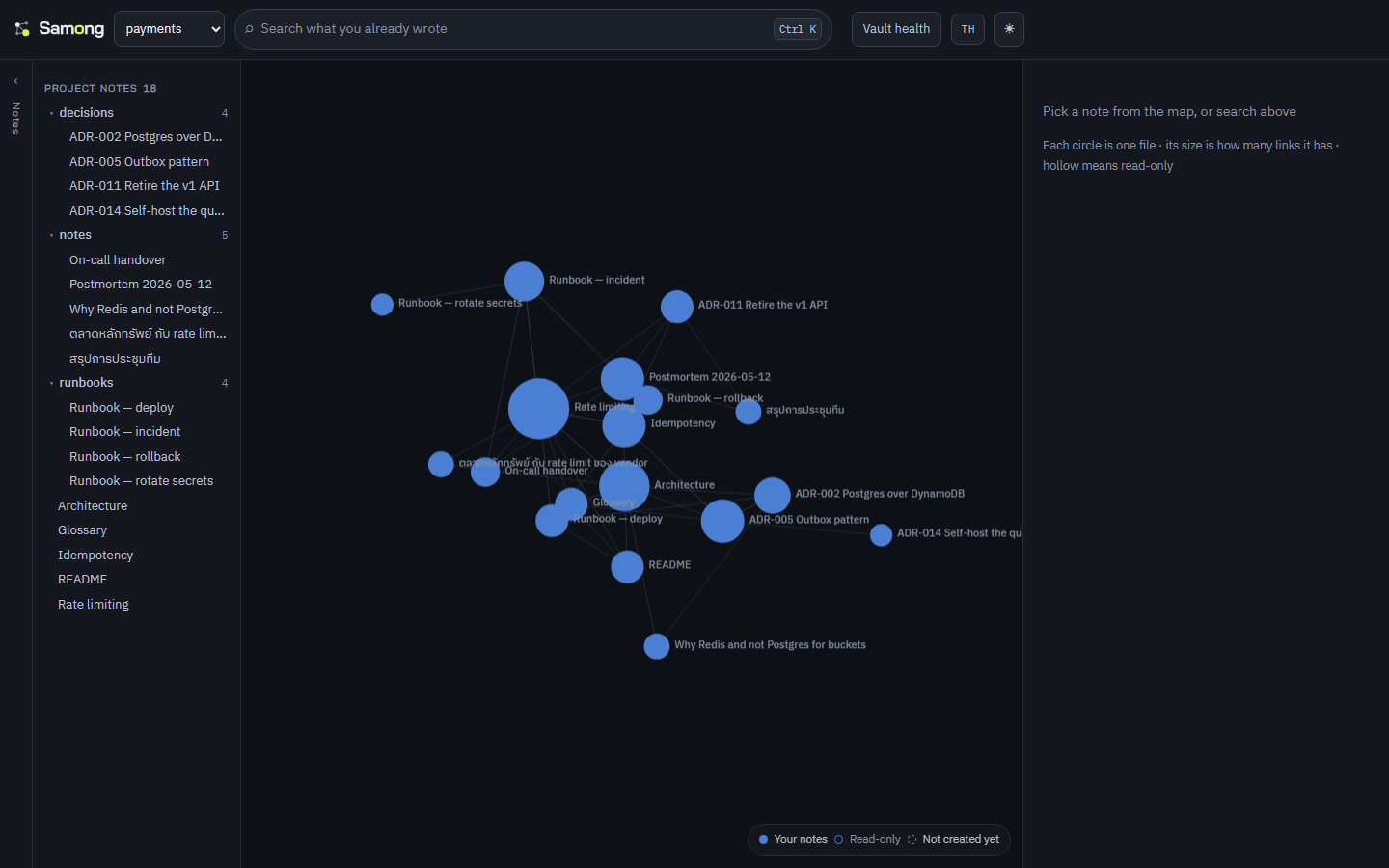
samong-mcpspeaks MCP, so Claude Code and Claude Desktop search, read and write the same knowledge base you do. No pasting context back in every session (setup). - 🗺 The graph is the workspace, not a novelty tab. A vault is a shape; typing dims everything that does not match, so a query becomes a place.
- 🔎 Notes are addressed by path, not by title. One repository holds twenty
files called
README.md. A title cannot tell them apart, and an index keyed on titles silently collapses them — so search results, the API and the MCP tools all carry the real path. - 📚 Learn from documentation you never commit.
.gitignoreanswers "what do I distribute?"; a knowledge base has to answer "what do I learn from?".scope.includepulls a dependency's own docs in as read-only reference notes — one project, one brain, no second vault. - 🔗 One repository per vault, links across all of them.
[[other-vault/note]]resolves across every registered vault, and backlinks come back the other way without any cross-vault index to keep in sync. - 🧭 Ranked by relevance and connectedness. When the words cannot tell two notes apart, the one the rest of your notes point at comes first. Capped at a 25% boost, so a popular note never outranks one that plainly matches better.
- 🧠 Semantic search, optional and local. Build with
--features semanticand runsamong embedto rank by meaning as well as by words, with a multilingual model that never leaves your machine. Off by default on purpose: see below. - ⚡ Fast, and yours. Link graph in redb,
search in tantivy, incremental
reindexing that only touches changed files. Every index lives in
<vault>/.brain/and can be rebuilt from the.mdfiles at any time — there is nothing to lock you in.
Install
Four ways in, in the order that costs you least trouble.
1. A package manager
macOS and Linux — waanvar/homebrew-samong:
Windows — waanvar/scoop-samong:
Once the winget submission is accepted this becomes winget install Waanvar.Samong
with nothing to add first, since winget ships with Windows. The manifests are in
packaging/winget/ and CI installs from them on every push; the pull request to
Microsoft is the only step left. If you are on Windows and want to avoid the
SmartScreen warning below, this section is the answer — not the download links.
Arch Linux — paru -S samong-bin, once the package is submitted. Until then
packaging/aur/ builds it: cd packaging/aur && makepkg -si.
No Gatekeeper prompt, no SmartScreen warning. Both fetch the archive
themselves and verify it against the SHA-256 published beside it. Nothing arrives
through a browser, so macOS never sets the com.apple.quarantine attribute it
would otherwise refuse to open, and Windows has no download reputation to weigh.
Each tap's CI installs on a real runner and asserts this rather than assuming it.
2. With Rust already installed
Builds all four binaries with the web UI inside them; needs Rust 1.88 or newer. Compiling locally, there is likewise no download for either OS to object to.
3. Download and double-click
Download, extract, double-click:
| Windows | Open Samong.exe |
| macOS | Samong.app |
| Linux | samong-app (copy samong.desktop to ~/.local/share/applications/ for a menu entry) |
No terminal, no configuration, no account. On the very first run it makes a
vault at Documents/Samong with two notes in it, indexes them, and opens
your browser. Everything after that is your own folder of Markdown files.
The ⏻ button in the top right stops it — the server outlives the browser tab,
so closing the tab is not the same as quitting.
Already have notes somewhere? Use + Add vault… in the vault menu and point it at that folder. Nothing is moved or converted.
Two environment variables exist for the awkward cases, because a double-clicked
program has no arguments: SAMONG_PORT when 3117-3128 are all taken by
something that stays, and SAMONG_NO_OPEN=1 to start without a browser.
If the launcher fails it writes ~/.config/samong/launcher.log and opens it.
4. Download the binaries and run them yourself
Grab one from Releases, extract,
run. Direct links that always point at the newest release:
Linux ·
Windows ·
macOS Apple Silicon ·
macOS Intel. No Rust or Node needed — the web UI is already inside the binary. Four
platforms: x86_64-linux, x86_64-windows, aarch64-macos (Apple Silicon),
x86_64-macos (Intel).
Verify what you downloaded against the .sha256 published beside it:
⚠️ Downloaded binaries are not code-signed
This applies to options 3 and 4 above — anything that arrives through a browser.
A package manager and cargo install are unaffected: neither leaves a download
for the OS to be suspicious of.
Samong has no code-signing certificate, so the OS gets in the way:
macOS — Gatekeeper refuses to open it (not merely a warning). Either
right-click Samong.app → Open, which asks once, or clear the flag:
Windows — SmartScreen warns and names the publisher as unknown; choose More info → Run anyway. The executables do carry an embedded icon and version information, so the dialog names Samong rather than a bare filename, but that is as far as it goes without a certificate.
Both happen to any open-source project without a paid certificate and are not a sign that something is wrong with the file — but do check the checksum above, and only download from the official Releases page.
Buying a certificate would not remove the Windows warning, which is worth saying because it looks like it should. A certificate replaces "Unknown publisher" with a name; the warning itself is driven by SmartScreen reputation, and since 2024 not even an EV certificate grants that on sight. Reputation is also tied to the certificate's thumbprint, so it resets when the certificate is renewed — at most every 459 days under the rules that took effect in February 2026.
Option 1 avoids all of this, today and for free. Scoop, Homebrew and winget fetch and verify the archive themselves, so there is no browser download for either OS to weigh.
Or build from source
Needs Rust (stable) and Node.js 20+ (Node only if you want the web UI, which is embedded into the binary at build time — without it you get the CLI + API).
Order matters: build the web UI before
cargo build/cargo install—samong-serverembeds the web UI into the binary, so it ships as a single file with no UI folder alongside it. (To build without installing, usecargo build --release; binaries land intarget/release/.)
Update to the latest version later with samong update (see Updating below).
Quickstart
samong-server start serves the embedded web UI and opens your browser — no UI
files needed alongside it. Change the port with --port 8080, skip the browser
with --no-open (the old samong-server --port 8080 form still works).
Related MCP Servers
Reviews
No reviews yet — be the first to share how this listing worked for you.
Frequently Asked Questions about Samong
AllMCPs Directory Badge
Showcase your server listing on GitHub or your project documentation. Embed this dynamic SVG badge to highlight official listing status and live engagement.
Badge Style:
Live Dynamic SVG Preview
Markdown (GitHub README)
[](https://allmcps.com/mcp/samong)HTML Embed
<a href="https://allmcps.com/mcp/samong"><img src="https://allmcps.com/api/badge/samong?style=directory" alt="Samong on AllMCPs" /></a>Technical Specs & Signals
CategoryKnowledge & Memory
27Quality signal: Emerging · 27/100How this signal is calculated ▾
Server availabilityNot measured
Not scored for repo-hosted servers — we can't reach the running server, only its GitHub page. Hosted MCP endpoints are health-checked live.
Verified ownership8/20
Documentation & tools11/30
Adoption & activity1/15
Community engagement0/10
A guidance signal from public completeness & health data — not a user rating. New listings start lower and rise as they add docs, get verified, and grow adoption. Signals we can't observe for a listing are skipped, not counted against it.
Own this project?
This directory is pre-filled from public sources. Claim via GitHub README, site badge, or DNS TXT to unlock edit access and the Official badge — proof is checked automatically, then reviewed by our team.
Free dofollow backlink: add your website and place the AllMCPs badge on it — no claim needed. We detect it automatically and keep it verified as long as the badge stays live.
Claim & get free dofollowShare & Embed
Add our SVG badge (dark/light directory styles) or embeddable widget to your site.