RoutineKit README
The full upstream README, mirrored here for reference. Install config, tool schemas, adoption signals, and an original overview live on the RoutineKit listing page.
RoutineKit
Your agent did it once. Make it a tool you can run again.
RoutineKit turns successful, explicitly selected tool calls into reviewed, parameterized, executable routines. Change the inputs, check the live tools, approve the run, and replay without asking a model to reconstruct each step.
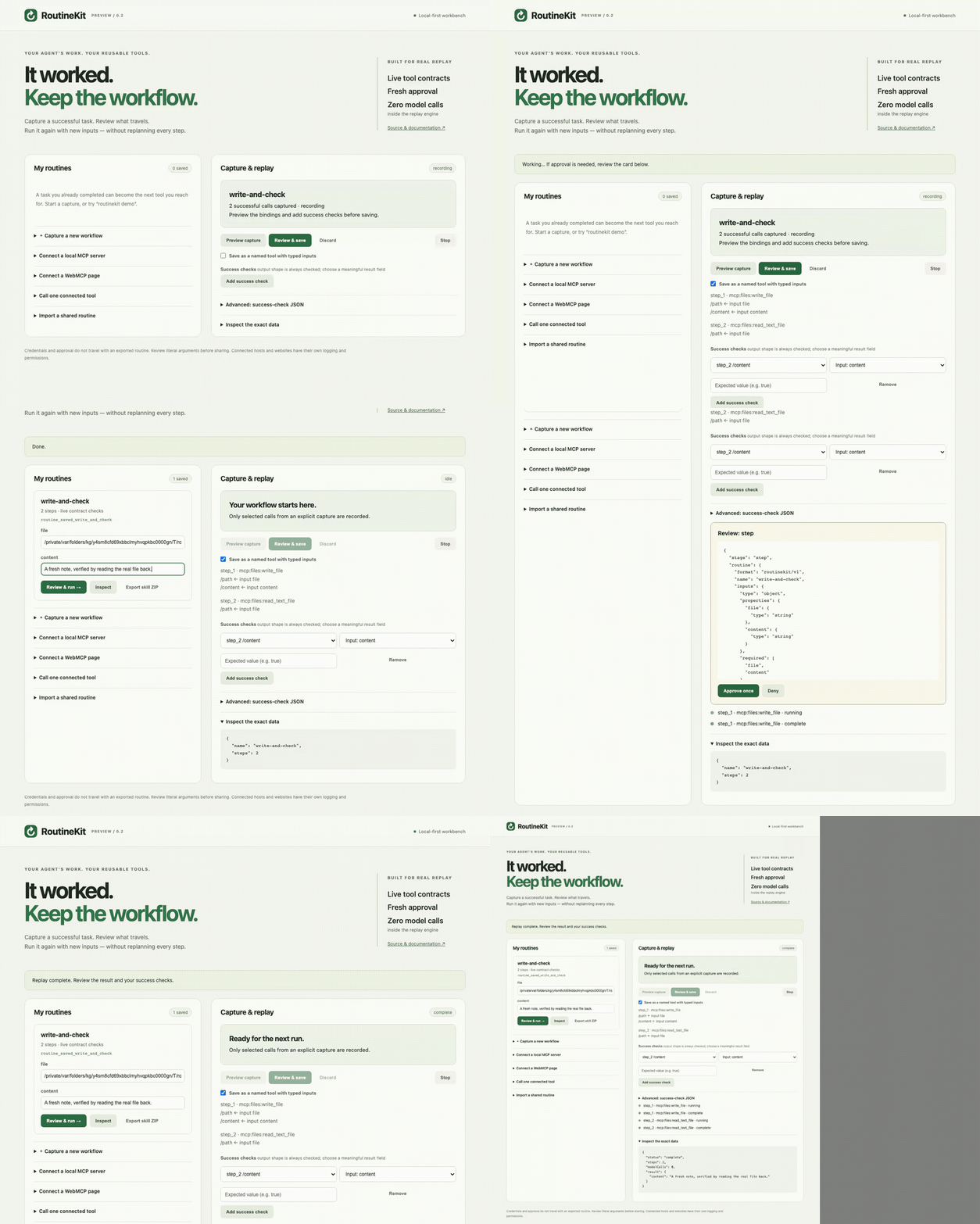
A scripted capture/replay tutorial through the official filesystem MCP server: a new file path, new content, and a read-back success check. Watch the recording.
Start in DeepSeek Harness (DSH), or use the standalone workbench and MCP server with native WebMCP pages. Export a routine with a companion SKILL.md for another agent to discover and run.
v0.2 preview. Connect an explicitly configured local MCP server, capture its calls, Save as Tool, and reuse typed inputs. The workbench also runs as an MCP App in compatible hosts. This is a deterministic runner for reviewed linear workflows, not a general computer-use agent or OS sandbox.
Try it locally
Requires Node 22.19+. Native WebMCP additionally needs a current Chrome/Edge or Playwright Chromium. Tested locally with Chromium 151 and Chrome 152; browser APIs are experimental and may change. Local MCP file workflows do not require a WebMCP-capable browser.
The demo opens a local workbench beside a real browser playground. A disclosed scripted tutorial, not an LLM, has made two real WebMCP calls: find a sample project and open its returned id.
- Click Preview capture. Notice the input binding and the reference to the first step's returned id.
- Click Add success check, choose
step_2 /opened, and entertrue. Check Save as a named tool, then Review & save and approve the exact routine. The JSON editor is optional. - Enter
timer(ordrawing) as the newcategory, then Review & run. - Approve the run and each WebMCP call. The selected project changes: the second step uses the new result id, not the recorded one.
The demo's localhost origin exists only while that process runs. Demo routines deliberately do not silently rebind to a different origin after a restart. For persistent use, connect your own WebMCP app at a stable origin.
No account, model API key, or GPU is needed for the tutorial. If no supported browser is installed:
Try a real filesystem MCP workflow
In a new empty demo directory, explicitly install the reference server and RoutineKit:
This disclosed scripted tutorial starts the installed official filesystem MCP server with a new temporary workspace, writes first-note.txt, and reads it back. It does not use your existing files. In the workbench:
- Add the check
step_2 /contentcompared with Input: content. - Select Save as a named tool, review the bindings, and approve saving.
- Use the new file path printed in the terminal, enter different content, and run with approval. The result must equal the new content.
- The same routine is available as
routine_saved_write_and_checkwith directfileandcontentinputs in its owning MCP session. Choose Export skill ZIP to keep it.
Exiting removes the demo's temporary files and routines. An exported routine needs a freshly approved matching files server before it can run elsewhere; permissions and file access are not transferred. The capture is scripted, not evidence of autonomous model success.
In DeepSeek Harness
Use DSH 0.1.2-rc.1 for this preview. The plugin registers tools and adds a RoutineKit button to the web sidebar. It does not modify the DSH core or replace your existing tool permissions.
Open the panel and choose Initialize RoutineKit in DSH, or ask:
Use routine_tools to list the tools you can record. I want to repeat [my task] with [these changing inputs]. Before doing it, use routine_record with only the needed tools and exact example argument values. Complete the task, show me routine_preview, and propose checks that prove its result. Save only after I approve.
When replaying a DSH-native routine, the panel's Run in DSH button queues a routine_run request through the current conversation. That launch can use the host model. The replay engine itself makes zero model calls and dispatches each step through ctx.tools.execute, retaining the same agent scope, cancellation, approval policies, and guards.
Recording is task-local. Saved DSH routines are kept under DSH_HOME/routinekit (partitioned by the available workspace/task identity); standalone storage uses ROUTINEKIT_HOME or ~/.routinekit. Explicitly exposed saved tools are registered in the owning agent scope, never globally for every workspace. Saving a routine does not grant permission to run it.
The web panel is loopback-only in this preview. Remote/LAN access is not supported. If DSH's package-age policy rejects a just-published package, wait for that policy window; do not lower it to install RoutineKit.
In an MCP client
Add this stdio server using your client's normal MCP configuration:
Human form elicitation is required for actions. A client without it can list/inspect routines but cannot auto-approve execution. Use npx routinekit open for the standalone workbench instead. Do not infer full client compatibility merely from basic MCP support.
Stop settles the active server operation and sends protocol cancellation for pending elicitation. Dismissing the client's approval UI depends on that client's cancellation support.
In an MCP Apps host, call routine_workbench to open the inline UI. It uses the same tool execution path and still requires the host's human form-elicitation prompt; no model-callable approval bypass is exposed. The packaged HTML has no external scripts, styles, or network assets. Browser integration is tested against the official @modelcontextprotocol/ext-apps AppBridge SDK, not certified across individual desktop clients. Hosts may block ZIP downloads; CLI export remains available.
Connect your own local MCP tools
RoutineKit does not inspect sibling MCP configurations or capture their calls automatically. Create your own local configuration with absolute paths to an installed executable and server, then run routinekit open --config /absolute/path/routinekit.config.json or routinekit mcp --config /absolute/path/routinekit.config.json. In DSH, supply the same path via ROUTINEKIT_CONFIG before starting your host.
On Windows use absolute Windows paths, escaped normally in JSON. Review & connect (or routine_mcp_connect with server: "files") shows the command and arguments before starting it. Select the resulting mcp:files:write_file and mcp:files:read_text_file tools for capture; invoke them via the workbench forms or routine_mcp_call. An optional envFrom array names environment variables to inherit; never put credential values in the file or routine.
This preview supports local stdio, an explicit tool allowlist, and structured JSON or one text result. It does not proxy HTTP/OAuth servers, sampling, roots requests, or upstream elicitation. The launched process is trusted local code with your OS user's authority, not a container; its own configured file/network restrictions matter. RoutineKit does not install the server for you. Review any configured command that could itself install software or start subprocesses.
Save as Tool
Use routine_save with expose: true, or check the workbench checkbox. A routine named write-and-check becomes routine_saved_write_and_check and accepts its named inputs directly instead of inputs_json. Names longer than the compatibility limit receive a deterministic hash suffix. MCP advertises a tool-list change; DSH registers the tool only for the owning agent. Reopening the same workspace loads its saved tool definitions. New inputs, live contract validation, host guards, and fresh approval still apply.
Typical flow:
routine_record takes name, inputs_json (a JSON object of scalar examples), and an explicit tools array. routine_web_call takes an exact webmcp: tool name and arguments_json. routine_run takes name and inputs_json. JSON strings keep the interface consistent between DSH and MCP.
Other tools: routine_list, routine_inspect, routine_import, routine_export, routine_discard, and routine_stop. Native DSH tools use the dsh: namespace and still require those tools in DSH; RoutineKit does not invent cross-host equivalents.
What gets saved?
A small JSON routine containing:
- Named input types, without the original example values.
- Selected tool identities, exact origins when applicable, and input/output contracts.
- Ordered arguments, with parameter bindings and unambiguous references to earlier results.
- Structural output checks and any explicit success checks you add.
Raw recording outputs are kept only in memory, up to 40 calls / 15 minutes / bounded JSON size. They are not saved in the routine. Reviewed literal arguments are saved and can contain private business data. Inspect them before sharing.
Bindings are inferred only for exact scalar matches. RoutineKit does not infer substrings, loops, branches, transformations, or ambiguous dependencies. Small numeric constants (0/1), booleans, short result strings, and ambiguous values are not automatically linked to earlier results. Review the proposed bindings and test representative changed inputs before relying on a routine.
Contract fingerprints detect schema/origin changes and, for upstream MCP, the server alias/name/version, not a changed implementation that reports the same identity and schema. Shape checks do not prove business success: add checks such as /opened == true or a result field matching a named input. Earlier side effects are not rolled back when a later step fails.
Share an executable skill
The new directory contains SKILL.md and routine.json. Export skill ZIP downloads those same two files from the workbench without a CLI. Extract the ZIP and choose routine.json in the import form. Existing destinations are never overwritten. Another user reviews the JSON, imports it, supplies their own inputs, reconnects compatible tools, and approves a fresh run.
An exported skill is not a transfer of credentials or consent. Different hosts, tools, origins, or schemas can make a routine intentionally non-runnable. Never silently replace a missing tool with a shell or computer-use fallback.
Boundaries worth knowing
- Capture is explicit, scoped to selected tools and one DSH task or MCP connection. Overlapping calls or failures invalidate a recording.
- WebMCP uses a fresh browser context: no existing cookies, login profiles, local files, or desktop capture. No polyfill is injected into third-party sites.
- Cross-origin requests, popups, downloads, and service workers are blocked. Cross-origin dependencies can therefore prevent a site from loading. Non-GET requests are blocked outside an approved WebMCP call.
- A site's tool description/read-only hint is untrusted. Every WebMCP call requires approval. An approved call can still change that site's state; this is not a hostile-site security sandbox.
- Credential detection is heuristic. Do not record secrets. DSH, the MCP client, and the website may retain their own logs independently of RoutineKit.
- Local endpoints check socket, Host, Origin, and Fetch Metadata; the standalone API also requires an ephemeral capability token. These checks do not protect against malicious software running as your OS user.
- JSON Schema references, regex constraints, and format constraints are rejected. Unsupported contracts stop, rather than being treated as validated. Nested input arguments may still require the advanced JSON editor.
- Stop cancels replay and closes the RoutineKit-owned browser and directly launched MCP processes. It cannot guarantee cleanup of grandchildren a trusted server spawns independently. DSH-native tools must cooperate with cancellation; RoutineKit cannot hard-kill arbitrary in-process plugins.
- No accounts, cloud backend, telemetry, model sampling, scheduled execution, marketplace, or automatic GitHub actions on the user's account.
Development
Unit/integration tests cover binding, result references, changed contracts, explicit success checks, denied approval, cancellation, secret rejection, file boundaries, the real DSH tool pipeline, scoped saved tools, skill ZIP contents, and actual filesystem MCP subprocesses. Browser E2E exercises three native-WebMCP workflows, workbench forms, and an MCP App inside the official AppBridge SDK. Test approvals are synthetic; UI tests click the same approval controls users see. These are not claims about autonomous model task success.
Please include the DSH/browser version, tool names, expected result, and a sanitized minimal reproduction in an issue. Do not attach raw recordings, cookies, tokens, or private routine literals.
Why another tool?
Record-to-skill projects such as Microsoft Skill Recorder demonstrate the value of reusing work. RoutineKit explores a narrower approach: capture structured calls in your existing harness, preserve reviewed data flow, and replay against live contracts. It is not a claim to have invented recording, skills, or workflow engines.
WebMCP is an experimental web standard. The browser adapter follows its native discovery/invocation APIs; the workflow-preservation discussion is related prior work, not an endorsement or an adopted standard for RoutineKit's JSON format.
If this is useful, a GitHub star helps other builders find it. A small reusable example or a failure case helps improve it even more.
MIT licensed.