MCP Server for Rootstock Blockchain
Quick Install
Automated & IDE SetupCopy the AI prompt to install this server into Claude Code, Cursor, or another agent — or use 1-click editor setup below.
Manual Client & Custom JSON ConfigExpand JSON ▾
Client Config & Setup
Choose your client or environment
Target File:
💡 Paste the JSON block into your client's configuration file under mcpServers, then restart the application.
Documentation Overview


RSK MCP Server - Rootstock Blockchain Tools
Rootstock MCP Server is a Model Context Protocol (MCP) server that provides advanced tools for interacting with the Rootstock (RSK) blockchain. This project enables AI clients to seamlessly connect and execute blockchain operations.
🚀 Key Features
- 💼 Wallet Management: Create, import, switch and manage multiple wallets
- 💰 Balance Queries: Check rBTC and ERC20 token balances
- 💸 Transfers: Send rBTC and tokens to other addresses
- 🔍 Transaction Tracking: Verify transaction status by hash
- 🚀 Contract Deployment: Deploy smart contracts on Rootstock
- ✅ Contract Verification: Verify deployed contracts
- 📄 Contract Interaction: Read data from verified contracts
- 📊 History: Query transaction history
- 🎯 Attestations: Create, verify, and manage attestations using RAS (Rootstock Attestation Service)
- 🏗️ Schema Management: Create and manage attestation schemas
- 📝 Attestation Queries: List and filter attestations by various criteria
🧰 Available Tools
This server exposes 22 MCP tools. You don't call these directly — once the MCP is connected, your AI client selects the right tool based on your prompt.
| Category | Tool | Description |
|---|---|---|
| Session | start-interaction | Start interacting with the Rootstock CLI functions |
| Session | list-pending-operations | List pending operations awaiting confirmation (deploys, transfers) |
| Session | confirm-operation | Confirm and execute a pending operation by ID |
| Session | cancel-operation | Cancel a pending operation by ID |
| Wallet | start-wallet-interaction | Show available wallet management operations |
| Wallet | create-wallet | Create, import, list, switch, or delete wallets |
| Wallet | use-wallet-from-creation | Reuse wallet data from a previous create-wallet result without re-uploading it |
| Balance | check-balance | Check rBTC or ERC20 token balances |
| Transfers | transfer-tokens | Transfer rBTC or ERC20 tokens between wallets |
| Transactions | check-transaction | Check a transaction's status and details by hash |
| Transactions | check-transaction-history | Query a wallet's transaction history via the Alchemy API |
| Contracts | deploy-contract | Deploy a smart contract using ABI and bytecode |
| Contracts | verify-contract | Verify a deployed contract's source code |
| Contracts | read-contract | Call view/pure functions on a verified contract |
| Attestations | issue-attestation | Issue a new attestation via RAS (Rootstock Attestation Service) |
| Attestations | verify-attestation | Verify an existing attestation by UID |
| Attestations | revoke-attestation | Revoke an existing attestation by UID |
| Attestations | list-attestations | Query attestations by event logs (requires a custom RPC URL) |
| Attestations | create-schema | Register a new attestation schema |
| Attestations | attest-deployment | Attest a contract deployment using the RAS default schema |
| Attestations | attest-verification | Attest a contract verification using the RAS default schema |
| Attestations | attest-transfer | Attest a token transfer using the RAS default schema |
See Detailed Functionality below for parameters and examples.
📋 Prerequisites
- Node.js v18 or higher
- npm or yarn
- TypeScript (included in dev dependencies)
Note: You will use this Model Context Protocol Server from a LLM Client (e.g Cursor, Claude, Warp, etc) which needs to be compatible with the MCP standard. Take into account there are 2 steps here:
- Installation and Build
- AI Client Configuration
IMPORTANT: You need to complete both settings to correctly use MCP within the Client.
🛠️ Installation and Build
1. Clone the Repository
2. Install Dependencies
3. Build the Project
This command:
- Compiles TypeScript to JavaScript in the
build/folder - Makes the main file executable (
build/index.js)
4. Verify Installation
Important Note: For local running this MCP, your client will point to the
index.jsfile created on thebuildfolder after building it.
⚙️ AI Client Configuration
🏠 Remote Configuration
For Cursor IDE
In Cursor, go to Settings > Cursor Settings > Tools & Integrations
You will see an option to Add Custom MCP
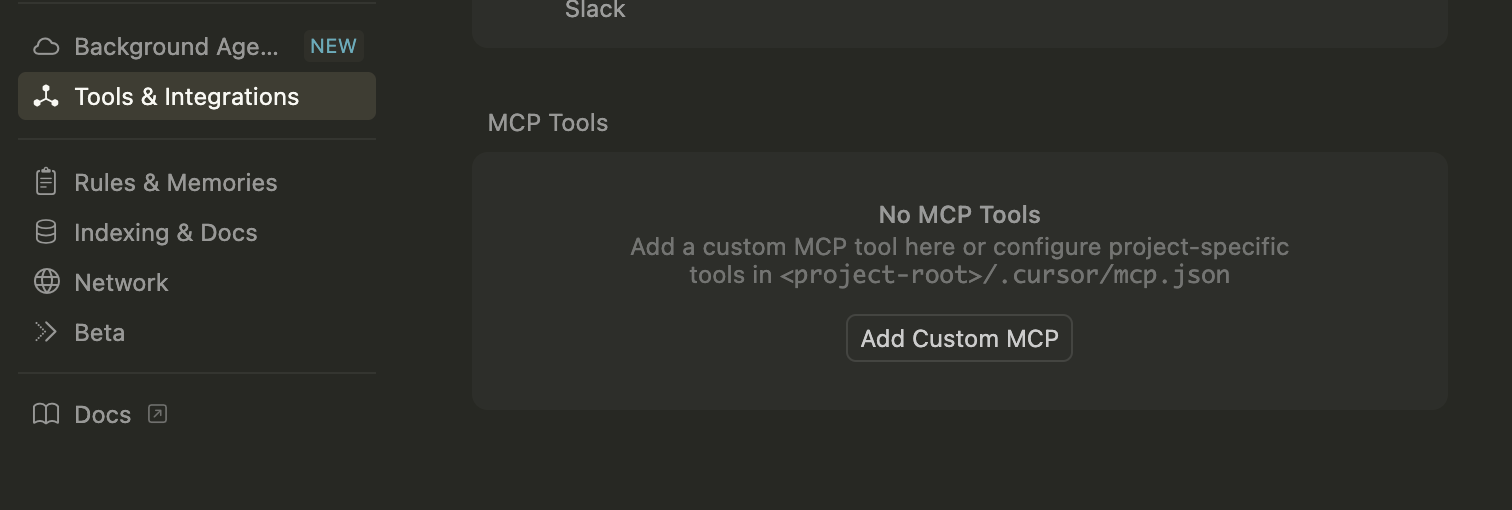
And add to the JSON file:
Note: For install reference on Cursor, please follow these instructions Here
Once it is installed into Cursor, you should see something like:
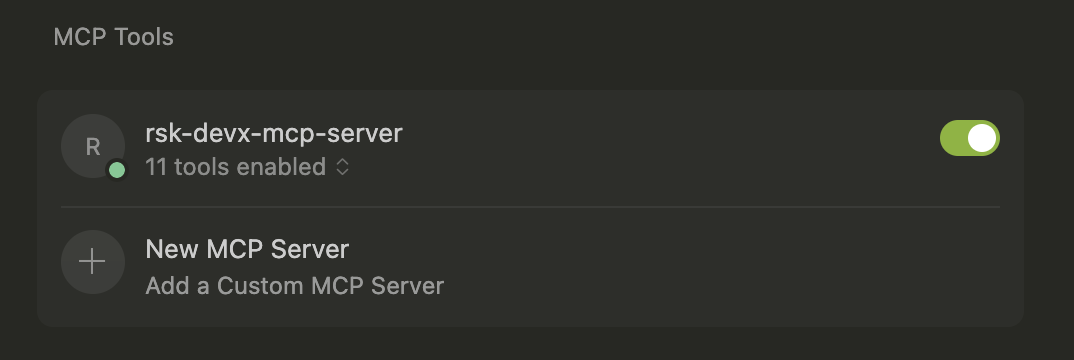
Green dot indicates it was installed correctly.
For Claude Desktop (Anthropic)
Edit your Claude Desktop configuration file:
Open your Claude client, and then click on Settings/Developer
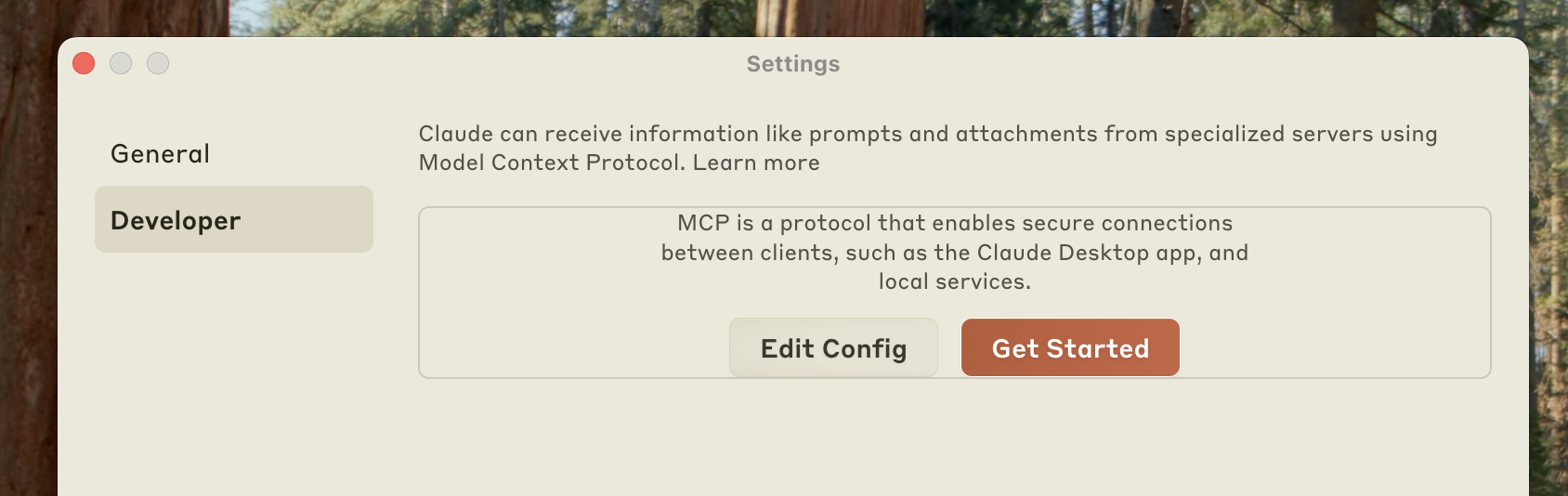
Click the “Edit Config” button to open the configuration file and add the following configuration:
Note: This action creates a new configuration file if one doesn’t exist, or opens your existing configuration. The file is located at:
- macOS:
~/Library/Application Support/Claude/claude_desktop_config.json - Windows:
%APPDATA%\Claude\claude_desktop_config.json
Note: For install reference on Claude, please follow these instructions Here
Once you have installed this MCP on the Claude client, you will see it once you click on the Search and toolsoption under Web search option (see next image)
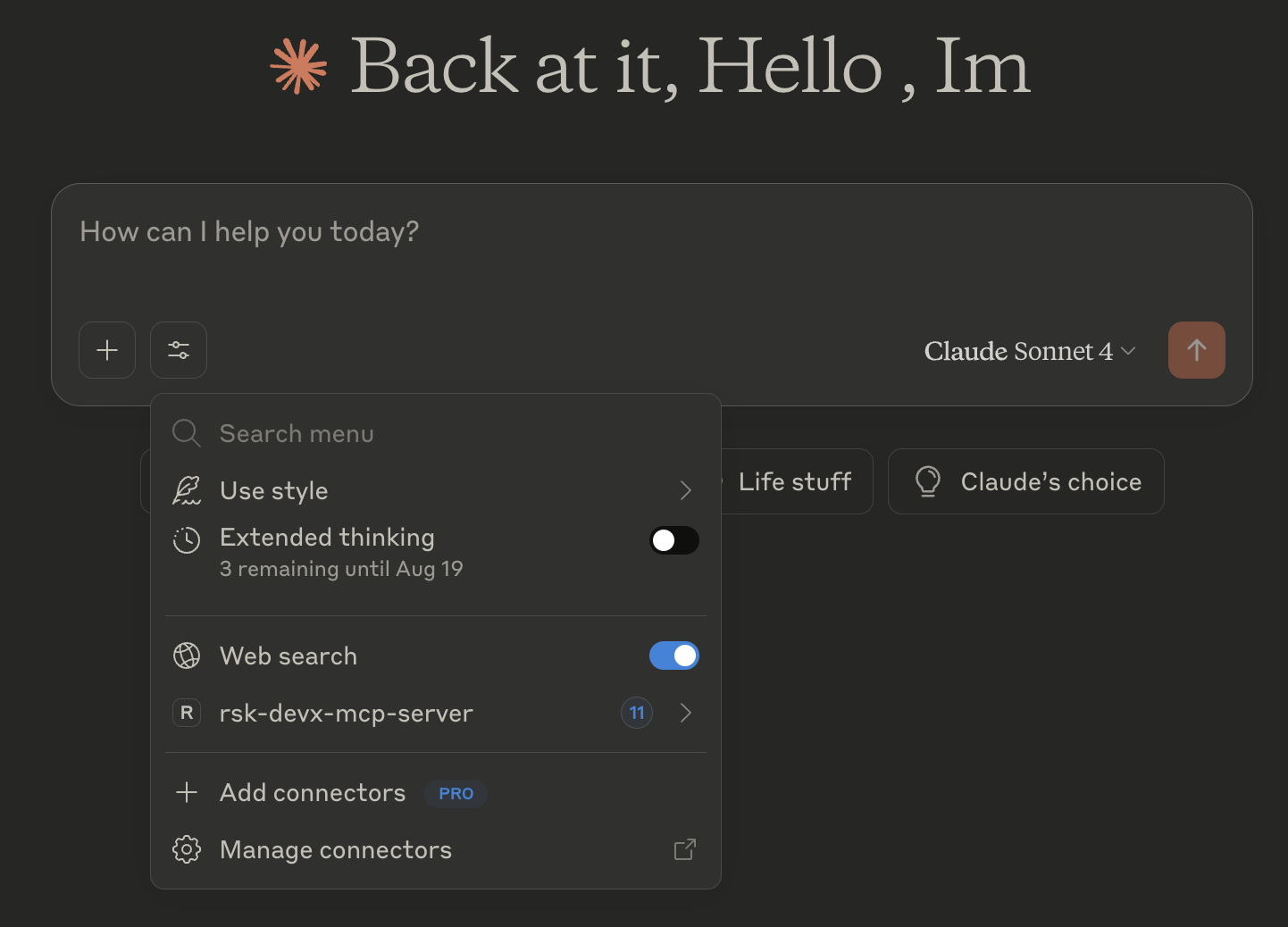
🏠 Local Configuration
For Cursor IDE
In Cursor, go to Settings > Cursor Settings > Tools & Integrations
You will see an option to Add Custom MCP
And add to the JSON file:
Note: For install reference on Cursor, please follow these instructions Here
Once it is installed into Cursor, you should see something like:
Green dot indicates it was installed correctly.
For Claude Desktop (Anthropic)
Edit your Claude Desktop configuration file:
Open your Claude client, and then click on Settings/Developer
Click the “Edit Config” button to open the configuration file and add the following configuration:
Note: This action creates a new configuration file if one doesn’t exist, or opens your existing configuration. The file is located at:
- macOS:
~/Library/Application Support/Claude/claude_desktop_config.json - Windows:
%APPDATA%\Claude\claude_desktop_config.json
Note: For install reference on Claude, please follow these instructions Here
Once you have installed this MCP on the Claude client, you will see it once you click on the Search and toolsoption under Web search option (see next image)
For Other MCP Implementations
Any MCP-compatible client can connect using:
🌐 Remote Configuration (URL)
Note: This functionality will be available when the server is deployed to a public endpoint.
Remote Client Configuration
🔧 Detailed Functionality
Once this MCP is installed on the client, you will be able to interact with it by prompt, using chat box, for example, a good prompt to start interacting with this MCP is to write a prompt like:
I would like to start interacting with Rootstock
Then it will require you to give permission to use the MCP tool, you click on accept, and then it should answer something like:
Related MCP Servers
Reviews
No reviews yet — be the first to share how this listing worked for you.
Frequently Asked Questions about Rootstock (RSK) MCP Server
AllMCPs Directory Badge
Showcase your server listing on GitHub or your project documentation. Embed this dynamic SVG badge to highlight official listing status and live engagement.
Badge Style:
Live Dynamic SVG Preview
Markdown (GitHub README)
[](https://allmcps.com/mcp/rootstock-rsk-mcp-server)HTML Embed
<a href="https://allmcps.com/mcp/rootstock-rsk-mcp-server"><img src="https://allmcps.com/api/badge/rootstock-rsk-mcp-server?style=directory" alt="Rootstock (RSK) MCP Server on AllMCPs" /></a>Technical Specs & Signals
CategoryDeveloper Tools
24Quality signal: Emerging · 24/100How this signal is calculated ▾
Server availabilityNot measured
Not scored for repo-hosted servers — we can't reach the running server, only its GitHub page. Hosted MCP endpoints are health-checked live.
Verified ownership8/20
Documentation & tools9/30
Adoption & activity1/15
Community engagement0/10
A guidance signal from public completeness & health data — not a user rating. New listings start lower and rise as they add docs, get verified, and grow adoption. Signals we can't observe for a listing are skipped, not counted against it.
Own this project?
This directory is pre-filled from public sources. Claim via GitHub README, site badge, or DNS TXT to unlock edit access and the Official badge and attach your website — proof is checked automatically, then reviewed by our team.
Free dofollow backlink: add your website and place the AllMCPs badge on it — no claim needed. We detect it automatically and keep it verified as long as the badge stays live.
Claim & get free dofollowShare & Embed
Add our SVG badge (dark/light directory styles) or embeddable widget to your site.