video-editingbrowserjsonai-integrationmultimedia
Browser-based non-linear video editor controlled via JSON timeline for AI-driven editing with live preview and ffmpeg export.
Quick Install
Automated & IDE SetupCopy the AI prompt to install this server into Claude Code, Cursor, or another agent — or use 1-click editor setup below.
One-click editor setup isn’t available for this listing yet — we don’t have a confirmed install command, and we’d rather show nothing than point your editor at the wrong package or host. Follow the project’s own setup instructions, linked above.
Manual Client & Custom JSON ConfigExpand JSON ▾
No confirmed setup config for this listing yet. We only publish a config block when the install details come from the project itself — its README, its docs, or a verified owner. We haven’t found those for ronak-create/FableCut, and we’d rather show nothing than a guess you’d paste into your client. Follow the project’s own setup instructions for the current steps.
Overview
Use cases
Drive video editing through JSON timeline manipulation
Integrate AI agents to automate video cutting and effects
Import and organize media assets with folder support
Apply transitions, keyframes, and text animations programmatically
Export edited videos using ffmpeg from the browser environment
Key features
3 video + 4 audio tracks with drag, trim, split, snap, undo/redo
Live timeline updates via server-sent events with JSON project file
Direct manipulation of clips on preview monitor (move, resize, rotate)
Beat and cue markers with snapping and transition overlays
Project bin with nested folders and drag/drop media import
Playback speed control and audio waveform visualization
Capabilities & Tool Schemas
Inspect callable tools, capabilities, and parameters exposed to AI agents by FableCut.
Extracted Tool Capabilities
3 video + 4 audio tracks with drag, trim, split, snap, undo/redo
Live timeline updates via server-sent events with JSON project file
Direct manipulation of clips on preview monitor (move, resize, rotate)
Beat and cue markers with snapping and transition overlays
Project bin with nested folders and drag/drop media import
Playback speed control and audio waveform visualization
Documentation Overview
███████╗ █████╗ ██████╗ ██╗     ███████╗ ██████╗██╗   ██╗████████╗
██╔════╝██╔══██╗██╔══██╗██║     ██╔════╝██╔════╝██║   ██║╚══██╔══╝
█████╗  ███████║██████╔╝██║     █████╗  ██║     ██║   ██║   ██║
██╔══╝  ██╔══██║██╔══██╗██║     ██╔══╝  ██║     ██║   ██║   ██║
██║     ██║  ██║██████╔╝███████╗███████╗╚██████╗╚██████╔╝   ██║
╚═╝     ╚═╝  ╚═╝╚═════╝ ╚══════╝╚══════╝ ╚═════╝ ╚═════╝    ╚═╝
A browser video editor that AI agents can drive.








English · 简体中文 · 日本語 · Español · Português (BR)
https://github.com/user-attachments/assets/2430b854-168b-4a9a-af2e-489e5efa7543
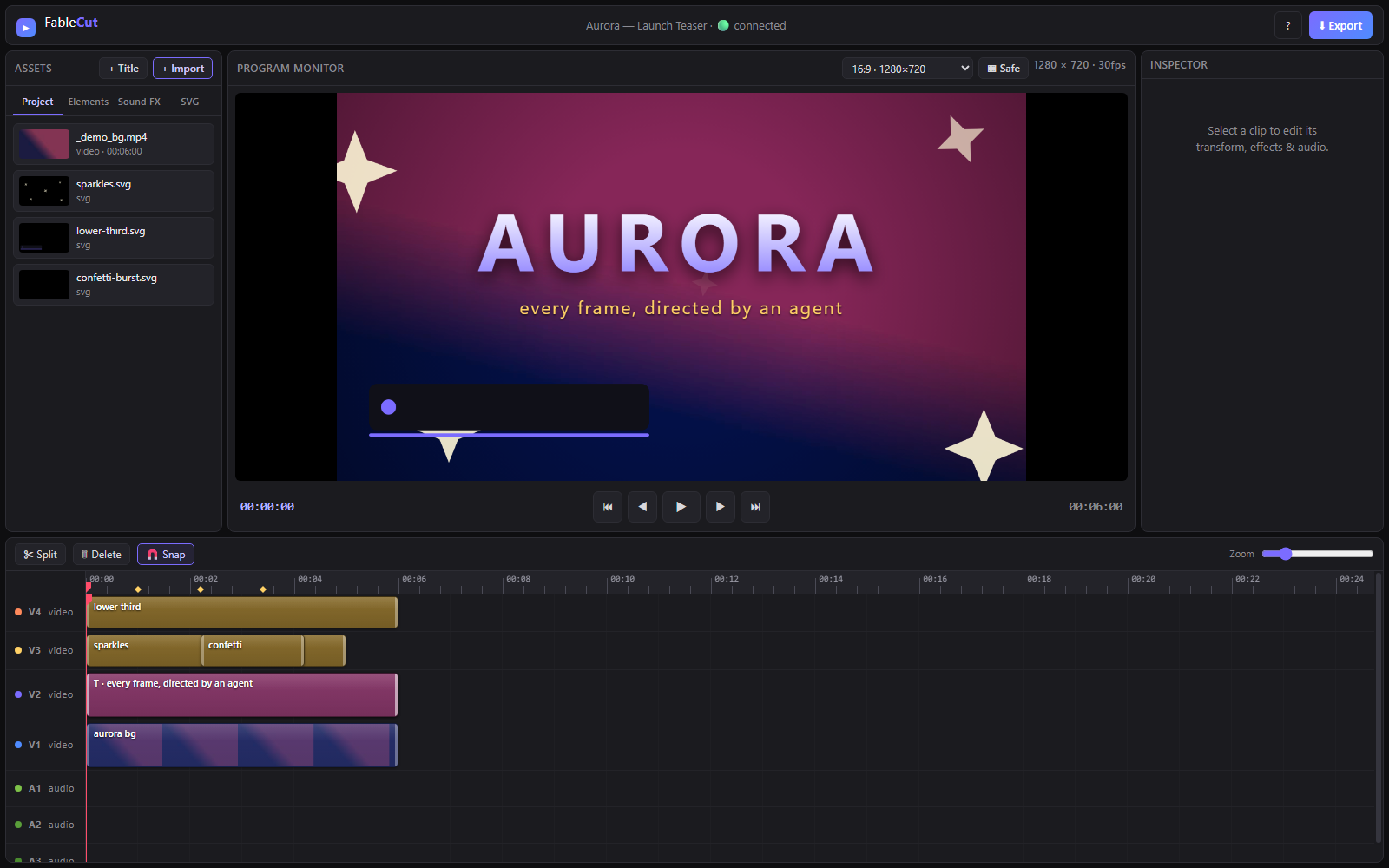
FableCut is a Premiere-style non-linear video editor that runs entirely in your browser — and exposes its whole timeline as one JSON document. Edit it by hand, from the UI, or let an AI agent (Claude Code, Claude Desktop, or anything that speaks MCP/REST) cut your video for you while you watch the timeline update live.
Zero npm dependencies. One node server.js. That's it.
Why it's interesting
Most "AI video" tools hide the edit behind an API. FableCut flips that: the
project file is the interface. project.json describes media, clips,
tracks, effects, keyframes and transitions — any process that can write JSON
can edit video, and the open browser UI hot-reloads within ~150 ms via
server-sent events. A human and an agent can work on the same timeline at the
same time.
Features
Editing
- Video + audio tracks (default 3+4; add more with +V / +A in the track header; right-click an empty header → Remove track), drag/trim/split/snap, undo/redo
- Settings (cog in the top bar) — optional prefs stored in this browser via
localStorage. Enable Link timeline and Project bin selection so picking a timeline clip highlights its media in Project, and clicking a Project item selects every timeline clip that uses it (off by default). - Video + audio tracks (default 3+4), drag/trim/split/snap, undo/redo
- +V / +A in the track header add a video or audio lane (up to 16 each)
- Right-click an empty track header → Remove track (disabled if the lane has clips, or if it would leave you with zero video/audio tracks)
- Track header S solos that lane (mutes all others); click again to restore the previous mute state. Using the mute toggle while soloed exits solo.
- Dropping a video with more audio channels than A-tracks adds the missing lanes automatically (up to 16) and toasts how many were added; each channel becomes a linked stem on its own A-track
- Direct manipulation on the monitor — click a clip or title on the preview to move, resize (corner handles), or rotate (top handle, Shift-snap) it directly
- Timeline multi-select — rubber-band marquee (drag on empty track area), Ctrl/Cmd/Shift+click to add/remove clips, Ctrl+A to select all, Esc to deselect. Drag any selected clip to move the whole group; Delete removes all selected; S splits all selected at the playhead. Inspector shows an "N clips selected" banner.
- Beat & cue markers (tap ⇧m on the beat during playback) with edge snapping
- Press Alt+t to add an in/out transition based on the playhead position over the selected clip. The last used transition is remembered as the default. Drag the overlay triangle to adjust duration; Delete clears the focused transition.
- Real decoded audio waveforms on clips
- Project bin folders — tree view with expand/collapse; drag media or folders to nest; right-click the Project tab → New folder; drop files onto a folder to import into it
- Import from URL — + URL downloads an HTTPS video/audio/image into
./media/(same-origin after import). Remote SVG is refused. Agents usefablecut_import_mediawith anhttps://path. The URL is not kept asmedia.src— that would taint the canvas and break export. - Audio Hold — timeline toolbar toggle: while paused, loops one frame of audio at the playhead (useful when stepping frame-by-frame). Scrubbing or frame-step retargets the held slice; meters stay live. Play / Pause turns it off.
- Canvas aspect presets (16:9, 9:16 reels, 4:5, 1:1) + project FPS select (24 / 25 / 30 / 50 / 60; non-preset rates show as Custom) + safe-area guides
- Export frame / reframing — composition canvas can be larger than the delivery
crop (
exportFrameinproject.json). Preview dims the overscan; drag the Export frame handle to reframe (e.g. 16:9 canvas → 9:16 export). Fast export crops to the frame; WebCodecs and Realtime export are disabled while a frame is set - Program Monitor zoom — mouse-wheel over the preview zooms the composition toward the cursor (fit → up to 2 screen pixels per canvas pixel). Magnified view uses native scrollbars so overflow stays reachable; middle-click or Alt+drag pans. The Fit button (shown while zoomed) resets to the fit-to-stage baseline
- Preview playback speed — shuttle the monitor through 1×/1.5×/2×/4× with J/K/L (from a stop J/L start playback; while playing L steps faster and J slower, K toggles play/pause and resets to 1×); affects the preview player only, never the export
- Resizable workspace: drag the divider between monitor and timeline (double-click resets), plus S/M/L timeline track-density presets (S hides thumbnails for compact tracks)
- Zoom to selection (⇧Z) frames all selected clips, not just one
- IN/OUT work area — set markers with i and o (⇧I / ⇧O to clear). The Program Monitor shows playhead as
current / sequence duration; when markers are set, IN, marked duration, and OUT stack on the right. Export has a Range dropdown (Entire timeline / IN–OUT; defaults to IN–OUT when markers exist) so you can keep markers for split/trim and still export the full sequence. Enabling Limit constrains playback to the marked range and maps Home / End to the IN and OUT positions rather than the full timeline. t splits clips at the markers; ⇧t trims clips to the work (between marker in and marker out) area. - Find & close gaps — a gap is a stretch where every enabled track is empty (black frames). g jumps the playhead to the next shared gap (wraps; respects IN/OUT when both are set). ⇧G closes the gap under the playhead by pulling later clips left on all enabled tracks.
- Reset a property — Ctrl/Cmd+click an inspector label or slider restores that effect/prop to its default and clears every keyframe on the channel (scale → 1, opacity → 1, paired fields like Crop L/R reset together; transition labels clear the in/out transition). Shift+click a label is playhead-local: if you are parked on a keyframe it removes that keyframe only; otherwise it sets the value at the playhead to the default (auto-keys if the channel is already animated).
- Replace media — the inspector's Source button (any video/audio/image/svg clip) swaps the underlying file while keeping position, trim, keyframes, transitions and every effect. Pick another item already in the bin or Browse file… to import and replace in one step. A video's linked L/R audio companions are swapped along with it; a shorter replacement clamps the trim to fit and toasts that it did so.
- Multi-channel video audio — a video with more than 2 audio channels gets a linked audio clip per channel, not just L/R (5.1, 7.1…). Extra audio tracks (A5, A6, …, capped at 16) are created automatically as needed; replacing a clip's media re-syncs the linked channel clips to the new source's channel count, adding/dropping extras and new tracks as needed.
Look
Related MCP Servers
Adoption & maintenance
Factual signals from GitHub, npm, and our automated checks — not a rating.
GitHub stars
663
Stargazers on the source repository.
Directory activity
1 views
Config copies, upvotes, and views on AllMCPs.
Reviews
No reviews yet — be the first to share how this listing worked for you.
Frequently Asked Questions about FableCut
AllMCPs Directory Badge
Showcase your server listing on GitHub or your project documentation. Embed this dynamic SVG badge to highlight official listing status and live engagement.
Badge Style:
Live Dynamic SVG Preview
Markdown (GitHub README)
[](https://allmcps.com/mcp/ronak-create-fablecut)HTML Embed
<a href="https://allmcps.com/mcp/ronak-create-fablecut"><img src="https://allmcps.com/api/badge/ronak-create-fablecut?style=directory" alt="FableCut on AllMCPs" /></a>