Robinhood For Agents
AI-native Robinhood trading interface — MCP server + TypeScript client
Install Robinhood For Agents
Pick your client, then add it in one click or paste the config.
~/Library/Application Support/Claude/claude_desktop_config.json{
"mcpServers": {
"robinhood-for-agents": {
"command": "bunx",
"args": [
"robinhood-for-agents"
]
}
}
}
Settings → Developer → Edit Config, merge this into mcpServers, then fully quit and reopen Claude Desktop.
We couldn’t confirm it starts correctly
We ran the install command but it didn't respond within our test window — this can mean a slow first-time install rather than a real problem.
bunx robinhood-for-agentsProcess exited before answering initialize.
This is an experimental automated check and can have false negatives — missing environment variables, a slow cold install, etc. It doesn’t necessarily mean something’s wrong. Last checked 3d ago.
Overview
Tools60
What Robinhood For Agents lets your agent do. Expand a tool for its parameters.
Security & health
What it can reach and how reliably it runs — from our own checks, not the maintainer’s claims.
Recent health check succeeded.
Supply-chain signal
No high-severity advisories surfaced by our automated scan.
Scanned 6d ago via OSV.dev · robinhood-for-agents (npm)
Adoption & maintenance
Factual signals from GitHub, npm, and our automated checks — not a rating.
From the project README
robinhood-for-agents





An MCP server that lets your AI agent read and trade your Robinhood account, in one of two modes:
- Standard mode (default): Robinhood's official hosted Trading MCP, 77 tools; orders reach your Agentic account.
- Web mode: the unofficial web API robinhood.com uses, 59 tools, every brokerage account.
Also included: a TypeScript client library (82 async methods) and a trading skill for agent apps that support skills. Works with Claude Code, Codex, Cursor, Antigravity, Hermes, and any other MCP client; OpenClaw uses the skill.
Quick start
-
Run the installer. Needs Bun v1.3+.
bunx robinhood-for-agents installIt detects your agent apps and asks which to configure and whether to add web mode, then registers the server with a generated
ROBINHOOD_TOKEN_KEY(reused on re-runs) and copies the trading skill into each app that supports skills. Manual setup instead:npx -y add-mcp "bunx robinhood-for-agents" -g -n robinhood-for-agents --env "ROBINHOOD_TOKEN_KEY=<32-byte base64 key>"plusnpx skills add kevin1chun/robinhood-for-agents.Other clients:
OpenClaw
Web mode only: the skill calls the client library through
bun, with no MCP server.bunx robinhood-for-agents installcovers it when~/.openclawexists (as "OpenClaw (skill only)": the skill plusrobinhood-for-agentsin~/.openclaw/workspace). Alternative:clawhub install robinhood-for-agentsHermes
Add to
~/.hermes/config.yaml, keeping the entries for the modes you use, then run/reload-mcp:mcp_servers: robinhood-for-agents: command: "bunx" args: ["robinhood-for-agents"] env: ROBINHOOD_TOKEN_KEY: "<any 32-byte base64 key, e.g. from the installer's config entry>" robinhood-web: command: "bunx" args: ["robinhood-for-agents", "--mode", "web"] -
Restart the app and ask your agent to "log in to Robinhood"; approve once in the browser. Then prompt it: "show my portfolio".
Choosing a mode
Use standard mode unless you need something only web mode has. It is the surface Robinhood supports for agents: the 76 official tools, with Robinhood's own titles, descriptions, schemas, and annotations, each call relayed unchanged to agent.robinhood.com/mcp/trading. Orders reach your Agentic account only; other accounts are read-only. Web mode trades that for reach: it calls the web API robinhood.com itself uses, serves every brokerage account, and backs the client library, but Robinhood does not sanction it for agents.
25 tools exist only in standard mode, 8 only in web mode; the Mode column in Tools says which, and docs/MODES.md has the full comparison. To run both, register both entries, robinhood-for-agents and robinhood-web. Tool names match, so your agent tells them apart by entry; the credentials are separate.
Install
Prerequisites: Bun v1.3+ and a Robinhood account. Standard mode needs ROBINHOOD_TOKEN_KEY (the installer sets it), and its sign-in opens your browser with the macOS open command. Web mode needs Google Chrome for login (playwright-core, channel: "chrome"; no bundled browser, Brave/Chromium fallback, or BROWSER_PATH override).
Setup commands
bunx robinhood-for-agents install      # pick apps, register the server, copy the skill; -y takes every detected app, standard mode only
bunx robinhood-for-agents login        # web-mode Chrome login outside an MCP client
bunx robinhood-for-agents login --export   # also writes ./tokens.enc for Docker
install registers entries through the add-mcp library (supported apps: npx add-mcp list-agents) and copies the skill with the skills CLI. It overwrites existing robinhood-for-agents/robinhood-web entries and keeps the ROBINHOOD_TOKEN_KEY already in them.
From source
git clone https://github.com/kevin1chun/robinhood-for-agents.git
cd robinhood-for-agents
bun install
bun bin/robinhood-for-agents.ts   # standard mode; add --mode web for web mode
To register a checkout, pass "bun run /path/to/checkout/bin/robinhood-for-agents.ts" as the add-mcp target in the manual setup line.
What each client gets:
| Feature | Claude Code | Codex | OpenClaw | Cursor | Antigravity | Hermes | Other MCP |
|---|---|---|---|---|---|---|---|
| MCP tools (both modes) | Yes | Yes | — | Yes | Yes | Yes | Yes |
| Trading skill | Yes | Yes | Yes | Yes | Yes | — | — |
| ClawHub install | — | — | Yes | — | — | — | — |
install setup | Yes | Yes | Yes | Yes | Yes | — | add-mcp list |
| Browser auth | Yes | Yes | Yes | Yes | Yes | Yes | Yes |
Sign in
- Standard: ask your agent to run
robinhood_official_login, then approve once in the browser it opens. The browser must reach the server's127.0.0.1callback. Until then, every standard-mode tool answers an error naming the login tool. The credential is stored asofficial-mcp.enc(AES-256-GCM underROBINHOOD_TOKEN_KEY), never in the keychain. - Web: say "setup robinhood" or call
robinhood_browser_login, then log in to Robinhood in Chrome with your credentials and MFA. The token capture is a passive network intercept that never touches the page. The session is cached in the OS keychain (or the encrypted file named byROBINHOOD_TOKENS_FILE) and renews a day before expiry and on any 401; a long idle gap lapses it and needs a new login.robinhood_check_sessionprobes the API and answerslogged_in,expired,unknown, ornot_authenticated. - Storage, rotation, and failure modes: docs/SECURITY.md. Mechanics: docs/ARCHITECTURE.md.
What you can do
"Buy 1 50-delta SPX call expiring tomorrow"
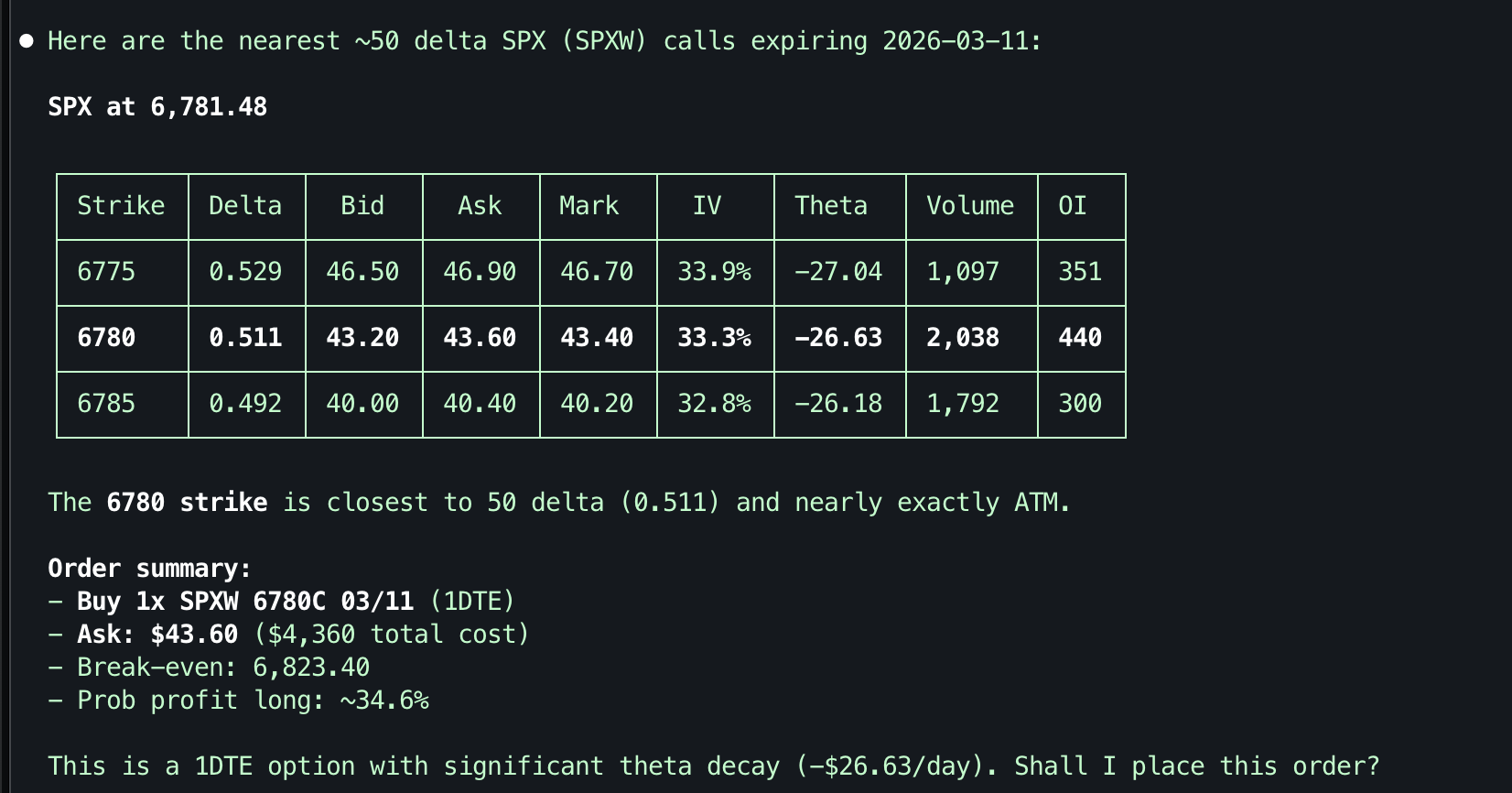
The robinhood-for-agents skill (Claude Code and OpenClaw; clawhub install robinhood-for-agents from ClawHub) adds guided workflows. With Claude Code it drives whichever MCP entry you registered, so standard-only tools need robinhood-for-agents; standalone it uses the client library, which is web mode only.
| Domain | Example Triggers |
|---|---|
| Setup | "setup robinhood", "connect to robinhood" |
| Portfolio | "show my portfolio", "my holdings" |
| Research | "research AAPL", "analyze TSLA" |
| Trading | "buy 10 AAPL", "sell my position" |
| Options | "show AAPL options", "SPX calls" |
In skills/robinhood-for-agents/, SKILL.md routes to domain files (portfolio.md, trade.md, …) and the client-api.md reference, loaded on demand. More examples: docs/USE_CASES.md.
Tools
Names and input schemas are the official ones, prefixed robinhood_ (parity table). In standard mode each tool also carries Robinhood's title, description, output schema, and annotations verbatim from docs/official-mcp-tools.json. The hosted server's rate limit: measured here. Mode: standard or web = only in that mode; both = both modes.
Reviews
No reviews yet — be the first to share how it worked for you.
Frequently Asked Questions about Robinhood For Agents
Related MCP servers
Add a badge to your READMEShow it’s listed — live SVG, Markdown or HTML.
AllMCPs Directory Badge
Showcase your server listing on GitHub or your project documentation. Embed this dynamic SVG badge to highlight official listing status and live engagement.
[](https://allmcps.com/mcp/robinhood-for-agents)<a href="https://allmcps.com/mcp/robinhood-for-agents"><img src="https://allmcps.com/api/badge/robinhood-for-agents?style=directory" alt="Robinhood For Agents on AllMCPs" /></a>