
roast-my-design-system








Find where your AI agent will invent UI.
Your AI can write the UI. This makes sure it writes your UI.
npx roast-my-design-system@latest
Run it at the root of a UI repo. One second later, a report opens. No account. No network. No telemetry. Nothing in your repo changes.
Version history is in CHANGELOG.md.
The idea
An agent copies what it finds.
It invents where the repo has no answer.
We tested this on 10 real open-source products, in 355 agent sessions, with and without this tool.
Findings each session added, counted by this tool's own rules:
| Task | Model | When | Without roast | Roast MCP and rules installed | Roast plugin with its edit hook |
|---|---|---|---|---|---|
| A new chart and a new component, 4 products, 3 runs each | Sonnet 5 | Oct 2026, roast 10.1 | 21 in 24 runs | not run | 7 in 24 runs |
| A new chart and a new component, 4 products, 3 runs each | Haiku 4.5 | Oct 2026, roast 10.1 | 72 in 24 runs | not run | 1 in 24 runs |
| Add a panel, build a dashboard, tighten a list (80 sessions) | Sonnet 5 | Sept 2026 | 7 | 9 | not run |
| A Christmas theme, 10 products | Sonnet 5 | Sept 2026 | 28 | 2 | not run |
| A new chart, 4 products, 5 runs each | Sonnet 5 | Sept 2026 | 10 in 20 runs | not run | 0 in 20 runs |
| A new chart, 4 products | Haiku 4.5 | Sept 2026 | 25 | 39 | 0 in 14 of 15 runs |
| Chart, status colour, empty state, new component | Haiku 4.5 | Sept 2026 | 42 in 16 runs | 49 in 16 runs | 3 in 51 runs |
Routine work stayed on-system with or without the tool. Work that needed something new did not.
An agent does not always call a tool when it should. In October, Sonnet called the MCP tools in 7 of 24 sessions and Haiku in 2 of 24. The edit hook runs without being asked. That is the column with the lowest numbers.
Where did the agent invent? Where the repo had nothing to copy. Dub has no chart palette. Its own charts hardcode 17 colours. Asked for a chart, Haiku hardcoded 9 more. In October, 5 of the 7 findings Sonnet left with the plugin on were chart colours on Dub. The agent kept them and wrote a comment saying the repo has no chart palette.
So the mess an agent adds is a map of the gaps in your system.
This tool draws the map.
Roast. Teach. Guard.
Roast the repo to find its real design system, the mess in it, and the gaps.
Teach the agent, through generated rules and a local MCP server.
Guard every edit, so the agent does not have to remember to ask.
ROAST   what is in the repo, and what is missing
  ↓
TEACH   rules in the agent files, answers over MCP
  ↓
GUARD   every edit checked, the PR gated
What you get
Where will your agent have to guess?
The first thing the report says: the places where the repo has no answer yet, or "No gaps found".
- the gap, in one line
- the files that prove it
- the one move that closes it
One gap is known for certain today, because the runs found it: charts hardcoding colours in a repo with no chart palette. 43 of 126 public repos look like that. A gap joins the list when it has been measured.
Fixes you can make right now to increase the health score
The mess the agent will copy, ranked by what fixing it is worth.
- what was found
- where, with the file path
- why it matters
- what to change
- a copy button with the fix prompt for your agent
Fix, rescan, press the next button.
A score you can defend in a meeting
0 to 100. The same number every run.
Measured against three yardsticks: the ideal norms of a design system, the median of 34 product repos at the core of a 119-repo benchmark, and 10 reputable systems (Primer, Polaris, Carbon, shadcn/ui and others).
Monorepos get a score per package. packages/ui at 80 stops hiding apps/web at 40.
Every finding, with its file path
- every hardcoded colour, and its near-identical twin
- every spacing value off the scale
- every duplicated component
And 8 more kinds, all in What it measures. One HTML file. Open it, Slack it, email it.
The colour usage bar shows where the repo's colour comes from: of every 100 colour uses, how many read a theme colour by name, how many use Tailwind's palette, and how many are strays written by hand. It follows CSS variables, Tailwind themes, Sass and Less variables and JavaScript theme objects to do the counting.
The header names what the repo is built on: shadcn/ui, a Tailwind theme, MUI, Mantine, Chakra or Ant Design, and both kits when a repo uses two.
Rules for your agent
Generated from your repo, into design-system-rules.md:
canonical components
the token file
known duplicates to avoid
spacing steps
typefaces
the kit's own vocabulary
--apply writes them into every agent file you have: Claude, Cursor, GitHub Copilot, Windsurf. Every scan also checks the rules you already have for stale references.
A script does the counting
Every number comes from a deterministic read of your files. Claude writes the explanation, labelled as written by AI and kept apart from the numbers.
How the runs were done
Claude Code, headless, on 10 public products pinned to one commit each: cal.com, Dub, Metabase, Plausible, SigNoz, trigger.dev and four more. 259 sessions in September 2026 and 96 in October 2026 on roast 10.1, with Sonnet 5 and Haiku 4.5. The October sessions repeat the chart and new-component tasks on Plausible, SigNoz, trigger.dev and Dub at the same commits. Every changed file was judged by this tool's rules at the end of the session and at the pinned commit. A finding counts only if the session added it.
Nothing was rendered. Zero findings means the code follows these rules. It does not mean the design was reviewed. Method, tables and limits are in the research write-up, which will be published separately.
Live examples
Eleven reports, hosted exactly as the tool writes them. Every number deterministic, every path real.
- npx shadcn create, fresh (factory install, all 61 components): read as a fresh install, "the score is the kit's, not yours"; 13 colours, every theme variable in place, shadcn's own 24 bracket values named and not counted. No score.
- Unleash (MUI): 1,109 files import the kit and the theme is read 6,166 times; 4 colours and 2 spacings per 100 kit files are written onto components. Score 60.
- Metabase (Mantine): its own wrapper over Mantine counts as the kit, so 2,679 files are read instead of 392; nothing written onto components, 2 spacings per 100 kit files. Score 47.
- SigNoz (Ant Design): 2 colours and 7 spacings per 100 kit files written in style objects where a token exists. Score 51.
- Apache Airflow (Chakra UI): no colours written onto components, 4 spacings per 100 kit files as pixel strings where a space step exists. Score 43.
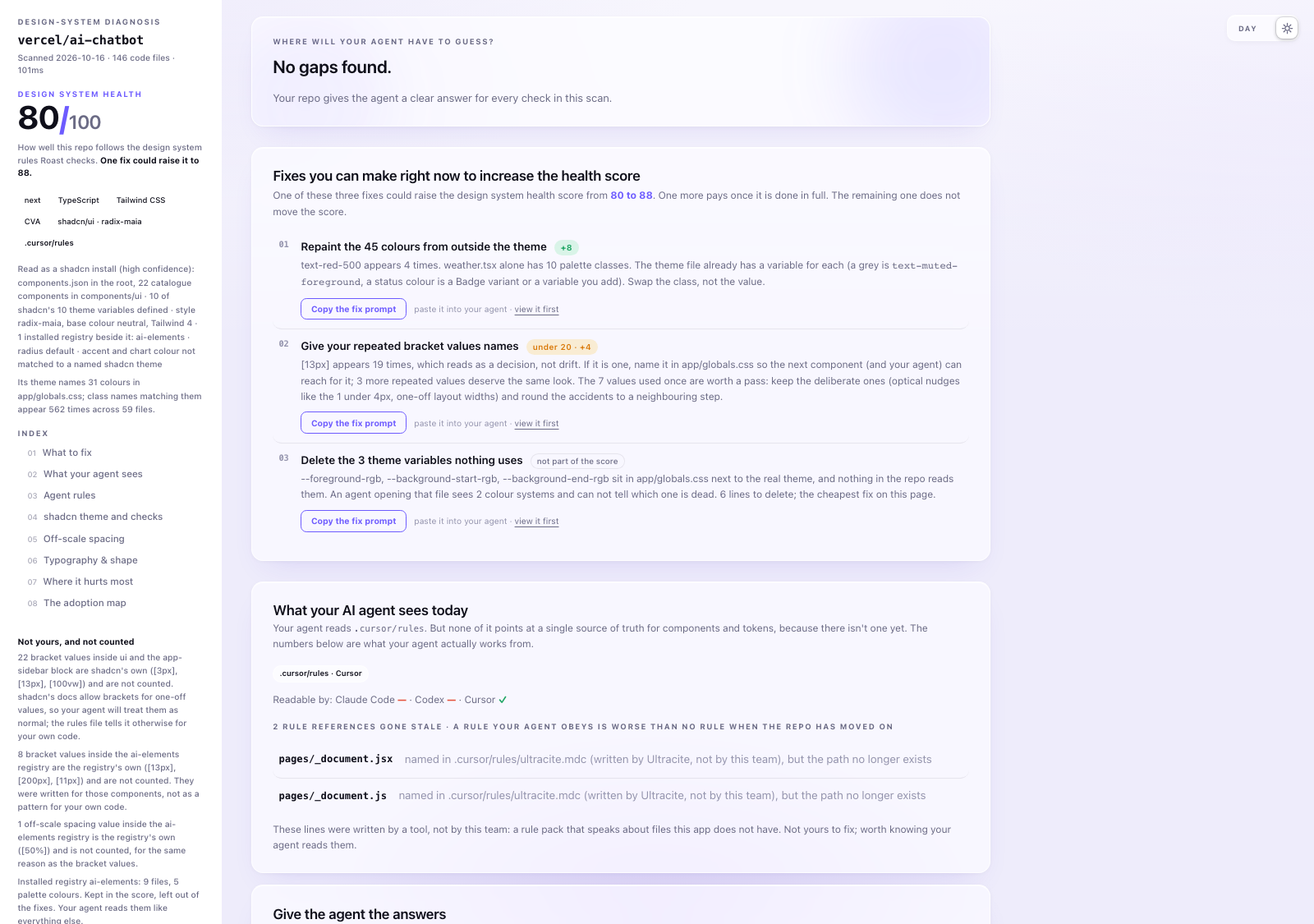
- vercel/ai-chatbot (shadcn install): 71 values like [13px] written outside the Tailwind scale, and 66 palette colours per 100 files where a theme variable exists; Claude's notes embedded. Score 80.
- excalidraw/excalidraw: 78 off-scale spacing values and 90 !important declarations. Score 55.
- dubinc/dub: 642 arbitrary bracket values, 21 duplicated components, and the chart-palette gap named. Score 20.
- telekom/scale (Stencil): 95 Stencil components read by tag; 66 spacing values outside the scale where about 12 would do; Claude's notes embedded. Score 55.
- magicuidesign/magicui (registry): counted on the components it publishes, 52 off-theme colours per 100 files in the code it ships, its docs site kept out and named. Score 78.
- adobe/spectrum-web-components (Lit): 740 colour tokens with 8 hardcoded colours beside them, and 37 !important declarations. Score 83.
The full report for vercel/ai-chatbot. The verdict answers what the agent will learn here, the gap section comes first, then "What the repo teaches the agent", Claude's read of the scan:

The same report in light mode (one file, built-in toggle):
Why the numbers hold
- Deterministic. A zero-dependency Node script reads every file and returns the same numbers every run. About a second on a normal repo.
- Read-only. No network. No telemetry. The test suite fails if package.json ever declares a dependency. Every release runs 468 checks against 29 sample repos before it is tagged; the fixtures and their snapshots live in
tests/, one JSON file each. - Honest gaps. What the scan cannot read says "not measured" and drops out of the score.
- Honest exclusions. Tests, stories, docs sites, artwork and email templates are left out. Your own exclusions are printed in the report header with file counts.
- A real benchmark. 119 public repos. A core fleet of 34 React repos sets the medians; the rest feed the kit and web-component groups, so a shadcn repo is compared with shadcn repos and a Lit system with Lit and Stencil systems. The builder is in
tools/benchmark/. - Importable scoring.
scoreHarvest(harvest)returns the score and metrics as plain data. The report and a CI check get the same numbers.
The long version, with scan scoping and what the plugin runs on your machine, is in docs/reference.md.
Works with
Frameworks
React, Next.js, Remix, Vite Stencil, Lit, custom elements
Kits and styling
Tailwind, shadcn/ui, MUI, Mantine, Chakra UI, Ant Design CSS Modules, Sass, Less, Emotion, styled-components, vanilla-extract, CVA, Stitches
Every repo is compared with repos built the same way: a shadcn install with shadcn installs, a product on MUI, Mantine, Chakra or Ant Design with products on that kit, a Tailwind theme with Tailwind themes, a Lit or Stencil system with other web-component systems, and a shadcn registry with the shadcn group. A repo that uses two kits is told so, and its rules name both.
Recognised, not measured yet
Vue, Angular, Svelte: named in the header, colours and spacing counted, components not measured. The report says so. HeroUI, NextUI, Radix Themes, Fluent UI, React Bootstrap, Grommet: named in the header, no kit rules.
Every command
One scan powers all of it; the flags decide what lands on disk. Combine freely.
Run it yourself
| Command | What you get |
|---|---|
npx roast-my-design-system@latest | The scan and design-system-roast.html, opened in your browser |
... <path> | Scan a different repo than the current directory |
... --apply | The generated agent rules injected into every agent file you have: CLAUDE.md, AGENTS.md, .cursorrules, .cursor/rules/, .windsurfrules and .github/copilot-instructions.md, inside a marked block. Re-running replaces only that block, never your own text. |
... --rules | The same rules written to design-system-rules.md instead, for pasting by hand |
... --card | roast-card.svg: a shareable 1200x630 card with the score and worst findings. Pure SVG, embeds in a README |
... --sarif | design-system-roast.sarif for GitHub code scanning: upload it in CI and findings appear in the Security tab, annotated on files |
... --check | The working tree's changed files checked against the design system, in the terminal. Exits 1 on findings, so it slots into scripts |
/roast-my-design-system:review (in Claude Code) | The same check in chat, from the plugin's second skill: each changed file's findings with the fix named, then the fixes applied and the check re-run |
... --exclude lab/ | Leave a folder out of the scan (repeat the flag or comma-separate). Or list folders in a .roastignore file at the repo root. Either way the report says so in the header |
... --json | The scan summary as JSON on stdout, for scripts and pipelines. Includes schemaVersion, the benchmark used, and every metric as a number, so two scans can be compared |
... --by "Dwayne Hicks" | Puts a name in the report header, for when you ran it for someone else |
... --theme light / --out <file> / --no-open / --open | Light report, custom report path, never open the browser, always open it |
For your agent
| Command | What you get |
|---|---|
... --notes <file.md> | The agent's read of this scan, embedded in the report as "What the repo teaches the agent": which findings matter, which good numbers are accidents, what to fix first. Labelled as written by AI and kept apart from the measured numbers. The Claude Code skill writes and passes it automatically; the flag is here so any agent can |
... --section "Title" <file.md> | A further agent-written chapter after the notes, same styling, same label, sub-headings allowed. Repeatable |
... --hook | The check the Claude Code plugin runs after every edit, for hand-installed setups: reads the hook event on stdin, checks the file that changed, prints only the findings the edit added as JSON. Always exits 0 |
... --stop-hook | The review the Claude Code plugin runs when the agent finishes its turn, for hand-installed setups: reads the Stop event on stdin and, when the files the session changed carry new problems, answers with a block that sends the agent back once. --session-start notes the work that was already uncommitted. ROAST_STOP_REVIEW=off turns it off. Always exits 0 |
... --mcp | The scan as a local MCP server: 5 tools your agent calls while writing UI, plus the roast-fix prompt that serves the top fix from a fresh scan. See Live answers over MCP |
/roast-my-design-system (in Claude Code) | The full experience: the roast in chat and embedded in the report as "What the repo teaches the agent", the rules offer, and the fix loop with Claude on your own numbers |
"Why this matters" is generic, ships with the tool and reads the same in every report. "What the repo teaches the agent" is your agent's read of your repo, and only appears when an agent passed it.
Live answers over MCP
The report and the rules file describe the repo as it was at scan time. --mcp keeps the same engine running while your agent works, so questions get answered from the code as it is right now, and mistakes get caught before they land.
| Tool | The question it answers |
|---|---|
roast_get_context | What should I know before touching UI here? Routed by the folder being edited |
roast_find_component | Is there already a component for this, and which one is canonical? With one real usage example. When two candidates tie, it says so and names both |
roast_find_token | I have #111111 / 13px in hand. What should I have used? |
roast_validate | I am about to save this. Does it break the system? |
roast_review | Review my changed files. Reads the git diff itself, so no code is pasted back |
The loop: context before building, find while building, validate before saving, review before finishing.
One real exchange, against Unleash, an MUI product at 60/100. The agent has a grey in hand and a padding in mind:
roast_find_token #6b7280
→ Nearest token: #607d8b, 11 channel steps from #6b7280. Unless the difference is a deliberate decision, use the token.

roast_validate (first draft)
→ ✕ L5 Colour #6b7280 written onto an MUI component, and the theme has no such colour.
     Fix: Add it to the theme once (frontend/src/themes/dark-theme.ts), then read it there: color: 'text.secondary' in sx.
  ✕ L5 Pixel size p: 12px on an MUI component.
     Fix: 12px is between steps 1 (8px) and 2 (16px). Keep it with a comment, or use the nearest step in sx.

roast_validate (second draft: color: 'text.secondary', p: 1.5)
→ No measured violations found. Checked: hardcoded colours vs the token set, near-identical colour twins, off-scale spacing …
Four calls, under 800 tokens, and the new component reads the theme instead of adding colour number 44.
Charts get their own rule, because a chart needs several colours that differ from each other and most design systems never name them. Where a repo keeps a chart palette, a colour written by hand in a chart file is a finding that names the palette. Where a repo has charts but no palette, a new chart that paints by hand gets one warning that names the existing chart doing the same and asks for the palette once. That warning is the gap report, live.
The server reads the repo the way the report does. On a product built on MUI, Mantine, Chakra UI or Ant Design, the context names the theme file and the kit's own way of reading it, roast_find_token answers in spacing steps, and the checks flag a colour or a pixel size written onto a kit component where the theme has a value. On a Tailwind theme or a shadcn repo they flag a palette class such as text-gray-500 where the theme names a colour of that kind. A token's raw value pasted into a component is flagged with the token's name, and a button built from scratch where the repo already has a well-used Button gets a warning that names the import line to use.
The roast-fix prompt serves the top Where-to-start move from a fresh scan, byte-identical to the report's copy buttons. In Claude Code type /mcp__roast__roast-fix, add a number to jump the queue. Fix it, ask again, and the next move has risen to the top: the scan is the progress bar.
Installed the Claude Code plugin? The server is already there. Otherwise:
claude mcp add roast -- npx roast-my-design-system@latest --mcp
Verified in Claude Code, Cursor and Windsurf (now Devin Desktop). Each was tested end to end: server connected, all 5 tools listed, real answers in the editor's own chat. Local, read-only, one scan at startup, no port, no account.
Cursor: put this in .cursor/mcp.json inside the project (the project, so the scan sees one repo, not your whole disk), then enable roast under Settings → Tools & MCP the first time:
{ "mcpServers": { "roast": { "command": "npx", "args": ["roast-my-design-system", "--mcp"] } } }
Windsurf (Devin Desktop): its MCP config is global (~/.codeium/windsurf/mcp_config.json), so name the project folder to keep the scan scoped to one repo:
{ "mcpServers": { "roast": { "command": "npx", "args": ["roast-my-design-system", "--mcp", "/path/to/your/repo"] } } }
Any other MCP client can register the same stdio command.
In CI
The scanner speaks SARIF, so wiring it into GitHub code scanning is 6 lines. Findings appear in the Security tab, annotated on the files themselves:
- uses: actions/checkout@v5
- run: npx roast-my-design-system@latest . --sarif --no-open
- uses: github/codeql-action/upload-sarif@v3
  with:
    sarif_file: design-system-roast.sarif
To fail a pull request on new mess only, use guard-my-design-system.
Install
No install, no Claude needed:
npx roast-my-design-system@latest
Claude Code (recommended):
/plugin marketplace add gregkozakiewicz/roast-my-design-system
/plugin install roast-my-design-system@roast-my-design-system
What it installs: two skills, one local MCP server and two checks that run on their own, nothing else. roast (/roast-my-design-system, or "roast my design system") scans the whole repo, writes the report with Claude's read of the numbers inside it, then walks the fixes with you. review (/roast-my-design-system:review, or "review my UI changes") checks only what changed, in about a second. The edit check runs after every file the agent edits and hands back the findings that edit added; a file with nothing new gets no message. The end-of-turn review runs when the agent says it is done: if the files this session changed still carry problems it added, the agent is sent back once to fix them before it finishes. Advice-only warnings never send it back, a problem is sent back once a session, and work that was uncommitted before the session started is left alone. To turn the review off, set ROAST_STOP_REVIEW=off in your Claude Code settings ("env": { "ROAST_STOP_REVIEW": "off" }).
If those commands error, your Claude Code is older than the plugin marketplace. Update it, or use the manual route:
git clone https://github.com/gregkozakiewicz/roast-my-design-system.git
cp -r roast-my-design-system/skills/roast-my-design-system roast-my-design-system/skills/review ~/.claude/skills/
(Use .claude/skills/ inside a repo to share it with your team. The review skill needs the roast-my-design-system folder beside it.)
OpenAI Codex CLI (same SKILL.md, same folder):
git clone https://github.com/gregkozakiewicz/roast-my-design-system.git
cp -r roast-my-design-system/skills/roast-my-design-system ~/.codex/skills/
Invoke with $roast-my-design-system. Use .codex/skills/ inside a repo to share with your team.
npx skills: npx skills add gregkozakiewicz/roast-my-design-system works for agents that read ~/.agents/skills/. Claude Code reads ~/.claude/skills/, so prefer one of the routes above.
Requires Node 18+.
Use
Open Claude Code in the repo you want roasted and type:
/roast-my-design-system
Once you have a design system worth protecting, the second skill checks only what you changed:
/roast-my-design-system:review
It runs the same check as --check on the files in your git diff and lists each finding with its fix, in the kit's own vocabulary on a MUI, Mantine, Chakra, Ant Design or Tailwind-theme repo. No score, no report: the small check for Tuesday afternoons. Claude also picks it up from plain words such as "review my UI changes" or "did I break the design system".
You get the roast in chat plus design-system-roast.html at your repo root, a self-contained page with:
- a health score computed from how your numbers sit against the ideal
- "What the repo teaches the agent": Claude's read of your scan, embedded in the file you'll forward, labelled as written by Claude and kept apart from the measured numbers. The score alone can flatter; this section keeps a shared 85/100 honest
- stat tiles comparing you to all 3 yardsticks
- a light/dark theme toggle in one file
- the usage-weighted palette bar, the grey ramp, the off-scale spacing receipts, the duplicate-component receipts with clickable file paths, and the worst-offenders ledger
- a Fixes you can make right now to increase the health score list: up to 3 moves derived from your repo's own numbers, each with a file-path receipt
- Where will your agent have to guess? opens the report: the gaps where the repo has no answer yet, with the files that prove each one and the move that closes it, or "No gaps found"
- Give the agent the answers:
design-system-rules.mdwrapped inside the report as a present. Unwrap, then copy or download the agent rules generated from your scan
After the roast, the skill offers to write design-system-rules.md to disk and merge it into your CLAUDE.md, .cursor/rules or AGENTS.md.
Four prompts to try
Roast my design system.
How bad is my CSS? Scan this repo and show me the receipts.
With the MCP server connected:
Is there already a Button component in this repo, and which one should I use?
And the everyday one, after you have changed some UI:
Review my UI changes against the design system.
Troubleshooting
- "Command not found" or the plugin will not install. Update Claude Code; the plugin marketplace needs a recent version. The manual install works on any version.
- "Nothing to roast" or a near-empty report. The scan found almost no colours or spacing. The styling probably lives in another repo, a CDN or an installed package. Run it from the repo that holds the styles.
- A score that looks wrong. Check the report header: it names how the repo was read (product, library, shadcn, a kit, a Tailwind theme) and every folder that was left out. Scope the scan with
.roastignoreor--excludeif a playground or an old app is blurring the numbers. - The report did not open. It is written to
design-system-roast.htmlat the repo root. Open it in any browser; it needs no server and makes no requests. - The MCP server does not appear. Restart the client after adding it. In Claude Code,
claude mcp listshows whether it connected. It needs Node 18 or newer.
Support
Bugs and questions go to GitHub Issues. Everything else reaches Greg through gregkozakiewicz.com. Security problems: see SECURITY.md.
Privacy
The tool reads the repository you point it at and writes its output next to it. It makes no network requests, collects no data, and has no telemetry. The MCP server answers from the same local scan. Nothing about your code, your prompts or your conversation is sent to anyone, including the author.
What it measures
| Metric | Ideal Design System | Median of the 34-repo core fleet | Median of 10 reputable systems |
|---|---|---|---|
| Distinct colours | ~24 | 119 | 14 |
| Shades of grey | up to 13 | 28 | 4 |
| Off-scale spacing values | ~12 | 24 | 5 |
| Typefaces | 2 to 3 | 3 | 1 |
| Off-scale border radii | up to 10 | 14 | 0 |
| Duplicated components | 0 | 16 | 9 |
| Inline style blocks | 0 | 51 | 12 |
| Arbitrary Tailwind values | ~20 | 56 | 0 |
| Near-identical colour pairs | 0 | 7 | 1 |
| !important declarations | 0 | 5 | 3 |
| Components never imported | 0 | 0 | 0 |
Benchmark rebuilt 3 October 2026 (version 10.0.0), counted by the scan's own harvest.
Yes, the median repo is already a mess. That is the point. An agent arriving in it will copy the mess faithfully and, where the mess runs out, add some of its own.
Your AI can write the UI. This makes sure it writes your UI.
License
MIT. The code is yours to fork, modify and redistribute; the copyright notice travels with it.
Building your own report, summary or audit from this tool's scores, counts or benchmark comparisons? Keep one line in it: Built with roast-my-design-system by Greg Kozakiewicz. The skill asks the same of an AI agent that writes such a document from the scan.
roast-my-design-system™ and the GK mark are trademarks of Greg Kozakiewicz. Forking is welcome, republishing under this name is not: see brand and attribution.
Built and designed by 