Real-time multi-track schedules for cooking, lab protocols, events and workouts. Validate and share.
Quick Install
Automated & IDE SetupCopy the AI prompt to install this server into Claude Code, Cursor, or another agent — or use 1-click editor setup below.
One-click editor setup isn’t available for this listing yet — we don’t have a confirmed install command, and we’d rather show nothing than point your editor at the wrong package or host. Follow the project’s own setup instructions, linked above.
Manual Client & Custom JSON ConfigExpand JSON ▾
No confirmed setup config for this listing yet. We only publish a config block when the install details come from the project itself — its README, its docs, or a verified owner. We haven’t found those for Rhylthyme, and we’d rather show nothing than a guess you’d paste into your client. Follow the project’s own setup instructions for the current steps.
Documentation Overview
Rhylthyme MCP server
A Model Context Protocol server for schedules that a person executes: cooking several dishes so they finish together, running a bench protocol with overlapping incubations, calling an event, running a workout. An agent describes the process, the server validates and analyzes the resulting program, and publishes it as a live timeline on rhylthyme.com that the person follows on their phone.
This repository is the source of the server that runs at
mcp.rhylthyme.com. It is the same code as mcp-api/ in the
rhylthyme-server application, copied here with the static assets it
needs so it can be read, tested and self-hosted.
Try it: ask for a workout
Connect the server (in Claude Code, /plugin marketplace add rhylthyme/rhylthyme-mcp
then /plugin install rhylthyme@rhylthyme; anywhere else, add
https://mcp.rhylthyme.com/gym/mcp as a connector), then say what you want in
plain words:
Two of us in a garage gym: one kettlebell, one pull-up bar, one jump rope. Thirty minutes, two rounds, and nobody stands around waiting for equipment. Make it a Rhylthyme timeline.
You write no JSON. The assistant does, and the server keeps it honest. With that prompt Claude made three tool calls:
| Call | What came back |
|---|---|
validate_program | ✅ Program is valid — 2 tracks, 20 steps, 30m makespan. |
analyze_schedule | Resource conflicts: none. Each station has capacity 1, so this is the proof that Alex and Sam never want the kettlebell at the same moment |
visualize_schedule | a link, gym.rhylthyme.com?share=4995ef1b88744e80, with rest timers and interval beeps, and a text chart for the chat: |
Ask "show me a picture" and preview_timeline returns an image in the chat.
For one coloured by station, which makes the rotation obvious, save the
program the assistant wrote (ours is examples/recipe/garage-circuit.json) and run:
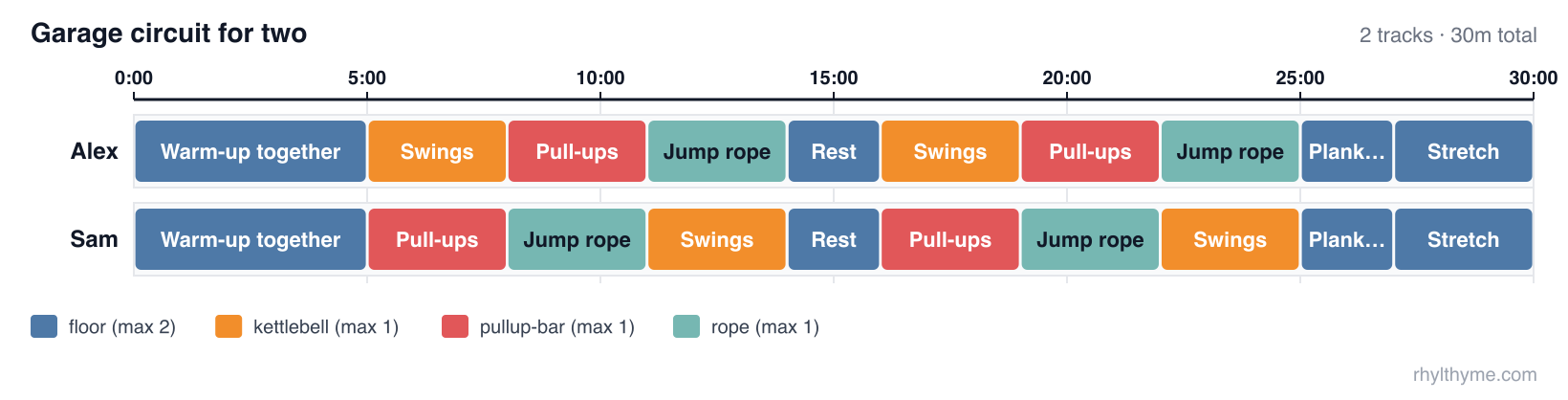
Then push on it: "add a third person", "we only have 20 minutes", "swap the rope for burpees". The assistant edits the program and the server checks it again.
This repository and rhylthyme-cli-runner
Two repositories do related things and are easy to confuse. This one is the server an AI assistant talks to. rhylthyme-cli-runner is the command a person types.
| rhylthyme-mcp | rhylthyme-cli-runner | |
|---|---|---|
| What it is | The MCP server: the tools an AI assistant calls | A command-line program: the rhylthyme command |
| Who uses it | Claude, ChatGPT, Cursor or any MCP client, on a person's behalf | A person at a terminal, a script, or CI |
| Where it runs | Hosted at mcp.rhylthyme.com; nothing to install | On your machine: pip install rhylthyme |
| Language | JavaScript (Node 20+) | Python 3.12+ |
| Input | A program the assistant builds in conversation | A program file on disk (JSON or YAML) |
| Validate a program | validate_program | rhylthyme validate (works offline) |
| Timing, conflicts, deadlines | analyze_schedule | rhylthyme analyze (asks the server) |
| Publish a live timeline | visualize_schedule | rhylthyme publish (asks the server) |
| Run a schedule with timers | no: it hands back a link to the web timeline | rhylthyme run, an interactive terminal runner |
| Recorded runs, calibration | reads runs saved to an account | records runs locally; rhylthyme runs, rhylthyme calibrate |
| Catalog search, imports, account library | yes | no |
| Also in the repository | the rhylthyme-mcp PyPI package (a stdio bridge to the hosted server), the Claude plugin marketplace | the Claude skill's source, the prompt-evaluation harness and its results, rhylthyme mcp-test |
How they fit together: the command-line tool is one of this server's clients.
rhylthyme analyze, publish, generate and mcp-test are MCP calls to
mcp.rhylthyme.com; rhylthyme validate, run, runs and calibrate never
touch the network. Each has its own validator for the same program schema
(JavaScript here, Python there), so a program is checked again when it is
published.
Use this repository to connect an assistant, to read or self-host the server, or to change a tool. Use rhylthyme-cli-runner if you have a program file and a terminal, want timers in the terminal, or keep run records.
Two names to keep apart: rhylthyme-mcp on PyPI is this server's stdio bridge
(command rhylthyme-mcp, source in python/); rhylthyme-cli-runner
on PyPI is the command-line tool (command rhylthyme). The program format
itself is defined in rhylthyme-spec,
with examples in rhylthyme-examples.
Endpoints
| URL | Server name | Adds |
|---|---|---|
https://mcp.rhylthyme.com/mcp | rhylthyme-mcp | generic scheduler |
https://mcp.rhylthyme.com/kitchen/mcp | rhylthyme-kitchen-mcp | cook_recipe, whats_for_dinner |
https://mcp.rhylthyme.com/lab/mcp | rhylthyme-lab-mcp | run_protocol, random_protocol, Benchling import |
https://mcp.rhylthyme.com/events/mcp | rhylthyme-events-mcp | plan_event, random_event_template |
https://mcp.rhylthyme.com/gym/mcp | rhylthyme-gym-mcp | start_workout, surprise_workout |
Transport: Streamable HTTP, stateless. No sign-in is needed for the public
catalog or the pure tools; account tools use the person's Rhylthyme account
through OAuth 2.1, or a pasted token from the login tool in clients without
OAuth. Server instructions describing the workflow are sent at
initialize.
Quickstart: timelines from the command line
The rhylthyme CLI can drive this server directly: describe what you
need in plain language and get back a live timeline URL, a program file,
or both.
login signs you in through the browser and hands the session back to a
one-shot listener on 127.0.0.1. It is stored in
~/.config/rhylthyme/credentials.json (mode 0600) and renews itself, so
you only log in once. generate then calls two tools on this server:
import_texton the endpoint for-e(/kitchen/mcp,/lab/mcp, …) turns the request into a validated multi-track program. It runs four model turns server-side, which is why it needs a sign-in; it takes 20–60 seconds and is capped per day.visualize_schedulepublishes that program and returns the live-timeline URL on the matching subdomain.
It prints the ASCII Gantt, the itinerary and the URL. More examples:
| Flag | Meaning |
|---|---|
-e, --env | generic (default), kitchen, lab, events or gym. Picks the endpoint and the timeline site. |
--by | When everything must be finished: 19:00, dinner at 7pm. |
--with | Equipment and people limits in your own words. |
-f, --file | Read the request or source text from a file, or - for stdin. |
-o, --output | Save the program JSON. |
--run | Run the program in the terminal runner afterwards. |
--open | Open the live timeline in a browser. |
--no-publish, --json, -q | Skip publishing; print JSON; print only the URL. |
To check a server (this one, or your own deployment) end to end:
rhylthyme whoami shows the stored sign-in; rhylthyme logout forgets it.
On a machine without a browser, set RHYLTHYME_TOKEN to an access token
from https://www.rhylthyme.com/mcp/auth (it lasts about an hour), or
run rhylthyme login --token <token>. RHYLTHYME_MCP_URL points the CLI
at a self-hosted server.
Connect
Claude Code
Claude Desktop / claude.ai: Settings → Connectors → Add custom
connector → paste one of the URLs above. Public tools work immediately;
run login only to save to your own account.
Claude Code plugin (the hosted server plus a skill that teaches Claude to author, validate and analyze schedules):
Related MCP Servers
Reviews
No reviews yet — be the first to share how this listing worked for you.
Frequently Asked Questions about Rhylthyme
AllMCPs Directory Badge
Showcase your server listing on GitHub or your project documentation. Embed this dynamic SVG badge to highlight official listing status and live engagement.
Badge Style:
Live Dynamic SVG Preview
Markdown (GitHub README)
[](https://allmcps.com/mcp/rhylthyme)HTML Embed
<a href="https://allmcps.com/mcp/rhylthyme"><img src="https://allmcps.com/api/badge/rhylthyme?style=directory" alt="Rhylthyme on AllMCPs" /></a>