Capability-aware OSS discovery for AI coding agents. Runs triage in your own session, no API key.
Quick Install
Automated & IDE SetupCopy the AI prompt to install this server into Claude Code, Cursor, or another agent — or use 1-click editor setup below.
Not yet automatically verified
We haven't yet run this listing's install command through our automated sandbox check. This isn't a red flag — we're steadily working through the catalog.
Manual Client & Custom JSON ConfigExpand JSON ▾
Client Config & Setup
Choose your client or environment
Target File:
💡 Paste the JSON block into your client's configuration file under mcpServers, then restart the application.
Documentation Overview

Replen
Smarter AI Development Workflows
A local intelligence layer for AI coding agents.





Website · Docs · Install · Workflow · MCP · Skill · Self-host · Research · app.replen.dev
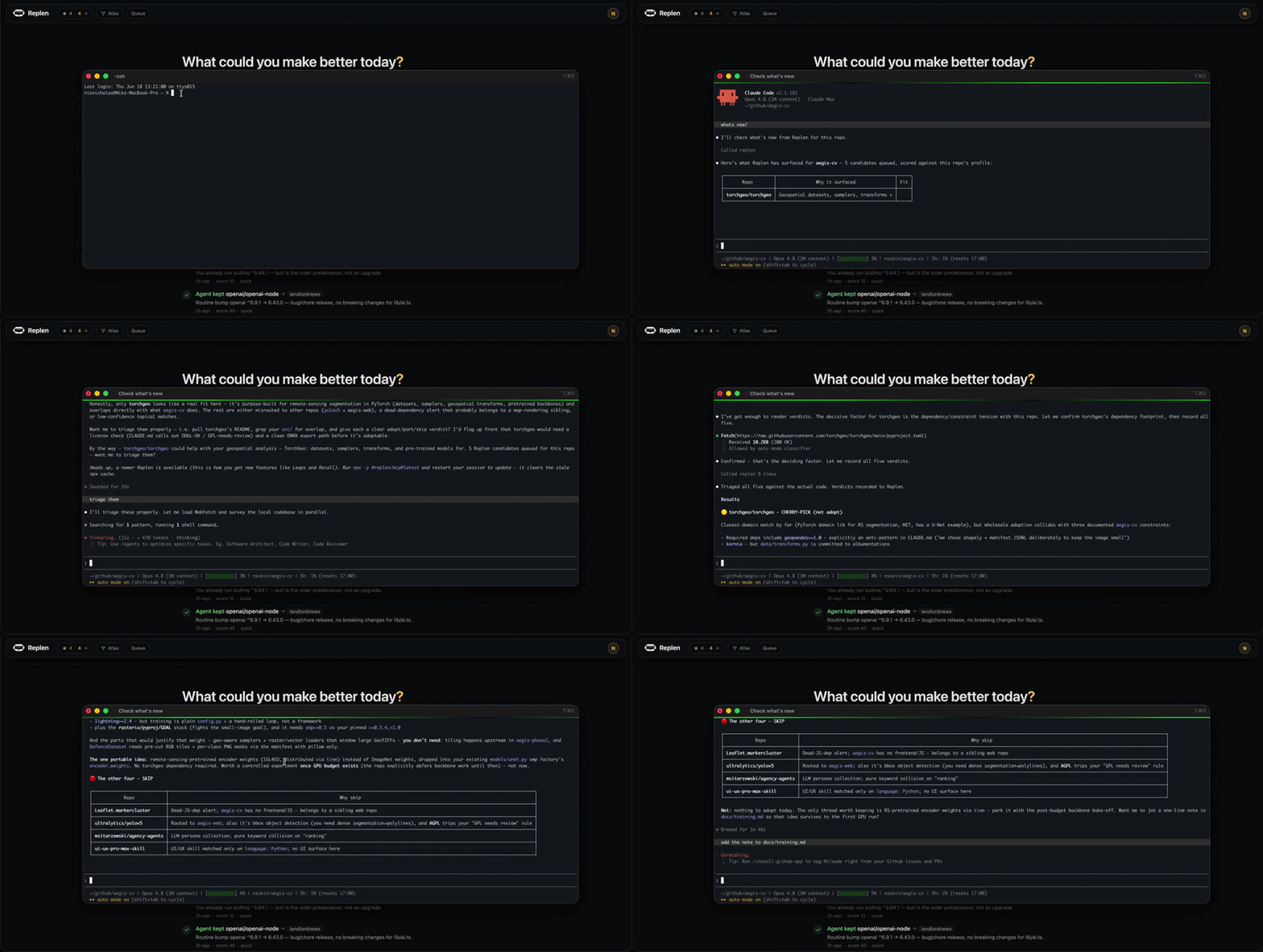
Claude Code, Codex and Cursor already help inside the repo you are working on. Replen gives them a local intelligence layer across every repo you build.
It maps each project to what it actually does, building an ontology and knowledge graph of your portfolio: computer vision, geospatial analysis, market-making, scraping, workflow automation, or whatever else you build. It then watches the OSS frontier and continuously scores relevant projects against your real capabilities, using semantic matching and a self-tuning learning loop shaped by what you adopt, skip and review.
The result is not a trending list, a keyword search, or a static repo graph. Replen autonomously surfaces a small number of high-signal suggestions your AI coding tools can actually use.
Sometimes that means adopting a library as-is. Sometimes it means porting a function or algorithm from a larger project. Sometimes it means cherry-picking a technique, or clean-room building an idea from scratch to stay licence-compliant.
The judgement happens locally, inside your session, against your real code. Your code never leaves your machine.
Replen aims for a few useful suggestions a month. Most days it says nothing. When something real lands, your AI tool can mention it the next time you open the repo, as a short note at the end of its first reply:
By the way,
D4Vinci/Scraplingcould help your scraper get past Cloudflare. Want the full review?
Brainstem, Watchtower, Atlas
Replen has three parts, and they mostly matter together.
- Brainstem is the matching core. It knows what each of your repos does (per-capability embeddings, not keywords) and sources what fits: a library to use as-is, an algorithm to port, a technique to cherry-pick, an idea to clean-room build. It also flags when something does a job better than what you already have. Every verdict your agent records tunes the ranking, so what you adopt pulls it toward your taste and what you skip pushes it away.
- Watchtower is a maintained network of about 1,250 sources covering what your code relies on: releases, advisories, pricing pages, licences, standards, and end-of-life dates. Four questions gate it (will this break my app, is there a security issue, will my bill rise, do I need to upgrade), so a quiet day stays silent.
- Atlas is the knowledge graph of your dev world: projects, capabilities, tools, decisions, goals. It's built from Tiles, the linked markdown your agents read straight off disk. Brainstem learns from it; Watchtower's alerts land on it.
The loop: Atlas records what you build, Brainstem matches it against what Watchtower sees, your agent triages it in-session, and the verdict lands back in Atlas.

Quickstart
Three steps: install → onboard → use.
1. Install: npx replen
One command, ~60 seconds: signs you in (Google / GitHub / email link), asks which repos to include (all (the default), a subset, or none for now), and wires the @replen/mcp server plus the /replen + /replen-onboard skills into Claude Code / Codex / Gemini. It also auto-extracts tags from each repo's manifests and drops a small "Replen integration" section into each included project's CLAUDE.md / AGENTS.md. No API key, no GitHub PAT, no manual project setup. (Repo discovery details and non-conventional-folder handling are in How repo discovery works below.)
2. Onboard: /replen-onboard (one-time)
Open Claude Code in your work and run /replen-onboard. The agent also offers it automatically on your first session, so you don't have to remember it. It reads each repo and builds a grounded profile (capabilities + a project report) so matches are relevant to what you actually build, not a generic trending list. Runs autonomously in the background; once per project. For deeper grounding you can opt in with npx replen immerse, which embeds your code content locally so only the vectors, never the source, leave your machine.
3. Use: just work
Carry on coding. /replen triages today's matches for the current repo (a verdict and effort estimate per candidate, against your code) and otherwise Replen drops a calm one-line note in your AI tool's reply when something genuinely fits. Silent on quiet days.
How repo discovery works
Replen finds your projects by locating git repos (directories containing a .git/) with a GitHub origin remote. It looks for them in this order, stopping at the first that turns up repos:
- A
--root <path>flag you pass explicitly - The
REPLEN_PROJECT_ROOTSenv var (colon-separated dirs) - Walk-up from the current directory: if you run
npx replenfrom inside a repo (or one of its subfolders), Replen finds that repo and scans its parent folder for siblings - Repos you've opened in Claude Code (
~/.claude.json) - Conventional folders:
~/github,~/code,~/projects,~/dev,~/src,~/work - An interactive prompt asking where your code lives
If your code lives in a non-conventional folder (e.g. ~/js stuff, ~/work-2024), the conventional-folder scan won't find it. Two easy fixes:
Both work for the initial setup and for npx replen sync-projects later.
What you do not provide:
- ❌ OpenAI / Anthropic / DeepSeek API key: your AI tool handles the reasoning
- ❌ GitHub PAT: optional, only needed if you want server-side handoff PRs
- ❌ Manual project setup: auto-discovered from your local filesystem
- ❌ Per-project tag config: auto-extracted from manifests
For self-host: REPLEN_BASE=https://replen.your-domain.dev npx replen.
Subcommands: replen sync-projects · replen status · replen inject · replen immerse · replen mcp setup · replen logout · replen uninstall · replen --help.
Backing out: npx replen uninstall reverses every local change: the MCP wiring (Claude / Codex / Gemini), the installed skills, the per-repo CLAUDE.md/AGENTS.md/GEMINI.md integration blocks, and ~/.replen. It asks before each category (nothing is removed without a yes; --dry-run previews). It only touches this machine. Your server-side profile is deleted separately from the dashboard.
What it does
-
Understands what your code does, then matches by capability. Replen extracts each project's technical capabilities from its docs and dependencies (computer vision, geospatial, market-making, realtime streaming) and scores candidates against those rather than a generic trending list. Candidates come from a shared, capability-indexed library catalogue plus targeted search; the matching is what makes a suggestion fit your repo. It's mechanical and cheap, with no per-candidate LLM.
-
Tells your AI tool when something landed. A small session-start check returns up to 5 candidates per project. When you next open Claude Code or Codex in a tracked repo, your AI tool sees the candidate list in its opening context and mentions it after answering your first message. Silent on the days nothing is queued.
Related MCP Servers
Reviews
No reviews yet — be the first to share how this listing worked for you.
Frequently Asked Questions about Replen
AllMCPs Directory Badge
Showcase your server listing on GitHub or your project documentation. Embed this dynamic SVG badge to highlight official listing status and live engagement.
Badge Style:
Live Dynamic SVG Preview
Markdown (GitHub README)
[](https://allmcps.com/mcp/replen)HTML Embed
<a href="https://allmcps.com/mcp/replen"><img src="https://allmcps.com/api/badge/replen?style=directory" alt="Replen on AllMCPs" /></a>Technical Specs & Signals
CategoryDeveloper Tools
39Quality signal: Fair · 39/100How this signal is calculated ▾
Server availabilityNot measured
Not scored for repo-hosted servers — we can't reach the running server, only its GitHub page. Hosted MCP endpoints are health-checked live.
Verified ownership10/20
Documentation & tools16/30
Adoption & activity3/15
Community engagement0/10
A guidance signal from public completeness & health data — not a user rating. New listings start lower and rise as they add docs, get verified, and grow adoption. Signals we can't observe for a listing are skipped, not counted against it.
Own this project?
This directory is pre-filled from public sources. Claim via GitHub README, site badge, or DNS TXT to unlock edit access and the Official badge — proof is checked automatically, then reviewed by our team.
Free dofollow backlink: add your website and place the AllMCPs badge on it — no claim needed. We detect it automatically and keep it verified as long as the badge stays live.
Claim & get free dofollowShare & Embed
Add our SVG badge (dark/light directory styles) or embeddable widget to your site.