MCP relay server for Claude Desktop <-> Claude Code communication
Quick Install
Automated & IDE SetupCopy the AI prompt to install this server into Claude Code, Cursor, or another agent — or use 1-click editor setup below.
Not yet automatically verified
We haven't yet run this listing's install command through our automated sandbox check. This isn't a red flag — we're steadily working through the catalog.
Manual Client & Custom JSON ConfigExpand JSON ▾
Client Config & Setup
Choose your client or environment
Target File:
💡 Paste the JSON block into your client's configuration file under mcpServers, then restart the application.
Documentation Overview
Relay
A wonderfully simple tool that moves information—files, code, data, comments, directions, etc.—between Claude Desktop and Claude Code while keeping their main context windows separate.
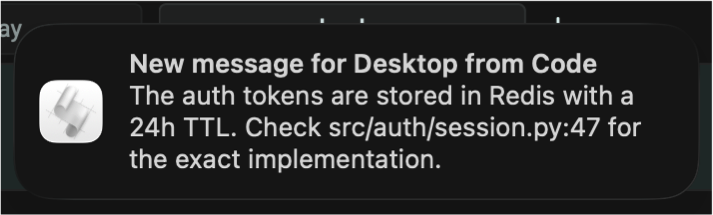
Both Claudes can send messages autonomously—when they need input from the other side, they just do it. You get a system notification when something arrives. You fetch when you're ready.
Why? Desktop and Code have different strengths. Desktop is better for conversation—planning, brainstorming, reviewing, iterating on prose. Code is better for execution—editing files, running commands, working through errors. But they don't share context. If you draft something in Desktop and want Code to implement it, or you want Desktop's opinion on code you're writing, you're copy-pasting between apps.
Relay connects them without requiring you to manually specify questions and cut & paste between windows. This is basic functionality that should have been integrated by Anthropic.
You're in control. Fetching is typically a user action—you type get or /get. Models can send or fetch when they decide they need input from the other side, but there's no automatic background sync. No runaway inter-LLM conversation burning through your tokens.
Quick Example
Extended Example
Usage
Type get in Desktop or /get in Code to check for messages from the other side. That's the primary interaction.
Command variants:
/get— Fetch and execute messages from Desktop/get status— Show message count and last activity/get clear— Clear all messages from the buffer/get <message>— Send a message to Desktop
Resource access: You can also reference messages directly with @relay:messages://latest. This is faster than /get and works in plan mode.
Startup preview: When Code starts, you'll see a preview of any pending messages from Desktop. Use /get to read them in full.
Sending is easy and implicit. When you say "Ask Desktop if this looks right" or "Send the README to Code," the models recognize the intent and call the relay automatically.
Notifications
When a message arrives, you'll get a system notification so you know to check the other side. No need to poll manually.
| Platform | Method | Notes |
|---|---|---|
| macOS | osascript | Native notification center |
| Linux | notify-send | Requires libnotify |
| Windows | PowerShell toast | Native toast notifications |
Sound: Add --sound to enable notification sounds. Without a value, uses platform defaults. With a value, uses the specified sound:
| Platform | Default | Custom example |
|---|---|---|
| macOS | blow | --sound tink |
| Linux | freedesktop message sound | --sound /path/to/sound.oga |
| Windows | system default | --sound ms-winsoundevent:Notification.IM |
Duration and display behavior are controlled by your OS settings.
Design Philosophy
Transport, not memory. The relay is a message bus. It does not summarize, compress, rewrite, or interpret messages. There is no shared hidden context, merged system prompts, or cross-agent planning. Messages pass through unchanged. This keeps concerns cleanly separated and avoids epistemic corruption.
Primarily user-controlled. Fetching messages is typically an explicit user action (get or /get), not a background process. This prevents runaway context growth and feedback loops. However, models may send or fetch autonomously when they decide they need input from the other side—the system allows this without encouraging it.
Independent interfaces. Desktop and Code remain fully usable on their own. You can have a long conversation in Desktop without Code, or spend hours debugging in Code without Desktop. The relay connects them when you want; it doesn't couple them. This also means no API costs—both interfaces use your existing subscriptions.
Minimal surface area. The relay does three things: send, fetch, clear. It does not attempt to provide orchestration, arbitration, consensus, or autonomous behavior. This restraint is intentional. Most multi-agent designs fail by blurring boundaries that should remain clear.
Scales naturally. Multiple Code sessions connect to the same Desktop—you direct messages to the appropriate conversation. Additional MCP-speaking peers, alternative storage backends, per-project buffers, and read-only observers all extend cleanly from this design.
This defines a distinct class of infrastructure: a human-mediated, explicitly synchronized multi-agent message bus.
Design Notes
The relay is global. The buffer at ~/.relay_buffer.db is shared across all projects. Desktop has no concept of which project you're working on, so per-project isolation isn't practical. This is intentional: one user, one machine, one relay.
If you switch projects in Code, the relay comes with you. Old messages from the previous project may still be there; use /get clear if you want a fresh start.
Large files are slow. For messages a page or two in length, the relay is fast. For large files, it's faster to drag them directly into the interface you want. You can still send accompanying context via relay.
Setup
What's uvx? uvx runs Python packages directly without installing them globally. It handles dependencies automatically. If you don't have it: curl -LsSf https://astral.sh/uv/install.sh | sh (See astral.sh/uv for more info.)
1. Configure Claude Desktop
Add to your Claude Desktop config:
- macOS:
~/Library/Application Support/Claude/claude_desktop_config.json - Linux:
~/.config/Claude/claude_desktop_config.json - Windows:
%APPDATA%\Claude\claude_desktop_config.json
Restart Claude Desktop, then tell it to remember this instruction:
Remember: When the user says "get" or "/get" alone, fetch recent messages from the relay using relay_fetch.
You can verify it was recorded by saying "Show me my memory edits."
2. Configure Claude Code
Add to .mcp.json in your project root:
Note: Only Desktop needs --sound since it handles notifications for both sides.
3. Install the /get command and startup hook
This installs the /get slash command and a SessionStart hook that shows pending messages when Code launches.
Alternative: Install from GitHub
If you prefer not to use uvx, clone the repository and run directly:
Then use the full path in your configs:
Claude Desktop (claude_desktop_config.json):
Claude Code (.mcp.json):
Replace /path/to/mcp-relay with your actual clone location.
Tools
| Tool | Description |
|---|---|
relay_send(message, sender) | Send a message (sender: "desktop" or "code") |
relay_fetch(limit, reader, unread_only) | Fetch recent messages, optionally mark as read |
relay_clear() | Delete all messages from the buffer |
Technical Details
- Buffer: SQLite at
~/.relay_buffer.db - Rolling window: 20 messages max (oldest evicted first)
- Message limit: 8 KB per message
- Idle timeout: 1 hour (server exits automatically when inactive)
- Transport: stdio (standard MCP)
- Python: 3.9+
Author
Michael Coen — mhcoen@alum.mit.edu · mhcoen@gmail.com
Related MCP Servers
Reviews
No reviews yet — be the first to share how this listing worked for you.
Frequently Asked Questions about Relay
AllMCPs Directory Badge
Showcase your server listing on GitHub or your project documentation. Embed this dynamic SVG badge to highlight official listing status and live engagement.
Badge Style:
Live Dynamic SVG Preview
Markdown (GitHub README)
[](https://allmcps.com/mcp/relay)HTML Embed
<a href="https://allmcps.com/mcp/relay"><img src="https://allmcps.com/api/badge/relay?style=directory" alt="Relay on AllMCPs" /></a>Technical Specs & Signals
CategoryDeveloper Tools
36Quality signal: Fair · 36/100How this signal is calculated ▾
Server availabilityNot measured
Not scored for repo-hosted servers — we can't reach the running server, only its GitHub page. Hosted MCP endpoints are health-checked live.
Verified ownership10/20
Documentation & tools15/30
Adoption & activity2/15
Community engagement0/10
A guidance signal from public completeness & health data — not a user rating. New listings start lower and rise as they add docs, get verified, and grow adoption. Signals we can't observe for a listing are skipped, not counted against it.
Own this project?
This directory is pre-filled from public sources. Claim via GitHub README, site badge, or DNS TXT to unlock edit access and the Official badge — proof is checked automatically, then reviewed by our team.
Free dofollow backlink: add your website and place the AllMCPs badge on it — no claim needed. We detect it automatically and keep it verified as long as the badge stays live.
Claim & get free dofollowShare & Embed
Add our SVG badge (dark/light directory styles) or embeddable widget to your site.