Event-sourced ticket system with a Jira reconciler, exposed as an MCP server.
Quick Install
Automated & IDE SetupCopy the AI prompt to install this server into Claude Code, Cursor, or another agent — or use 1-click editor setup below.
Manual Client & Custom JSON ConfigExpand JSON ▾
Client Config & Setup
Choose your client or environment
Target File:
💡 Paste the JSON block into your client's configuration file under mcpServers, then restart the application.
Documentation Overview
rebar




An event-sourced, git-backed ticket store + Jira reconciler built for agent swarms — one store, exposed as a Python library, a CLI, and an MCP server.
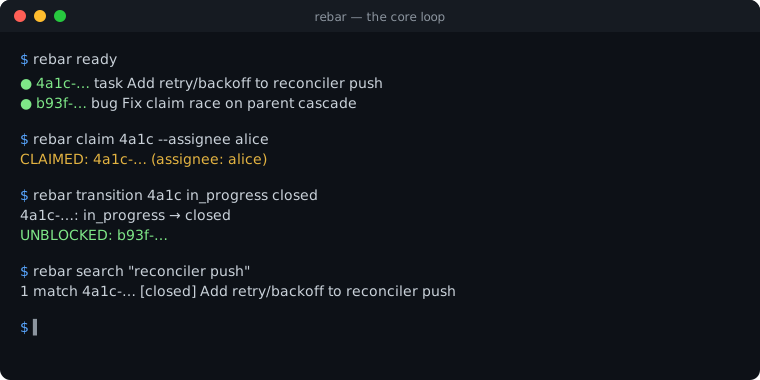
- Three surfaces, one store — drive rebar as a CLI (
rebar), a Python library (import rebar), or an MCP server (rebar-mcp). - The tracker lives in the repo — tickets are an append-only event log on a
ticketsgit branch; no database, no daemon, and it travels with every clone. - Built for parallel agents — atomic claims, convergent merges, and provenance links let many agents and sessions write at once without lost work.
- Optional LLM gates — review a ticket's plan before work, its completion before close, and its code before it merges.
- Bidirectional Jira sync — a level-triggered reconciler keeps tickets and Jira in step, so teammates stay in the loop.
- Dogfooded through two independent gates — every change to rebar's own
mainmust pass an LLM code review and CI, on Gerrit, before it lands.
Install
Quickstart
Run one ticket end-to-end with the CLI or the Python library; the JSON block is the
MCP server config so agents can drive the same loop over MCP. rebar --help (and
rebar <command> --help) is the authoritative command reference.
That's the whole loop — init → create → ready → claim → close. The CLI and Python blocks each drive one ticket end-to-end (the same id threaded through every step, no hard-coded id); the JSON is the MCP server config — add it to your client so an agent can run the same loop via the MCP tools. State is shared through the repo so many agents (and teammates via Jira) coordinate without stepping on each other.
How it works
rebar stores tickets as an append-only event log on a dedicated tickets git
orphan branch (worktree at .tickets-tracker/); ticket state is computed by replaying
events, and every write auto-commits and pushes so the store is shared immediately. A
level-triggered reconciler bidirectionally syncs tickets with Jira. The branch name
and worktree dir are configurable (tracker.branch / tracker.dir — see
Configuration). Reads stay sub-second into the thousands of tickets;
for measured numbers and git-growth expectations see
docs/scale-envelope.md.
Documentation lives under docs/ — start with the
docs index (grouped by audience: user / operator / contributor /
agent) or the day-to-day user guide.
Why rebar
If you run coding agents against a repo, you eventually want to run several at once — and the moment you do, they need a shared place to coordinate. Most trackers weren't built for that:
- They're heavy. A daemon to babysit or a local database to keep running, with dependencies thick enough that a routine upgrade can break your work tracking across machines.
- They don't travel with the code. State lives outside the repo, so a fresh clone doesn't come with its tickets.
- They fight your git history. A tracker that writes to your working branch tangles ticket churn into your source-code commits.
- They have no concurrency story. Nothing stops two agents from claiming the same work or clobbering each other's state, and concurrent edits produce merge conflicts you resolve by hand — or lose.
- They buckle at scale. Speed and usability fall off past a few hundred tickets.
rebar's answer is to make the tracker part of the repo. Tickets are an
append-only event log on a dedicated tickets orphan branch (linked in through a
gitignored worktree); current state is a fast, deterministic replay of that log.
That single decision pays off across the board:
- Zero infrastructure, fully portable. No database, no daemon — just git and a lightweight Python install. Clone the repo and the tracker comes with it.
- No commit interference. Ticket events live on their own branch and never touch your source history. Every write auto-commits and auto-pushes, so activity is shared in real time.
- Concurrency by design. Each event gets a globally-unique filename, so
parallel writes merge as a clean union, and the rare conflicting fork resolves
deterministically — every clone converges with no lost data.
claimis an atomic, optimistic-concurrency primitive: agents grab work without stepping on each other. - Built to scale. The event log plus cached replay stays fast as tickets grow.
On top of that foundation, rebar adds what parallel agent work actually needs:
- Bidirectional Jira sync — agents work in rebar, teammates work in Jira, and a level-triggered reconciler keeps the two in step. To run it automatically in CI, see docs/jira-sync-setup.md (the GitHub Actions reconcile-bridge + heartbeat-canary setup).
- Conflict-aware scheduling — tickets record their file impact, so
next-batchhands parallel agents work that won't collide on the same files. - Scratch space — an invisible per-ticket channel for subagents to pass notes to one another.
- Structural quality gates — clarity, acceptance-criteria, dispatch-readiness, and repo-wide health checks keep work dispatch-ready.
- LLM review gates (optional). Review an agent's plan before work starts, its completion before the ticket closes, and its code before it merges. Plan-review and code-review share one four-pass kernel. A finder cites evidence, a separate verifier tests each claim with atomic yes or no questions, and deterministic policy decides what blocks. A passing plan or completion review records an operation certificate as a DSSE envelope. The envelope carries an SSHSIG signature over its PAE bytes, produced with the signing environment's Ed25519 key. The certificate names that environment as its principal. The result is a machine-checkable process record for the reviewed work.
- Provenance links —
discovered_fromties emergent work back to the ticket that surfaced it. - One store, three interfaces — drive it from the CLI, a Python library, or the MCP server.
Requirements
System prerequisites:
- Python ≥ 3.11
gitis a runtime prerequisite because the store uses a Git orphan branch and worktree. The runtime engine uses in-process Python and does not requirebashorjq.- Git 2.38 or newer is required for development, tests, and CI. The floor is declared in
.github/git-version-floor.txt. The test suite and CI fail when Git is below that floor. - Deployments that use the optional S3 repair path require Git 2.38 or newer because that path invokes
git merge-tree --write-tree. - No external lock binary is required. Write serialization uses a two-window
lock built entirely from the Python standard library — a
fcntl.flock(LOCK_EX)advisory lock plus an atomicmkdirlock (src/rebar/_store/lock.py) — so there is no dependency on util-linux'sflockbinary (or any other external tool). Themkdirwindow keeps mutual exclusion holding even wherefcntl.flockis unreliable (e.g. some network filesystems). acli(Atlassian CLI) — a required external binary for the Jira Cloud reconciliation/bridge path: everybridge/reconcileCloud mutation shells out to it, so it must be installed onPATH(install pointer: docs/jira-sync-setup.md). The[jira-datacenter]Data Center path does not need it — it uses thejiraPython library.
Python dependencies. A base install (pip install nava-rebar) provides the rebar CLI, the import rebar library, and the lean workflow engine. It installs pyyaml>=6 for the workflow DSL loader, jsonschema>=4.18 for schema registry and workflow input and output validation, and referencing>=0.30 for JSON Schema $ref resolution. The engine core and reconciler otherwise use the Python standard library. All other dependencies are optional extras that are imported lazily to keep the base installation light. CI verifies this boundary.
Related MCP Servers
Reviews
No reviews yet — be the first to share how this listing worked for you.
Frequently Asked Questions about Rebar
AllMCPs Directory Badge
Showcase your server listing on GitHub or your project documentation. Embed this dynamic SVG badge to highlight official listing status and live engagement.
Badge Style:
Live Dynamic SVG Preview
Markdown (GitHub README)
[](https://allmcps.com/mcp/rebar)HTML Embed
<a href="https://allmcps.com/mcp/rebar"><img src="https://allmcps.com/api/badge/rebar?style=directory" alt="Rebar on AllMCPs" /></a>Technical Specs & Signals
CategoryWorkplace & Productivity
27Quality signal: Emerging · 27/100How this signal is calculated ▾
Server availabilityNot measured
Not scored for repo-hosted servers — we can't reach the running server, only its GitHub page. Hosted MCP endpoints are health-checked live.
Verified ownership8/20
Documentation & tools11/30
Adoption & activity1/15
Community engagement0/10
A guidance signal from public completeness & health data — not a user rating. New listings start lower and rise as they add docs, get verified, and grow adoption. Signals we can't observe for a listing are skipped, not counted against it.
Own this project?
This directory is pre-filled from public sources. Claim via GitHub README, site badge, or DNS TXT to unlock edit access and the Official badge and attach your website — proof is checked automatically, then reviewed by our team.
Free dofollow backlink: add your website and place the AllMCPs badge on it — no claim needed. We detect it automatically and keep it verified as long as the badge stays live.
Claim & get free dofollowShare & Embed
Add our SVG badge (dark/light directory styles) or embeddable widget to your site.