Quarry README
The full upstream README, mirrored here for reference. Install config, tool schemas, adoption signals, and an original overview live on the Quarry listing page.
Quarry
The database workbench built for the AI era — one kernel, many faces (CLI / GUI / MCP / agent skill).




Every database tool you know — DBeaver, TablePlus, pgAdmin — assumes a human at the keyboard. But increasingly, the entity running your queries is an AI agent, and agents need different guarantees:
- Results a machine can parse, not a screen a human can read
- Shared query safety policies, with explicit authorization by entry point
- Deterministic error contracts (stable exit codes), not stack traces to scrape
- Configuration as files, not clicks — so it can be versioned, diffed, and shared with agents
Quarry inverts the traditional design: it is a query kernel with an agent-safe contract first, and the human faces (CLI, GUI) are thin shells grown from the same kernel. Whether a query comes from a person in the browser, a script in CI, or Claude running a skill, it uses shared query policies. CLI formats render rows; the GUI, MCP and Python API expose a structured QueryResult. See the interface and support contract for the exact boundaries.
Philosophy
-
One core, many faces. Connection management, query execution, schema introspection, and safety rails live in an importable kernel (
quarry.core). The CLI (qy), the GUI, the MCP server, and agent skills are thin shells. Fix a bug once, every face gets it. -
Read-only by default; escalation is explicit and graduated. CLI writes require
--write; prod additionally needs confirmation or--yes. MCP requires server and per-call authorization, plusconfirm_prodfor prod. GUI queries are read-only; Python callers obtain authorization before passingallow_write=True. Read queries without an outer LIMIT default to a 500-row cap;--max-rows 0explicitly disables it. PostgreSQL/MySQL query execution also uses database read-only transactions unless writes are authorized. -
A contract machines can trust. GUI/MCP/Python queries return
{columns, rows, rowCount, truncated, elapsedMs, engine, sql, downloadBytes, sizeIsEstimated}. CLI JSON remains an array of rows; diagnostics and truncation notices go to stderr. Exit codes are stable API:0ok,2connection error,3SQL error,8safety block. CLI argument syntax errors also use2; other commands have their own codes (for examplepingreturns1on failure). GUI/MCP/Python report structured errors. -
Workspace as code. A workspace is just a directory:
connections.toml+queries/**/*.sql(named queries with-- @metaheaders). Share query files and credential-free templates through your repo; keep actual connection credentials local. -
Nearly zero dependencies. The base package and GUI use Python 3.11+ stdlib. PostgreSQL uses system
psql, Redis needsredis-cli6+, SSH uses systemssh, and MySQL uses the optionalquarry-db[mysql]dependencies. No Electron or cloud service; the optionalqy upkeeper runs in the background.
Install
PostgreSQL uses the system psql binary; MySQL needs pip install "quarry-db[mysql]".
Quickstart
Workspace
A workspace directory is the source of connections + queries:
Resolution order: --workspace PATH → ~/.config/quarry/config.toml → current directory.
See COMPATIBILITY.md for lossless number/string representations, write support by entry point, stable interfaces and tested environment boundaries.
CLI reference
| Command | Purpose |
|---|---|
qy connections [list|add|set|remove|test] | Manage connections |
qy ping <db>|--all [--timeout N] [--format text|json] | Reachability probe (ok/fail + latency; exit 1 if any fail) |
qy exec <db> --sql "..." [--format json|ndjson|csv|table] [--timeout N] | Run ad-hoc SQL |
qy speedtest <db> [--env dev] [--bytes N] [--runs N] | Benchmark the current PostgreSQL/MySQL tunnel path |
qy schema <db> <table> | Live table structure |
qy run <name> [k=v ...] | Run a saved named query |
qy save <name> --db X --sql "..." | Save a named query |
qy list / describe / validate / fingerprint / audit | Manage named queries |
qy workspace list/add/remove | Manage aggregated workspaces |
qy up/down/status [--format text|json] | Workspace tunnel keep-alive keeper |
qy local up/down/status/sync [--engine postgres|redis|neptune|all] | Local dev services (see below) |
qy gui | Launch the local GUI |
qy mcp [--write] | Serve the MCP face over stdio (for AI agents) |
MCP (the agent-native face)
qy mcp speaks the Model Context Protocol over stdio — pure stdlib, no SDK dependency. Agents get six tools (list_connections, list_tables, describe_table, exec_sql, list_saved_queries, run_saved_query) with the exact same kernel rails: read-only unless the server was started with --write and the call passes write: true; a prod env additionally requires confirm_prod: true.
Published in the MCP Registry as mcp-name: io.github.Wangggym/quarry.
Safety rails (the AI-native moat)
- CLI read-only default: writes/DDL blocked with exit code
8;--writeto allow - Automatic row cap: read queries without an outer LIMIT default to 500 rows; raise with
--max-rows N, disable with--max-rows 0(utility/locking queries are not rewritten; Redis caps after receipt) - CLI prod protection: all envs default read-only → dev needs
--write→ prod needs--writeplus an interactive confirmation (--yesfor automation) - Query exit codes:
0success (rows optional),1usage,2connection or CLI argument syntax,3execution,8safety block; other commands have their own documented codes
Timeouts
Query execution and connection establishment (including SSH tunnel setup) are capped independently, so an unreachable host fails fast instead of eating the whole query budget:
- Connect timeout: 15s, fixed — bounds tunnel/dial only.
- Execute timeout: 300s default for the CLI/GUI, 120s for MCP (agents should converge faster).
The effective execute timeout is resolved in priority order:
--timeout N(CLI, onqy exec/qy run)QUARRY_TIMEOUTenv var- the connection's
timeoutfield inconnections.toml(set viaqy connections add/set --timeout N) - the default above
On PostgreSQL, qy also sets a server-side statement_timeout (~90% of the execute timeout) before running the query; on MySQL/MariaDB it sets the equivalent session variable (MAX_EXECUTION_TIME / max_statement_time, whichever the server supports) best-effort. PostgreSQL enforces its statement timeout server-side. MySQL support is best-effort and its MAX_EXECUTION_TIME applies to SELECTs; a client timeout is not proof that a write was cancelled. A timeout error always tells you how to raise it (--timeout, QUARRY_TIMEOUT, or the connection's timeout setting). --timeout and the timeout field must be a positive number of seconds.
As a library (what the GUI and agents use)
SSH tunnels
For databases only reachable via a bastion, add ssh_* fields and qy opens the tunnel automatically (system ssh, zero dependencies):
Neptune participates in the same tunnel path now: if a Neptune connection has
ssh_host (plus optional ssh_user/ssh_key/ssh_port), it joins tunnel
pooling/keep-alive the same way as Postgres/MySQL/Redis.
Workspace keep-alive (qy up/down/status)
If you query the same SSH-backed connections repeatedly (CLI + GUI + MCP), run the workspace keeper once and reuse warm forwards across processes:
keep_alive=true + reconnect=true are persisted per workspace in
~/.config/quarry/config.toml. When reconnect is enabled, dropped tunnels are
re-opened with exponential backoff and reported as reconnecting in both qy status and the GUI header badge. If keep-alive is enabled but the keeper is
down, cold qy exec/qy run still work (legacy behavior) and print a one-line
hint to stderr suggesting qy up.
With reconnection explicitly disabled, the keeper makes an initial attempt but
does not retry failed or dropped tunnels. Missing keys, authentication failures,
and invalid SSH configuration report blocked; fixing the relevant connection
or SSH files allows another attempt. qy status describes tunnel transport,
not database authentication or query health; the GUI's “keeper up” badge means
the background process is running. Use a read-only query to test the full path.
The registry verifies process identities before sharing a forward. Older keeper records containing only a PID are not trusted; stop the old version's keeper before upgrading. On proxy changes, active queries retain their existing forward. Retired keeper-owned forwards stay alive until keeper shutdown because external clients may still be using them.
For PostgreSQL server identity verification, add sslmode=verify-full and a
trusted sslrootcert to the database URL. Quarry preserves the database hostname
for certificate verification and supplies hostaddr=127.0.0.1 plus the forwarded
port to libpq. An SSH tunnel alone does not verify the database server.
Proxy (for throttled tunnels)
If an SSH tunnel's throughput is throttled (a cross-border bastion, for example — the handshake connects fine but data crawls), route it through your machine's HTTP(S) proxy instead:
The proxy is auto-discovered — macOS system proxy settings first (scutil --proxy), falling back to ALL_PROXY/HTTPS_PROXY — and the toggle is persisted per workspace in config.toml (never connections.toml). It only affects connections with ssh_host (tunneled via ProxyCommand) and Neptune's direct HTTPS requests; a direct (non-tunneled) DB connection is unaffected, and qy connections add/set warns if you enable the proxy for a connection with no ssh_host. If the proxy is enabled but nothing is listening on its port, qy falls back to a direct connection instead of erroring; targets covered by the system proxy's exceptions list (loopback, private CIDR ranges) are never proxied.
Confirming the proxy is actually in effect
Because the fallback-to-direct behavior above is silent by design (a query still has to run), it's worth knowing how to check whether a given call actually went through the proxy:
qyoutput: if a workspace has the proxy enabled but a call still ran direct,qy exec/qy runprint a one-line reason to stderr — no proxy discovered, discovered but nothing listening on its port, or the target is covered by the proxy's exceptions list.--no-proxysuppresses this (you asked for direct, so there's nothing to report).qy proxy: besides the discovered proxy and each workspace's toggle, it lists every pooled SSH tunnel — ssh target, local port, whether it's actually routed through the proxy (and which address), and whether the underlyingsshprocess is still alive. Add--format jsonfor atunnelsarray with the same fields, handy for scripting.- GUI: an env pill in the sidebar shows a small badge when that connection's tunnel is routed through the proxy; the workspace manager shows each workspace's proxy toggle alongside the currently discovered proxy address. Both are computed server-side from the same logic
qyuses, not guessed in the browser.
Redis
engine = "redis" (uses system redis-cli). Queries are redis commands:
Read-only rail applies here too: GET/SCAN/TYPE/TTL/HGETALL pass; SET/DEL/FLUSHALL are blocked without --write. In the GUI, redis keys are clickable with TYPE-aware value display.
Groups & env-sets
Connections can be organized into project folders (group) and env-sets (same db, different env, shared schema):
- Connections with the same
dbfold into one env-set — one saved query runs against any environment:qy run recent_orders --env prod qy connections add/setaccepts--dband--group; when a new key such asshop_prod --env prodmatches an existing env-set, Quarry inherits that identity automatically- If one env member omits
groupbut every grouped sibling agrees, CLI/GUI/MCP keep the logical DB together in that group instead of creating a duplicate underOTHER - Unspecified env defaults to
dev(the safest) - The GUI shows an environment switcher (prod turns red)
Multiple workspaces
qy aggregates all workspaces listed in ~/.config/quarry/config.toml — one GUI/CLI over all your projects:
--workspace a:b (os.pathsep-separated) works as a temporary override; the first directory is primary for writes.
Agent skill and saved queries
The portable skill is in skills/quarry. Install that
directory in your agent's skill location and use it with the qy CLI built
from this version. No personal connections or queries ship with the skill.
English is the default SKILL.md; the equivalent
Simplified Chinese edition is SKILL.zh-CN.md.
To use Chinese as the installed entry point, copy that edition to SKILL.md
in the installation directory. Install one edition, not two duplicate skills;
maintain both editions together when changing the skill's behavior.
save owns the file format and writes <workspace>/queries/<db>/<name>.sql.
--skill-dir creates <skill>/queries/<workspace-name> as a symlink to that
query directory before running the command. Credentials remain outside the
link. Pass the option on each call to recreate missing links after updates;
the CLI does not remember or guess skill installation paths. Missing workspace
directories are reported rather than recreated. Existing files
and links to other locations are never replaced. Duplicate workspace directory
names require selecting one with --workspace. Linking errors stop the command
with a usage error; query data is not removed. Keep generated queries/ entries
out of the published skill package.
For legacy workspaces whose queries/ points into a skill repository, first
back up and move the query files into a real workspace queries/ directory,
then remove the old skill query entry before using --skill-dir. The CLI
does not automatically move existing user data.
Local dev containers
If the default port is occupied, choose a free port explicitly:
The port is saved in [local] postgres_port (or redis_port) in Quarry's
config.toml and used by CLI and GUI local setup. Only env=local connections
with Quarry's named-volume metadata still pointing to the old loopback port
are updated across all configured workspaces; other connections stay unchanged.
Changed connection files are backed up beside the originals.
A port change requires stopping a running Quarry container first with
qy local down --engine postgres. A stopped container is recreated with its
existing image and named volume; custom data mounts require manual handling.
Docker must be running. Query commands only diagnose failures, never launch
Docker or stop conflicting services automatically.
When a locally-running service shares a remote (dev) database, every read/write
crosses the public network — and a test/e2e run that hammers the DB gets flaky
on the round trips. qy local runs Postgres/Redis in a docker container so the
service talks only to localhost:
qy local up <db> stores a new local connection in the source database's
workspace. Before creating it, Quarry checks every configured workspace and
reuses the one existing local entry for the same project scope (group, or the
source workspace when ungrouped); multiple matches in that scope are reported
as a config error. Different projects may use the same logical DB name safely:
their physical Postgres databases are namespaced, for example
brain_matrix_runtime and yiminlab_matrix_runtime. Managed local entries are
reconciled to the configured port, namespace, and localhost credentials when
the shared container is recreated.
The local Neptune service listens on https://localhost:18182 and accepts both
Quarry and AWS Neptune Data API openCypher requests. Its default empty mode
returns no rows and acknowledges writes without persisting them.
For deterministic tests, start only Neptune with qy local up neptune --engine neptune --fixture /path/to/responses.json. A fixture contains an
ordered responses array; the first rule whose query_contains substring and
optional parameter subset match returns its results verbatim:
Mock mode returns HTTP 501 for unmatched queries, including unconfigured writes,
so tests cannot silently pass on an empty response. qy local neptune-calls --format json lists every openCypher call, its parameters, match status, and a
monotonic next cursor; --after <cursor> isolates a subsequent test window.
The fixture and calls live in process memory and reset when the endpoint stops.
This is a protocol-level response mock, not a Cypher graph database. Mock
mode binds to loopback only; changing between empty and mock (or changing
fixtures) requires explicitly stopping the existing endpoint first. qy local status --engine neptune shows the active backend.
One shared Postgres container hosts a namespaced physical database per scoped
logical connection (fixed port 5433; redis 6380), and data lives on a named
docker volume. Requires a docker daemon; the image tag is overridable with
--image.
GUI
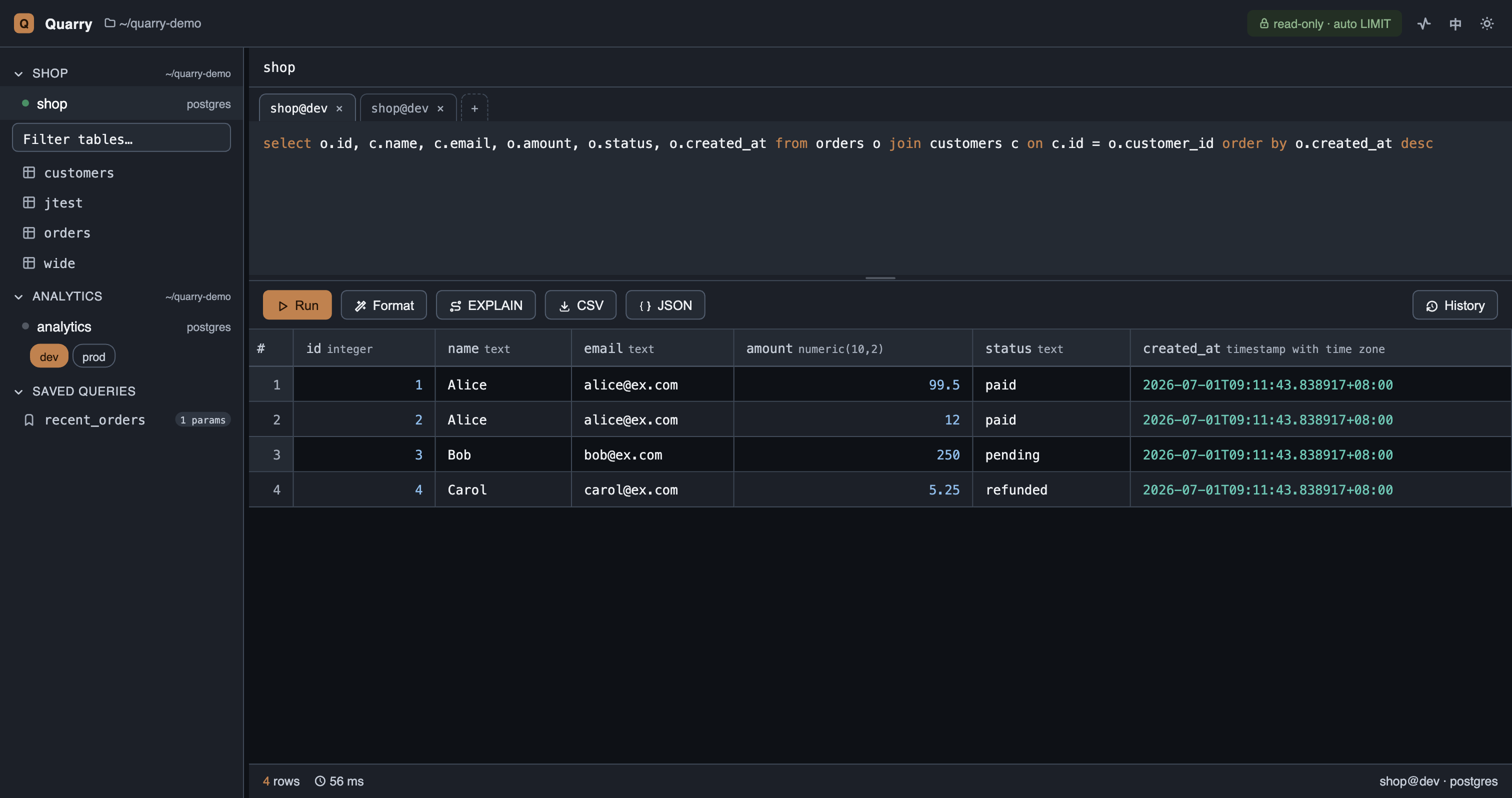
qy gui — a local, zero-build web GUI (Slate & Copper theme, light/dark):
- Grouped sidebar tree with env switcher (prod turns red), connection health dots
- Multi-tab editor — SQL and connection drafts persist when browser storage is available; result snapshots are bounded and large results remain in-session
- SQL highlighting + local autocomplete (keywords / tables / columns)
- EXPLAIN button — one click to the query plan
- Type-aware data grid: sorting, column resize, keyboard navigation (arrows + Enter), cell inspection with a collapsible JSON tree
- CSV/JSON export, searchable query history (with connection + time)
- TYPE-aware Redis key browsing with a collapsible namespace tree
- Update check — a background thread polls PyPI once every 24h and shows
a header badge (with the upgrade command + release notes) when a newer
quarry-dbis out. Editable/dev installs are skipped automatically; setQUARRY_UPDATE_CHECK=0to disable it entirely.
Privacy and support boundaries
Quarry does not upload connection credentials, queries or results to a Quarry service. Queries travel to the databases you configure. The GUI binds to localhost by default and checks local origins. Installed GUI packages periodically check PyPI for updates; set QUARRY_UPDATE_CHECK=0 to disable this.
Neptune/openCypher is experimental, outside the stable database support commitment. Its endpoint and local empty-service tests do not verify real AWS/IAM behavior. See COMPATIBILITY.md for supported test environments, persistence limits and the final 1.0 acceptance checklist.
Roadmap
- Column types in the result contract for all engines
- SQLite & DuckDB engines (zero-setup local demo)
- Cross-environment schema/data diff
- Write audit log (who ran what, where, when)
- Single-binary distribution
Development & testing
Tests are classified into four layers; use python -m pytest --collect-only -q
for the current count and CI reports for current coverage.
| Layer | Covers | Needs |
|---|---|---|
unit | pure logic and mocked engine behavior | test dependencies |
integration | real database and in-process CLI/GUI/MCP dispatch | relevant database; Docker for local lifecycle/sync |
e2e | real CLI/MCP subprocesses | PostgreSQL |
browser | real built GUI driven by Chromium (also in e2e) | PostgreSQL + Playwright; Redis for key browsing |
Missing dependencies can skip tests; a green run with skips is not a full release validation. CI provides PostgreSQL 16, MySQL 8.4 and Redis 7. The unit/integration coverage gate is ≥95%; frontend behavior is verified separately.
Seeing test status at a glance
- On GitHub: the CI badge above is live — it goes red if any layer or the coverage gate fails. Per-commit and per-PR results show under the Actions tab and as PR checks.
- Locally, pass/fail:
make testprints a colored per-layer summary; run one layer withmake test-unit/test-integration/test-e2e/test-browser. - Locally, coverage:
make covenforces the gate and writes an HTML report — openhtmlcov/index.htmlfor a line-by-line view of exactly what's covered.
See TESTING.md for the full architecture, fixtures, and CI layout, and CONTRIBUTING.md for contribution guidelines.
Quarry is developed and tested on macOS and Linux. Windows is currently untested (the psql/ssh integration and port takeover are Unix-flavored) — PRs welcome.
License
Explicit production connections
Environment names are labels, not a safety policy. Set production = true in
that connection's connections.toml section, for example env = "jp" with
production = true. An omitted flag defaults to false, even for env = "prod".
When upgrading, explicitly mark existing production connections before use.
Use qy connections set CONNECTION_KEY --production --no-test to mark one,
or --no-production to clear the flag (add --workspace PATH before
connections for a particular workspace). Other updates preserve the flag.
Production navigation prepares previews without executing them; Run remains an
explicit action. CLI writes require confirmation (or --yes), and MCP writes
require confirm_prod: true, in addition to their normal write opt-ins.