excelspreadsheetsagent-toolsstatefulrecalculation
Stateful MCP server for safe, token-efficient Excel workbook analysis, editing, and recalculation with session caching and fork workflows.
Quick Install
Automated & IDE SetupCopy the AI prompt to install this server into Claude Code, Cursor, or another agent — or use 1-click editor setup below.
One-click editor setup isn’t available for this listing yet — we don’t have a confirmed install command, and we’d rather show nothing than point your editor at the wrong package or host. Follow the project’s own setup instructions, linked above.
Manual Client & Custom JSON ConfigExpand JSON ▾
No confirmed setup config for this listing yet. We only publish a config block when the install details come from the project itself — its README, its docs, or a verified owner. We haven’t found those for PSU3D0/spreadsheet-mcp, and we’d rather show nothing than a guess you’d paste into your client. Follow the project’s own setup instructions for the current steps.
Overview
Use cases
Read and analyze Excel workbook sheets, regions, and named ranges
Perform safe, dry-run spreadsheet edits with formula-aware batch workflows
Recalculate workbooks and verify changes via proof and diff commands
Manage named ranges and perform formula-only replacements
Fork and branch workbook sessions with undo/redo and event sourcing
Key features
Supports .xlsx and .xlsm read/write; .xls and .xlsb read-only
Event-sourced session editing with logs, branches, forks, and undo/redo
Region detection and structured table reads
Formula inspection, diagnostics, and formula-safe batch editing
Verification workflows including proof and diff for changes
SheetPort manifest lifecycle for contract-driven automation
Capabilities & Tool Schemas (9)
Inspect callable tools, capabilities, and parameters exposed to AI agents by Spreadsheet MCP.
inspect_cellsdetail-view for up to 25 individual cells with full metadata (value, formula, style, number format)
layout_pagerender a sheet range with layout semantics (column widths, borders, merges) as JSON and optionally an ASCII grid
grid_exportexport a range as a rich grid payload with per-cell values, formulas, number formats, styles, column sizes, and merges
close_workbookevict a workbook from cache
execute_manifestexecute a SheetPort manifest with JSON inputs
verify_workbookcompare baseline/current workbook or fork ids and report target proof plus new/resolved/preexisting errors; the summary-first proof step after `recalculate`
Documentation Overview
agent-spreadsheet




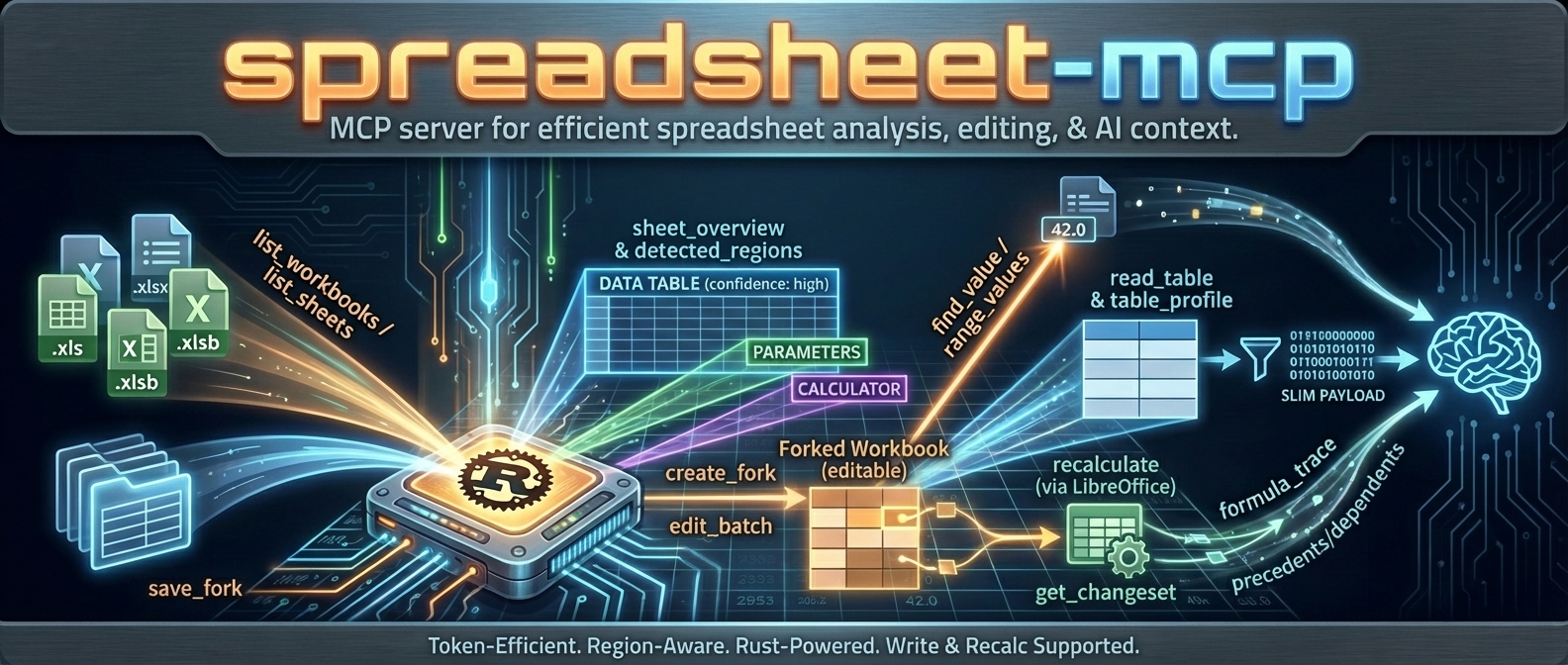
agent-spreadsheet is the tool interaction service for agent-based spreadsheet usage.
It gives agents a safe, inspectable, token-efficient way to read, analyze, mutate, verify, and operationalize Excel workbooks without falling back to brittle UI automation.
If you want an agent to work with spreadsheets like a real system instead of a screenshot puppet, this is the stack.
What this project is
agent-spreadsheet ships a unified spreadsheet interaction layer across three surfaces:
| Surface | Binary / Package | Mode | Best for |
|---|---|---|---|
| CLI | agent-spreadsheet / asp | Stateless files + resident sessions | One-shot pipelines or retained multi-turn workbook editing |
| MCP server | agent-spreadsheet-mcp | Stateful | Multi-turn agent sessions, workbook caching, fork/recalc workflows |
| TypeScript SDK | agent-spreadsheet-sdk | Library | App integrations — drives the server's canonical /v1 route, or runs fully in-process via the embedded WASM engine (no server required) |
The WASM build (agent-spreadsheet-wasm) is the SDK's local runtime, not a separate product surface: JS and TypeScript code targets one object model and the execution substrate (server vs embedded engine) is a configuration choice.
In 0.16 these surfaces share the resident Rust document/evaluator runtime and 32-operation registry. Explicit native sessions automatically start a private journal-backed host. SDK/WASM and genuine just-bash sessions retain their history in memory; XLSX export saves a document snapshot, not a restartable session journal. Warm edit/recalculate/read loops avoid XLSX serialization and repeated evaluator ingestion. See runtime guarantees and limits and the SDK/just-bash examples.
Supported workbook modes:
.xlsx/.xlsm— read + write.xls/.xlsb— discovery/read-oriented workflows only
Powered by Formualizer
Default in-process calculation uses Formualizer — a permissively licensed (MIT/Apache-2.0) spreadsheet engine written in Rust: formula parsing, dependency-graph recalculation, 400+ Excel functions, dynamic arrays, and deterministic evaluation built for agents. No Excel COM or headless LibreOffice is required. Optional LibreOffice integration remains available, but Formualizer is the release-critical backend.
That native engine is why this project can offer what most spreadsheet tooling for agents cannot: recalculate the actual workbook, trace which cells changed and why, and prove it — not just read cached values or push blind edits.
Embedding spreadsheet logic in your own product rather than driving workbooks as an agent? Use Formualizer directly (Rust, Python, JS/WASM).
Why agents use agent-spreadsheet
Built for tool use, not just humans
- deterministic JSON contracts
- schema and example discovery from the CLI itself
- explicit pagination and compact output modes
- machine-readable warnings and error envelopes
Safe mutation, not blind mutation
- dry-run first workflows
- stateless output modes and overwrite safety
- event-sourced session editing
- verification surfaces for proving downstream outcomes
- structural impact analysis before risky workbook changes
Spreadsheet-aware, not generic file editing
- region detection
- table and footer-aware append helpers
- template row / row band cloning
- formula-specific replace and diagnostics
- named range CRUD
- recalculation + diff + proof flows
Good agent ergonomics
- nested command groups with legacy alias compatibility
- token-efficient reads
- exact-cell inspection and layout inspection
- workflow helpers for the repetitive parts agents usually get wrong
What is new / what makes this stack different
The current surface is much stronger than a plain “read some cells” tool. Major capabilities now include:
aspas the primary CLI withagent-spreadsheetpreserved as a compatibility alias- grouped verification via
asp verify proofandasp verify diff - preview-first workflow helpers for:
write appendwrite clone-template-rowwrite clone-row-band
- formula-safe batch workflows with parse-policy diagnostics
- cell/layout/export/import inspection surfaces
- named range management (
write name define|update|delete) - formula-only replacement (
write formulas replace) - event-sourced session editing with log, branch, undo/redo, fork, apply, and materialize
- SheetPort manifest lifecycle + execution for contract-driven spreadsheet automation
Install
Shell installer
The installer downloads a prebuilt CLI to ~/.local/bin and creates the asp command. Pin a release with ASP_VERSION=0.16.0, set ASP_INSTALL_DIR to choose another destination, or pass --mcp to install the MCP server too:
npm
This installs both asp (the primary command) and agent-spreadsheet (the compatibility alias) from a prebuilt native binary. No Rust toolchain is required.
cargo-binstall
This installs the prebuilt CLI in seconds.
Cargo
This builds the CLI from source. Formualizer (the native Rust recalc engine) is included by default.
mise
MCP server
Docker
JavaScript SDK
Prebuilt binaries
Download raw binaries and archives from GitHub Releases.
Published native assets include:
- Linux x86_64
- Linux arm64
- macOS x86_64
- macOS arm64
- Windows native binaries are not shipped for 0.16; native release validation targets Linux and macOS
Start here: the core workflows
1) Orient the workbook before reading cells
2) Inspect exactly what an agent needs
3) Do a safe stateless edit → recalc → proof → diff loop
A representative label-mode lookup:
4) Preview structural risk before mutating the workbook
This is intentionally read-only. It surfaces shifted spans, absolute-reference warnings, token counts, and optional before/after formula samples.
5) Use workflow helpers instead of reinventing row logic
6) Use a stateful session when the edit story gets complex
And when you need proper history and branching:
Related MCP Servers
Adoption & maintenance
Factual signals from GitHub, npm, and our automated checks — not a rating.
GitHub stars
56
Stargazers on the source repository.
Last commit
2d ago
Most recent push to the default branch.
Tools exposed
9
Callable tools this server registers over MCP.
Directory activity
1 views
Config copies, upvotes, and views on AllMCPs.
Reviews
No reviews yet — be the first to share how this listing worked for you.
Frequently Asked Questions about Spreadsheet MCP
AllMCPs Directory Badge
Showcase your server listing on GitHub or your project documentation. Embed this dynamic SVG badge to highlight official listing status and live engagement.
Badge Style:
Live Dynamic SVG Preview
Markdown (GitHub README)
[](https://allmcps.com/mcp/psu3d0-spreadsheet-mcp)HTML Embed
<a href="https://allmcps.com/mcp/psu3d0-spreadsheet-mcp"><img src="https://allmcps.com/api/badge/psu3d0-spreadsheet-mcp?style=directory" alt="Spreadsheet MCP on AllMCPs" /></a>