Proxmox VE MCP server for VMs, LXCs, snapshots, backups, storage, and cluster operations.
Quick Install
Automated & IDE SetupCopy the AI prompt to install this server into Claude Code, Cursor, or another agent — or use 1-click editor setup below.
Not yet automatically verified
We haven't yet run this listing's install command through our automated sandbox check. This isn't a red flag — we're steadily working through the catalog.
Manual Client & Custom JSON ConfigExpand JSON ▾
Client Config & Setup
Choose your client or environment
Target File:
💡 Paste the JSON block into your client's configuration file under mcpServers, then restart the application.
Documentation Overview
ProxmoxMCP-Plus

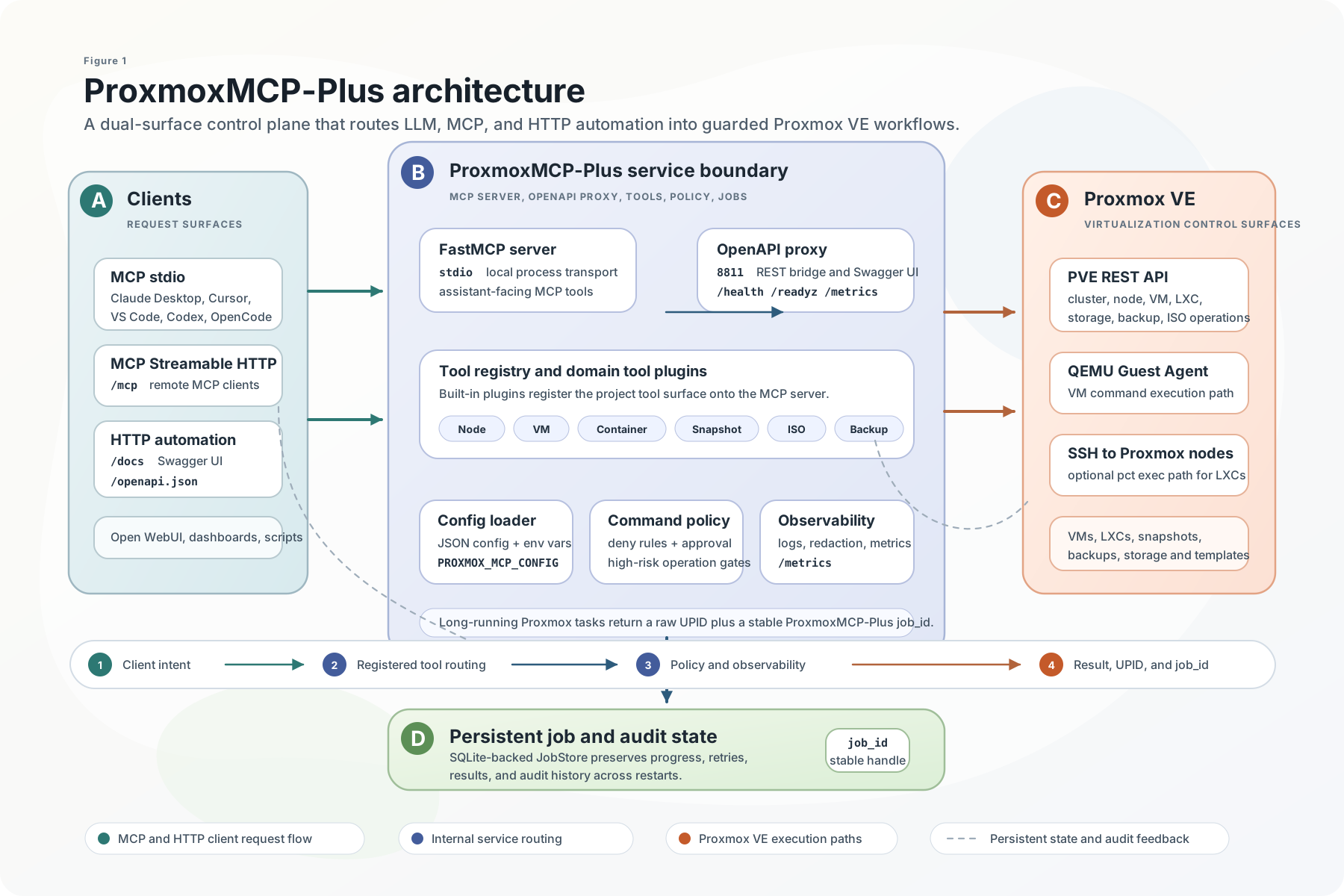
Operate Proxmox VE from MCP clients, AI agents, and OpenAPI tooling through one security-conscious control plane for VMs, LXCs, snapshots, backups, ISOs, container commands, and persistent long-running jobs.




Quick Start | Client Install | Demo | Tools | Safety | Scenarios | Docs | Wiki
Why ProxmoxMCP-Plus
ProxmoxMCP-Plus sits between AI clients and Proxmox VE so operators do not have to stitch together raw API calls, one-off shell scripts, and custom job polling for every workflow.
It exposes the same operational surface in two ways:
MCPfor Claude Desktop, Cursor, VS Code, Open WebUI, Codex, and other MCP-capable agentsOpenAPIfor HTTP automation, dashboards, internal tools, and no-code workflows
What you get:
- VM and LXC lifecycle actions
- snapshot create, rollback, and delete
- backup and restore workflows
- ISO download and cleanup
- node, storage, and cluster inspection
- SSH-backed container command execution with guardrails
- persistent job tracking for async Proxmox tasks
What Makes It Different
| Priority | How the project handles it |
|---|---|
| Dual access paths | Native MCP for agent workflows and OpenAPI for standard HTTP automation |
| Proxmox-oriented workflows | Day-2 VM, LXC, snapshot, backup, ISO, storage, and cluster operations |
| Long-running operations | Stable job_ids, Proxmox UPID tracking, polling, retry, cancel, and audit history |
| Safer execution | Proxmox API tokens, OpenAPI bearer auth, command policy, approval tokens, TLS validation, and MCP HTTP Host/Origin controls |
| Real validation | Unit, integration, Docker/OpenAPI, and live Proxmox e2e entry points are documented in the repo |
Quick Start
1. Prepare Proxmox Credentials
Create a Proxmox API token with only the permissions your workflows need. Then create the local config file:
Then edit proxmox-config/config.json with your environment. At minimum, it needs:
proxmox.hostproxmox.portauth.userauth.token_nameauth.token_value
Add an ssh section as well if you want container command execution.
Add a jobs section if you want job state persisted somewhere other than the default local SQLite file.
For real live verification, use a separate proxmox-config/config.live.json created from proxmox-config/config.live.example.json.
Do not point live e2e at a placeholder or local-only config.json unless you intentionally run a local API tunnel there.
Optional job persistence config:
Optional tool exposure filtering can reduce the schemas sent to MCP clients. It is
disabled by default, so existing configurations continue to expose every available
tool. Configure exactly one mode under mcp:
Alternatively, use tool_denylist, or the comma-separated environment variables
MCP_TOOL_ALLOWLIST and MCP_TOOL_DENYLIST. Do not configure both modes. Environment
selection replaces the file-level filtering mode. An empty allowlist exposes no tools;
an empty denylist hides none. Exact lowercase tool names are required, and unknown names
fail startup so a typo cannot silently widen access. Restart or reconnect the MCP server
after changing the filter.
2. Choose One Runtime Path
| Path | Best for | Start command | Verify |
|---|---|---|---|
| MCP stdio from PyPI | Claude Desktop, Cursor, VS Code, Codex, local agents | uvx proxmox-mcp-plus | client lists get_nodes, get_vms, and job tools |
| Native MCP HTTP from Docker | remote MCP clients that support Streamable HTTP | docker compose --profile mcp-http up -d proxmox-mcp-http | connect to http://localhost:8000/mcp |
| OpenAPI bridge from Docker | HTTP clients, dashboards, scripts, no-code tools | docker compose up -d | curl -f http://localhost:8811/livez |
MCP stdio with PyPI
Or install it first:
Use this path when the MCP client launches a local stdio server.
Code Mode (opt-in)
Code Mode is disabled by default to preserve the legacy full tool catalog. Enable it
with mcp.code_mode: true in the config file or MCP_CODE_MODE=true. When enabled,
MCP exposes three tools instead: proxmox_code_search, proxmox_code_get_schema, and
proxmox_code_execute. Code execution runs in an isolated sandbox and reaches domain
tools through the existing validation, policy, and approval path. Discovery uses the
filtered runtime catalog, so it also works in installed wheels. For example:
The final expression is returned as data.result; tool results use MCP JSON content
blocks (and structured content where supplied). Use proxmox_code_get_schema for
arguments, including target and approval tokens. Scripts have no filesystem or
network access except registered tool calls. Limits: 64,000 source characters,
100 MB sandbox memory, 25 tool calls, 16 KB final JSON, and two concurrent executions.
Execution has a 30-second budget; cancelling or failing a script does not roll back
tool side effects. Do not automatically retry a failed mutation script.
Native MCP HTTP with Docker
Use this path when a remote MCP client supports Streamable HTTP:
Point MCP clients at:
Send Authorization: Bearer <MCP_API_KEY> with every native MCP HTTP request.
The key is independent of Proxmox credentials. Native Streamable HTTP and SSE
require a key by default. For an endpoint protected by an external access-control
layer such as Tailscale ACLs, explicitly set MCP_ALLOW_UNAUTHENTICATED_HTTP=true
or mcp.allow_unauthenticated_http: true in JSON configuration. This allows
keyless startup and logs a warning; it does not configure or verify the external
access controls. A configured MCP_API_KEY is always enforced, even with opt-out.
This setting does not change OpenAPI authentication or DNS rebinding protection.
When serving MCP HTTP behind a reverse proxy, keep DNS rebinding protection enabled and allow only the hostnames you expect:
OpenAPI bridge with Docker
OpenAPI mode is the default Docker runtime and requires an API key:
Verify the OpenAPI surface:
For local unauthenticated development only, set PROXMOX_ALLOW_NO_AUTH=true.
Source checkout
The 8811 service is the OpenAPI/REST bridge. The 8000 service is the native MCP HTTP endpoint.
Client Install
Use the one-click buttons when your client supports MCP install deeplinks, or copy the JSON config below.
Related MCP Servers
Adoption & maintenance
Factual signals from GitHub, npm, and our automated checks — not a rating.
GitHub stars
550
Stargazers on the source repository.
Last commit
4d ago
Most recent push to the default branch.
Reviews
No reviews yet — be the first to share how this listing worked for you.
Frequently Asked Questions about ProxmoxMCP Plus
AllMCPs Directory Badge
Showcase your server listing on GitHub or your project documentation. Embed this dynamic SVG badge to highlight official listing status and live engagement.
Badge Style:
Live Dynamic SVG Preview
Markdown (GitHub README)
[](https://allmcps.com/mcp/proxmoxmcp-plus)HTML Embed
<a href="https://allmcps.com/mcp/proxmoxmcp-plus"><img src="https://allmcps.com/api/badge/proxmoxmcp-plus?style=directory" alt="ProxmoxMCP Plus on AllMCPs" /></a>Technical Specs & Signals
CategoryDeveloper Tools
11/13 checks healthy over the last 46d
47Quality signal: Fair · 47/100How this signal is calculated ▾
Server availabilityNot measured
Not scored for repo-hosted servers — we can't reach the running server, only its GitHub page. Hosted MCP endpoints are health-checked live.
Verified ownership10/20
Documentation & tools16/30
Adoption & activity9/15
Community engagement0/10
A guidance signal from public completeness & health data — not a user rating. New listings start lower and rise as they add docs, get verified, and grow adoption. Signals we can't observe for a listing are skipped, not counted against it.
Supply-chain signal
No high-severity advisories surfaced by our automated scan.
Critical 0High 0Medium 0Low 0
Scanned 2d ago via OSV.dev · proxmox-mcp-plus (PyPI)
Own this project?
This directory is pre-filled from public sources. Claim via GitHub README, site badge, or DNS TXT to unlock edit access and the Official badge — proof is checked automatically, then reviewed by our team.
Free dofollow backlink: add your website and place the AllMCPs badge on it — no claim needed. We detect it automatically and keep it verified as long as the badge stays live.
Claim & get free dofollowShare & Embed
Add our SVG badge (dark/light directory styles) or embeddable widget to your site.