
proxmox-mcp
An MCP server that lets an AI client read and operate a Proxmox VE cluster, VMs, containers, and nodes, over plain API-token auth.
Why: your homelab lives in Proxmox, and you want an agent to inventory it, boot a guest, or trace a task without you clicking through the web UI. How it differs: a strict three-tier write gate is built into every tool, so reads are open but anything that changes state needs an explicit confirm flag, and anything destructive needs two more gates on top. Status: WIP. The tool surface and the safety model are stable, but the package is still pre-1.0. The latest release is 0.12.0.
Website & docs → lidless.dev/proxmox-mcp




What it does
proxmox-mcp is an open-source Model Context Protocol server for Proxmox VE, the open-source virtualization platform. It gives an AI client (Claude Desktop, Claude Code, OpenClaw, Codex CLI, or any MCP host) a structured, gated interface to a Proxmox cluster: inventory VMs and LXC containers, inspect node and storage status, read RRD metrics, trace tasks, manage snapshots and backups, run gated reads and shell commands inside guests, and provision, clone, or destroy resources, all over Proxmox API-token auth.
It is built for homelab and virtualization operators who want to point an agent at their cluster without handing it a root shell. The differentiator is the write-safety model: 96 tools split across four tiers, where reads need nothing, safe writes need confirm: true, and destructive operations need confirm: true + destructive: true + a process-level PROXMOX_ENABLE_DESTRUCTIVE=1 env flag. A hallucinated or careless tool call fails closed, before any HTTP traffic reaches Proxmox.
Proof
A real MCP client config. Drop this into Claude Desktop (claude_desktop_config.json) and the 96 tools appear in the client. Reads work immediately; the destructive env gate stays off until you opt in.
{
  "mcpServers": {
    "proxmox": {
      "command": "npx",
      "args": ["-y", "@solomonneas/proxmox-mcp"],
      "env": {
        "PROXMOX_URL": "https://192.0.2.10:8006",
        "PROXMOX_TOKEN_ID": "pve-admin@pam!api-token-1",
        "PROXMOX_TOKEN_SECRET": "REPLACE_WITH_TOKEN_SECRET",
        "PROXMOX_TLS_INSECURE": "false"
      }
    }
  }
}
Tool list (96 tools, verified against source)
Tier markers below are authoritative: each tool's gate is enforced in code (src/gates.ts + per-tool schema), and WriteGateError fires before any HTTP call when a gate is unmet.
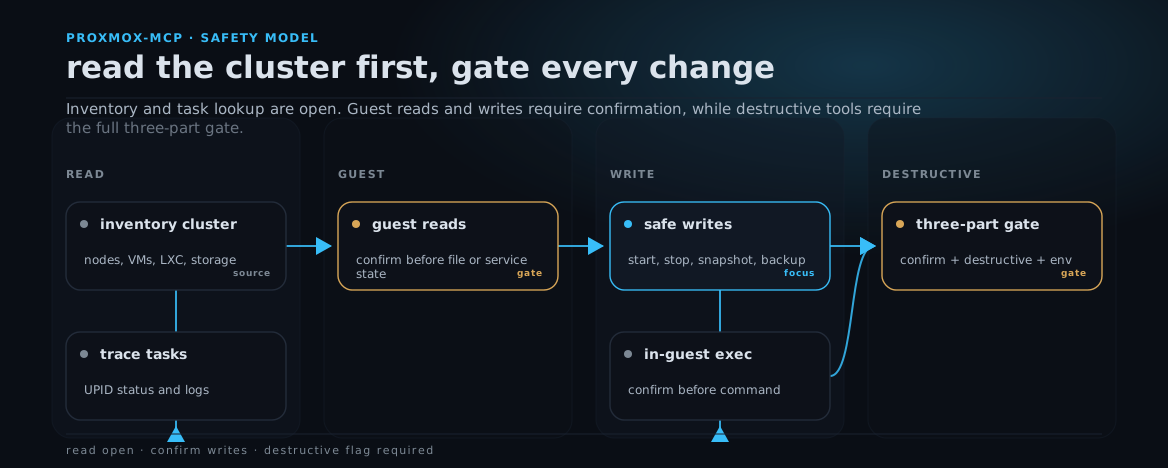
Generated from docs/assets/workflows/proxmox-safety.json with lidless workflow.
| Tool | Tier | Notes |
|---|---|---|
proxmox_status | 1 read | Cluster + node status. |
proxmox_list_containers | 1 read | LXC inventory across all nodes. |
proxmox_list_vms | 1 read | QEMU inventory across all nodes. |
proxmox_get_resource | 1 read | Single container or VM config + status by vmid. |
proxmox_get_vm_config | 1 read | QEMU VM config by vmid. |
proxmox_get_container_config | 1 read | LXC container config by vmid. |
proxmox_validate_qemu_smoke_source | 1 read | Preflight a QEMU VM before live smoke cloning. |
proxmox_audit_permissions | 1 read | Inspect effective permissions across smoke-relevant paths. |
proxmox_recent_tasks | 1 read | Recent UPID task list per node. |
proxmox_list_backups | 1 read | Backup inventory by storage. |
proxmox_resource_usage | 1 read | CPU/mem/disk RRD metrics. |
proxmox_list_templates | 1 read | LXC + VM templates available for cloning + container creation. |
proxmox_list_storage | 1 read | Storage status on one node or all nodes. |
proxmox_list_snapshots | 1 read | Snapshot inventory for one LXC or VM. |
proxmox_guest_network | 1 read | Guest network interfaces and usable IPv4 addresses. |
proxmox_wait_task | 1 read | Poll a UPID until stopped or timeout. |
proxmox_next_vmid | 1 read | Get the next available VMID for provisioning. |
proxmox_list_pool_resources | 1 read | Inspect resources assigned to a Proxmox pool, defaulting to mcp-smoke. |
proxmox_get_task_status | 1 read | Single UPID status lookup. |
proxmox_get_task_log | 1 read | Task log tail for a UPID. |
proxmox_list_storage_content | 1 read | List volumes on a storage: ISOs, templates, disk images, backups. |
proxmox_list_node_services | 1 read | Host systemd service states (pveproxy, pvedaemon, corosync). |
proxmox_list_disks | 1 read | Physical disks with model/size/SMART health/wearout. |
proxmox_list_updates | 1 read | Pending APT updates on a node (needs a Sys.Modify token). |
proxmox_list_firewall_rules | 1 read | Firewall rules at cluster/node/guest scope. |
proxmox_get_firewall_options | 1 read | Firewall enable state + default policy at a scope. |
proxmox_list_storage_config | 1 read | Datacenter storage definitions (id/type/content/nodes). |
proxmox_list_backup_jobs | 1 read | Scheduled vzdump backup jobs. |
proxmox_list_users | 1 read | Access users (userid, realm, enabled state). |
proxmox_list_roles | 1 read | Roles and their privileges. |
proxmox_list_acl | 1 read | ACL entries: who holds which role on which path. |
proxmox_list_pools | 1 read | All resource pools. |
proxmox_list_tokens | 1 read | API tokens for a user. |
proxmox_cluster_status | 1 read | Cluster membership + quorum per node. |
proxmox_ha_status | 1 read | HA manager status: quorum, fencing, resource states. |
proxmox_list_ha_resources | 1 read | HA-managed resources. |
proxmox_list_ha_rules | 1 read | HA rules (PVE 9+ replacement for HA groups). |
proxmox_list_replication | 1 read | Storage replication jobs. |
proxmox_list_sdn_zones | 1 read | SDN zones. |
proxmox_list_sdn_vnets | 1 read | SDN virtual networks. |
proxmox_list_metric_servers | 1 read | External metrics servers (InfluxDB/Graphite). |
proxmox_get_cluster_options | 1 read | Datacenter options (keyboard, MAC prefix, tags). |
proxmox_cluster_log | 1 read | Recent cluster-wide log entries. |
proxmox_read_file | 2 gated guest read | Read a file from inside an LXC or QEMU VM (SSH + cat). Requires confirm: true. |
proxmox_stat_path | 2 gated guest read | Inspect guest path metadata. Requires confirm: true. |
proxmox_list_directory | 2 gated guest read | List one guest directory. Requires confirm: true. |
proxmox_service_status | 2 gated guest read | Read systemd service state inside a guest. Requires confirm: true. |
proxmox_start_resource | 2 safe-write | Boot container or VM. Requires confirm: true. |
proxmox_stop_resource | 2 safe-write | Graceful shutdown. Requires confirm: true. |
proxmox_reboot_resource | 2 safe-write | Reboot in place. Requires confirm: true. |
proxmox_snapshot_resource | 2 safe-write | Create named snapshot. Requires confirm: true. |
proxmox_run_backup | 2 safe-write | Trigger vzdump for a vmid. Requires confirm: true. |
proxmox_create_container | 2 safe-write | Provision new LXC from template (POST /nodes/{node}/lxc). Requires confirm: true. |
proxmox_create_vm | 2 safe-write | Provision new QEMU VM (POST /nodes/{node}/qemu). Requires confirm: true. |
proxmox_clone_resource | 2 safe-write | Clone existing container or VM into a fresh vmid. Requires confirm: true. |
proxmox_exec | 2 safe-write | Run a shell command inside an LXC or QEMU VM. Returns stdout/stderr/exit_code. Requires confirm: true. |
proxmox_write_file | 2 safe-write | Write a text file (with parent dirs) inside an LXC or QEMU VM. Requires confirm: true. |
proxmox_service_start | 2 safe-write | Start a systemd service inside a guest. Requires confirm: true. |
proxmox_service_stop | 2 safe-write | Stop a systemd service inside a guest. Requires confirm: true. |
proxmox_service_restart | 2 safe-write | Restart a systemd service inside a guest. Requires confirm: true. |
proxmox_update_vm_config | 2 safe-write | Edit an existing QEMU VM config (cores/memory/net/etc, PUT .../qemu/{vmid}/config). Requires confirm: true. |
proxmox_update_container_config | 2 safe-write | Edit an existing LXC config (cores/memory/hostname/etc, PUT .../lxc/{vmid}/config). Requires confirm: true. |
proxmox_resize_disk | 2 safe-write | Grow a VM or container disk (PUT .../{type}/{vmid}/resize). Grow-only. Requires confirm: true. |
proxmox_restore_backup | 2 safe-write | Restore a vzdump/PBS archive into a VMID. Overwriting an existing VMID escalates to the destructive gate. Requires confirm: true. |
proxmox_migrate_resource | 2 safe-write | Migrate a VM or container to another node (POST .../migrate). Requires confirm: true. |
proxmox_suspend_resource | 2 safe-write | Suspend/pause a running guest (QEMU can hibernate to disk). Requires confirm: true. |
proxmox_resume_resource | 2 safe-write | Resume a suspended guest. Requires confirm: true. |
proxmox_reset_resource | 2 safe-write | Hard-reset a QEMU VM (reset button; no graceful shutdown). Requires confirm: true. |
proxmox_convert_to_template | 2 safe-write | Convert a stopped guest into a clone template (one-way). Requires confirm: true. |
proxmox_download_url | 2 safe-write | Download an ISO or container template from a URL onto a storage. Requires confirm: true. |
proxmox_cancel_task | 2 safe-write | Stop a running task by UPID (abort a stuck migration/backup). Requires confirm: true. |
proxmox_add_firewall_rule | 2 safe-write | Add a firewall rule at cluster/node/guest scope. Requires confirm: true. |
proxmox_delete_firewall_rule | 2 safe-write | Delete a firewall rule by position at a scope. Requires confirm: true. |
proxmox_set_firewall_enabled | 2 safe-write | Enable/disable the firewall at a scope. Requires confirm: true. |
proxmox_move_disk | 2 safe-write | Relocate a VM disk or container volume to another storage. Requires confirm: true. |
proxmox_create_storage | 2 safe-write | Define a new datacenter storage (dir/nfs/lvm/pbs/etc). Requires confirm: true. |
proxmox_create_backup_job | 2 safe-write | Create a scheduled vzdump backup job. Requires confirm: true. |
proxmox_delete_backup_job | 2 safe-write | Delete a scheduled backup job (archives untouched). Requires confirm: true. |
proxmox_set_acl | 2 safe-write | Grant or revoke a role for a user/token/group on a path. Requires confirm: true. |
proxmox_create_token | 2 safe-write | Create an API token; returns the secret once. Requires confirm: true. |
proxmox_delete_token | 2 safe-write | Revoke an API token. Requires confirm: true. |
proxmox_create_pool | 2 safe-write | Create a resource pool. Requires confirm: true. |
proxmox_update_pool | 2 safe-write | Add/remove guests or storage in a pool. Requires confirm: true. |
proxmox_delete_pool | 2 safe-write | Delete an empty resource pool. Requires confirm: true. |
proxmox_add_ha_resource | 2 safe-write | Place a VM/container under HA management. Requires confirm: true. |
proxmox_delete_ha_resource | 2 safe-write | Remove a guest from HA management. Requires confirm: true. |
proxmox_create_replication | 2 safe-write | Create a storage replication job to another node. Requires confirm: true. |
proxmox_delete_replication | 2 safe-write | Delete a replication job. Requires confirm: true. |
proxmox_rollback_snapshot | 3 destructive | Roll back a resource to a named snapshot. |
proxmox_destroy_resource | 3 destructive | Permanently delete an LXC or VM (DELETE /nodes/{node}/{type}/{vmid}). |
proxmox_cleanup_smoke_resources | 3 destructive | Dry-run or destroy smoke-prefixed LXC/QEMU guests from a smoke pool. |
proxmox_delete_snapshot | 3 destructive | Delete a named snapshot. |
proxmox_force_stop_resource | 3 destructive | Non-graceful hard stop of a running container or VM. |
proxmox_delete_volume | 3 destructive | Permanently delete a storage volume (backup, ISO, template, disk image). |
proxmox_node_power | 3 destructive | Reboot or shut down an entire node, taking down every guest on it. |
proxmox_delete_storage | 3 destructive | Remove a storage definition from the datacenter config. |
Reads (43): open; no flags required.
Gated guest reads (4): guest file/path/directory/service inspection tools require confirm: true because they expose in-guest state through host-backed SSH.
Safe writes (41): require confirm: true. The schema documents the gate on every tool. WriteGateError fires before any HTTP call.
Destructive (8): require confirm: true + destructive: true + env PROXMOX_ENABLE_DESTRUCTIVE=1. All three gates must be satisfied; if any one is missing the tool throws WriteGateError before resolving the resource.
MCP annotations. tools/list reports readOnlyHint, destructiveHint and openWorldHint on every tool (true only for proxmox_download_url, which fetches from a host outside the cluster, and proxmox_exec, whose shell command can contact any host), plus idempotentHint where it applies, so clients that ask a person before running a tool can do so. The annotations follow the tier with these refinements: the four gated guest reads report readOnlyHint: true, and the safe-write tools that execute commands, write files, stop or reset workloads, or change credentials, permissions, firewall or storage placement report destructiveHint: true even though their gate stays confirm: true. The gate arguments a call must carry are unchanged; the hint only changes how a client presents the call. The full list lives in src/registry.ts.
Eight tools are destructive and can delete, hard-stop, or power off resources:
proxmox_destroy_resource,proxmox_cleanup_smoke_resources,proxmox_rollback_snapshot,proxmox_delete_snapshot,proxmox_force_stop_resource,proxmox_delete_volume,proxmox_node_power, andproxmox_delete_storage. They are gated behind thePROXMOX_ENABLE_DESTRUCTIVE=1process env flag and stay inert until you set it. See SECURITY.md and the Safety section.
Quickstart
Install globally or run on demand with npx:
npm install -g @solomonneas/proxmox-mcp
# or, no install:
npx -y @solomonneas/proxmox-mcp
Set the three required credential env vars (scrub real hosts and IPs out of any shared config):
export PROXMOX_URL=https://192.0.2.10:8006
export PROXMOX_TOKEN_ID=pve-admin@pam!api-token-1
export PROXMOX_TOKEN_SECRET=REPLACE_WITH_TOKEN_SECRET

# Optional: skip TLS cert validation for homelab self-signed certs.
# Accepts true/1/yes (case-insensitive). Defaults to false.
export PROXMOX_TLS_INSECURE=false
Wire it into your MCP client (full per-client config in Setup):
# Claude Code
claude mcp add proxmox -s user -- npx -y @solomonneas/proxmox-mcp
Then ask your agent to list your cluster's containers. Reads work with nothing but the three credential vars; write and destructive tiers stay gated until you opt in.
Note: the latest published version is
0.12.0.npx/npm installpins the published release; this repository may track ahead between releases.
Configuration
Set the following env vars. All three credential vars are required.
PROXMOX_URL=https://192.0.2.10:8006
PROXMOX_TOKEN_ID=pve-admin@pam!api-token-1
PROXMOX_TOKEN_SECRET=REPLACE_WITH_TOKEN_SECRET

# Optional: skip TLS cert validation (homelab self-signed certs).
# Accepts true/1/yes (case-insensitive). Defaults to false.
PROXMOX_TLS_INSECURE=false

# Optional (experimental): load tools on demand instead of listing all 96.
# Accepts true/1/yes (case-insensitive). Defaults to false. See "Deferred tool loading".
PROXMOX_DEFERRED_TOOLS=false
PROXMOX_TOKEN_SECRET is the UUID Proxmox shows exactly once when you create the API token; it cannot be read back afterwards. Every example here uses a literal REPLACE_WITH_TOKEN_SECRET placeholder rather than a UUID-shaped dummy, so copying a snippet into your own repo will not trip a secret scanner.
Trailing slashes on PROXMOX_URL are stripped. The token secret is registered with the redactor on startup and masked from all log + error output.
Deferred tool loading (experimental)
96 tool schemas cost roughly 17k tokens of context in every request, whether or not the agent needs a single one of them. Set PROXMOX_DEFERRED_TOOLS=1 and the server instead starts with one tool, proxmox_search_tools. The agent describes its task, gets back matching tool descriptors, and those tools are added to that connection's tool list; the server emits notifications/tools/list_changed, the client re-reads the list, and the agent calls the tool it wants with its own real schema. Measured on a live connection, the visible tools/list payload drops from 68,495 bytes to 1,400, a 98% reduction.
Requirements and caveats:
-
Your client must honor
notifications/tools/list_changed, and not all of them do. Measured against a real connection:Client Deferred mode Notes Claude Code 2.1.219 works re-fetches tools/list2ms after the notification, then calls the new toolCursor (cursor-agent 2026.07.23) does not work receives the notification, never re-lists; the agent is then told the tool does not exist Codex CLI 0.145.0 untested could not dispatch MCP tool calls headlessly in our harness, so list_changedsupport is unknownA client that ignores the notification will see the search succeed, be told which tools were loaded, and then be unable to call any of them. Leave the flag unset there. Default (flag unset) is the full static tool list exactly as before, which is why static profiles remain the supported path.
-
On clients that apply their own tool deferral, a newly listed tool may be visible but not immediately callable until the client fetches its schema, which costs one extra turn.
-
Hiding a tool is not a safety mechanism. Destructive tools are searchable, and the gate chain is unchanged: a tool reached through search still requires
confirm: true,destructive: true, andPROXMOX_ENABLE_DESTRUCTIVE=1exactly as it would otherwise. Search results carry each tool's tier and the gate arguments it will demand. The gates insrc/gates.tsare the boundary; visibility is a token optimization. -
Calling a tool by name that search has not surfaced still works. Refusing it would create a second, weaker enforcement surface without adding safety.
In-container exec env vars
The proxmox_exec, proxmox_read_file, and proxmox_write_file tools SSH to the Proxmox host (for LXC, via pct exec) or directly to the VM (for QEMU). All are optional; defaults derive from PROXMOX_URL.
| Env var | Default | Purpose |
|---|---|---|
PROXMOX_SSH_HOST | hostname from PROXMOX_URL | Proxmox host for pct exec |
PROXMOX_SSH_PORT | 22 | SSH port |
PROXMOX_SSH_USER | root | SSH user on Proxmox host |
PROXMOX_SSH_KEY | ~/.ssh/id_ed25519 | Key path for Proxmox host SSH |
PROXMOX_VM_SSH_USER | falls through to PROXMOX_SSH_USER | Default user for direct VM SSH |
PROXMOX_VM_SSH_KEY | falls through to PROXMOX_SSH_KEY | Default key for direct VM SSH |
PROXMOX_SSH_MAX_OUTPUT_BYTES | 1048576 | Max stdout bytes and max stderr bytes captured per SSH command |
PROXMOX_MAX_RESULT_BYTES | 100000 | Max size of one tool result returned to the client (minimum 2048). Larger results are replaced by a JSON envelope with truncated: true and a preview. |
PROXMOX_EXEC_BACKEND | ssh | QEMU exec backend: ssh (direct SSH to the VM) or guest-agent (qemu-guest-agent API, no in-guest SSH key needed). LXC always uses pct exec over host SSH. |
Per-VM overrides (read at execute time, no MCP restart needed):
PROXMOX_VM_<vmid>_SSH_HOST- pin a VM's IP (bypasses guest agent)PROXMOX_VM_<vmid>_SSH_USER- per-VM user overridePROXMOX_VM_<vmid>_SSH_KEY- per-VM key override
For QEMU VMs without a per-VM env override, install qemu-guest-agent in the VM and enable it with qm set <vmid> --agent 1 so the IP can be discovered automatically.
Set PROXMOX_EXEC_BACKEND=guest-agent to run QEMU guest commands entirely through the qemu-guest-agent API instead of SSH. This needs no in-guest SSH key and no network path from the MCP host to the VM (traffic goes through the Proxmox API), but the API token needs the VM.GuestAgent.* privileges (Unrestricted for exec, FileRead/FileWrite for file ops). LXC guests always use pct exec over host SSH regardless of this setting.
Waiting for long-running tasks
Provisioning and disk operations (proxmox_create_container, proxmox_create_vm, proxmox_clone_resource, proxmox_run_backup, proxmox_restore_backup, proxmox_migrate_resource, proxmox_resize_disk, proxmox_download_url, proxmox_destroy_resource) return a task UPID immediately. Pass wait: true (with optional wait_timeout seconds, default 120) to block until the task finishes; the result then includes a task object with done, exitstatus, and ok (true only for an OK exit). Without wait, use proxmox_wait_task to poll the UPID yourself.
CLI
The same package ships a read-only control CLI, proxmoxctl (alias proxops), for shells, cron, and CI. It shares the ProxmoxClient core with the MCP server and reads the same env config (PROXMOX_URL, PROXMOX_TOKEN_ID, PROXMOX_TOKEN_SECRET, PROXMOX_TLS_INSECURE). It exposes only read/inventory/audit operations; every lifecycle, snapshot, backup, and exec action stays in the MCP/plugin surface behind the safety gates.
npx @solomonneas/proxmox-mcp@latest status
# or, installed globally:
proxmoxctl status                       # PVE version + per-node status (exit 1 if a node is offline)
proxmoxctl vms list
proxmoxctl containers list
proxmoxctl vm config 100
proxmoxctl storage list --node pve
proxmoxctl storage content local --node pve --content backup
proxmoxctl disks list --node pve        # physical disks + SMART health
proxmoxctl services list --node pve     # host systemd services
proxmoxctl firewall rules --scope cluster
proxmoxctl backups list --vmid 100
proxmoxctl snapshots list 100
proxmoxctl audit-permissions
proxmoxctl recent-tasks --limit 20
proxmoxctl task status UPID:pve:...
proxmoxctl vms list --json              # raw JSON for piping
Run proxmoxctl help for the full command list. --json emits raw JSON instead of the concise summary. Exit codes: 0 success, 1 runtime error (backend unreachable / call failed, and status when a node is offline), 2 usage error (unknown command/flag or bad value).
Starting the MCP server
proxmoxctl mcp (or the back-compat proxmox-mcp bin) starts the stdio MCP server. If a launcher referenced the file path dist/mcp-server.js directly, it keeps working; new launchers can point at dist/mcp-bin.js (or dist/cli.js mcp). Launchers that use the proxmox-mcp bin name need no change.
Shared HTTP mode
Run one persistent process for multiple MCP clients:
node dist/cli.js mcp --http
# Or: proxmoxctl mcp --http
Set the usual PROXMOX_URL, PROXMOX_TOKEN_ID, and PROXMOX_TOKEN_SECRET
on the server, plus an independent PROXMOX_MCP_HTTP_TOKEN. Generate a random
HTTP token, for example with openssl rand -hex 32. Startup refuses a missing or
blank token, or one equal to the Proxmox token ID, token secret, complete API
authorization value, or URL credentials. Tokens are compared using SHA-256 and
constant-time comparison. Keep the token private: every client with it shares
the server's Proxmox privileges and process-level destructive-operation flag.
| Variable | Default | Purpose |
|---|---|---|
PROXMOX_MCP_HTTP_TOKEN | Required | Bearer credential, at least 32 characters, separate from upstream credentials |
PROXMOX_MCP_HTTP_HOST | IPv4 loopback | Listener bind address. Wildcards (0.0.0.0, ::, [::]) are refused |
PROXMOX_MCP_HTTP_PORT | 3100 | TCP port (0 selects a free port) |
The resolved address is printed to stderr on startup. /mcp supports Streamable
HTTP POST, GET, and DELETE with bearer authentication on every request.
GET /healthz requires no token and returns only {"status":"ok"}.
Requests must use the bound host or a loopback alias in Host. A supplied
Origin must be an HTTP or HTTPS loopback origin. Request bodies are limited to
1 MiB. The listener accepts at most 128 sessions, reaps sessions idle for 30 minutes
(on a minute timer), and closes transports and the listener on SIGTERM or SIGINT.
Active tool requests are excluded from idle expiry. An idle SSE channel does not
keep a session alive. Clients must initialize again after expiry or a restart.
Each initialized MCP session gets its own server and deferred-tool visible set.
Confirmation gates have no pending approvals: confirm, destructive, and the
environment gate are checked on every tool invocation. One session's confirmation
cannot authorize another call. The secret-redaction registry is process-wide and
only adds masking, never authorization. Session IDs route connection state and
are not separate user identities. All clients using the shared bearer token are
in the same trust boundary. HTTP mode preserves the existing stdio defaults.
Keep the default loopback binding for local clients. A non-loopback listener requires a trusted TLS proxy or tunnel and appropriate network access controls. This transport does not provide TLS, OAuth, browser CORS access, or per-client Proxmox accounts. Preserve the allowed Host header through a proxy. A wildcard bind does not allow arbitrary Host headers. Use a specific bind address or host name for remote clients.
Claude Code
Add this entry under mcpServers in ~/.claude.json. Replace the token placeholder
with the HTTP token. Restrict access to the config file.
{
  "mcpServers": {
    "proxmox": {
      "type": "http",
      "url": "http://localhost:3100/mcp",
      "headers": {
        "Authorization": "Bearer <HTTP_TOKEN>"
      }
    }
  }
}
The type and header syntax follow the
Claude Code MCP configuration.
Codex
Add to ~/.codex/config.toml, and export PROXMOX_MCP_HTTP_TOKEN in the environment
that launches Codex. Its value must match the server's token, without the
Bearer prefix. The client needs no upstream Proxmox credentials.
[mcp_servers.proxmox]
url = "http://localhost:3100/mcp"
bearer_token_env_var = "PROXMOX_MCP_HTTP_TOKEN"
These fields follow the Codex Streamable HTTP configuration.
systemd user service
An example unit is at
docs/systemd/proxmox-mcp-http.service.
Adjust its generic installation paths, build the project there, and place the
server environment in %h/.config/proxmox-mcp/http.env with mode 0600:
PROXMOX_URL=https://proxmox.example.com:8006
PROXMOX_TOKEN_ID=operator@pve!mcp
PROXMOX_TOKEN_SECRET=REPLACE_WITH_UPSTREAM_SECRET
PROXMOX_MCP_HTTP_TOKEN=REPLACE_WITH_INDEPENDENT_RANDOM_TOKEN
PROXMOX_MCP_HTTP_PORT=3100
The unit reads this file with EnvironmentFile. Add SSH settings there if the
chosen tools require them. Leave PROXMOX_ENABLE_DESTRUCTIVE unset unless the
service should permit destructive calls. Installing or starting the example is
an operator action, separate from building the server.
Setup
Claude Desktop
~/Library/Application Support/Claude/claude_desktop_config.json (macOS) or %APPDATA%\Claude\claude_desktop_config.json (Windows):
{
  "mcpServers": {
    "proxmox": {
      "command": "npx",
      "args": ["-y", "@solomonneas/proxmox-mcp"],
      "env": {
        "PROXMOX_URL": "https://192.0.2.10:8006",
        "PROXMOX_TOKEN_ID": "pve-admin@pam!api-token-1",
        "PROXMOX_TOKEN_SECRET": "REPLACE_WITH_TOKEN_SECRET",
        "PROXMOX_TLS_INSECURE": "false"
      }
    }
  }
}
Claude Code
claude mcp add proxmox -s user -- npx -y @solomonneas/proxmox-mcp
Then export env vars in your shell (~/.bashrc, ~/.zshrc) or pass --env flags.
OpenClaw
Plugin loads automatically once installed. Config goes in your ~/.openclaw/openclaw.json plugins.entries.proxmox (or use the bundled openclaw.plugin.json):
{
  "plugins": {
    "entries": {
      "proxmox": {
        "package": "@solomonneas/proxmox-mcp",
        "activation": { "onStartup": true }
      }
    }
  }
}
Env vars from ~/.openclaw/workspace/.env are inherited by the plugin.
Codex CLI
~/.codex/config.toml:
[mcp_servers.proxmox]
command = "npx"
args = ["-y", "@solomonneas/proxmox-mcp"]

[mcp_servers.proxmox.env]
PROXMOX_URL = "https://192.0.2.10:8006"
PROXMOX_TOKEN_ID = "pve-admin@pam!api-token-1"
PROXMOX_TOKEN_SECRET = "REPLACE_WITH_TOKEN_SECRET"
PROXMOX_TLS_INSECURE = "false"
Safety
This MCP uses a three-tier write-gating model. The tier is enforced in code, not just documented.
- Tier 1 (reads): open. No confirm flag needed. Status, listings, config inspection, QEMU smoke-source validation, permission audit, usage, recent tasks, backup inventory, template inventory, storage inventory, snapshot inventory, guest network lookup, task wait, next-VMID lookup, task status/log, pool resource audit, storage content listing, node service/disk/update inventory, and firewall rule/option inspection, storage-config and backup-job listing, and access/role/ACL/pool/token inspection, and cluster/HA/SDN/replication observability live here.
- Tier 2 (gated guest reads + safe writes): require an explicit
confirm: truearg. Guest file/path/directory/service inspection, start, stop, reboot, snapshot create, run backup, create container, create VM, clone, VM/container config edit, disk resize, backup restore (to a new VMID), node migration, suspend/resume/reset, convert-to-template, ISO/template download, task cancel, firewall rule add/delete and enable-toggle, disk move, storage creation, backup-job create/delete, ACL grant/revoke, API-token create/delete, pool create/update/delete, HA resource add/remove, replication job create/delete, in-containerexec, in-containerwrite_file, and guest service start/stop/restart live here. A tool call without the confirm flag throwsWriteGateErrorbefore any HTTP traffic. Restoring a backup over an existing VMID escalates to the Tier-3 gate because it wipes the target's disks. - Tier 3 (destructive): require
confirm: true+destructive: true+ the env flagPROXMOX_ENABLE_DESTRUCTIVE=1on the MCP process. Permanent resource deletion, smoke pool cleanup, snapshot rollback/deletion, non-graceful force-stop, storage-volume deletion, storage-definition removal, and node reboot/shutdown live here.
Destructive operations env gate
Tier 3 destructive tools (proxmox_destroy_resource, proxmox_cleanup_smoke_resources, proxmox_rollback_snapshot, proxmox_delete_snapshot, proxmox_force_stop_resource, proxmox_delete_volume, proxmox_node_power, proxmox_delete_storage) require an additional safety gate beyond the per-tool confirm: true + destructive: true args: the env var PROXMOX_ENABLE_DESTRUCTIVE=1 must be set on the MCP process. Without it, the tools throw WriteGateError before any HTTP call is made. proxmox_cleanup_smoke_resources defaults to dry_run: true, which previews targets without the destructive env gate.
This is intentional: destructive ops are rare. The env flag is a coarse "I am actively doing smoke-test cycles" toggle. Leave it unset day to day; flip it only when actively destroying resources is part of the workflow.
API token scope recommendation: start with a read-only token (PVE Datastore.Audit + VM.Audit + Sys.Audit) and verify the read tools work end to end. Grade up to write privileges (VM.PowerMgmt, VM.Snapshot, VM.Backup) only after you have confirmed the redactor is masking your secret in your transcripts and that the model is honoring the confirm gate. Tokens are tied to a PVE user and can be revoked instantly from Datacenter > Permissions > API Tokens.
The PROXMOX_TLS_INSECURE=true toggle exists for homelab self-signed certs. Leave it false in any environment with a real CA-signed cert.
Full security policy, reporting, and in-scope/out-of-scope detail in SECURITY.md.
Live smoke testing
Read-only live smoke:
PROXMOX_ENABLE_LIVE_SMOKE=1 npm run smoke:live
Full scratch CT lifecycle smoke requires a token that can create, start, stop, inspect, and destroy resources in the mcp-smoke pool:
PROXMOX_ENABLE_LIVE_SMOKE=1 \
PROXMOX_SMOKE_CREATE=1 \
PROXMOX_ENABLE_DESTRUCTIVE=1 \
npm run smoke:live
Optional scratch CT backup and snapshot rollback smoke:
PROXMOX_ENABLE_LIVE_SMOKE=1 \
PROXMOX_SMOKE_CREATE=1 \
PROXMOX_SMOKE_BACKUP=1 \
PROXMOX_SMOKE_BACKUP_STORAGE=local \
PROXMOX_SMOKE_SNAPSHOT_ROLLBACK=1 \
PROXMOX_ENABLE_DESTRUCTIVE=1 \
npm run smoke:live
Create a scoped smoke-test role/user/token on the Proxmox host:
PROXMOX_CREATE_SMOKE_TOKEN=1 bash scripts/create-smoke-token.sh
The script creates or updates role McpSmokeRole, pool mcp-smoke, user mcp-smoke@pve, token mcp-smoke@pve!live-smoke, and ACLs for the smoke pool plus local and local-lvm storage. Proxmox prints the token secret once; store it in your private environment and do not commit it.
Proxmox also checks /vms/<vmid> before creating a new CT/VM. For one-off smoke tests, grant the exact next VMID before running the lifecycle smoke:
PROXMOX_CREATE_SMOKE_TOKEN=1 PROXMOX_SMOKE_VMID_GRANT=102 bash scripts/create-smoke-token.sh
npm run smoke:live now attempts that exact VMID grant automatically before creating a scratch CT or QEMU clone when PROXMOX_SSH_HOST, PROXMOX_SSH_USER, and PROXMOX_SSH_KEY are available. Set PROXMOX_SMOKE_SKIP_AUTO_GRANT=1 to disable it.
Optional QEMU clone smoke:
PROXMOX_ENABLE_LIVE_SMOKE=1 \
PROXMOX_ENABLE_DESTRUCTIVE=1 \
PROXMOX_SMOKE_QEMU_SOURCE_VMID=9000 \
npm run smoke:live
This validates the source, full-clones it to a scratch VMID, starts it, waits for guest-agent network data, stops it, and destroys it. Use PROXMOX_SMOKE_QEMU_TARGET_VMID or PROXMOX_SMOKE_QEMU_NAME to override the generated target.
The QEMU source should be a small stopped VM or template with agent: enabled=1, DHCP networking, no PCI/USB passthrough, no raw args, and a modest disk size. Check it first:
# tool: proxmox_validate_qemu_smoke_source { "vmid": 9000 }
Audit smoke-token permissions:
# tool: proxmox_audit_permissions {
#   "userid": "mcp-smoke@pve!live-smoke",
#   "source_vmid": 103,
#   "target_vmid": 102
# }
Optional systemd service smoke:
PROXMOX_ENABLE_LIVE_SMOKE=1 \
PROXMOX_SMOKE_SYSTEMD_VMID=100 \
PROXMOX_SMOKE_SERVICE=basic.target \
npm run smoke:live
To run a live service action as well as status, add PROXMOX_SMOKE_SERVICE_ACTION=start|stop|restart and PROXMOX_SMOKE_SERVICE_ACTION_CONFIRM=1.
Audit or clean leftover smoke resources:
# Read-only pool audit
# tool: proxmox_list_pool_resources { "pool": "mcp-smoke" }

# Dry-run cleanup, only resources named mcp-smoke-* in the pool are targeted
# tool: proxmox_cleanup_smoke_resources {}

# Actual cleanup waits for delete tasks and skips running guests unless force:true
# tool: proxmox_cleanup_smoke_resources { "dry_run": false, "confirm": true, "destructive": true }
Why not the alternatives?
- The Proxmox web UI is the canonical control plane and you should keep it. proxmox-mcp is not a replacement; it is the agent-facing read/operate surface so an AI client can inventory, trace, and operate the cluster in the same loop it is already running, without you driving a browser.
- Hand-rolling Proxmox API calls in your agent works, but the agent has to manage token auth, the redactor, retry, task polling, and (critically) safety on its own. proxmox-mcp ships the token redactor, structured MCP error payloads, and the three-tier write gate so a careless or hallucinated call fails closed instead of deleting a guest.
- A general "run any HTTP request" MCP tool gives a model unbounded access to the Proxmox API with no guardrails. proxmox-mcp is the opposite: a fixed, named tool surface where every state change is gated and every destructive op needs an explicit process-level env flag.
- Terraform / Ansible /
pct+qmare the right tools for declarative, reviewed, repeatable infrastructure. proxmox-mcp is for interactive, agent-driven inspection and operation, not for codifying your cluster.
What proxmox-mcp is not
- It is not a tool for blind automation of destructive operations. The destructive tier exists for deliberate, supervised work (smoke-test cycles, intentional teardown), not for unattended agents. The
PROXMOX_ENABLE_DESTRUCTIVE=1flag is a coarse "I am actively doing this right now" toggle; leave it unset day to day. - It is not a Proxmox cluster manager or orchestrator. It does not schedule cluster work. HTTP mode keeps MCP session state in memory. It translates MCP tool calls into Proxmox API calls and SSH commands, and that is all.
- It is not a substitute for least-privilege tokens. The write gate is a guardrail against a misbehaving model, not a substitute for a properly scoped Proxmox API token. Start read-only and grade up. See SECURITY.md.
- It is not stable yet. It is WIP, pre-1.0, and the tool surface can change between minor versions.
Contributing
Bug reports and patches are welcome. See CONTRIBUTING.md for what lands easily, local dev, and the safety rules every change must keep. By participating you agree to the Code of Conduct.
Changelog
See CHANGELOG.md for the release history.
License
MIT. See LICENSE.
Part of Lidless Labs · the eye does not close
Homelab: adguardctrl · immichctrl · jellyctrl · proxguard