The Power BI Modeling MCP Server brings Power BI semantic modeling capabilities to your AI agents.
Quick Install
Automated & IDE SetupCopy the AI prompt to install this server into Claude Code, Cursor, or another agent — or use 1-click editor setup below.
Not yet automatically verified
We haven't yet run this listing's install command through our automated sandbox check. This isn't a red flag — we're steadily working through the catalog.
Manual Client & Custom JSON ConfigExpand JSON ▾
Client Config & Setup
Choose your client or environment
Target File:
💡 Paste the JSON block into your client's configuration file under mcpServers, then restart the application.
Documentation Overview
✨ Power BI Authoring MCP Server
[!IMPORTANT] When authoring semantic models in a Fabric workspace, use the remote (hosted) Power BI Authoring MCP server. It requires no local installation, and Microsoft manages updates. See Power BI Authoring MCP server to compare the remote and local options.
The Power BI Authoring MCP Server implements the MCP specification to create a seamless connection between AI agents and Power BI semantic models. This project is in Public Preview and implementation may significantly change prior to our General Availability.
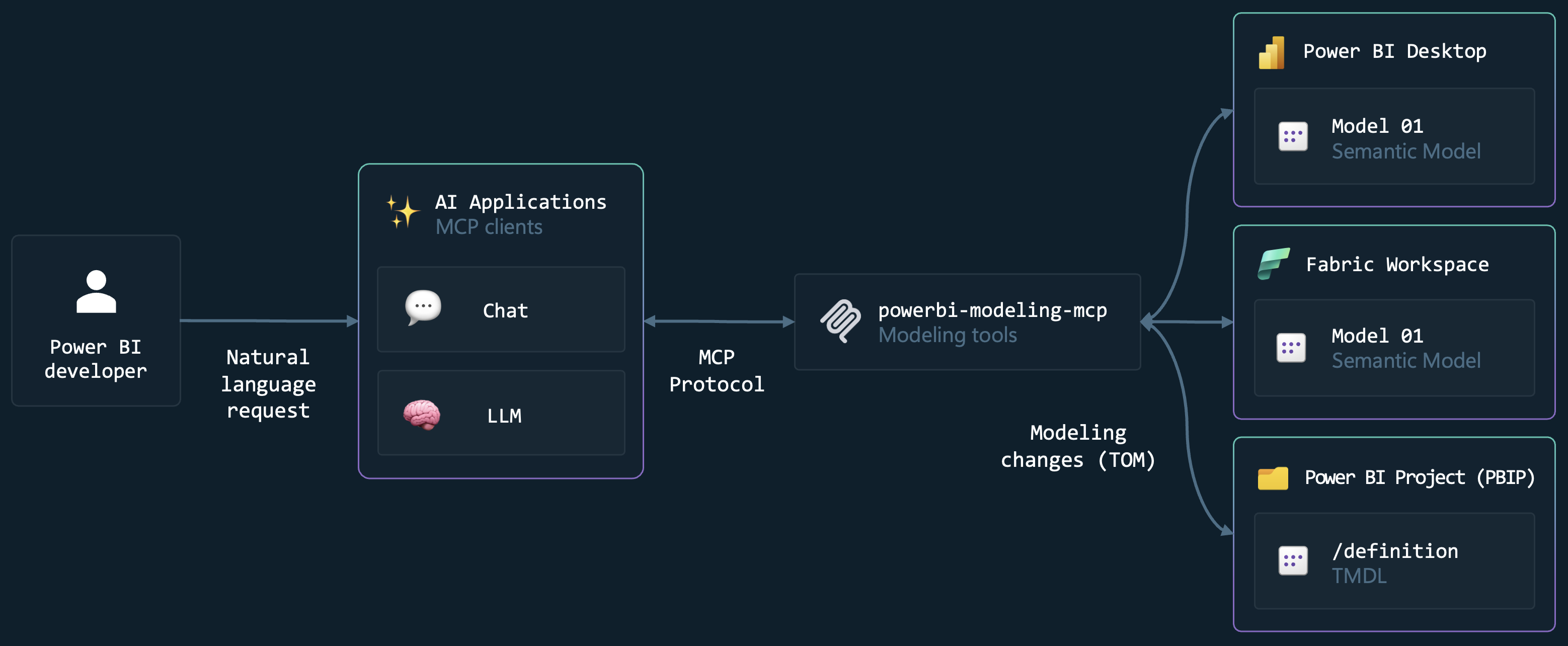
The Power BI Authoring MCP Server brings Power BI semantic modeling capabilities to your AI agents through a local MCP server. This allows developers and AI applications to interact with Power BI models in entirely new ways, from using natural language to execute modeling changes to autonomous AI agentic development workflows.
💡 What can you do?
-
🔄 Build and Modify Semantic Models with Natural Language - Tell your AI assistant what you need, and it uses this MCP server to create, update, and manage tables, columns, measures, relationships, and more... across Power BI Desktop and Fabric semantic models.
-
⚡ Bulk Operations at Scale - AI applications can execute batch modeling operations on hundreds of objects simultaneously — bulk renaming, bulk refactoring, model translations, or model security rules - with transaction support and error handling, turning hours of repetitive work into seconds.
-
✅ Apply modeling best practices - Easily evaluate and implement modeling best practices against your model.
-
🤖 Agentic Development Workflows - Supports working with TMDL and Power BI Project files, enabling AI agents to autonomously plan, create, and execute complex modeling tasks across your semantic model codebase.
-
🔍 Query and Validate DAX - AI assistants can execute and validate DAX queries against your model, helping you test measures, troubleshoot calculations, and explore your data
📹 Watch the video for an end-to-end demo.
[!WARNING]
- Use caution when connecting an AI Agent to a semantic model. The underlying LLM may produce unexpected or inaccurate results, which could lead to unintended changes. Always create a backup of your model before performing any operations.
- LLMs might unintentionally expose sensitive information from the semantic model, including data or metadata, in logs or responses. Exercise caution when sharing chat sessions. See Data Privacy and LLM Providers.
- The Power BI Authoring MCP server can only execute modeling operations. It cannot modify other types of Power BI metadata, such as report pages or semantic model elements like diagram layouts.
- The AI model you select directly influences the quality and relevance of the responses you receive. For the best results, choose a deep-reasoning model such as
GPT-5orClaude Sonnet 4.5. You can find more details about available models in the GitHub Copilot AI model comparison.
📦 Installation
The easiest way to install this MCP Server is by using the Visual Studio Code extension extension together with GitHub Copilot. However, you can also manually install it in any other MCP client.
Visual Studio Code (Recommended)
-
Install Visual Studio Code.
-
Install the GitHub Copilot Chat extension.
-
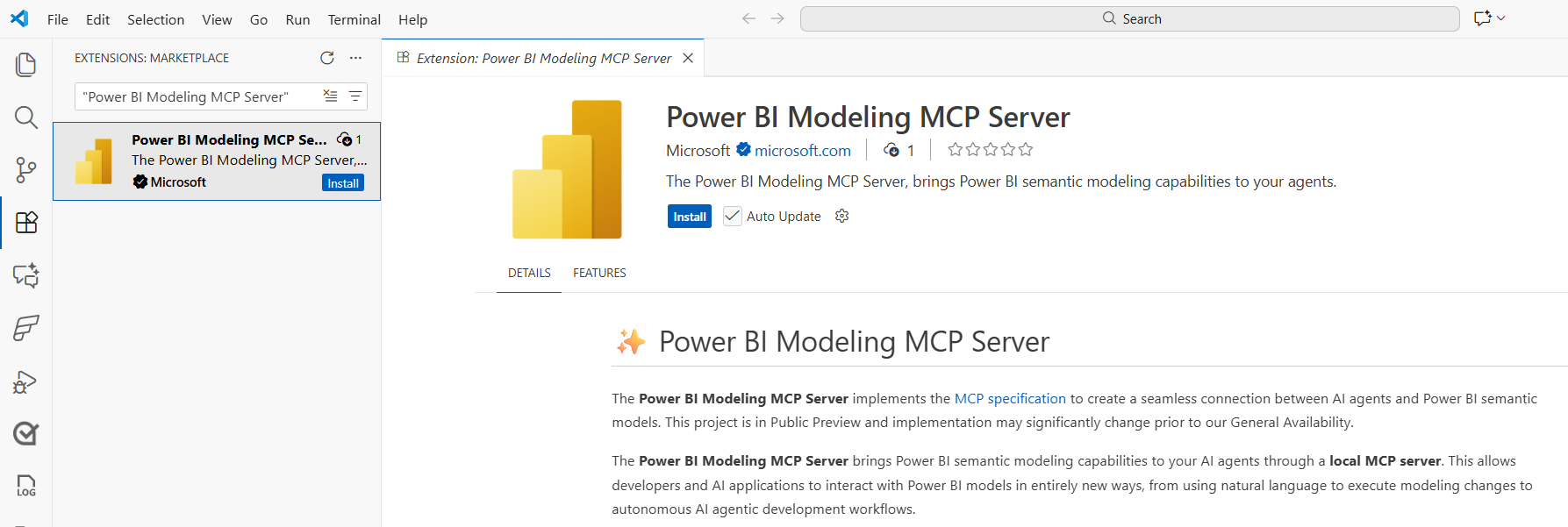
Install the Power BI Authoring MCP Visual Studio Code extension.
-
Open GitHub Copilot chat and confirm the powerbi-modeling-mcp is available and selected.
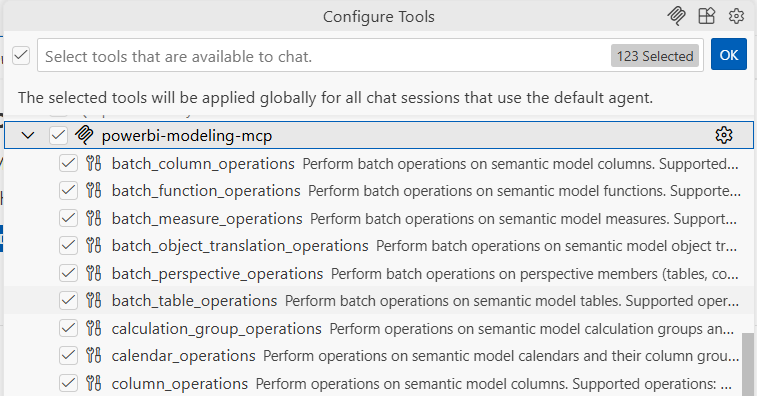
[!NOTE] If you do not see powerbi-modeling-mcp in the available tool list, verify that the MCP servers in Copilot option is enabled in Copilot settings on GitHub.com. For enterprise accounts, this option is disabled by default and must be enabled by an administrator.

Manual
This MCP Server can also be configured across other IDEs, CLIs, and MCP clients.
Node Package Executor (NPX) (requires Node.js)
Add the JSON configuration to your MCP client. Node will automatically download the MCP server from the @microsoft/powerbi-modeling-mcp npm package.
Manual download
- Download the VSIX package for the version you want using the URL below:
- Template:
https://marketplace.visualstudio.com/_apis/public/gallery/publishers/analysis-services/vsextensions/powerbi-modeling-mcp/[version]/vspackage?targetPlatform=[platform] - Example (version
0.1.9, platformwin32-x64):https://marketplace.visualstudio.com/_apis/public/gallery/publishers/analysis-services/vsextensions/powerbi-modeling-mcp/0.1.9/vspackage?targetPlatform=win32-x64
- Template:
- Rename the downloaded
.visxfile to.zip - Unzip the contents to a folder of your choice, for example:
C:\MCPServers\PowerBIAuthoringMCP - Run
\extension\server\powerbi-modeling-mcp.exe - Copy the MCP JSON registration from the console and register it in your preferred MCP client tool.
Example of config that should work in most MCP clients:
🚀 Get started
First, you must connect to a Power BI semantic model, which can reside in Power BI Desktop, Fabric workspace or in Power BI Project (PBIP) files.
-
For Power BI Desktop:
-
For Semantic Model in Fabric Workspace:
-
For Power BI Project files:
Once the connection is established, you can use natural language to ask the AI agent to make any modeling changes. To get started, try one of the following scenarios.
Example scenarios
Related MCP Servers
Adoption & maintenance
Factual signals from GitHub, npm, and our automated checks — not a rating.
GitHub stars
1.2k
Stargazers on the source repository.
Last commit
16d ago
Most recent push to the default branch.
Directory activity
1 views
Config copies, upvotes, and views on AllMCPs.
Reviews
No reviews yet — be the first to share how this listing worked for you.
Frequently Asked Questions about Power BI Modeling MCP Server
AllMCPs Directory Badge
Showcase your server listing on GitHub or your project documentation. Embed this dynamic SVG badge to highlight official listing status and live engagement.
Badge Style:
Live Dynamic SVG Preview
Markdown (GitHub README)
[](https://allmcps.com/mcp/power-bi-modeling-mcp-server)HTML Embed
<a href="https://allmcps.com/mcp/power-bi-modeling-mcp-server"><img src="https://allmcps.com/api/badge/power-bi-modeling-mcp-server?style=directory" alt="Power BI Modeling MCP Server on AllMCPs" /></a>