FlowStudio MCP — Power Automate Skills for AI Agents
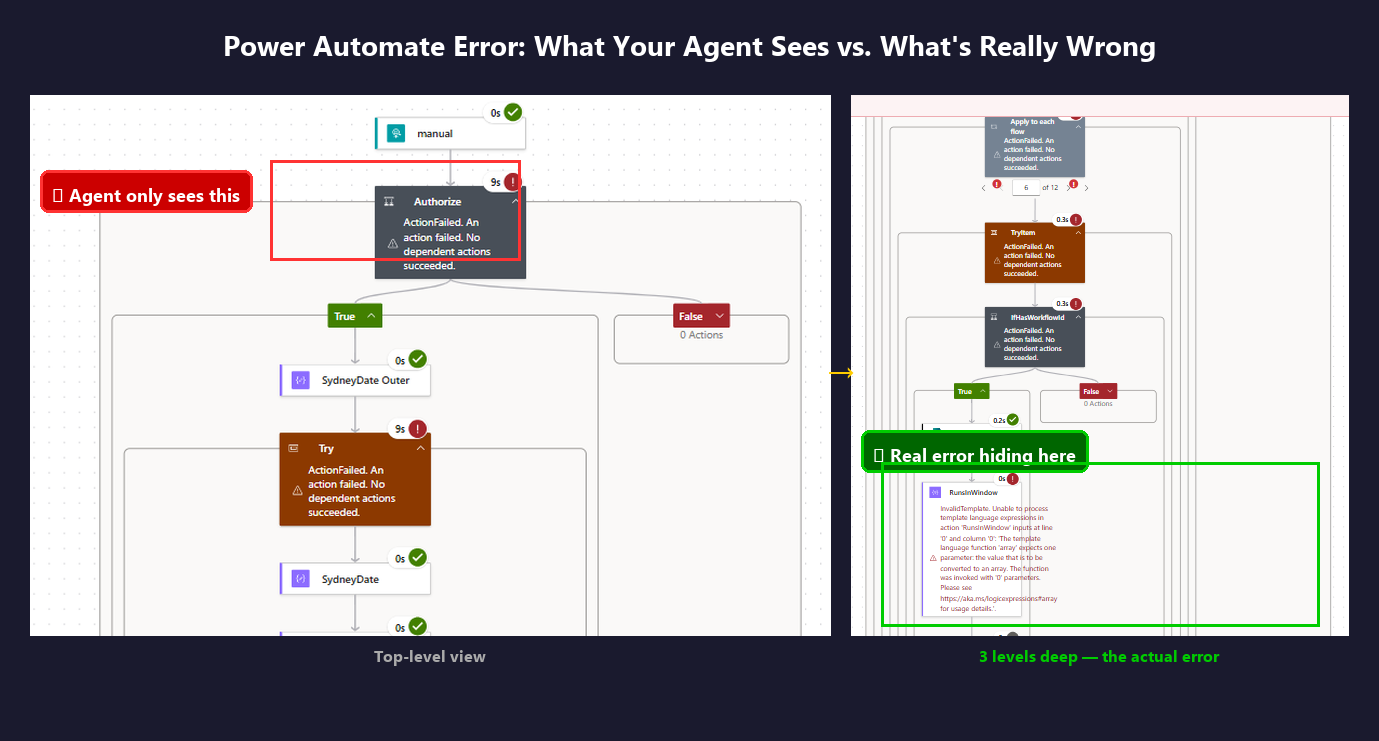
Give your AI agent the same visibility you have in the Power Automate portal — plus a bit more. The Graph API only returns top-level run status — agents can't see action inputs, loop iterations, or nested failures. FlowStudio MCP exposes all of it.
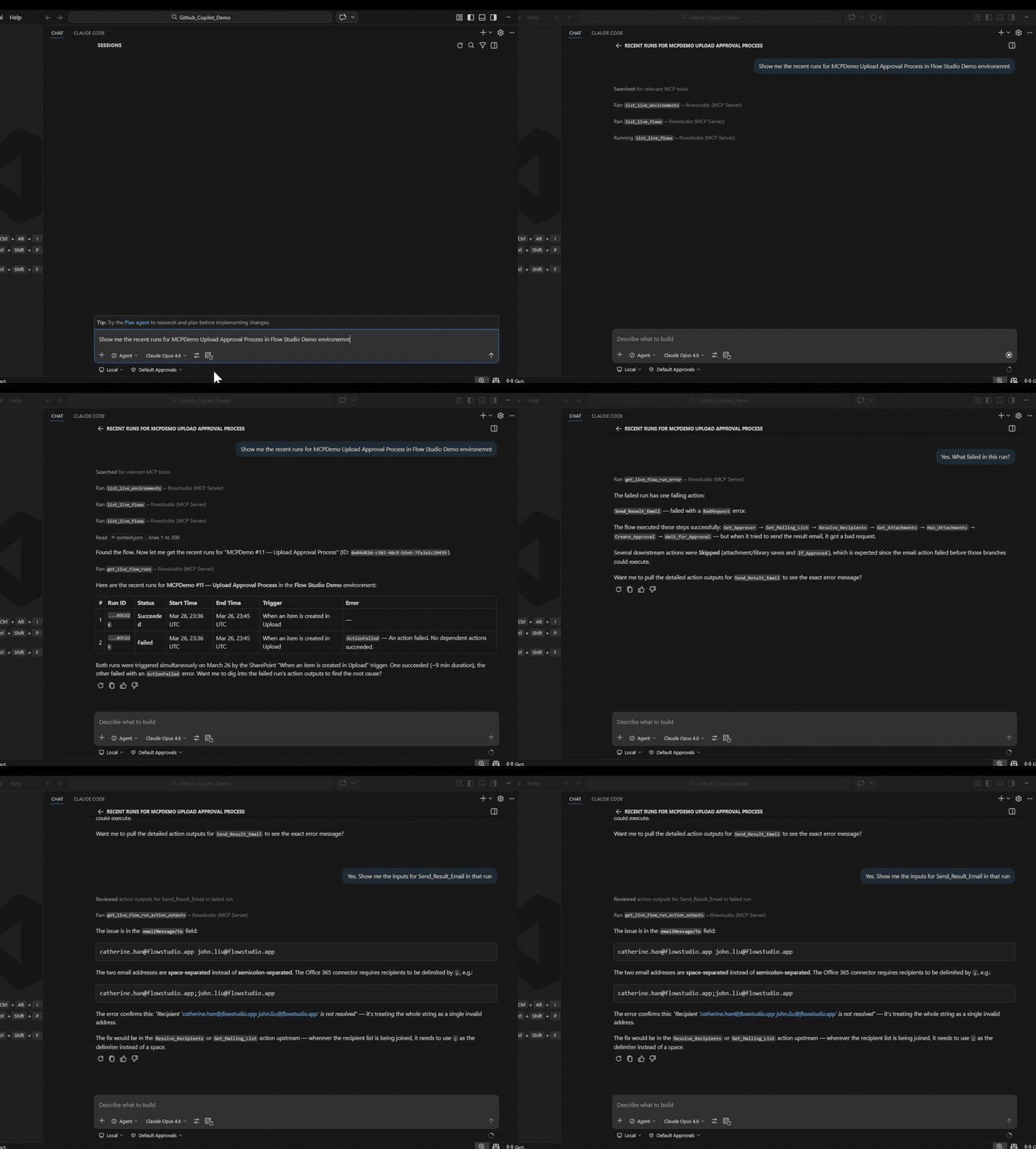
You can click through the portal and find the root cause. Your agent can't — unless it has MCP.
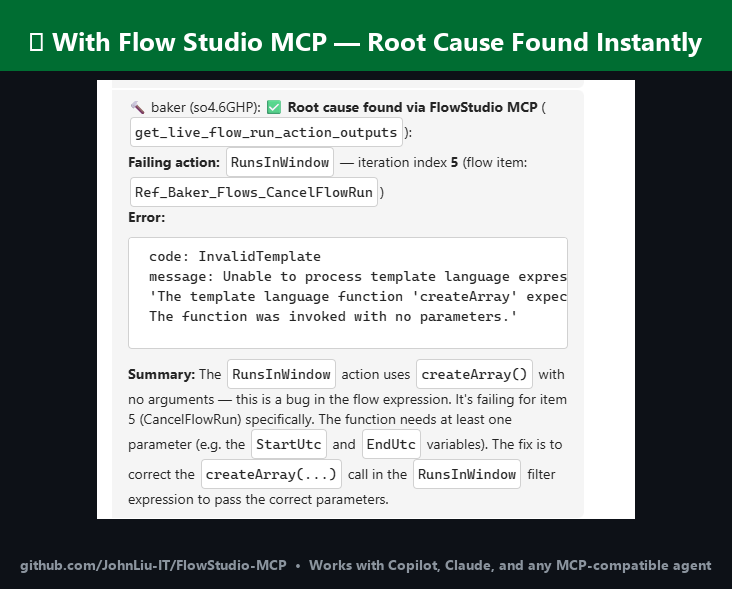
When you need this
- Your agent can see that a flow failed, but not why — Graph API only returns status codes
- You want your agent to see action-level inputs and outputs, like you can in the portal
- A loop has hundreds of iterations and some produced bad output — in the portal you'd click through each one, but the agent can scan all iteration inputs and outputs at once
- You want to check flow health, failure rates, and maker activity across your tenant without opening the admin center
- You need to classify flows, detect orphaned resources, or audit connectors at scale — without installing the CoE Starter Kit
- You're tired of being the middle-man between your agent and the portal
Graph API vs FlowStudio MCP
The core difference: Graph API gives your agent run status. MCP gives your agent the inputs and outputs of every action.
| What the agent sees | Graph API | FlowStudio MCP |
|---|---|---|
| Run passed or failed | Yes | Yes |
| Action inputs and outputs | No | Yes |
| Error details beyond status code | No | Yes |
| Child flow run details | No | Yes |
| Loop iteration data | No | Yes |
| Flow definition (read + write) | Limited | Full JSON |
| Resubmit / cancel runs | Limited | Yes |
| Cached flow health & failure rates | No | Yes |
| Maker / Power Apps / connection inventory | No | Yes |
| Governance metadata (tags, impact, owner) | No | Yes |
Skills
| Skill | Description |
|---|---|
power-automate-mcp | Connect to and operate Power Automate cloud flows — list flows, read definitions, check runs, resubmit, cancel |
power-automate-debug | Step-by-step diagnostic process for investigating failing flows |
power-automate-build | Build, scaffold, and deploy Power Automate flow definitions from scratch |
power-automate-monitoring | Flow health, failure rates, maker inventory, Power Apps, environment and connection counts |
power-automate-governance | Classify flows by impact, detect orphans, audit connectors, manage notifications, compute archive scores |
power-apps-canvas-mcp | Ground rules for the canvas tools — sessions, draft vs live, timeouts. Load first for canvas work |
power-apps-canvas-read | Inspect canvas apps — formulas, data sources, formula checks, quality score, version diffs |
power-apps-canvas-edit | Build and change canvas apps — screens, controls, Power Fx, galleries, data sources |
power-apps-canvas-ship | Push and publish canvas changes — moved-app refusals, apps that call flows, Power Apps Studio |
The first three skills use live Power Automate API calls. The monitoring and governance
skills use the cached store — a daily snapshot with aggregated stats, remediation hints,
and governance metadata. Requires an MCP Pro+ subscription for store tools.
The four power-apps-canvas-* skills drive the canvas app tools, which are in preview and
on for every plan.
Each skill follows the Agent Skills specification and works with any compatible agent.
Supported agents
Copilot, Claude Code, ChatGPT, Codex, OpenClaw, Gemini CLI, Cursor, Goose, Amp, OpenHands
Guides
Full walkthroughs on learn.flowstudio.app:
- Getting started — install FlowStudio MCP for any agent
- Build flows with AI agents — a worked 3-step example
- Vibe code Power Automate — describe the flow, the agent builds it
- Power Automate in VS Code — work on flows from your editor
- Debug a failing flow — find the root cause from action-level data
- By agent: ChatGPT · Claude · GitHub Copilot · Copilot Studio · Codex
Quick Start
Connect from ChatGPT or claude.ai
Sign in with your Microsoft account instead of pasting a key. Add
https://mcp.flowstudio.app/mcp/oauth as a connector in ChatGPT (Developer mode
on) or at claude.ai, then follow the sign-in prompt. Walkthrough:
ChatGPT for Power Automate.
Install as Claude Code plugin
Available through the Claude plugin marketplace after approval. To test locally:
git clone https://github.com/ninihen1/power-automate-mcp-skills.git
claude --plugin-dir ./power-automate-mcp-skills
Then connect the MCP server:
claude mcp add --transport http flowstudio https://mcp.flowstudio.app/mcp \
  --header "x-api-key: <YOUR_TOKEN>"
Get your token at mcp.flowstudio.app.
Install in Codex
Inside a Codex session, install skills directly:
$skill-installer install https://github.com/ninihen1/power-automate-mcp-skills/tree/main/skills/power-automate-mcp
$skill-installer install https://github.com/ninihen1/power-automate-mcp-skills/tree/main/skills/power-automate-debug
$skill-installer install https://github.com/ninihen1/power-automate-mcp-skills/tree/main/skills/power-automate-build
$skill-installer install https://github.com/ninihen1/power-automate-mcp-skills/tree/main/skills/power-automate-monitoring
$skill-installer install https://github.com/ninihen1/power-automate-mcp-skills/tree/main/skills/power-automate-governance
$skill-installer install https://github.com/ninihen1/power-automate-mcp-skills/tree/main/skills/power-apps-canvas-mcp
$skill-installer install https://github.com/ninihen1/power-automate-mcp-skills/tree/main/skills/power-apps-canvas-read
$skill-installer install https://github.com/ninihen1/power-automate-mcp-skills/tree/main/skills/power-apps-canvas-edit
$skill-installer install https://github.com/ninihen1/power-automate-mcp-skills/tree/main/skills/power-apps-canvas-ship
Then connect the MCP server in ~/.codex/config.toml:
[mcp_servers.flowstudio]
url = "https://mcp.flowstudio.app/mcp"

[mcp_servers.flowstudio.http_headers]
x-api-key = "<YOUR_TOKEN>"
Install via skills.sh
Search for flowstudio on skills.sh, or:
npx skills add github/awesome-copilot -s flowstudio-power-automate-mcp
npx skills add github/awesome-copilot -s flowstudio-power-automate-debug
npx skills add github/awesome-copilot -s flowstudio-power-automate-build
npx skills add github/awesome-copilot -s flowstudio-power-automate-monitoring
npx skills add github/awesome-copilot -s flowstudio-power-automate-governance
Install via ClawHub
npx clawhub@latest install power-automate-mcp
Manual install
Copy the skill folder(s) into your project's .github/skills/ directory
(or wherever your agent discovers skills).
Connect the MCP server
Claude Code:
claude mcp add --transport http flowstudio https://mcp.flowstudio.app/mcp \
  --header "x-api-key: <YOUR_TOKEN>"
Codex (~/.codex/config.toml):
[mcp_servers.flowstudio]
url = "https://mcp.flowstudio.app/mcp"

[mcp_servers.flowstudio.http_headers]
x-api-key = "<YOUR_TOKEN>"
Copilot / VS Code (.vscode/mcp.json):
{
  "servers": {
    "flowstudio": {
      "type": "http",
      "url": "https://mcp.flowstudio.app/mcp",
      "headers": { "x-api-key": "<YOUR_TOKEN>" }
    }
  }
}
Get your token at mcp.flowstudio.app.
Real debugging examples
These are from real production investigations, not demos.
-
Expression error in child flow —
contains(string(...))crashed on a nested property. Agent traced through parent flow, into child, through loop iterations, and found the failing input. Portal showed "ExpressionEvaluationFailed" with no context. -
Data entry, not a flow bug — User reported two "bugs" back to back. Agent proved both were data entry errors (missing comma in email, single address in CC field). Flow was correct. Diagnosed in seconds.
-
Null value crashes child flow —
split(Name, ', ')crashed when 38% of records had null Names. Agent traced parent to child to loop to action, found the root cause, and deployed a fix viaupdate_live_flow.
Prerequisites
- A FlowStudio MCP subscription (all live tools)
- For store tools (monitoring, governance): MCP Pro+ (not in Microsoft 365 Copilot)
- For canvas skills: nothing extra; the canvas tools are in preview and on for every plan
- MCP endpoint:
https://mcp.flowstudio.app/mcp - An API key from your dashboard, sent as the
x-api-keyheader (Authorization: Bearer <key>also works), or the Microsoft sign-in athttps://mcp.flowstudio.app/mcp/oauthin apps that support it
Repository structure
skills/
  power-automate-mcp/          core connection & operation skill
  power-automate-debug/        debug workflow skill
  power-automate-build/        build & deploy skill
  power-automate-monitoring/   flow health & tenant inventory skill
  power-automate-governance/   compliance & governance skill
  power-apps-canvas-mcp/       canvas app ground rules (preview)
  power-apps-canvas-read/      inspect and diagnose canvas apps
  power-apps-canvas-edit/      build and change canvas apps
  power-apps-canvas-ship/      push and publish canvas changes
examples/                      real debugging walkthroughs
README.md
LICENSE                        MIT
Available on GitHub
Works with Copilot, Claude, ChatGPT, and any MCP-compatible agent.
- awesome-copilot (merged)
- skills.sh (3K+ installs)
- ClawHub (v1.1.0)
Contributing
Contributions welcome. Each skill folder must contain a SKILL.md with the
required frontmatter. See the existing skills for the format.
License
Keywords: Power Automate debugging, flow run history, expression evaluation failed, child flow failure, nested action errors, loop iteration output, agent automation MCP, Power Platform AI, flow definition deploy, resubmit failed run, flow monitoring, governance, CoE, orphan detection, connector audit, archive score, maker inventory