Lossless archive and search for AI agent sessions across clients, exposed to agents over MCP.
Quick Install
Automated & IDE SetupCopy the AI prompt to install this server into Claude Code, Cursor, or another agent — or use 1-click editor setup below.
Manual Client & Custom JSON ConfigExpand JSON ▾
Client Config & Setup
Choose your client or environment
Target File:
💡 Paste the JSON block into your client's configuration file under mcpServers, then restart the application.
Documentation Overview

pond




"I know we discussed that before. Why can't I find that damn conversation?"
Pond makes every AI agent session you've ever run - Claude Code, Codex, any tool, any machine - searchable in one place.
Your agent history is already on your disk: thousands of sessions full of decisions, fixes, and dead ends - scattered across tools that can't search them. Pond ingests them all automatically and losslessly into storage you own (a local dir or your own S3 bucket), makes the whole corpus searchable and SQL-queryable, and hands that recall back to your agents over MCP - so "how did we fix this before?" is a query, not an archaeology dig. Sessions stop being locked to the tool that created them: any session can be restored into any supported client and continued there.
Or prompt your agent: "Please install and set up pond (see github.com/tenequm/pond)" - the full, failure-proofed version of that prompt is in Connect your agents.
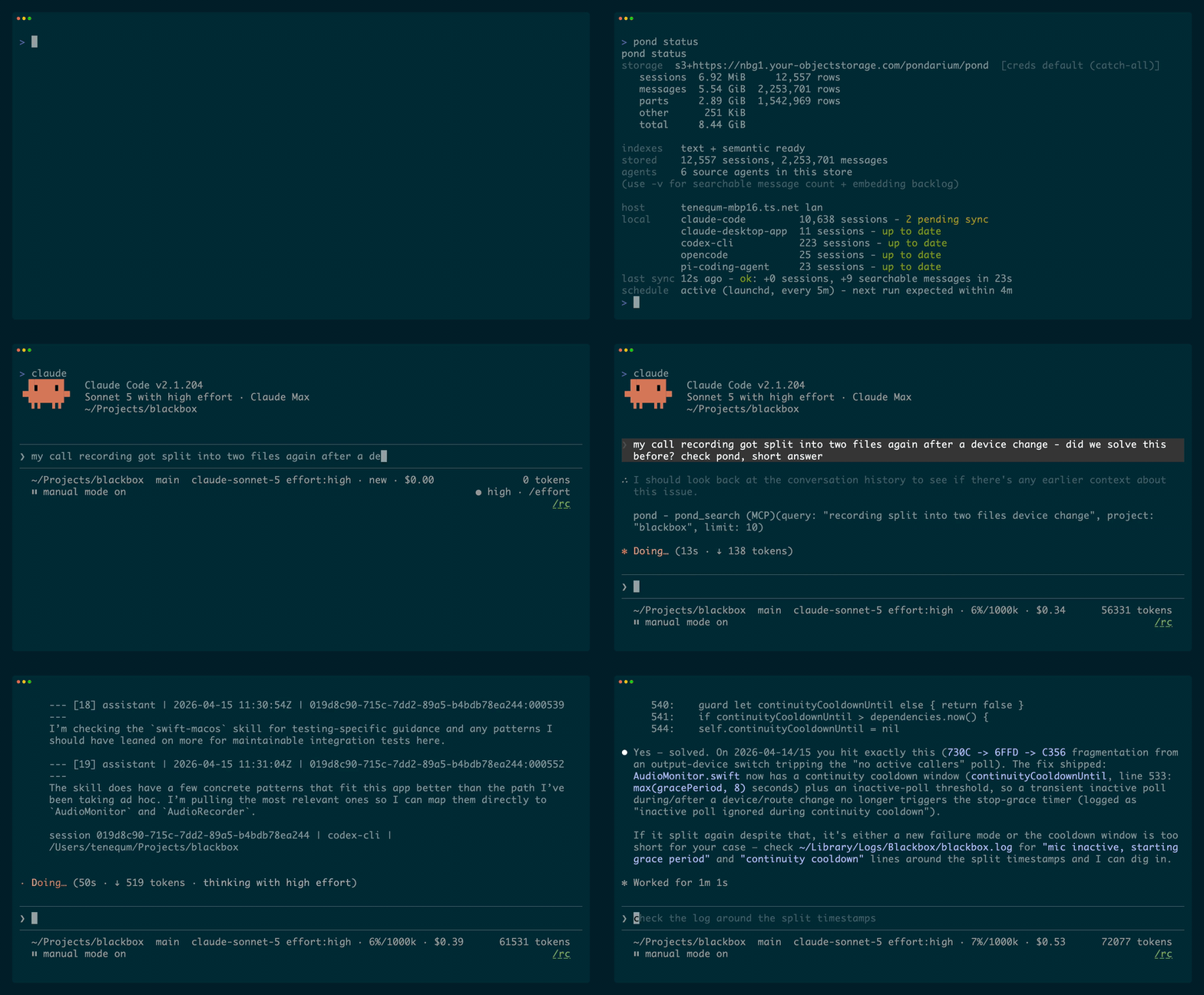
A live 12k-session corpus, then a three-month-old fix found and verified against the current code (crisper MP4)

Five real recall questions, one corpus, one machine - method, raw numbers, and a rerunnable script in docs/benchmarks
Status: pre-v1. Schemas, wire shapes, and config keys are subject to breaking change until v1. Full documentation lives at pond.locker; the contract is docs/spec.md.
Quickstart
Install, run guided setup, and ingest your local sessions:
pond init registers pond as an MCP server for Claude Code and installs the bundled pond skill; for Codex it prints the command to run instead - restart the client afterwards so the tools load. By hand: claude mcp add -s user pond -- pond mcp, codex mcp add pond -- pond mcp; skill: mkdir -p ~/.claude/skills/pond && pond skill > ~/.claude/skills/pond/SKILL.md (that whole line is POSIX-only - mkdir -p, &&, and > all break or corrupt in Windows PowerShell 5.1; use the PowerShell block in Connect your agents). Then ask your agent - real prompts from daily use:
Sessions are picked up automatically from Claude Code, the Claude desktop app (local agent mode), Codex CLI, opencode, pi-coding-agent, oh-my-pi, OpenClaw, NanoClaw, Hermes Agent, letta-code, and grok-build. A Claude.ai data export imports with pond sync claude-ai-export --path <path> (manual download, so not auto-discovered).
Isn't this another memory tool?
No - it's the layer underneath one. Memory tools store what they decided you'd need - facts, summaries, filed chunks; the sessions themselves are gone. Pond keeps the sessions: every message, tool call, and result, value-complete, cross-client, in storage you own, never pruned - searchable over MCP and restorable into any client. Memory is a derived view you can always rebuild from an archive; an archive can never be rebuilt from memories.
Three kinds of tool get called "memory". Side by side:
| pond | Session search (ctx, deja-vu, cass) | Memory layers (Mem0, Letta) | |
|---|---|---|---|
| History from before install | yes | yes | no |
| What is kept | the whole session | a search index ¹ | extracted facts |
| Where it lives | local dir or S3 bucket | local index | the tool's database |
| After the harness deletes the file | still there | gone at next refresh ¹ | only the extract |
| Several machines | one shared bucket | pulled into one machine ² | shared server or cloud |
| Agent access | CLI, MCP, HTTP, SQL | CLI, MCP ³ | HTTP, SDK, MCP |
¹ cass also mirrors the raw files, so they outlive the source. ² deja-vu copies records between machines over ssh; cass pulls other hosts' session files over ssh/rsync into its local index; ctx is single-machine. ³ cass has no MCP server.
Pick session search for fast local recall. Pick a memory layer when the agent should carry distilled facts, not the record. Pick pond when you want the sessions themselves, in storage you own, from every machine you run.
Full comparison, with receipts per tool: pond.locker/compare. Every cell is a claim about a specific version of someone else's project. If one has gone stale, open an issue and it gets fixed the same day.
Background
Every agentic CLI ships its own session format and its own search surface. Switching tools means losing history. Replaying a Claude Code session in another provider's tooling means re-translating the wire shape by hand. Hosted multi-tenant deployments rebuild the same storage layer from scratch.
Pond is the storage and retrieval layer that sits underneath. Every adapter is a bidirectional codec between a client format and one canonical schema, so any session can be restored by any adapter - it need not return to the client that produced it. Storage, search (BM25 full-text by default, with optional semantic search, one arm per query), and provider-agnostic replay all sit on a single Lance-on-object-storage foundation.
The v1 surface includes: full CLI, HTTP+JSON and MCP transports, search over three Lance datasets, opt-in intfloat/multilingual-e5-small embeddings at FP16 weights (Metal on macOS, CUDA opt-in, CPU fallback), and local-FS / S3 / GCS / Azure backends through Lance's object_store integration.
Install
Linux, macOS, and Windows are supported.
macOS and Linux:
Windows (Scoop, the primary channel - it also ships pondw.exe, the windowless launcher that scheduled sync runs through):
Buckets are git clones, so the first line needs git on PATH - if it fails with "Git is required for buckets", run scoop install git and retry.
No Scoop yet? Bootstrap it first, from a normal (non-admin) PowerShell (its installer refuses an elevated shell):
Then open a new terminal - PATH changes reach only processes started after the install. See the Windows notes for Defender, long paths, scheduling, and WSL.
No package manager (any platform): every release attaches prebuilt binaries (pond-x86_64-pc-windows-msvc.zip on Windows, ~223 MB unpacked) - unpack one and add its directory to PATH (on Windows: Settings > System > About > Advanced system settings > Environment Variables, under your user variables), nothing else to install.
Via cargo (any platform, needs the Rust toolchain):
Both install pond.exe only, so scheduled sync on Windows - which runs through pondw.exe - wants the Scoop or zip install instead (or --features windows-launcher on a source build). cargo install also needs the protoc and NASM prerequisites below.
Build from source:
On Windows that clone needs git config --global core.longpaths true first (test-fixture paths exceed 260 characters), and the build needs an explicit --target x86_64-pc-windows-msvc - without it cargo applies the repo's +crt-static flag to build scripts and proc-macros too, which then fail to load.
For CUDA acceleration on Linux:
Related MCP Servers
Reviews
No reviews yet — be the first to share how this listing worked for you.
Frequently Asked Questions about Pond
AllMCPs Directory Badge
Showcase your server listing on GitHub or your project documentation. Embed this dynamic SVG badge to highlight official listing status and live engagement.
Badge Style:
Live Dynamic SVG Preview
Markdown (GitHub README)
[](https://allmcps.com/mcp/pond)HTML Embed
<a href="https://allmcps.com/mcp/pond"><img src="https://allmcps.com/api/badge/pond?style=directory" alt="Pond on AllMCPs" /></a>Technical Specs & Signals
CategoryDeveloper Tools
27Quality signal: Emerging · 27/100How this signal is calculated ▾
Server availabilityNot measured
Not scored for repo-hosted servers — we can't reach the running server, only its GitHub page. Hosted MCP endpoints are health-checked live.
Verified ownership8/20
Documentation & tools11/30
Adoption & activity1/15
Community engagement0/10
A guidance signal from public completeness & health data — not a user rating. New listings start lower and rise as they add docs, get verified, and grow adoption. Signals we can't observe for a listing are skipped, not counted against it.
Own this project?
This directory is pre-filled from public sources. Claim via GitHub README, site badge, or DNS TXT to unlock edit access and the Official badge — proof is checked automatically, then reviewed by our team.
Free dofollow backlink: add your website and place the AllMCPs badge on it — no claim needed. We detect it automatically and keep it verified as long as the badge stays live.
Claim & get free dofollowShare & Embed
Add our SVG badge (dark/light directory styles) or embeddable widget to your site.