


IDE intelligence for agents — guardrails for unattended work, coordination for fleets.
Plumb is an MCP server that gives a coding agent the intelligence layer of an IDE — LSP-backed semantics, a tree-sitter code index, and project memory — inside guardrails: atomic, lock-serialised writes with transactional rollback, scoped filesystem and git access, and a daemon that survives its own crashes. And because every agent you run shares that one daemon, plumb is also the coordination layer between them: peers see the writes others made, message each other, and hand off work instead of duplicating it. A single binary; nothing else to install.
Why Plumb
LLM agents usually work by reading whole files into the context window — token-heavy, lossy at scale, blind to symbol semantics, and unsafe to let loose on a real repo. Plumb is built on four pillars, in priority order.
1. Reliability & write-safety
Leaving an agent to edit a codebase for an hour is only viable if writes can't corrupt files and a crash can't wedge your session.
- Atomic I/O — every write is staged in a temp file and renamed into place. No partial writes, ever. Symlink-aware, CRLF-tolerant.
- Per-path locking — the daemon serialises concurrent writes to the same file across every session and chat window. No races.
- Multi-file transactions — apply edits across dozens of files with guaranteed atomic rollback if any step fails.
- Crash-resilient daemon —
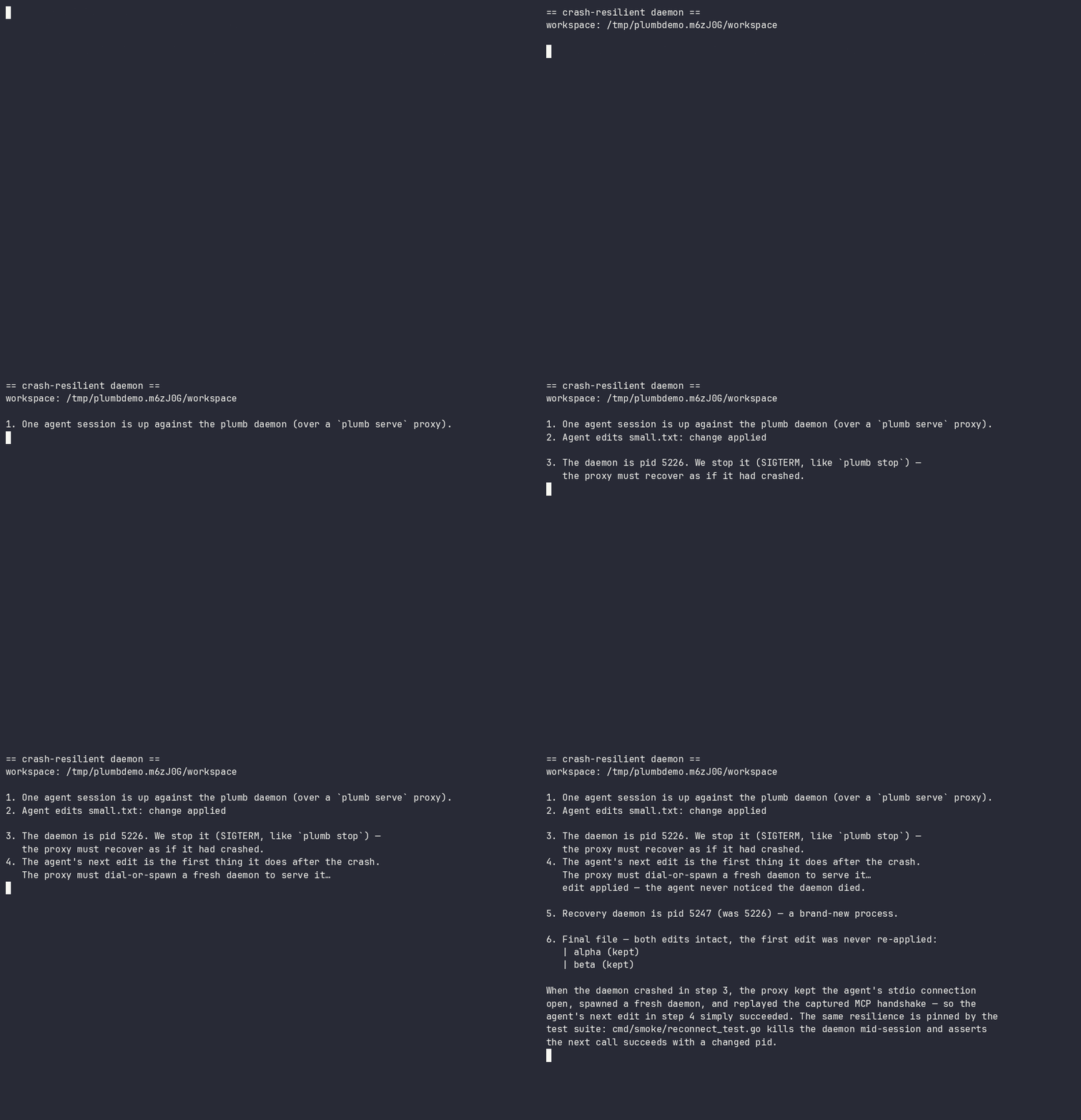
plumb serveis a reconnecting proxy. If the daemon crashes or hangs, it respawns one and replays the handshake; the agent never notices. In-flight writes are never silently re-run. - Optimistic concurrency — mtime/sha guards catch stale edits before they clobber newer changes.
See it run: docs/demos/ — two-agents-one-file.sh (a stale write is refused, nothing is lost) and daemon-respawn.sh (below — the daemon is killed mid-session; the agent's next edit still succeeds):
2. Multi-agent coordination
One daemon serves every agent you run — which makes it the natural place for agents to see and talk to each other, not merely avoid each other's writes. Locks stop two agents corrupting a file; coordination stops them duplicating a task, rebasing onto a function signature a peer is mid-rewrite of, or shipping a change a peer's in-flight work is about to invalidate.
- Peer awareness (on by default) —
workspace_sessionsnames every active session and the writes it made, as the daemon recorded them. Recorded activity, not another agent's say-so: an agent about to start a task can see that a peer is already in those files. (Read-only operations never appear, and a write that failed or was refused is kept but marked[failed — no change applied]— so "a peer is working here" and "this landed" are distinguishable at a glance.) - An agent-to-agent mailbox (on by default, same workspace) —
leave_note/check_messagesgive sessions a threaded channel: hand a change to the peer already rewriting those files, or ask a peer to measure a behaviour instead of assuming it. Messages ride on ordinary tool results, so a working agent receives them without polling. - Advisory intents (opt-in:
[collab] intents) —share_intentdeclares what an agent is working on; a peer whose write touches a claimed path gets a hint at the moment of the would-be collision. Intents are deliberately labelled as unverified claims, kept distinct from the daemon-recorded activity feed, and never block anything. - Durable findings (opt-in:
[collab] knowledge_handoff) —share_findingsturns what an agent just learned into a searchable, secret-scrubbed project memory immediately, so the knowledge outlives the session that produced it.
Coordination is advisory by design — the write-safety above never depends on agents cooperating. Reference: Cross-agent sharing in the tool docs and the [collab] config section.
3. Semantic intelligence
The same primitives your editor has, exposed as structured tools:
- LSP-backed refactors —
rename_symbol,replace_symbol_body,safe_delete_symbolunderstand scope, types, and references. - Real diagnostics inline — actual
gopls/pyrightoutput is appended to every write, so the agent learns it broke the build immediately. - Symbol search — scoped to your code, no stdlib or dependency noise.
4. Context efficiency & safety controls
- Read only what you need — symbols or line ranges, not 2,000-line files.
- Scoped access you control — a per-connection path allowlist (read-only vs read-write roots) plus tiered git gating (destructive and network operations are off by default and need explicit confirmation). See SECURITY.md.
- One-round-trip bootstrap —
session_startreturns workspace, branch, recent commits, diagnostics, and project memory.
See the measured, reproducible numbers behind this: docs/use-cases.md — reading one function is 2.9×–33.4× less context than the whole file (the ratio is how much of the file you didn't need), and find_references returns the real call sites where a text search is 60% noise. The page publishes the losses too: read_multiple_files costs 1.31× more payload than reading the files natively (down from 1.32×, but still a loss — see Scenario 10 for why it isn't smaller). Every figure is regenerated by scripts/measure-use-cases.py.
Get started
Plumb is a single binary — from zero to your first answer:
1. Install
macOS note: prebuilt binaries are not yet notarised — on first run you may need
xattr -d com.apple.quarantine ./plumb, or right-click → Open. Homebrew installs avoid this.
2. Connect your agent
plumb setup writes the MCP config for you — no hand-editing JSON.
3. Open your project and try it
Make sure the language server you need is on your $PATH (gopls for Go,
pyright for Python, …), then point your agent at a real question. In Claude
Code:
Plumb resolves the workspace and runs session_start for orientation, then
answers with real LSP and topology data — actual call sites and blast radius —
instead of guessing from file dumps. It's read-only; nothing is modified. (Any
connected agent works — just paste the prompt.)
No
go.mod/pyproject.tomland not a git repo? Runplumb initonce to pin the workspace root (it also seeds.plumb/context.mdand project config).
Full walkthrough → docs/getting-started.md.
Language support (honest version)
Plumb negotiates LSP capabilities per language and also ships a built-in tree-sitter index for search and navigation with no language server. Support comes in tiers — we'd rather be precise than claim a big number.
| Tier | Languages | What you get |
|---|---|---|
| First-class (CI-tested, real-binary integration) | Go (gopls), Python (pyright) | Full LSP: definitions, references, rename, diagnostics, hierarchies + all write tools |
| Validated | Java (jdtls), Rust (rust-analyzer), Swift (sourcekit-lsp), TypeScript/JS (typescript-language-server), Zig (zls), Kotlin (kotlin-lsp), HTML (vscode-html-language-server) | Full LSP; just put the server on $PATH and it activates automatically (exclude any language with [lsp.<lang>] enabled = false). HTML carries one caveat: that server has no filesystem access, so it answers only from documents already opened |
| Search & navigation (tree-sitter, no LSP needed) | 31+ incl. JS/TS/TSX, Ruby, C, C#, Elixir, Scala, PHP, JSON, CSS, SCSS, XML, Lua, C++, Objective-C, Dart, Bash, SQL, HCL, Dockerfile, TOML, YAML, Markdown | Ranked symbol search, outlines, graph exploration via the Topology index |
Real-binary validation has been exercised on macOS and Linux — as of 2026-08-21, all nine adapters pass their integration tests against real server binaries on both. Details, including three toolchain traps that look like adapter bugs, are in docs/adding-an-lsp.md. Windows is tracked but not yet supported — the daemon's Unix-socket architecture needs a port.
How it works
plumb serve is a thin, reconnecting stdio proxy. The real work happens in one shared background daemon, so language servers stay warm across chats.
* plumb serve is a reconnecting proxy — if the daemon crashes or hangs it respawns one and replays the handshake, so your session survives without the agent noticing.
** one shared process, reused across every conversation.
*** SQLite. One global stats.db (tool stats + episodic summaries); two per-project indexes under each workspace's .plumb/ — topology.db (the code graph) and memory.db (memory search). Schema details → docs/architecture.md.
Servers stay warm across chats, per-path locks are shared across every connection, and symbol indexes update live after each write. Full architecture → docs/architecture.md.
Monitoring (TUI)
Run plumb with no arguments for a live dashboard — see what your agent is doing in real time: every tool call as it happens, daemon health, per-tool stats, and streaming logs you can follow and filter. The fastest way to catch a runaway loop or confirm an edit landed.
Core capabilities
Plumb exposes 58 tools. The ones you'll use constantly:
session_start · workspace_symbols · get_definition · find_references · rename_symbol · edit_file · transaction_apply · diagnostics
The rest cover filesystem reads/writes, LSP hierarchies, tiered git, an optional local Topology index (ranked search + blast-radius/route analysis, no language server needed), durable per-project memory, and cross-agent coordination (peer sessions, an agent mailbox, opt-in intents and knowledge handoff). Full API reference: docs/tools.md.
Configuration
Global or per-project config.toml, or environment variables. Run plumb config show to see the resolved config with provenance.
Full settings reference: docs/configuration.md.
The hard part
Agents can already read code well enough; writing it unsupervised — concurrently, transactionally, recoverably — is what's still unsolved. Plumb is the bet that this is the half worth getting right first. It's early, and the language coverage says so: a small validated core, the rest clearly marked experimental.
Roadmap
Plumb is pre-1.0. The core — write-safety, the resilient daemon, the topology index, and project memory — is in daily use. The road to 1.0 is mostly about proving it beyond the validated core and smoothing distribution. Issues and ideas welcome.
Shipped
- Concurrency-safe, atomic, transactional writes with rollback
- Crash-resilient reconnecting daemon
- Tree-sitter topology index + per-project memory
- Cross-agent coordination: peer awareness + agent mailbox (default on), intents + knowledge handoff (opt-in)
- Go and Python LSP adapters validated (real-binary)
Getting to 1.0. Rather than jump from 0.9 straight to 1.0, Plumb ships a series of focused minor releases — 0.10 through 0.19 — each with one coherent theme. 0.19.x is the last 0.x release; 1.0 follows it as a deliberate stability commitment. Native Windows support is intentionally a post-1.0 (1.1) item, not a 1.0 gate. The themed plan:
- 0.10 — distribution + honest claims (Homebrew, semantic re-rank → GA)
- 0.11 — validate the experimental LSP adapters on real binaries (zls ✓ validated; Kotlin ✓ validated on JetBrains' kotlin-lsp)
- 0.12 — Swift on Xcode via Build Server Protocol guidance
- 0.13 — daemon robustness (git-write crash safety, liveness probe)
- 0.14 — agent ergonomics + tool surface
- 0.15 — honesty + full config surface
- 0.16 — stabilisation + cross-platform proving
- 0.17 — distribution + discoverability (registries)
- 0.18 — proof + docs
- 0.19 — soak + feedback, the last 0.x (rolling patches, not a formal RC)
- 1.0 — general availability: the stability + validated-core promise
Full detail, rationale, and the post-1.0 items (Windows, tree-sitter cleanup) are in docs/roadmap.md.
Contributing
See CONTRIBUTING.md and AGENTS.md for architecture and code style. We follow Australian English in all prose. By contributing you agree to the Code of Conduct.
License
MIT — see LICENSE.