Typed on-prem knowledge graph for AI agents — read-only for humans, write-only for agents via MCP.
Quick Install
Automated & IDE SetupCopy the AI prompt to install this server into Claude Code, Cursor, or another agent — or use 1-click editor setup below.
Manual Client & Custom JSON ConfigExpand JSON ▾
Client Config & Setup
Remote HTTPChoose your client or environment
Target File:
💡 Paste the JSON block into your client's configuration file under mcpServers, then restart the application.
Capabilities & Tool Schemas (15)
Inspect callable tools, capabilities, and parameters exposed to AI agents by Plexus.
save_entityCreate a new entity
get_entityFetch a single entity by id
list_entitiesList with filters (kind, context, status)
search_entitiesBM25-ranked full-text search with optional highlighting
update_entityUpdate with optimistic locking (`expected_version`)
archive_entitySoft-delete (status → archived)
Documentation Overview
plexus (_graph)
A typed, on-prem knowledge graph for AI agents. Read-only for humans, write-only for agents, spoken over the Model Context Protocol.
Part of the pcas.io product line.



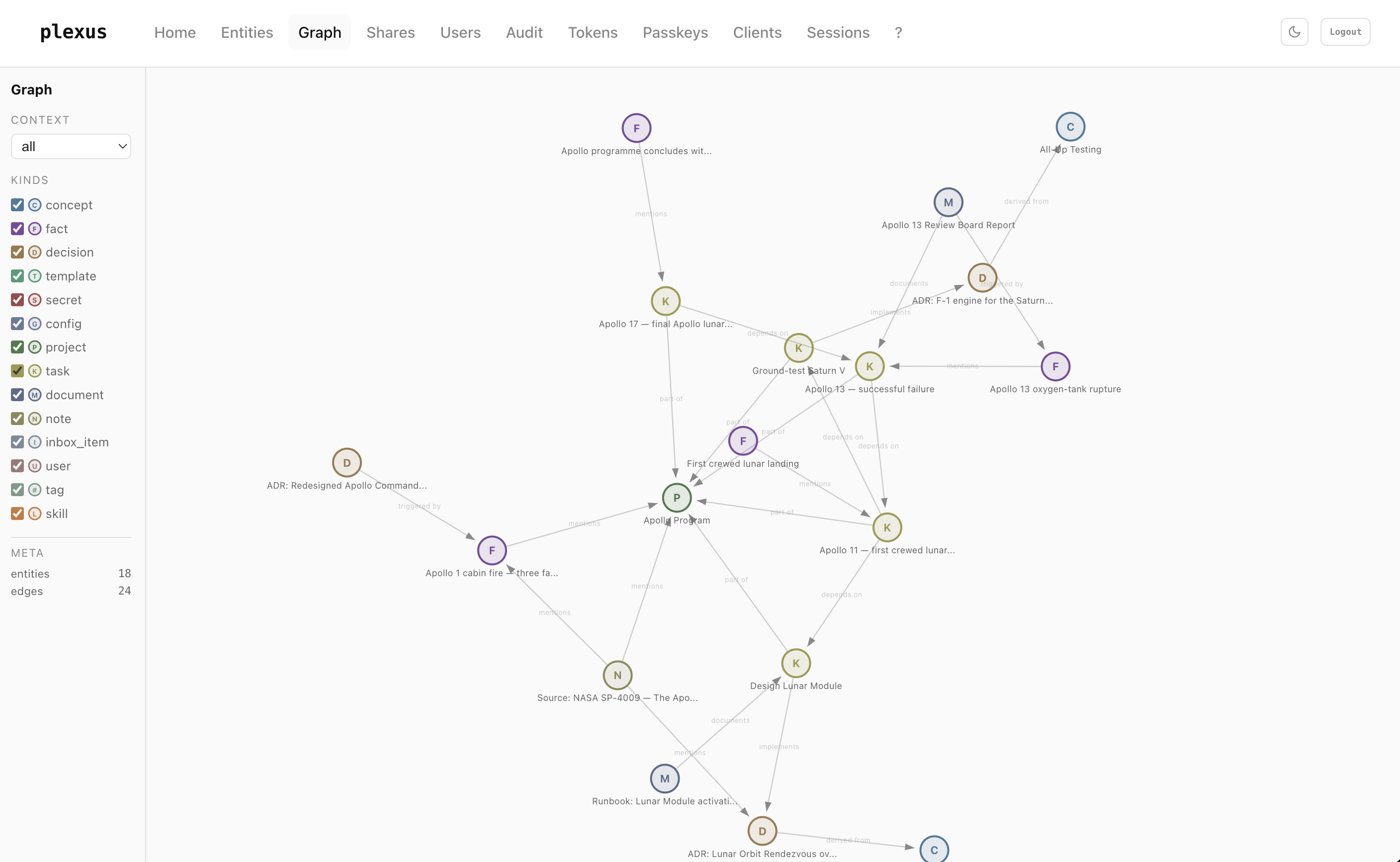
TL;DR
Knowledge management has been a document sport for twenty years — folders, notes, wikis, editor wars. plexus inverts that.
In plexus, every piece of information is a typed entity — concept, decision, fact, project, task, document, skill, … — with hard, temporally-valid edges between them. No free-form text, no forgotten tags, no "I'll clean that up later." Writing and linking happen exclusively through MCP — from your agent. The dashboard shows you the graph; it has no edit buttons.
That gets you three things:
- Your agent doesn't have to ask you — it just builds, with strict kind-and-relation discipline.
- The graph never goes stale, because lint, supersede, and provenance are part of the workflow.
- You can share a single idea, not your graph — passkey-gated one-shot links that burn on first click.
Runs in Docker Compose on your own hardware. Apache-2.0 licensed.
Think of it as a wiki, but for LLMs
Traditional wikis are built for human readers: free-form prose, hand-curated links, a tree of pages that rots the moment you stop grooming it. Put an LLM in front of one and the first thing the LLM does is ask you to summarise it.
plexus reverses the audience. The LLM is the reader and the writer. Each page is a typed record instead of a paragraph, each link is a named relation instead of a hyperlink, and each edit is an atomic MCP call instead of a markdown diff. The UI shows you the same graph your agent sees — but your agent does the curation.
This is the same pattern Andrej Karpathy sketched in his "The LLM wiki" gist (April 2026, 5000+ stars): instead of stateless RAG against raw documents on every query, an LLM compiles knowledge into a structured, cross-referenced wiki once and keeps it up to date. plexus is that pattern on infrastructure:
| Karpathy's LLM wiki | plexus |
|---|---|
| Raw sources (unchanging) | External documents the agent reads with web_fetch, file I/O, … |
| Wiki (typed markdown, curated) | Typed entities + named edges in a graph the agent writes via MCP |
Schema (conventions in CLAUDE.md / AGENTS.md) | list_kinds + list_relations registries, enforced at the MCP boundary |
| ingest → compile → reflect → query → lint | search_entities → save_entity / update_entity → link_entities → get_related → lint_graph |
Karpathy calls the gist an "idea file" — a vendor-neutral prompt pattern. plexus gives it a production backend: typed storage, optimistic locking, temporal edges, multi-user auth, audit log.
What that buys you:
- One source of truth across sessions. Your agent loads the context at the start of every conversation. You don't re-explain yourself.
- One source of truth across agents. Claude web, Claude Code, Claude Desktop, Le Chat, Gemini — whoever connects speaks the same graph.
- One source of truth across humans. Multi-user out of the box, scoped tokens per person, shared
projectcontainers, audit log.
Contents
Understand it
- Use cases — seven concrete scenarios plexus is built for
Run it
- Quickstart — Docker Compose up in under two minutes
- Create your admin user (first run) — the bootstrap walk-through, including where to find the admin token
Wire an agent to it
- Connecting an agent — Claude web / Code / Desktop snippets
- Agent system-prompt template — copy-paste block that makes an LLM use plexus correctly
- Example: ingesting a source — a Karpathy-style LLM-wiki ingest walked end-to-end against plexus
Reference
Operate it
Use cases
Persistent agent memory. Every conversation starts with context_load, so your assistant remembers which ADRs you've already made, which projects are live, and which tasks you finished yesterday. No "as you might recall…" prompt engineering.
Cross-agent handoff. Claude Code finishes a feature, writes a handoff-fact. Next morning Claude web picks up the same context, knows which commits shipped, what's still open. Zero re-briefing.
Team memory for small groups. Spin up one instance, issue scoped personal tokens per person, share a project container. Read-only dashboard for everybody, agents write for everybody. No Notion, no wiki, no Slack-archaeology.
Decision archaeology. Every ADR is a first-class decision entity with supersedes / derived_from edges. A year later you can trace why the F-1 engine stayed, what the Apollo 13 post-mortem triggered, and which design superseded which. Time-travel queries via get_related(as_of: "2026-01-01").
Incident → fix loop. A production incident becomes a fact with severity: high. The mitigation ADR links triggered_by that fact. The runbook documents the ADR. When you hire someone six months later, they read one graph walk instead of twelve Slack threads.
Literature / research digest. An agent ingests a paper, creates a note for the source, extracts concept and fact entities, attaches mentions edges. You query the graph by topic; every claim has provenance back to a derived_from note.
Private "second brain" that an agent actually uses. Capture with inbox_item, promote to task/concept/fact during a weekly review, archive with supersedes. Your notes are structured without you having to touch a form.
Quickstart
The admin token you'll need for the very first login is in .env:
Copy that hex value — the next section walks through the one-time bootstrap.
Full configuration reference is in .env.example. Deployment notes for Coolify, plain Docker, and Kubernetes are below.
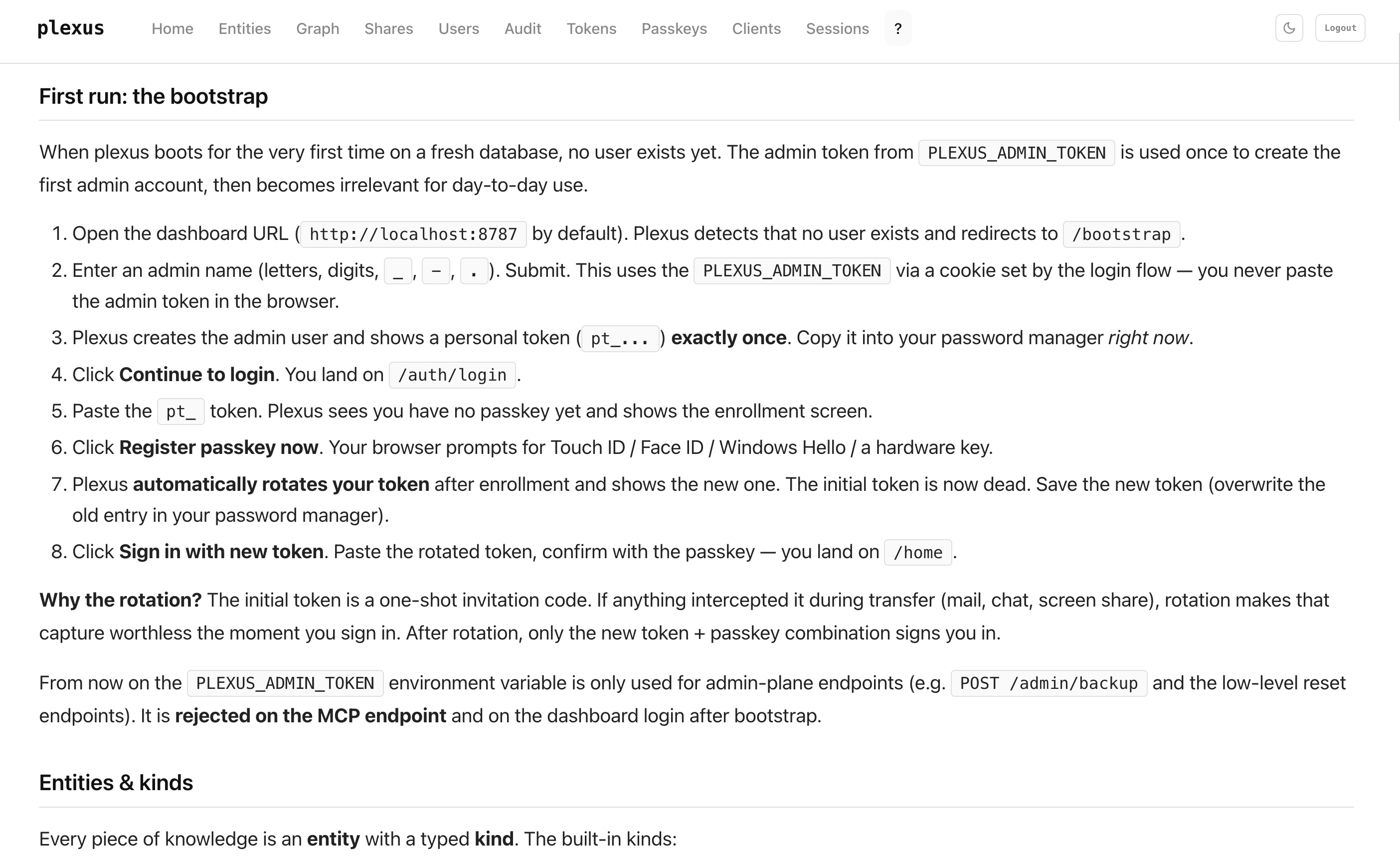
Create your admin user (first run)
plexus boots on an empty database with no user. You'll use your PLEXUS_ADMIN_TOKEN once to create the first admin account, then it steps aside.
1. Find your admin token
The scripts/bootstrap_env.sh script you ran in the Quickstart wrote the token into your .env. Read it back:
Copy the hex value after the =. You'll paste it once into the dashboard; after the bootstrap, plexus rejects the admin token on MCP and on normal login.
2. Walk the flow
| # | What you do | What plexus does |
|---|---|---|
| 1 | Open http://localhost:8787 | Shows the login form |
| 2 | Paste the admin token, click Continue | Recognises "admin token + no admin user exists" → redirects to /bootstrap |
| 3 | Enter an admin name (letters, digits, _, -, .), Create admin | Creates the admin user, shows a new personal token pt_… once. Copy it. |
| 4 | Click Continue to login | Back to /auth/login, pending-auth cookie set |
| 5 | Paste the pt_ token | Shows the passkey-enrollment screen |
| 6 | Register passkey now, confirm with Touch ID / Face ID / Windows Hello / YubiKey | Stores the passkey, then rotates the pt_ token and shows the new one once. Overwrite your password-manager entry. |
| 7 | Sign in with new token, paste new token, tap passkey | Lands you on /home |
From here on, the admin token is only used for admin-plane endpoints (backup, reset). It's rejected on MCP and on normal dashboard login.
Why the rotation?
The initial tokens (admin + first pt_) are one-shot invitation codes. If anything intercepted them — mail, chat, a screen share — rotation makes that capture worthless the moment you sign in. For additional users you create via /users, the same admin→user handoff + first-enroll rotation protects them the same way.
Where to go next
The /help page inside the dashboard covers everything else: MCP integration, token scoping, passkey management, share links, graph view.
Connecting an agent
plexus speaks Model Context Protocol over POST /mcp. Any MCP-capable client can connect.
Claude.ai (web)
Settings → Integrations → Add Custom Integration → https://<your-plexus-host>/mcp. plexus handles OAuth automatically — you'll see a consent screen once.
Claude Code (CLI)
Related MCP Servers
Adoption & maintenance
Factual signals from GitHub, npm, and our automated checks — not a rating.
npm downloads
17
Package downloads in the last 30 days.
Last commit
4mo ago
Most recent push to the default branch.
Tools exposed
15
Callable tools this server registers over MCP.
Reviews
No reviews yet — be the first to share how this listing worked for you.
Frequently Asked Questions about Plexus
AllMCPs Directory Badge
Showcase your server listing on GitHub or your project documentation. Embed this dynamic SVG badge to highlight official listing status and live engagement.
Badge Style:
Live Dynamic SVG Preview
Markdown (GitHub README)
[](https://allmcps.com/mcp/plexus)HTML Embed
<a href="https://allmcps.com/mcp/plexus"><img src="https://allmcps.com/api/badge/plexus?style=directory" alt="Plexus on AllMCPs" /></a>Technical Specs & Signals
CategoryDeveloper Tools
49Quality signal: Fair · 49/100How this signal is calculated ▾
Server availabilityNot measured
Not scored for repo-hosted servers — we can't reach the running server, only its GitHub page. Hosted MCP endpoints are health-checked live.
Verified ownership10/20
Documentation & tools25/30
Adoption & activity2/15
Community engagement0/10
A guidance signal from public completeness & health data — not a user rating. New listings start lower and rise as they add docs, get verified, and grow adoption. Signals we can't observe for a listing are skipped, not counted against it.
Own this project?
This directory is pre-filled from public sources. Claim via GitHub README, site badge, or DNS TXT to unlock edit access and the Official badge and attach your website — proof is checked automatically, then reviewed by our team.
Free dofollow backlink: add your website and place the AllMCPs badge on it — no claim needed. We detect it automatically and keep it verified as long as the badge stays live.
Claim & get free dofollowShare & Embed
Add our SVG badge (dark/light directory styles) or embeddable widget to your site.