Plateau Creative MCP
PLATEAU 3D city data as scene-editing and glTF export tools for creative LLM agents.
Install Plateau Creative MCP
Pick your client, then add it in one click or paste the config.
~/Library/Application Support/Claude/claude_desktop_config.json{
"mcpServers": {
"plateau-creative-mcp": {
"command": "npx",
"args": [
"-y",
"@yodolabs/plateau-creative-mcp"
]
}
}
}
Settings → Developer → Edit Config, merge this into mcpServers, then fully quit and reopen Claude Desktop.
We couldn’t confirm it starts correctly
We ran the install command but it didn't respond within our test window — this can mean a slow first-time install rather than a real problem.
npx -y @yodolabs/plateau-creative-mcpNo response to initialize.
This is an experimental automated check and can have false negatives — missing environment variables, a slow cold install, etc. It doesn’t necessarily mean something’s wrong. Last checked 3d ago.
Overview
Tools10
What Plateau Creative MCP lets your agent do. Expand a tool for its parameters.
Security & health
What it can reach and how reliably it runs — from our own checks, not the maintainer’s claims.
Recent health check succeeded.
Supply-chain signal
No high-severity advisories surfaced by our automated scan.
Scanned 10h ago via OSV.dev · @yodolabs/plateau-creative-mcp (npm)
Adoption & maintenance
Factual signals from GitHub, npm, and our automated checks — not a rating.
From the project README

@yodolabs/plateau-creative-mcp
An MCP server that turns Project PLATEAU's 3D city data into scene-editing and glTF export tools for creative LLM agents.




English · 日本語
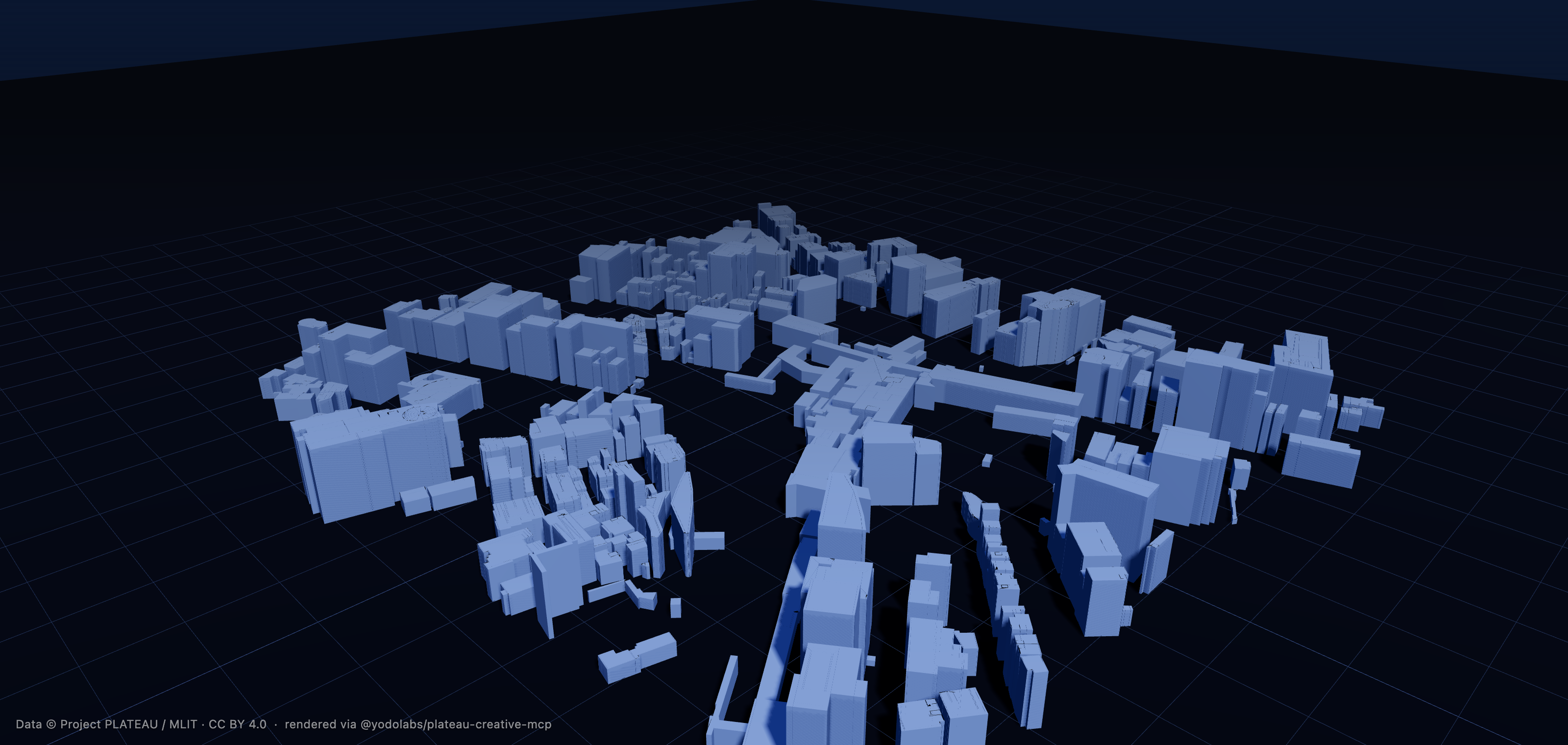
A real Shibuya block — loaded from PLATEAU, edited, and exported as one .glb by the export_glb tool, here rendered with three.js. Same geometry your LLM hands off to Blender / Unity / Unreal. Data © Project PLATEAU / MLIT (CC BY 4.0).
This server exposes tools. Orchestration is your LLM's job — point Claude / Cursor / any MCP client at this server alongside Blender MCP / Unity MCP / Unreal MCP and let it compose the workflow.
PLATEAU has an official MCP server for data access (catalog, specs, CityGML, attributes). This one fills the missing creation, scene-editing, and DCC export layer: load a Tokyo neighbourhood, delete every skyscraper, scale a block to 3× height, and emit a .glb ready for Blender / Unity / Unreal — all driven by tool calls.
flowchart LR
  CLIENT["Claude / Cursor<br/>(any MCP client)"] -->|tool calls| MCP["plateau-creative-mcp"]
  MCP -->|download_area| DATA["plateau-bridge<br/>artifact index + bundles"]
  MCP -->|"load → filter → edit"| SCENE["scene_id<br/>(in-memory)"]
  MCP -->|export_glb| OUT[".glb + LICENSE.txt"]
  OUT --> DCC["Blender / Unity / Unreal"]
Status
v0.1.0 — first public release. 10 MCP tools (incl. on-demand artifact download — no data clone needed), polygon footprint extrusion with mesh merging, single-GLB export ≤ 1 km² (≈40% gltf-transform compression) with a scene_manifest 3D Tiles fallback for larger areas, three data-access modes (TS+duckdb artifact / Python subprocess / upstream MCP via JSON-RPC), Overpass POI linking, and an optional cross-MCP bridge to BlenderMCP. Vendor-neutral over MCP — Claude, Cursor, any client works.
Tools
| Tool | Purpose |
|---|---|
download_area | Fetch + cache a prebuilt city bundle from the plateau-bridge artifact index (resolves the slug, downloads the .tar.zst, verifies sha256, extracts buildings.parquet + manifest.json), so load_area works without cloning the data pipeline. |
load_area | Load a city + bbox + LOD into a new scene_id. |
filter_buildings | Query building_uid[] inside a scene by height / year / use / zoning / flood depth. |
delete_buildings | Counterfactual edits — mark buildings as removed. |
extrude_buildings | Scale heights by a factor. |
compose_scene | Set render hints (time of day, weather, camera). |
export_glb | Emit a .glb (single_glb, real geometry from the parquet) or a scene_manifest referencing 3D Tiles. scene_manifest tile enrichment needs locally-built 3D Tiles; downloaded cities get a tile-less manifest (edits + bbox + attribution) plus a tileset_note. |
link_buildings_to_pois | Associate buildings with nearby OSM POIs (Overpass). |
get_attribution | Full dataset / license / URL metadata for a scene. |
render_via_blender | Export the scene as GLB and (optionally) bridge to a BlenderMCP-compatible HTTP MCP server via JSON-RPC. Dry-run returns the suggested cross-MCP call sequence instead. |
When PLATEAU_UPSTREAM_ENABLED=true, the server also exposes 13 tools proxied from the official Project PLATEAU MCP server: plateau_spec_outline, plateau_spec_read, plateau_get_metadata, plateau_search_areas, plateau_get_area, plateau_search_datasets, plateau_get_dataset, plateau_list_dataset_types, plateau_citygml_get_attributes, plateau_citygml_get_features, plateau_citygml_get_geoid_height, plateau_get_citygml_files, plateau_explain_spatial_id. The LLM client sees 23 tools in a single catalog, with no need to wire two separate MCP servers.
Every tool returns { result, attribution_metadata }. export_glb writes asset.extras.attribution into the GLB and a LICENSE.txt next to it. You must keep that attribution in any derived video, image, or asset.
Quickstart
npm install
npm run build
There are two ways to get city data in place.
Option A — zero setup (recommended)
Don't clone the data pipeline at all. Out of the box the server reads the public plateau-bridge artifact index, so download_area works with no configuration — it fetches the prebuilt bundle for a city, verifies its sha256, and caches it locally:
export PLATEAU_AUTO_DOWNLOAD=true     # load_area auto-fetches a missing city (optional)
export PLATEAU_OUTPUT_DIR=./out
npx @yodolabs/plateau-creative-mcp             # stdio MCP server
Call download_area(city="shibuya") once (or set PLATEAU_AUTO_DOWNLOAD=true and just call load_area, which fetches a missing city first). Only buildings.parquet + manifest.json are extracted; bundles cache under PLATEAU_ARTIFACT_DIR (default ~/.cache/plateau-creative-mcp/artifacts), so each city downloads only once. Point PLATEAU_ARTIFACT_INDEX_URL at a different index to use your own mirror.
Downloaded bundles do not include 3D Tiles (they are gigabytes per city). Everything works from the parquet — load_area, all edits, and export_glb single_glb (real geometry, ≤ 1 km² / ≤ 5000 buildings). Only scene_manifest export loses its tile references for downloaded cities (it still emits the edit list, bbox, and attribution, with a tileset_note telling you to narrow to single_glb or run a local build). For full-geometry exports of larger areas, use Option B with a local build.
For Claude Desktop, add to claude_desktop_config.json:
{
  "mcpServers": {
    "plateau-creative": {
      "command": "npx",
      "args": ["-y", "@yodolabs/plateau-creative-mcp"],
      "env": {
        "PLATEAU_AUTO_DOWNLOAD": "true",
        "PLATEAU_OUTPUT_DIR": "/Users/you/plateau-out"
      }
    }
  }
}
Option B — bring your own artifacts
If you already have plateau-bridge's out_<city>/ outputs, point straight at them:
export PLATEAU_ARTIFACT_DIR=/path/to/plateau-bridge
export PLATEAU_OUTPUT_DIR=./out
npx @yodolabs/plateau-creative-mcp        # stdio MCP server
{
  "mcpServers": {
    "plateau-creative": {
      "command": "npx",
      "args": ["-y", "@yodolabs/plateau-creative-mcp"],
      "env": {
        "PLATEAU_ARTIFACT_DIR": "/path/to/plateau-bridge",
        "PLATEAU_OUTPUT_DIR": "/Users/you/plateau-out"
      }
    }
  }
}
Smoke run without an MCP client:
npx tsx scripts/smoke-load-area.ts
Example workflows
1. Cyberpunk Shibuya flythrough (cross-MCP)
load_area(city="shibuya", bbox=[139.6975,35.6555,139.7045,35.6605], lod=2)
  -> compose_scene(time="19:30", weather="rain")
  -> export_glb()              # to ./out/<scene>_v3.glb
=> BlenderMCP: import_glb + cyberpunk shader + render
flowchart LR
  LLM(("LLM")) --> A["plateau-creative-mcp<br/>load · edit · export_glb"]
  LLM --> B["Blender MCP<br/>import · shade · render"]
  A -->|".glb + sidecar"| B
2. Tokyo without skyscrapers
load_area(...)
  -> filter_buildings({height_min: 100})
  -> delete_buildings(filter={height_min: 100})
  -> export_glb()
3. Office-tower draft (requires zoning fields in the artifact)
load_area(...)
  -> filter_buildings({zoning_use: ["commercial"], far_max_min: 400})
=> SketchUp MCP: design a new building inside those parcels
Architecture
src/
  server/   MCP protocol entry, tool registry, unified envelope
  tools/    10 MCP tool handlers
  schemas/  Zod schemas + JSON Schema export
  scene/    scene_id LRU + lock + optional disk persistence
  data/     Artifact (duckdb) access layer + on-demand bundle downloader
  export/   three.js scene builder + GLTFExporter + manifest fallback
  attribution/  Envelope wrapping, attribution merge
  rateLimit/    Token bucket per (client, tool)
  errors/   Stable error codes + AppError
  config/   Env-driven config
  utils/    ids, bbox, paths, logger
scene_idis the only shared state. All mutate / export tools must reference it. IDs are server-generated ULIDs.building_uidis the single canonical reference. Nogml_idor batch index alternates.export_glbhard limits: ≤ 1 km² bbox and ≤ 5000 buildings forsingle_glb. Larger scenes returnEXPORT_LIMIT_EXCEEDEDwith a suggestion to switch toscene_manifest.- Attribution is wrapped at the executor level — no handler can return a result without it.
Configuration
Reviews
No reviews yet — be the first to share how it worked for you.
Frequently Asked Questions about Plateau Creative MCP
Related MCP servers
Add a badge to your READMEShow it’s listed — live SVG, Markdown or HTML.
AllMCPs Directory Badge
Showcase your server listing on GitHub or your project documentation. Embed this dynamic SVG badge to highlight official listing status and live engagement.
[](https://allmcps.com/mcp/plateau-creative-mcp)<a href="https://allmcps.com/mcp/plateau-creative-mcp"><img src="https://allmcps.com/api/badge/plateau-creative-mcp?style=directory" alt="Plateau Creative MCP on AllMCPs" /></a>