AllMCPs
BrowseBestCategoriesStackCompareToolsGuidesBlog
Log in Submit MCP

Stay in the loop

Get new MCP servers and top picks in your inbox.

AllMCPs

The open directory for discovering and installing Model Context Protocol servers.

AllMCPs on GitHub (opens in a new tab)
Launched onTiny Startupstinystartups.com
Explore
  • Browse servers
  • Best MCP servers
  • Categories
  • MCP clients
  • Agent prompts
  • Stack Builder
  • Compare servers
  • Random discovery New
  • Submit a server
  • Pricing & Boost Boost
Learn
  • Guides hub
  • What is MCP?
  • Install guide
  • Build an MCP server
  • Deploy an MCP server
  • Security guide
  • Troubleshooting
  • MCP for SEO & AEO
  • Protocol versioning
  • Blog & updates
Tools
  • All developer tools
  • Config generator
  • Config validator
  • Config auditor
  • MCP playground
  • Token calculator
  • OpenAPI β†’ MCP
  • Badge generator
For agents
  • REST API docs
  • Trust & traffic Live
  • Remote MCP server SSE β†— (opens in a new tab)
  • llms.txt β†— (opens in a new tab)
  • Catalog JSON β†— (opens in a new tab)
Company
  • About
  • Advertise Sponsor
  • Contact
  • GitHub β†— (opens in a new tab)
  • Terms
  • Privacy
AllMCPs VerifiedAllMCPs VerifiedFeatured on Nick LaunchesFeatured on Nick LaunchesLaunch Llama NewsletterLaunch Llama NewsletterVerified DR - allmcps.comVerified DR - allmcps.comFeatured on SaaSGrowFeatured on SaaSGrowFeatured on Twelve ToolsFeatured on Twelve ToolsFeatured on Saaspa.geFeatured on Saaspa.geFeatured on Findly.toolsFeatured on Findly.toolsFeatured on Startup FameFeatured on Startup FameFeatured on LaunchKiwiFeatured on LaunchKiwiFeatured on ScrollLaunchFeatured on ScrollLaunchFeatured on DailyPingsFeatured on DailyPingsFazier badgeFazier badgeFeatured on NewTool.siteFeatured on NewTool.siteFeatured on saasfame.comFeatured on saasfame.comDR Checker - Domain RatingDR Checker - Domain RatingListed on Turbo0Listed on Turbo0Launched on LaunchBoard - Product Launch PlatformLaunched on LaunchBoard - Product Launch PlatformList on SimilarlabsList on Similarlabshttps://codetrendy.comhttps://codetrendy.comListed on DevTool.ioFeatured on BuildlistFeatured on BuildlistLaunched on Tiny StartupsFeatured on ShowMeBestAIFeatured on ShowMeBestAIFind us on LaunchZoneFind us on LaunchZoneAllMCPs VerifiedAllMCPs VerifiedFeatured on Nick LaunchesFeatured on Nick LaunchesLaunch Llama NewsletterLaunch Llama NewsletterVerified DR - allmcps.comVerified DR - allmcps.comFeatured on SaaSGrowFeatured on SaaSGrowFeatured on Twelve ToolsFeatured on Twelve ToolsFeatured on Saaspa.geFeatured on Saaspa.geFeatured on Findly.toolsFeatured on Findly.toolsFeatured on Startup FameFeatured on Startup FameFeatured on LaunchKiwiFeatured on LaunchKiwiFeatured on ScrollLaunchFeatured on ScrollLaunchFeatured on DailyPingsFeatured on DailyPingsFazier badgeFazier badgeFeatured on NewTool.siteFeatured on NewTool.siteFeatured on saasfame.comFeatured on saasfame.comDR Checker - Domain RatingDR Checker - Domain RatingListed on Turbo0Listed on Turbo0Launched on LaunchBoard - Product Launch PlatformLaunched on LaunchBoard - Product Launch PlatformList on SimilarlabsList on Similarlabshttps://codetrendy.comhttps://codetrendy.comListed on DevTool.ioFeatured on BuildlistFeatured on BuildlistLaunched on Tiny StartupsFeatured on ShowMeBestAIFeatured on ShowMeBestAIFind us on LaunchZoneFind us on LaunchZone
Β© 2026 Jackalope Digital LLC. All rights reserved.
  1. Home
  2. πŸ’» Developer Tools
  3. Pixelpact
Pixelpact logo
Health: ActiveRecent health check succeeded.Last checked 9/7/2026, 8:42:10 PM

Pixelpact

User RatingsBe the first to rate and review this MCP server! Enrichment pendingWe haven’t run our AI enrichment pass on this listing yet, so the overview, use cases, and FAQ below may be sparse or missing. We work through the catalog over time β€” check back soon.
View Repository2 GitHub StarsTotal stargazers on GitHub for the source repository (2 stars).Visit Website

Extract a visual contract from a reference page and measure an implementation against it

Quick Install

Automated & IDE Setup

Copy the AI prompt to install this server into Claude Code, Cursor, or another agent β€” or use 1-click editor setup below.

Add to CursorAdd to VS Code
Not yet automatically verified

We haven't yet run this listing's install command through our automated sandbox check. This isn't a red flag β€” we're steadily working through the catalog.

Manual Client & Custom JSON ConfigExpand JSON β–Ύ

Client Config & Setup

Choose your client or environment
Target File:~/Library/Application Support/Claude/claude_desktop_config.json
claude_desktop_config.json
{
  "mcpServers": {
    "pixelpact": {
      "command": "npx",
      "args": [
        "-y",
        "pixelpact"
      ]
    }
  }
}

πŸ’‘ Paste the JSON block into your client's configuration file under mcpServers, then restart the application.

Install Directory Badge Claim listing AlternativesπŸ’» More in Developer Tools

Documentation Overview

pixelpact

Your coding agent cannot see the page it just built. pixelpact measures it against the reference and hands back numbers.

CI npm node license

A coding agent writes the CSS and says it is done. It never sees the result. Nothing hands it a number, so the loop cannot close: the agent guesses, you open the page, you send it back, it guesses again. Every round costs you the one thing the agent was supposed to save.

The same gap exists without an agent, when a teammate says a section is finished and nobody in the room has a measurement. The difference is that a person can at least look.

pixelpact reads the reference page and writes down what it actually renders: sizes, colors, spacing, typography, hover and focus states, animation keyframes, design tokens. That file is the contract. Point pixelpact at the implementation and it answers with one line per property that drifted, which is precisely what an agent can act on.

Terminal
npx pixelpact extract https://reference.example.com -o contract.json
npx pixelpact check contract.json http://localhost:3000

Works with

MCP clientsPlaywrightGitHub ActionsAny frameworkFigma
Claude Code, Cursor, anything that speaks stdio MCPthe engine it drivesone comment on the pull requestit reads the DOM, not your stacka frame as the reference, when you want one

If a browser can render it, pixelpact can measure it.

For coding agents

An agent that writes UI code cannot tell whether it succeeded. pixelpact-mcp gives it the measurement, so the loop closes without a person in the middle: extract the contract once, then let the agent check its own work, read the deviation list, fix, and check again.

jsonc
// .mcp.json
{
  "mcpServers": {
    "pixelpact": { "command": "npx", "args": ["-y", "pixelpact-mcp"] }
  }
}

Tools exposed: extract_contract, check_implementation, diff_pixels, read_contract_summary.

Why this is not visual regression testing

Percy, Chromatic, Applitools, BackstopJS and Pixeleye all compare your page against a baseline that you approved earlier. That model works once the page already looks right and you want to keep it that way. While you are still building toward a design, there is no baseline to compare with, and the first run of a regression tool simply records whatever you produced.

Visual regression toolspixelpact
Compares againsta snapshot you approved earlierthe reference design itself
Useful whenthe UI is already correctthe UI is being built
First run on a new pagerecords, cannot judgemeasures against the reference
Answer you getan image diff to inspect by eyea value per property, with a delta
Fits an autonomous agentneeds a human to approve the diffthe numbers close the loop

The two models are complementary. Use a regression tool to keep a finished page finished, and pixelpact to get it finished in the first place.

Problems pixelpact solves

Without pixelpactWith pixelpact
❌ A coding agent writes CSS, declares it done, and a person has to open the page to find out that it is not.βœ… The agent calls the MCP server, reads the deviations, fixes them and checks again. No person in the middle.
❌ Someone says the section is finished, you disagree, and neither of you has a number. The louder opinion wins.βœ… Every value in the reference is asserted against your page. What failed is listed with expected, actual and the difference.
❌ A regression tool has nothing to compare a brand new page against, so its first run records whatever you happened to build.βœ… The reference is the baseline from the first minute. Nothing has to be approved before the tool is useful.
❌ Hover, focus and animation values are almost never reviewed, because checking them by hand is slow and boring.βœ… They are part of the contract, so they are measured on every run like any other value.
❌ An image diff tells you that something changed and leaves you to hunt for what.βœ… Deviations name the element, the property, the expected value and the measured one.
❌ The design lives in a file nobody opens during code review.βœ… The contract is committed JSON, so a pull request shows exactly which values moved.

Install

bash
pnpm add -D pixelpact playwright
pnpm exec playwright install chromium

playwright is a peer dependency, so the browser download stays under your control and a project that already has Playwright installs nothing extra. Node 22.12 or newer is required.

Quickstart

1. Extract the contract from the reference.

Terminal
npx pixelpact extract https://reference.example.com \
  --selector "main" \
  --viewport desktop,mobile \
  --screenshots .pixelpact/shots \
  -o contract.json

2. Measure your implementation.

Terminal
npx pixelpact check contract.json http://localhost:3000 --viewport desktop

3. Fix what it reports, then run it again. The command exits 0 when everything is inside tolerance and 1 when it is not, so it drops straight into a script or a CI job.

What a contract looks like

A contract is plain JSON, readable and diffable, with no proprietary format and no service behind it.

JSON Config
{
  "version": 1,
  "source": { "type": "url", "value": "https://reference.example.com" },
  "root": "main",
  "extractedAt": "2026-09-06T01:20:44.812Z",
  "viewports": [{ "name": "desktop", "width": 1440, "height": 900 }],
  "tokens": { "--brand-600": "rgb(11, 114, 133)" },
  "keyframes": { "fade-up": [{ "offset": "0%", "css": "opacity: 0" }] },
  "byViewport": {
    "desktop": {
      "documentHeight": 4218,
      "elements": [
        {
          "selector": "main > header > a.cta",
          "tag": "a",
          "text": "Get started",
          "box": { "x": 120, "y": 32, "w": 148, "h": 44 },
          "styles": {
            "background-color": "rgb(11, 114, 133)",
            "font-size": "16px",
            "border-radius": "8px"
          },
          "hover": { "background-color": "rgb(8, 90, 105)" },
          "focus": { "outline": "2px solid rgb(11, 114, 133)" }
        }
      ]
    }
  }
}

Because it is a file, you can commit it, review it in a pull request, hand it to another developer, or hand it to an agent.

What a check prints

text
pixelpact check  FAILED
  target    http://localhost:4173/impl.html
  reference http://localhost:4173/ref.html
  viewport  desktop 1440x900
  elements  14 matched, 0 missing of 14
  checks    1056 passed, 10 failed (99.1% of 1066)

deviations (10)
SELECTOR          PROPERTY                  EXPECTED                ACTUAL                  DIFF
body > main > h1  font-size                 48px                    44px                    4px
body > main > a   box.width                 117.75px                109.75px                8px
body > main > a   padding-right             24px                    20px                    4px
body > main > a   padding-left              24px                    20px                    4px
body > main > a   background-color          rgb(11, 114, 133)       rgb(37, 99, 235)        60.1 (color)
body > main > a   border-top-left-radius    8px                     4px                     4px
body > main > a   border-top-right-radius   8px                     4px                     4px
body > main > a   border-bottom-left-ra...  8px                     4px                     4px
body > main > a   border-bottom-right-r...  8px                     4px                     4px
body > main > a   focus.outline             rgb(11, 114, 133) s...  rgb(37, 99, 235) so...  differs

That is a real run against two copies of one page with four declarations changed. Four edits produce ten measured deviations, because padding moves the box width and one border-radius shorthand sets four corners. Run the same check against the reference itself and all 1066 assertions pass, which is the property that matters: a passing check has to mean something.

Add --json to get the same report as a data structure, which is what CI jobs and agents read.

What a side by side run shows

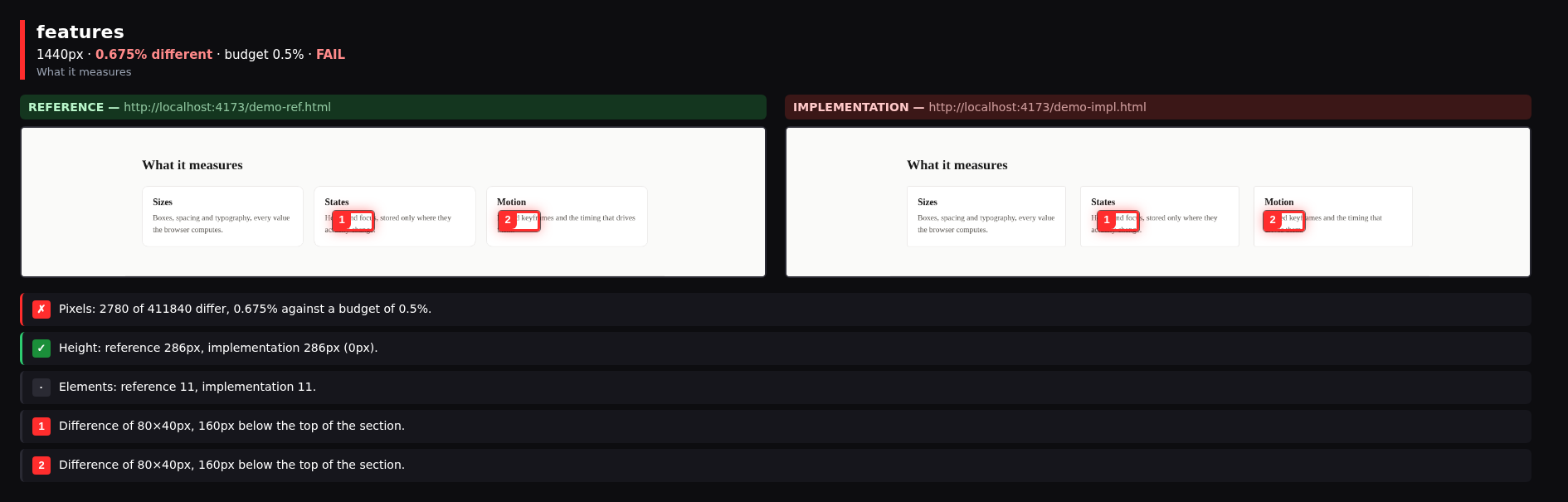
check says which values moved. diff says how many pixels moved. Neither tells a person where to look. side splits both pages into sections, puts them next to each other, and boxes what differs.
Terminal
npx pixelpact side https://reference.example.com http://localhost:3000 --widths 1440,390
text
#   SECTION   WIDTH   VERDICT  DIFF
01  hero      1440px  PASS     0.000%
02  features  1440px  FAIL     0.675%
  .pixelpact/side/1440/02-features.png
03  pricing   1440px  PASS     0.000%
04  foot      1440px  FAIL     1.265%
  .pixelpact/side/1440/04-foot.png

One section compared side by side, differences boxed in red

Read the full README β†’View source on GitHub β†’

Related MCP Servers

View all in Developer Tools View all alternatives
  • PraisonAI logoPraisonAI

    AI Agents Framework with Self Reflection and MCP support

    πŸ’» Developer Tools1 views
    Compare vs PraisonAI β†’
  • Nx Console logoNx Console

    A Model Context Protocol server implementation for Nx

    πŸ’» Developer Tools0 views
    Compare vs Nx Console β†’
  • Labelhead Artist Momentum logoLabelhead Artist Momentum

    Trending hip-hop artist momentum scores across four cultural dimensions.

    πŸ’» Developer Tools0 views
    Compare vs Labelhead Artist Momentum β†’
  • PDF Reader MCP logoPDF Reader MCP

    Evidence-first PDF MCP. Agent Document Twin with citeable page+bbox evidence.

    πŸ’» Developer Tools1 views
    Compare vs PDF Reader MCP β†’

Reviews

No reviews yet β€” be the first to share how this listing worked for you.

Frequently Asked Questions about Pixelpact

Add the following block to your claude_desktop_config.json under mcpServers: "mcpServers": { "pixelpact": { "command": "npx", "args": ["-y", "pixelpact"] } }

AllMCPs Directory Badge

Full Badge Customizer

Showcase your server listing on GitHub or your project documentation. Embed this dynamic SVG badge to highlight official listing status and live engagement.

Badge Style:
Live Dynamic SVG PreviewPixelpact AllMCPs Directory Badge

Markdown (GitHub README)
[![AllMCPs](https://allmcps.com/api/badge/pixelpact?style=directory)](https://allmcps.com/mcp/pixelpact)
HTML Embed
<a href="https://allmcps.com/mcp/pixelpact"><img src="https://allmcps.com/api/badge/pixelpact?style=directory" alt="Pixelpact on AllMCPs" /></a>

Technical Specs & Signals

CategoryπŸ’»Developer Tools
More technical detailsExpand β–Ύ
TransportSTDIO
RuntimeNode.js
Last updatedSep 7, 2026
Views0
Unique ViewsTotal visits recorded for this listing page on AllMCPs.
Installs0
Installs & Copy ActionsTotal times users copied install commands or configuration snippets for this server.
GitHub stars2
GitHub Star CountTotal stargazers on GitHub representing community popularity (2 stars).
37Quality signal: Fair Β· 37/100How this signal is calculated β–Ύ
Server availabilityNot measured

Not scored for repo-hosted servers β€” we can't reach the running server, only its GitHub page. Hosted MCP endpoints are health-checked live.

Verified ownership10/20
Documentation & tools16/30
Adoption & activity2/15
Community engagement0/10

A guidance signal from public completeness & health data β€” not a user rating. New listings start lower and rise as they add docs, get verified, and grow adoption. Signals we can't observe for a listing are skipped, not counted against it.

β˜… FeaturedAllMCPs Server logo

AllMCPs Server

The official MCP server for AllMCPs.com - submit and manage tools directly from your AI. The open directory for MCP servers. Connect Claude, Cursor, Windsurf, and AI agents to databases, tools, files, and APIs. Explore 10,000+ servers. AllMCPs is the premier, open directory for discovering, evaluating, and installing Model Context Protocol (MCP) servers to equip AI agents and LLMs with real-world superpowers.

Explore Server β†’

Own this project?

This directory is pre-filled from public sources. Claim via GitHub README, site badge, or DNS TXT to unlock edit access and the Official badge β€” proof is checked automatically, then reviewed by our team.

Free dofollow backlink: add your website and place the AllMCPs badge on it β€” no claim needed. We detect it automatically and keep it verified as long as the badge stays live.

Claim & get free dofollow

Share & Embed

Add our SVG badge (dark/light directory styles) or embeddable widget to your site.

Explore more

More in πŸ’» Developer Tools β†’Best MCP servers for Developers β†’Alternatives to Pixelpact β†’Install in Claude DesktopInstall in CursorInstall in VS Code
