AllMCPs
BrowseBestCategoriesStackCompareToolsGuidesBlog
Log in Submit MCP

Stay in the loop

Get new MCP servers and top picks in your inbox.

AllMCPs

The open directory for discovering and installing Model Context Protocol servers.

AllMCPs on GitHub (opens in a new tab)
Launched onTiny Startupstinystartups.com
Explore
  • Browse servers
  • Best MCP servers
  • Categories
  • MCP clients
  • Agent prompts
  • Stack Builder
  • Compare servers
  • Random discovery New
  • Submit a server
  • Pricing & Boost Boost
Learn
  • Guides hub
  • What is MCP?
  • Install guide
  • Build an MCP server
  • Deploy an MCP server
  • Security guide
  • Troubleshooting
  • MCP for SEO & AEO
  • Protocol versioning
  • Transports: stdio vs HTTP
  • State of MCP (stats)
  • Blog & updates
Tools
  • All developer tools
  • Config generator
  • Config validator
  • Config auditor
  • MCP playground
  • Token calculator
  • OpenAPI → MCP
  • Badge generator
For agents
  • REST API docs
  • Trust & traffic Live
  • Remote MCP server SSE ↗ (opens in a new tab)
  • llms.txt ↗ (opens in a new tab)
  • Catalog JSON ↗ (opens in a new tab)
Company
  • About
  • Advertise Sponsor
  • Contact
  • GitHub ↗ (opens in a new tab)
  • Terms
  • Privacy
AllMCPs VerifiedAllMCPs VerifiedFeatured on Nick LaunchesFeatured on Nick LaunchesLaunch Llama NewsletterLaunch Llama NewsletterVerified DR - allmcps.comVerified DR - allmcps.comFeatured on SaaSGrowFeatured on SaaSGrowFeatured on Twelve ToolsFeatured on Twelve ToolsFeatured on Saaspa.geFeatured on Saaspa.geFeatured on Findly.toolsFeatured on Findly.toolsFeatured on Startup FameFeatured on Startup FameFeatured on LaunchKiwiFeatured on LaunchKiwiFeatured on ScrollLaunchFeatured on ScrollLaunchFeatured on DailyPingsFeatured on DailyPingsFazier badgeFazier badgeFeatured on NewTool.siteFeatured on NewTool.siteFeatured on saasfame.comFeatured on saasfame.comDR Checker - Domain RatingDR Checker - Domain RatingListed on Turbo0Listed on Turbo0Launched on LaunchBoard - Product Launch PlatformLaunched on LaunchBoard - Product Launch PlatformList on SimilarlabsList on Similarlabshttps://codetrendy.comhttps://codetrendy.comListed on DevTool.ioFeatured on BuildlistFeatured on BuildlistLaunched on Tiny StartupsFeatured on ShowMeBestAIFeatured on ShowMeBestAIFind us on LaunchZoneFind us on LaunchZoneAllMCPs VerifiedAllMCPs VerifiedFeatured on Nick LaunchesFeatured on Nick LaunchesLaunch Llama NewsletterLaunch Llama NewsletterVerified DR - allmcps.comVerified DR - allmcps.comFeatured on SaaSGrowFeatured on SaaSGrowFeatured on Twelve ToolsFeatured on Twelve ToolsFeatured on Saaspa.geFeatured on Saaspa.geFeatured on Findly.toolsFeatured on Findly.toolsFeatured on Startup FameFeatured on Startup FameFeatured on LaunchKiwiFeatured on LaunchKiwiFeatured on ScrollLaunchFeatured on ScrollLaunchFeatured on DailyPingsFeatured on DailyPingsFazier badgeFazier badgeFeatured on NewTool.siteFeatured on NewTool.siteFeatured on saasfame.comFeatured on saasfame.comDR Checker - Domain RatingDR Checker - Domain RatingListed on Turbo0Listed on Turbo0Launched on LaunchBoard - Product Launch PlatformLaunched on LaunchBoard - Product Launch PlatformList on SimilarlabsList on Similarlabshttps://codetrendy.comhttps://codetrendy.comListed on DevTool.ioFeatured on BuildlistFeatured on BuildlistLaunched on Tiny StartupsFeatured on ShowMeBestAIFeatured on ShowMeBestAIFind us on LaunchZoneFind us on LaunchZone
© 2026 Jackalope Digital LLC. All rights reserved.
  1. Home
  2. 💻 Developer Tools
  3. Pixasso
P
Health: Not checked yetWe have not completed a health check for this listing yet.No health check has run yet.

Pixasso

User RatingsBe the first to rate and review this MCP server! Enrichment pendingWe haven’t run our AI enrichment pass on this listing yet, so the overview, use cases, and FAQ below may be sparse or missing. We work through the catalog over time — check back soon.
View Repository

End-to-end frontend engineering and design orchestrator across 16 foundational pillars.

Quick Install

Automated & IDE Setup

Copy the AI prompt to install this server into Claude Code, Cursor, or another agent — or use 1-click editor setup below.

One-click editor setup isn’t available for this listing yet — we don’t have a confirmed install command, and we’d rather show nothing than point your editor at the wrong package or host. Follow the project’s own setup instructions, linked above.

Manual Client & Custom JSON ConfigExpand JSON â–¾
No confirmed setup config for this listing yet. We only publish a config block when the install details come from the project itself — its README, its docs, or a verified owner. We haven’t found those for pixasso, and we’d rather show nothing than a guess you’d paste into your client. Follow the project’s own setup instructions for the current steps.
Install Directory Badge Claim listing Alternatives💻 More in Developer Tools

Documentation Overview

Pixasso

The Complete End-to-End Frontend Engineering & Design Orchestrator for AI Agents and Humans.

License: MIT npm version npm downloads MCP Server TypeScript Platform Support M8ven Score Live

Live Documentation and Showcase: pixasso.erebuzzz.tech


Overview

Pixasso is a senior design-research, intent-discovery, and full-spectrum frontend engineering orchestrator inspired by Picasso's exploratory breadth. It rejects cookie-cutter AI interfaces, purple gradients, Lucide icon flooding, and superficial templates. Instead, Pixasso guides autonomous coding agents (and human engineers) through a rigorous pipeline:

text
Intent Discovery -> Design Genome -> Decision Graph -> Capability Graph -> Task DAG -> Specialist Agents -> Automated QA

Pixasso unifies Art Direction, UX Architecture, Typography Direction, Motion Systems, Full-Stack Frontend Implementation, and Automated Multi-Viewport Testing into a single cohesive skill and Model Context Protocol (MCP) server.


Visual Showcase & Themes

Pixasso supports multi-mode aesthetic execution tailored to your product identity:

ThemeAesthetic ModeKey Visual Traits
Paper LightArchitectural EditorialWarm ivory (#fbfaf7), hairlines, wide grotesque display headlines, Newsreader serif body
CRT TerminalRetro Phosphor ComputingPhosphor emerald (#00ff66), scanlines, cathode vignette, bracket hotkeys [B], monospace telemetry
Pitch Black AMOLEDDeep Space OperationsTrue #000000 ground, cold metallic accents, sharp geometric borders, maximum contrast

Interface Previews

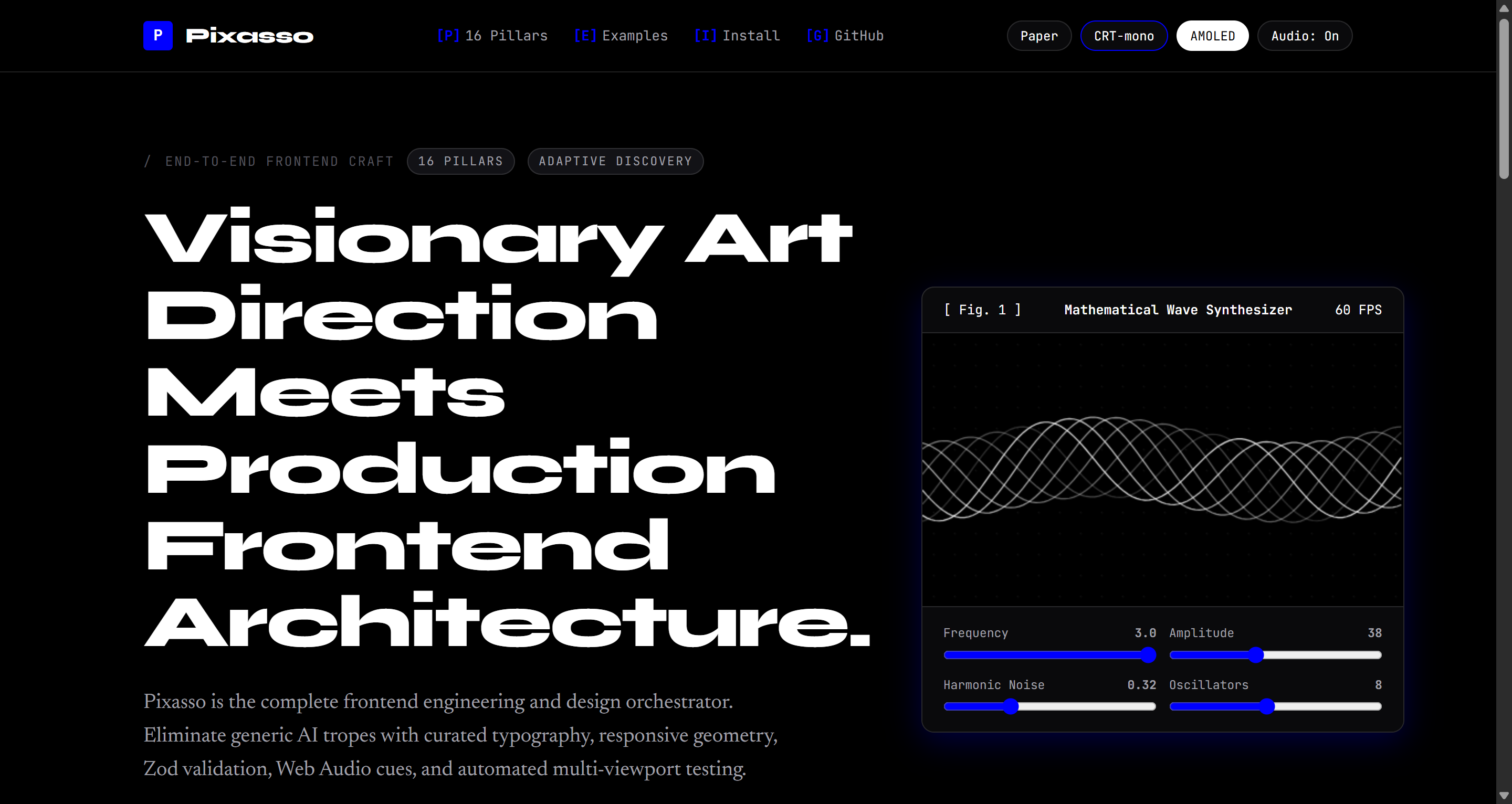
Pixasso Paper Light Theme Figure 1: Architectural Paper Light Theme with wide display headlines and generative wave synthesizer.
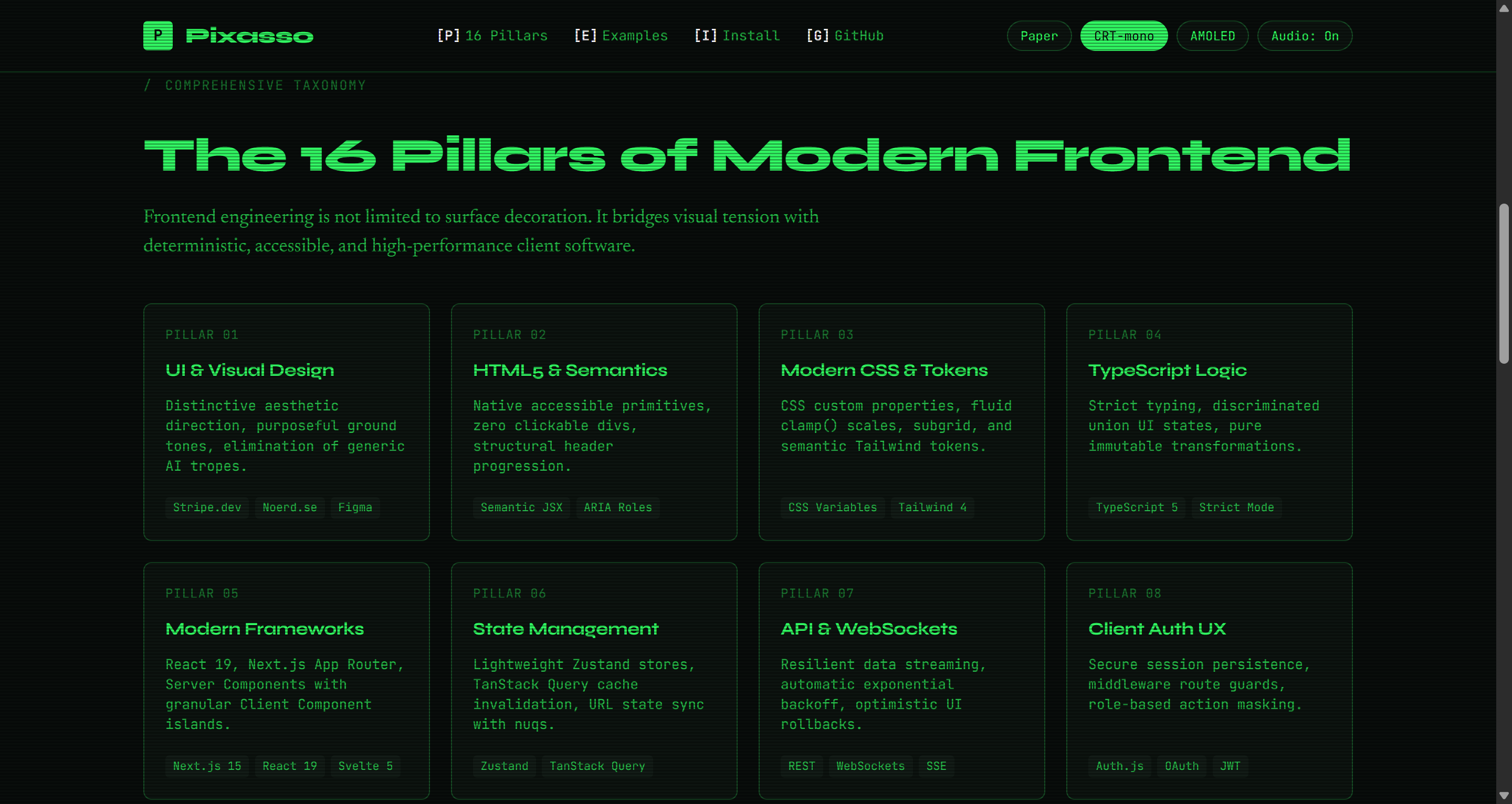
Pixasso CRT Terminal Theme Figure 2: Retro Cathode Ray Terminal Theme with phosphor glow, scanline shader, and telemetry HUD.
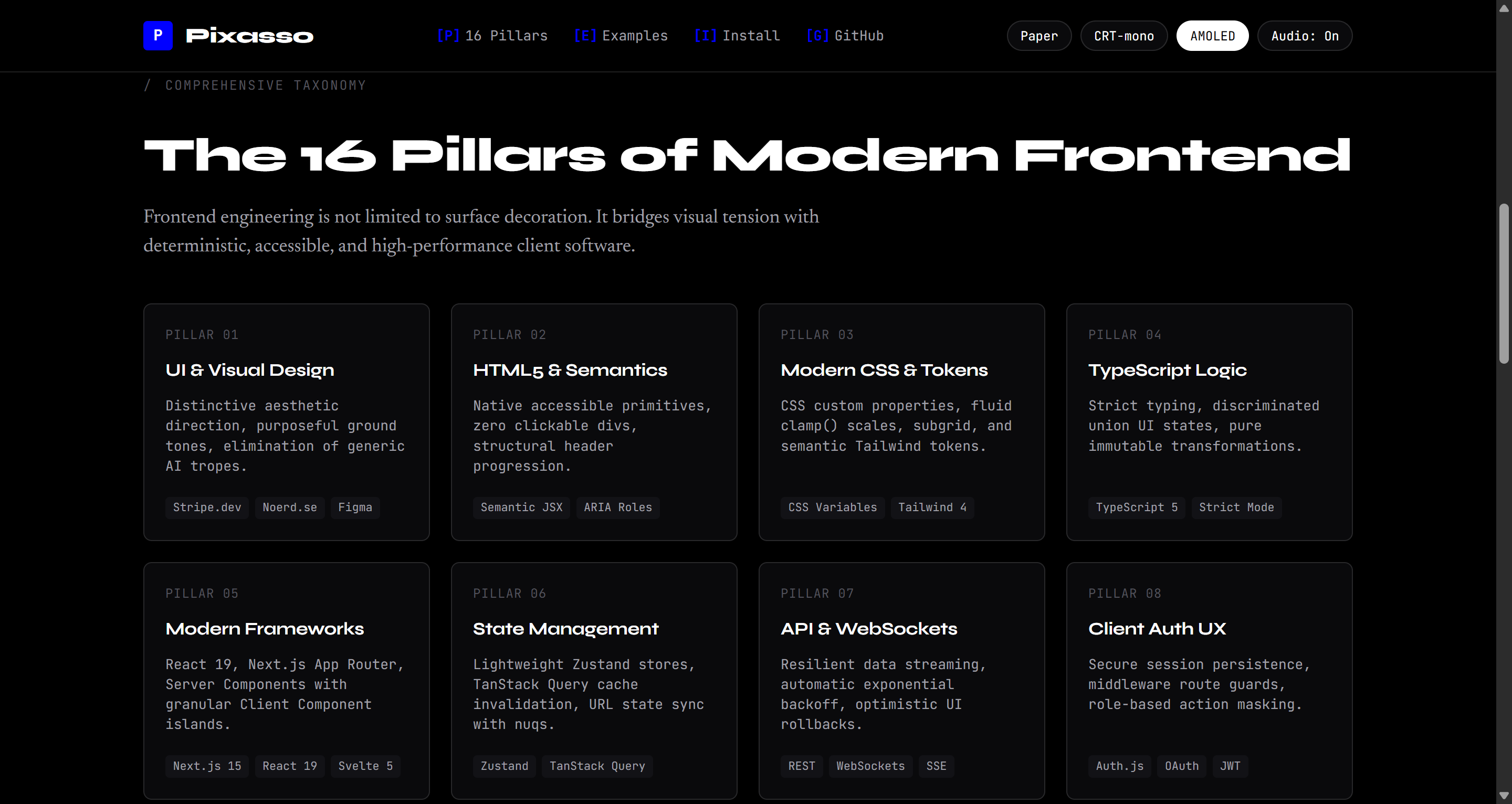
Pixasso AMOLED Pitch Black Theme Figure 3: Pitch Black AMOLED Theme optimized for high-contrast, edge-density operational dashboards.
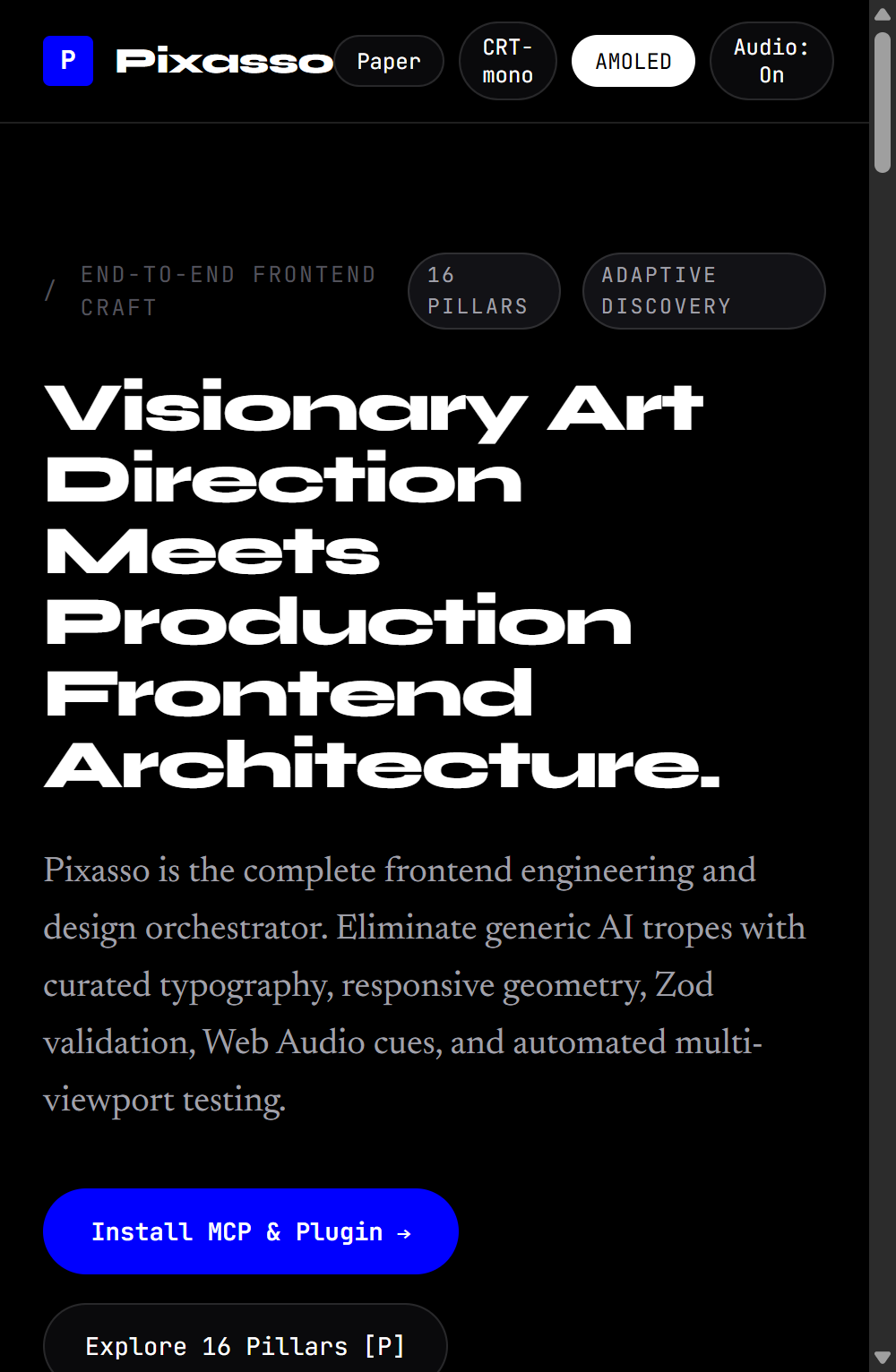
Pixasso Responsive Mobile Viewport Figure 4: Mobile Viewport (390px) verified with zero horizontal DOM overflow and accessible touch targets.
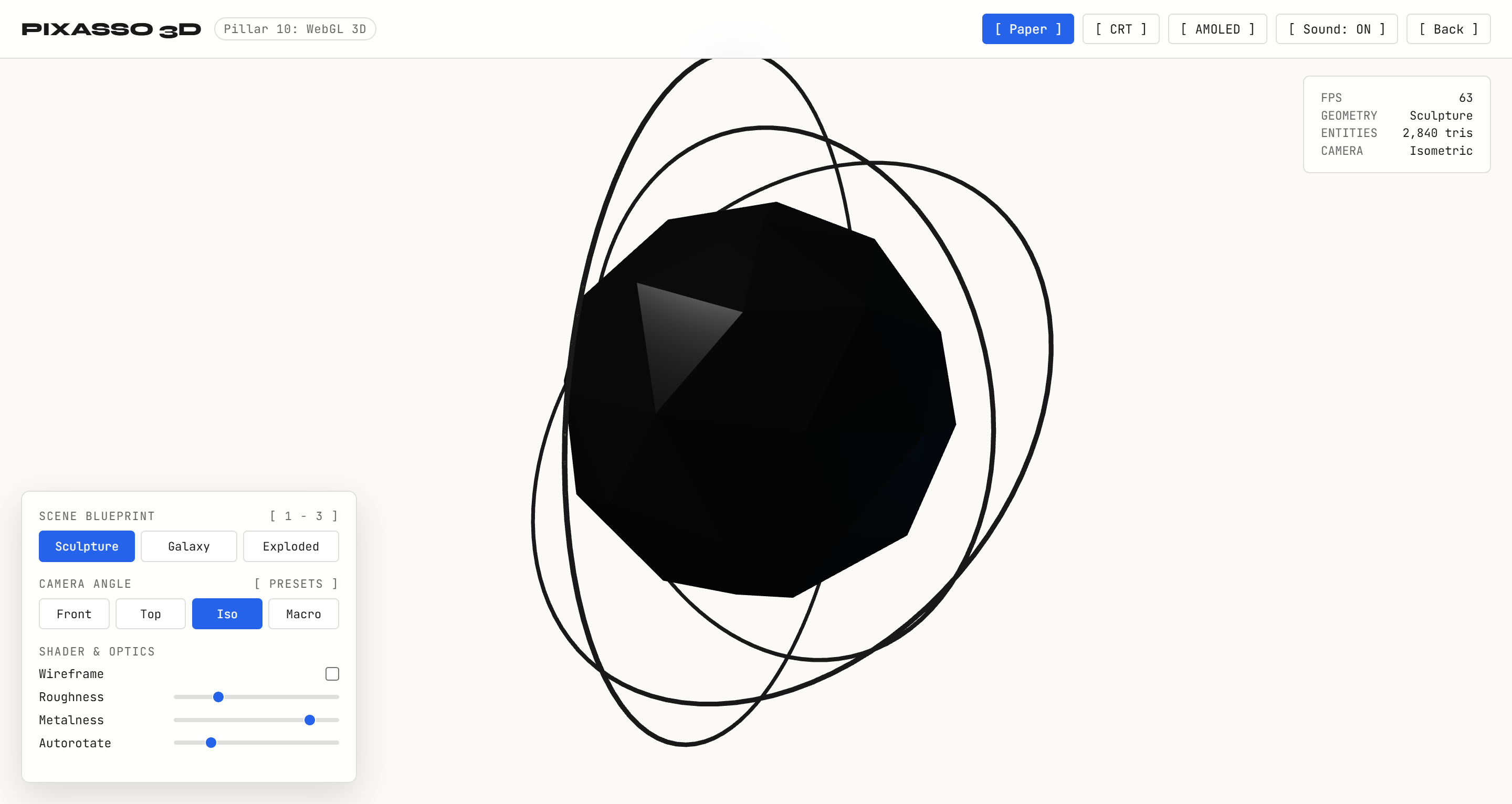
Pixasso 3D Kinetic Sculpture Figure 5: 3D Kinetic Sculpture with procedural faceted cage, PBR metallic core, and orbital gimbal rings.
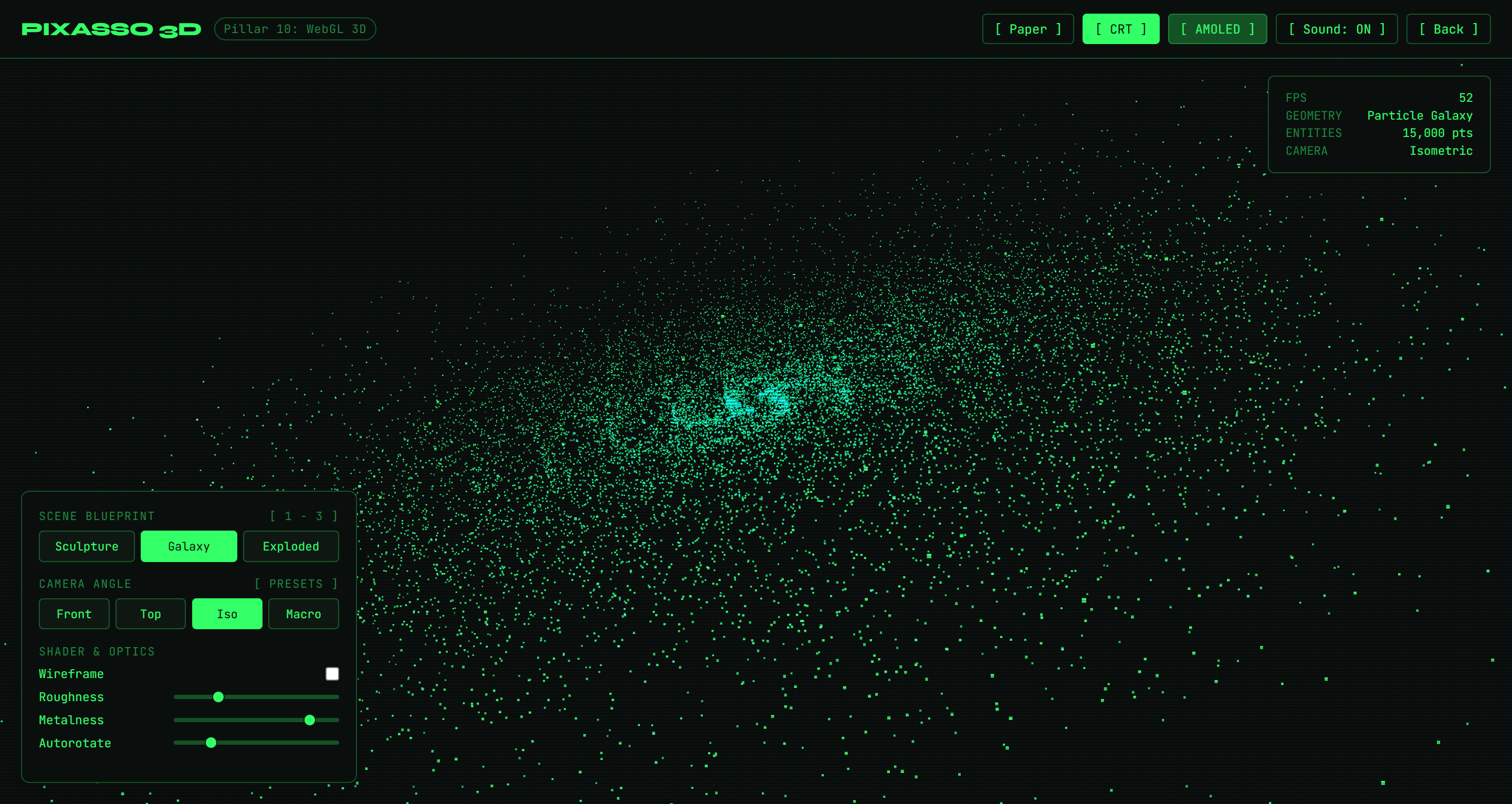
Pixasso 3D Gravitational Particle Galaxy Figure 6: 15,000 GPU particle galaxy in CRT phosphor mode with mouse gravitational attraction vectors.
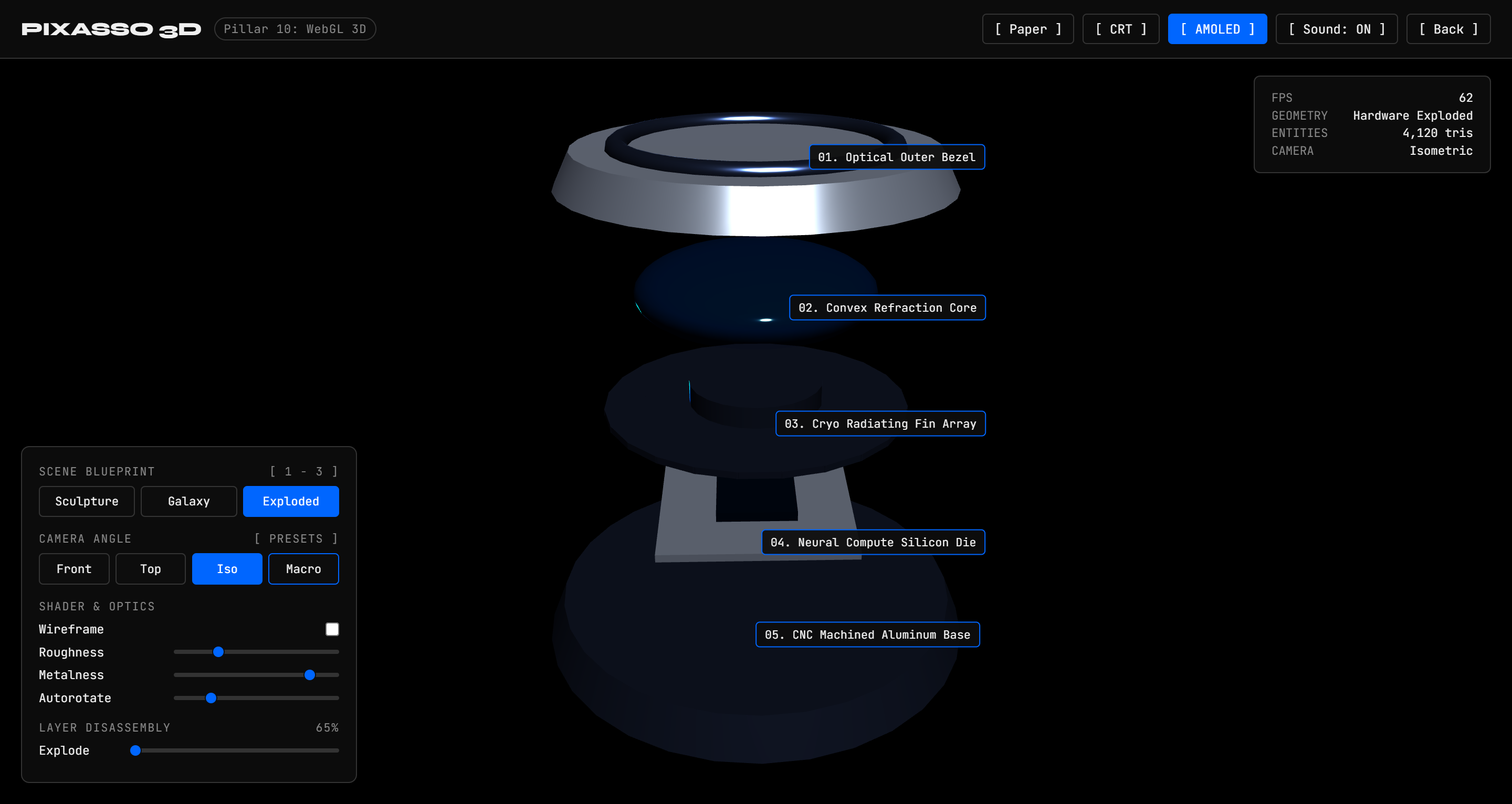
Pixasso 3D Spatial Hardware Exploded View Figure 7: 5-Layer precision hardware assembly with interactive exploded-view disassembly slider and callouts.


The 16 Pillars of Frontend Architecture

Pixasso treats frontend engineering not as shallow visual styling, but as a complete 16-pillar software engineering discipline:

PillarDisciplineKey Technical Responsibilities
1. UI & Visual DesignDesign Systems & TokensSemantic color scales, modular typography scales, surface depth, spacing systems
2. Semantic HTML & JSXDocument StructureAccessible landmarks (main, nav, article), ARIA roles, microdata, zero div soup
3. Modern CSS SystemsStyling ArchitectureCSS custom properties, container queries, Cascade Layers (@layer), subgrid, zero-runtime CSS
4. TypeScript ExcellenceType SafetyStrict mode, discriminated unions for UI state, zero any, typed event handlers
5. Framework ArchitectureComponent LifecycleReact 19, Next.js App Router, Svelte 5 runes, Vue 3 Composition, Islands Architecture
6. State ManagementData Flow & CacheServer state (TanStack Query), client state (Zustand), URL search params as source of truth
7. API & Realtime DataNetwork TransportType-safe REST, GraphQL, WebSockets, Server-Sent Events, optimistic UI mutations
8. Client Authentication UXSession SecurityRoute protection guards, PKCE OAuth flows, token refresh queues, zero credential flicker
9. Forms & Input ValidationData IntegrityReact Hook Form, Zod schema validation, inline error hints, accessible fieldsets
10. Motion & AnimationKinetic DirectionMotion (motion.dev), GSAP timelines, WebGL canvas shaders, prefers-reduced-motion
11. Responsive DesignViewport VersatilityFluid typography (clamp()), container queries, adaptive layouts (390px to 2560px+)
12. Accessibility (WCAG)Inclusive DesignWCAG 2.2 AA/AAA compliance, screen reader tree, keyboard traps, focus rings, ARIA live
13. Core Web VitalsPerformance BudgetLCP under 1.2s, INP under 100ms, CLS at 0, streaming SSR, image srcset optimization
14. Frontend TestingVerification SuiteVitest component unit tests, Playwright end-to-end tests, visual regression checks
15. Tooling & BundlingDeveloper ExperienceVite, Turbopack, Biome/ESLint linting, automated dependency updates, Docker images
16. Deployment & CDNProduction ReleaseEdge runtime, CDN cache headers (stale-while-revalidate), atomic rollbacks, CI/CD

System Architecture

mermaid
flowchart TB
    subgraph ClientLayer ["Client & IDE Integration"]
        Cursor["Cursor IDE"]
        Claude["Claude Desktop & Claude Code"]
        Antigravity["Google Antigravity & Gemini"]
        Codex["VS Code / Codex / Custom Agents"]
    end

    subgraph Protocol ["Transport Layer"]
        JSONRPC["Model Context Protocol (JSON-RPC 2.0 over Stdio)"]
        SkillsShim["Native Skills Runtime (SKILL.md)"]
    end

    subgraph PixassoCore ["Pixasso Engine"]
        Discovery["Adaptive Intent Discovery Matrix"]
        Genome["Design Genome Engine (YAML + Brain)"]
        TaskDAG["Dependency-Aware Task DAG"]
        Orchestrator["Specialist Agent Dispatcher"]
    end

    subgraph KnowledgeHub ["Curated Knowledge Catalogs"]
        Pillars["16 Frontend Architecture Pillars"]
        TypeSpec["Typography Systems & Variable Fonts"]
        MotionSpec["Motion Choreography & Spring Physics"]
        SensorySpec["Web Audio API UISFX Engine"]
        QASpec["Multi-Viewport & DOM Overflow Verification"]
    end

    subgraph Specialists ["Specialist Agent Roles"]
        ArtDir["Art Director"]
        UXArch["UX Architect"]
        TypeDir["Typography Director"]
        FrontArch["Frontend Architect"]
        QAEng["Interface QA Engineer"]
    end

    subgraph Delivery ["Shipped Artifacts"]
        Site["pixasso.erebuzzz.tech"]
        CodeProd["Production Component Code"]
        DesignBrain["Graphify Design Brain (.md)"]
        TestPlan["Operational Test Plan (.md)"]
    end

    ClientLayer --> Protocol
    Protocol --> PixassoCore
    PixassoCore <--> KnowledgeHub
    PixassoCore --> Specialists
    Specialists --> Delivery

Operating Principle: Intent to Validation

Pixasso enforces a structured workflow that turns user intent into verified production code:

mermaid
flowchart LR
    A["Intent Discovery<br/>(ask_question)"] --> B["Design Genome<br/>(Tokens & Modes)"]
    B --> C["Design Brain<br/>(Mermaid Graph)"]
    C --> D["Reference Analysis<br/>(Benchmarks)"]
    D --> E["Task DAG<br/>(Dependencies)"]
    E --> F["Specialist Agents<br/>(Code & Motion)"]
    F --> G["Interface Testing<br/>(Multi-Viewport QA)"]
    G --> H["Final Verification<br/>(Shipped UI)"]
mermaid
sequenceDiagram
    autonumber
    actor User as Developer / Designer
    participant Pixasso as Pixasso Orchestrator
    participant MCP as Pixasso MCP Server
    participant Genome as Design Genome
    participant Agents as Specialist Agents
    participant QA as Automated Interface QA

    User->>Pixasso: Request interface or application
    Pixasso->>User: Compulsory Popup Questions (ask_question)
    User-->>Pixasso: Theme, typography, dimensionality, conversion goals
    Pixasso->>MCP: pixasso_generate_genome
    MCP-->>Genome: Structured Design Genome (YAML)
    Pixasso->>MCP: pixasso_generate_brain
    MCP-->>Pixasso: Mermaid Decision Tree and Task DAG
    Pixasso->>Agents: Dispatch concurrent implementation tasks
    Agents-->>Pixasso: Production HTML5, Tailwind, TypeScript, Motion code
    Pixasso->>QA: Multi-viewport audit (390px, 768px, 1024px, 1440px)
    QA-->>Pixasso: Zero DOM overflow and accessibility sign-off
    Pixasso->>User: Verified components, live preview, and test report

Compulsory Popup Discovery Gate

Pixasso strictly forbids assuming generic defaults or hiding questions inside plans. Before generating code or planning architectures, agents must call ask_question across key dimensions:

mermaid
flowchart TD
    Prompt["User Prompts New Project"] --> Popup["Compulsory Interactive Popup Modal (ask_question)"]

Read the full README →View source on GitHub →

Related MCP Servers

View all in Developer Tools View all alternatives
  • O
    Openapi MCP Server

    Connect any HTTP/REST API server using an Open API spec (v3)

    💻 Developer Tools3 views
    Compare vs Openapi MCP Server →
  • C
    Claude Task Master

    AI-powered task management system for AI-driven development. Features PRD parsing, task expansion, multi-provider support (Claude, OpenAI, Gemini, Perplexity, xAI), and selective tool loading for optimized context usage.

    💻 Developer Tools8 views
    Compare vs Claude Task Master →
  • M
    MCP Server Docker

    Integrate with Docker to manage containers, images, volumes, and networks.

    💻 Developer Tools3 views
    Compare vs MCP Server Docker →
  • A
    Andrea9293 MCP

    Local-first document management and semantic search for AI coding agents

    💻 Developer Tools2 views
    Compare vs Andrea9293 MCP →

Reviews

No reviews yet — be the first to share how this listing worked for you.

Frequently Asked Questions about Pixasso

We don't have a confirmed install command for pixasso yet, so we don't publish a generated one — a guessed package name would point at the wrong package or none at all. Follow the project's own README or setup instructions (https://github.com/Erebuzzz/pixasso) for the current steps.

AllMCPs Directory Badge

Full Badge Customizer

Showcase your server listing on GitHub or your project documentation. Embed this dynamic SVG badge to highlight official listing status and live engagement.

Badge Style:
Live Dynamic SVG PreviewPixasso AllMCPs Directory Badge

Markdown (GitHub README)
[![AllMCPs](https://allmcps.com/api/badge/pixasso?style=directory)](https://allmcps.com/mcp/pixasso)
HTML Embed
<a href="https://allmcps.com/mcp/pixasso"><img src="https://allmcps.com/api/badge/pixasso?style=directory" alt="Pixasso on AllMCPs" /></a>

Technical Specs & Signals

Category💻Developer Tools
More technical detailsExpand â–¾
Last updatedSep 28, 2026
Views0
Unique ViewsTotal visits recorded for this listing page on AllMCPs.
Installs0
Installs & Copy ActionsTotal times users copied install commands or configuration snippets for this server.
27Quality signal: Emerging · 27/100How this signal is calculated ▾
Server availabilityNot measured

Not scored for repo-hosted servers — we can't reach the running server, only its GitHub page. Hosted MCP endpoints are health-checked live.

Verified ownership8/20
Documentation & tools11/30
Adoption & activity1/15
Community engagement0/10

A guidance signal from public completeness & health data — not a user rating. New listings start lower and rise as they add docs, get verified, and grow adoption. Signals we can't observe for a listing are skipped, not counted against it.

★ Featured
A

AllMCPs Server

The official MCP server for AllMCPs.com - submit and manage tools directly from your AI. The open directory for MCP servers. Connect Claude, Cursor, Windsurf, and AI agents to databases, tools, files, and APIs. Explore 10,000+ servers. AllMCPs is the premier, open directory for discovering, evaluating, and installing Model Context Protocol (MCP) servers to equip AI agents and LLMs with real-world superpowers.

Explore Server →

Own this project?

This directory is pre-filled from public sources. Claim via GitHub README, site badge, or DNS TXT to unlock edit access and the Official badge and attach your website — proof is checked automatically, then reviewed by our team.

Free dofollow backlink: add your website and place the AllMCPs badge on it — no claim needed. We detect it automatically and keep it verified as long as the badge stays live.

Claim & get free dofollow

Share & Embed

Add our SVG badge (dark/light directory styles) or embeddable widget to your site.

Explore more

More in 💻 Developer Tools →Best MCP servers for Developers →Alternatives to Pixasso →Install in Claude DesktopInstall in CursorInstall in VS CodeSetup guides for all 13 MCP clients