F1 race engineer for Claude — 67 tools for telemetry, strategy, and 75 years of history
Quick Install
Automated & IDE SetupCopy the AI prompt to install this server into Claude Code, Cursor, or another agent — or use 1-click editor setup below.
Not yet automatically verified
We haven't yet run this listing's install command through our automated sandbox check. This isn't a red flag — we're steadily working through the catalog.
Manual Client & Custom JSON ConfigExpand JSON ▾
Client Config & Setup
Choose your client or environment
Target File:
💡 Paste the JSON block into your client's configuration file under mcpServers, then restart the application.
Documentation Overview
Pitwall
Turn Claude into your F1 race engineer.
Real telemetry. Real strategy data. 75 years of history.




Quick Start
Claude Code — one command, all 79 tools:
Then ask Claude: "Who won the 2025 Australian GP?"
Needs uv (
curl -LsSf https://astral.sh/uv/install.sh | sh). No pip, no virtualenv, no "which python3" — and you always get the latest release.First launch downloads the FastF1 stack (~540 MB) and takes about 25 seconds. Every launch after that is under a second. If the very first start times out, just restart Claude Code — the download is already cached.
Want the plugin instead, so you get the f1 skill along with the server? See Install as a Claude Code plugin.
Lighter install (30 tools, no plots)
Skips pandas/numpy/matplotlib/FastF1. Still includes all 16 live-timing tools.
Install with pip instead
Install from source instead
Install as a Claude Code plugin
The plugin ships the MCP server and the f1 skill together — the skill teaches Claude which of the 79 tools to reach for and how to explain F1 to someone who's never watched a race.
Claude Desktop
Add to claude_desktop_config.json (Settings → Developer → Edit Config):
Why Pitwall?
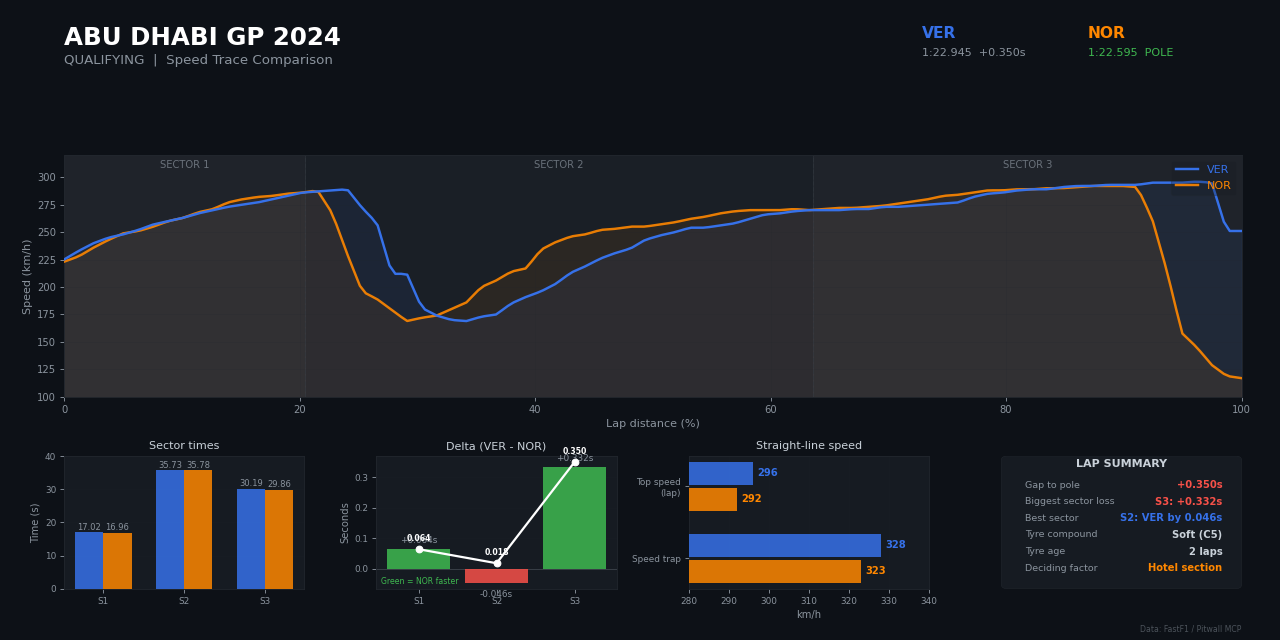
Claude knows F1 from training data — but it can't look up last week's race. It can't show you Verstappen's throttle trace through Turn 1. It doesn't know who pitted first or when the safety car came out.
Pitwall connects Claude to real F1 data:
- Real data, not hallucinations — actual timing feeds from formula1.com
- Lap-level telemetry — speed, RPM, throttle, brake, gear, DRS at 4Hz per car
- Visual plots — speed trace comparisons, gear shift maps returned as images
- 75 years of history — every race result and championship since 1950
- Fresh after every session — full telemetry and timing published ~30 min after each session ends, back to 2018
- Zero API keys — all core data is free, no account needed
What You Can Ask
See all example questions
| Question | Tool Used |
|---|---|
| "Who won the Chinese GP?" | get_standings |
| "What was Verstappen's speed on lap 25?" | get_telemetry |
| "Compare Hamilton vs Leclerc" | get_driver_comparison |
| "What tyres did everyone use?" | get_tyre_strategy |
| "Fastest pit stop at Australia 2025?" | get_pit_stops |
| "When was the safety car?" | get_race_control |
| "Was it raining during the race?" | get_weather |
| "Top speeds at Monza 2024?" | get_speed_traps |
| "Norris's lap times in the race" | get_lap_times |
| "Who won the 2005 championship?" | get_championship_standings |
| "Plot Verstappen vs Hamilton speed trace" | plot_telemetry_comparison |
| "Show me the gear shift map at Monaco" | plot_gear_shifts |
| "Who gained the most positions?" | compare_grid_to_finish |
| "Overtakes in the race" | detect_overtakes |
| "Compare Verstappen lap 5 vs lap 50" | plot_multi_telemetry_comparison |
| "Ferrari head-to-head in qualifying" | team_head_to_head |
| "Deleted laps in qualifying" | get_deleted_laps |
| "Gap to leader throughout the race" | get_gap_to_leader |
Features
79 tools across two modes. Pitwall auto-detects what's installed — no config changes needed.
Lite Mode (30 tools)
pip install f1pitwall — light deps only (mcp, requests, plus websockets/aiohttp for live timing); no pandas/numpy/FastF1.
Race results, lap times, telemetry, tyre strategy, pit stops, weather, race control, speed traps, driver comparison, and historical data back to 1950. Plus 16 live-timing tools (running order, gaps, lap/sector times, tyres, weather, race control, speed traps, mini-sectors, …) that read F1's real-time SignalR feed during a session — no auth needed. (Live car telemetry + GPS are auth-gated and live in Full mode.) Uses F1's free static archive and the Jolpica API.
Full Mode (79 tools)
pip install -r requirements-full.txt — adds FastF1.
Everything in Lite, plus:
| Category | What You Get |
|---|---|
| Visual Plots | Speed trace comparisons, gear shift maps, multi-lap telemetry overlays |
| Deep Telemetry | Brake point analysis, RPM patterns, DRS usage, throttle traces |
| Advanced Strategy | Stint degradation, compound comparisons, tire age performance |
| Race Intelligence | Overtake detection, gap tracking, position changes, qualifying progression |
Full tool list (79 tools)
Lite Tools (always available)
| Tool | Description |
|---|---|
list_seasons | Available seasons (2018-present) |
list_races | Full season calendar with dates |
get_race_info | Session details and available data feeds |
get_standings | Race classification — positions, gaps, best laps, pits |
get_lap_times | Lap-by-lap times, filterable by driver and lap range |
get_telemetry | Speed, RPM, throttle, brake, gear, DRS for a specific lap |
get_tyre_strategy | Compound, stint length, new/used for every driver |
get_pit_stops | All pit stops sorted by fastest |
get_race_control | Flags, penalties, safety cars, investigations |
get_weather | Air/track temp, rain, humidity, wind |
get_speed_traps | Speed at 4 measurement points per driver |
get_driver_comparison | Head-to-head: position, pace, strategy, pit stops |
get_historical_results | Race results from 1950 to present |
get_championship_standings | Driver/constructor championships from 1950+ |
Live Timing (lite — no auth, reads F1's real-time SignalR feed during a session)
| Tool | Description |
|---|---|
get_live_session_status | Session name, flag/track status, lap count |
get_live_positions | Live running order with gap + interval |
get_live_lap_times | Last + best lap per driver |
get_live_sector_times | Sector times + speed trap for one driver |
get_live_time_gaps | Gap to leader + interval to car ahead (mode-aware) |
get_live_best_sectors | Personal-best sectors + best lap, ranked |
get_live_speed_trap | Speed-trap (ST) ranking across the field |
get_live_speed_comparison | Best speed at I1/I2/FL/ST per driver |
get_live_tyres | Compound, age (laps), stint number per driver |
get_live_stint_history | Full compound sequence per driver |
get_live_pit_activity | Pit count + in-pit / out-lap flags |
get_live_weather | Air/track temp, humidity, wind, rain |
get_live_race_control | Flags, penalties, track-limit deletions, SC/VSC |
get_live_session_clock | Time remaining in the session |
get_live_track_status_history | Chronological track/session status log |
get_live_mini_sectors | Mini-sector status (green/purple/yellow) per driver |
Related MCP Servers
Reviews
No reviews yet — be the first to share how this listing worked for you.
Frequently Asked Questions about Pitwall
AllMCPs Directory Badge
Showcase your server listing on GitHub or your project documentation. Embed this dynamic SVG badge to highlight official listing status and live engagement.
Badge Style:
Live Dynamic SVG Preview
Markdown (GitHub README)
[](https://allmcps.com/mcp/pitwall)HTML Embed
<a href="https://allmcps.com/mcp/pitwall"><img src="https://allmcps.com/api/badge/pitwall?style=directory" alt="Pitwall on AllMCPs" /></a>Technical Specs & Signals
CategoryDeveloper Tools
39Quality signal: Fair · 39/100How this signal is calculated ▾
Server availabilityNot measured
Not scored for repo-hosted servers — we can't reach the running server, only its GitHub page. Hosted MCP endpoints are health-checked live.
Verified ownership10/20
Documentation & tools16/30
Adoption & activity3/15
Community engagement0/10
A guidance signal from public completeness & health data — not a user rating. New listings start lower and rise as they add docs, get verified, and grow adoption. Signals we can't observe for a listing are skipped, not counted against it.
Own this project?
This directory is pre-filled from public sources. Claim via GitHub README, site badge, or DNS TXT to unlock edit access and the Official badge — proof is checked automatically, then reviewed by our team.
Free dofollow backlink: add your website and place the AllMCPs badge on it — no claim needed. We detect it automatically and keep it verified as long as the badge stays live.
Claim & get free dofollowShare & Embed
Add our SVG badge (dark/light directory styles) or embeddable widget to your site.