UX review for apps built with AI, run by your own agent. The fixes keep your design.
Quick Install
Automated & IDE SetupCopy the AI prompt to install this server into Claude Code, Cursor, or another agent — or use 1-click editor setup below.
One-click editor setup isn’t available for this listing yet — we don’t have a confirmed install command, and we’d rather show nothing than point your editor at the wrong package or host. Follow the project’s own setup instructions, linked above.
Manual Client & Custom JSON ConfigExpand JSON ▾
No confirmed setup config for this listing yet. We only publish a config block when the install details come from the project itself — its README, its docs, or a verified owner. We haven’t found those for Phyll, and we’d rather show nothing than a guess you’d paste into your client. Follow the project’s own setup instructions for the current steps.
Documentation Overview
Phyll
UX review for apps built with AI, inside the agent you already use.
Phyll walks through your app the way a first-time user would. It collects screenshots, measurements from the live page and the clicks each job took, then tells you what makes the product hard to understand or use. It knows the defaults that code generators leave behind, in how an app looks and in how its flows work, and it can fix them for you.
Phyll keeps your design. Colors, gradients, fonts and layout stay as they are. The changes go where people get stuck: forms that ask for more than the job needs, steps that fit on one screen, buttons that lead nowhere and text too faint to read.
The review runs in Codex or Claude Code, on your own plan. Phyll adds a browser, a scanner and its review engine, and never charges for AI tokens.
To try it with no account, run the scanner in your project. It gives an AI tell index from 0 to 100, lower is better, and points to each tell by file and line:
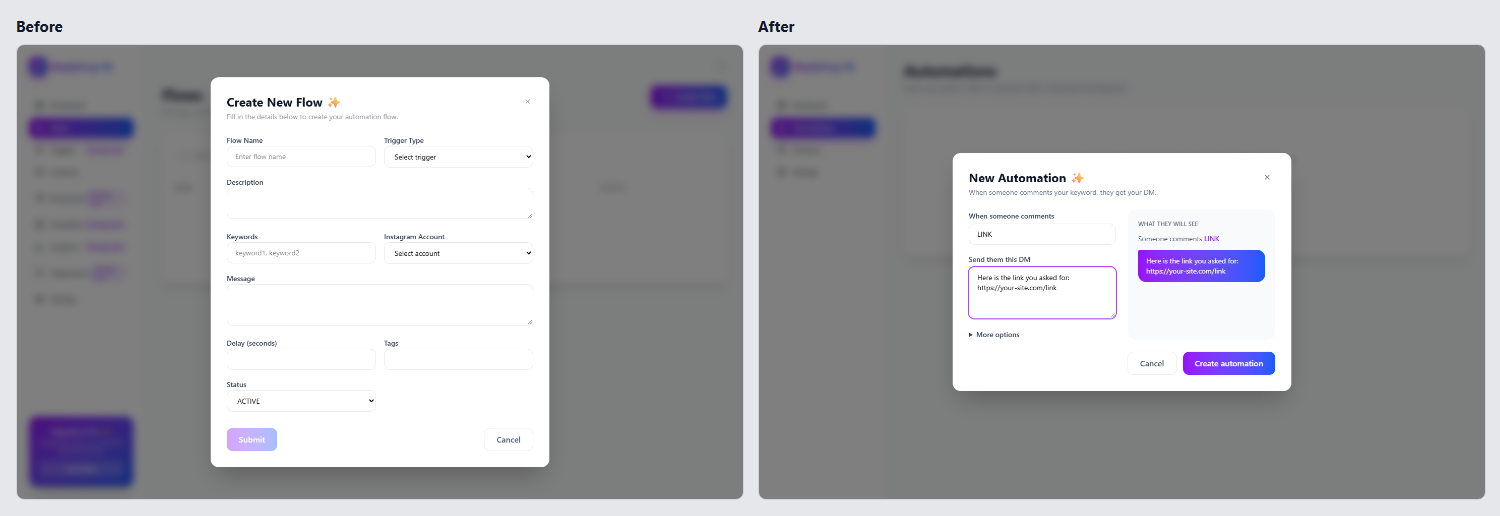
The same app, a ManyChat-style tool for Instagram creators, before and after a Phyll review. The review of the left side is in examples/dm-automation/review/report.md: 12 findings, an AI tell index of 79, and a first job that could not be finished.
Start
Create a free account at agentphyll.com, or from the terminal, and connect Phyll to your agent:
Then ask your agent: "review my app at http://localhost:3000". It opens the app, walks the core jobs, writes the report in .phyll/reports/<time>/ and gives you a link to it.
Built in Lovable, Bolt or v0, with no agent on your computer? agentphyll.com/check checks a public page for free, with no account: one page load at laptop and phone size, the index and what it found, in half a minute.
Every report, your keys and your plan are also at agentphyll.com/account, and npx phyll account opens it already signed in. If you lose the key, sign in there with your email and create a new one.
Already have an account? npx phyll login connects this computer: you allow it in the browser, and the terminal gets a key of its own. Every command, with examples, is at agentphyll.com/commands.
In Claude Code you can also install the plugin, which adds /phyll:review, /phyll:fix and /phyll:scan:
The plugin starts the connector by itself, so with it you skip npx phyll setup claude. You need Node 20 or newer. setup installs the Chromium build that Phyll's browser uses. For an agent not on the list, npx phyll setup other prints the MCP entry to paste into its settings.
Free and Phyll Pro
| Free | Phyll Pro, R$ 9 a month | |
|---|---|---|
| The source scanner, here and in CI | Unlimited | Unlimited |
| Full reviews in your agent, with fixes | 5 | Unlimited |
| A link to each report, history, before and after | Yes | Yes |
| Specialized rule packs | No | As they come out |
The price is in Brazilian reais, and checkout shows it in your currency. npx phyll pro opens the checkout, and npx phyll billing changes the card or cancels. The AI work always runs on your agent's plan.
Four apps, before and after
Each example is a small app written the way a code generator tends to write it, the same app after the review, and the full review of the first version. Three of them are Brazilian businesses, reviewed in Portuguese.
| Example | The first job | Fields | Clicks | AI tell index | Style kept |
|---|---|---|---|---|---|
| Replyloop | Send a DM to everyone who comments a keyword | 9 before, 2 after | 9 before, 3 after | 75 before, 7 after | 10 of 10 traits |
| Navalha Barbearia | Book a haircut | 20 before, 4 after | 18 before, 4 after | 54 before, 6 after | 9 of 9 traits |
| Orça Já | Write a quote and send it to the client | 41 before, 4 after | 10 before, 2 after | 66 before, 6 after | 9 of 10 traits |
| Brasa Burger | Order a burger for delivery | 33 before, 4 after | 15 before, 5 after | 53 before, 6 after | 8 of 8 traits |
Fields and clicks count what a first-time user had to do for the first job, and none of the before apps got that person to the result. The AI tell index comes from the scanner, and lower is better. Style kept counts the visual traits of the before app, such as gradients, glass and emoji, that are still there after the fixes.
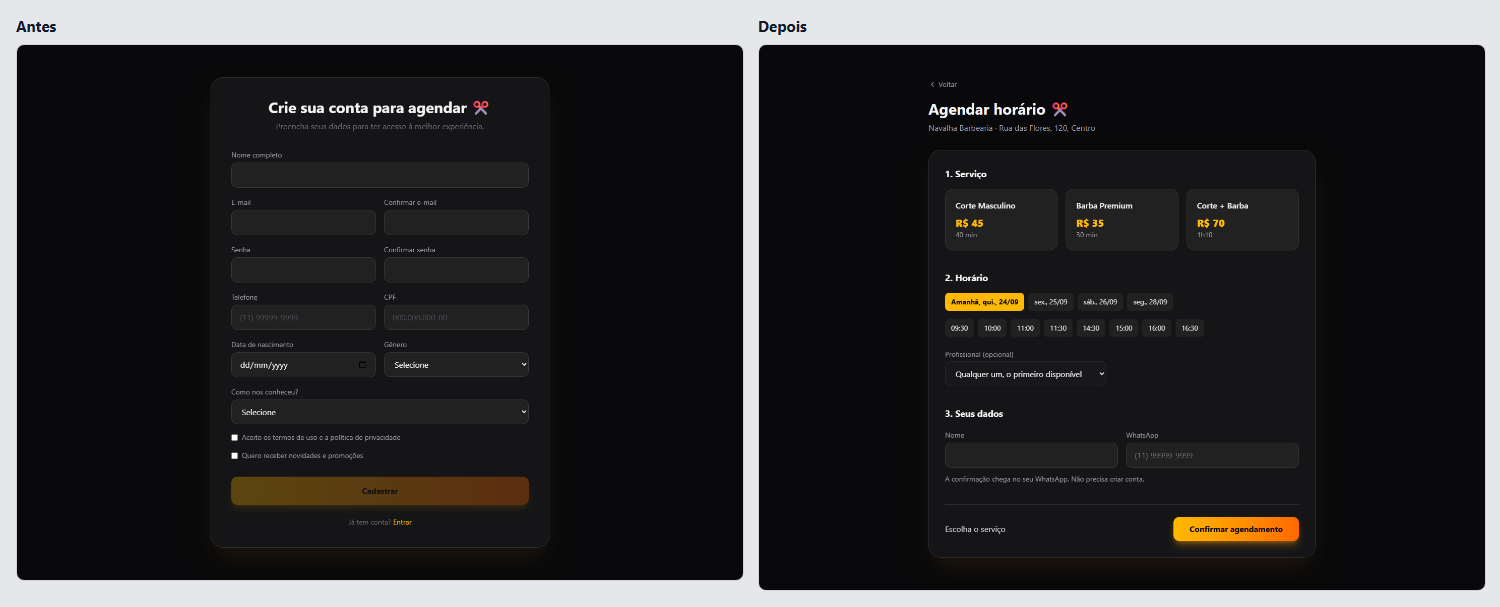
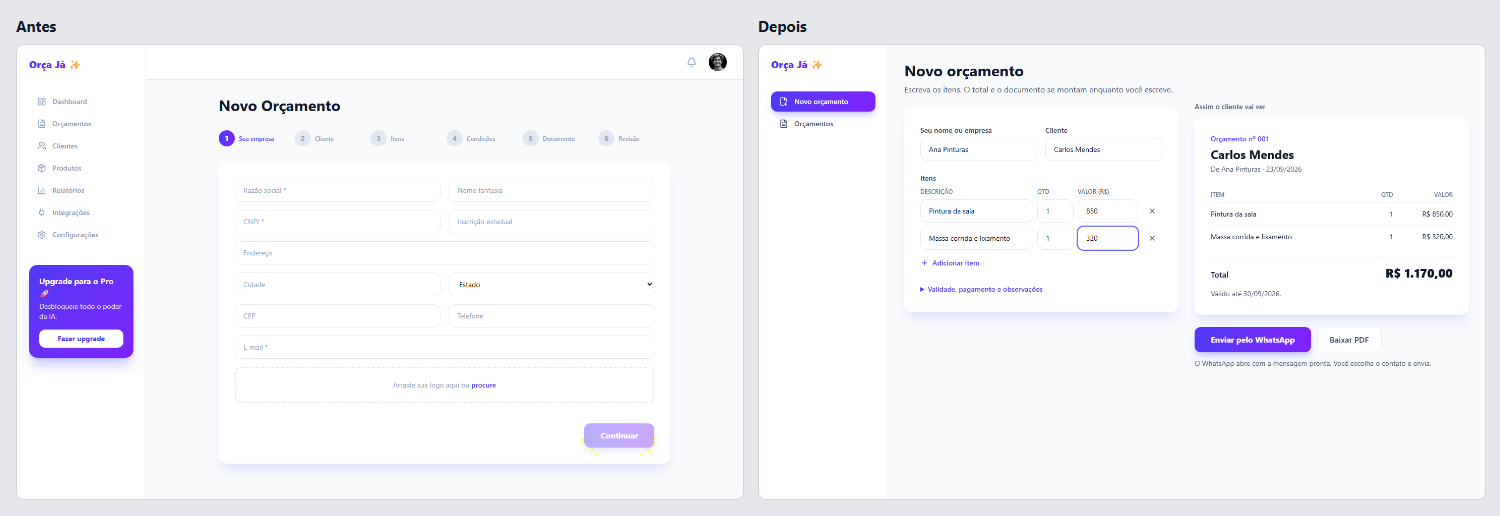
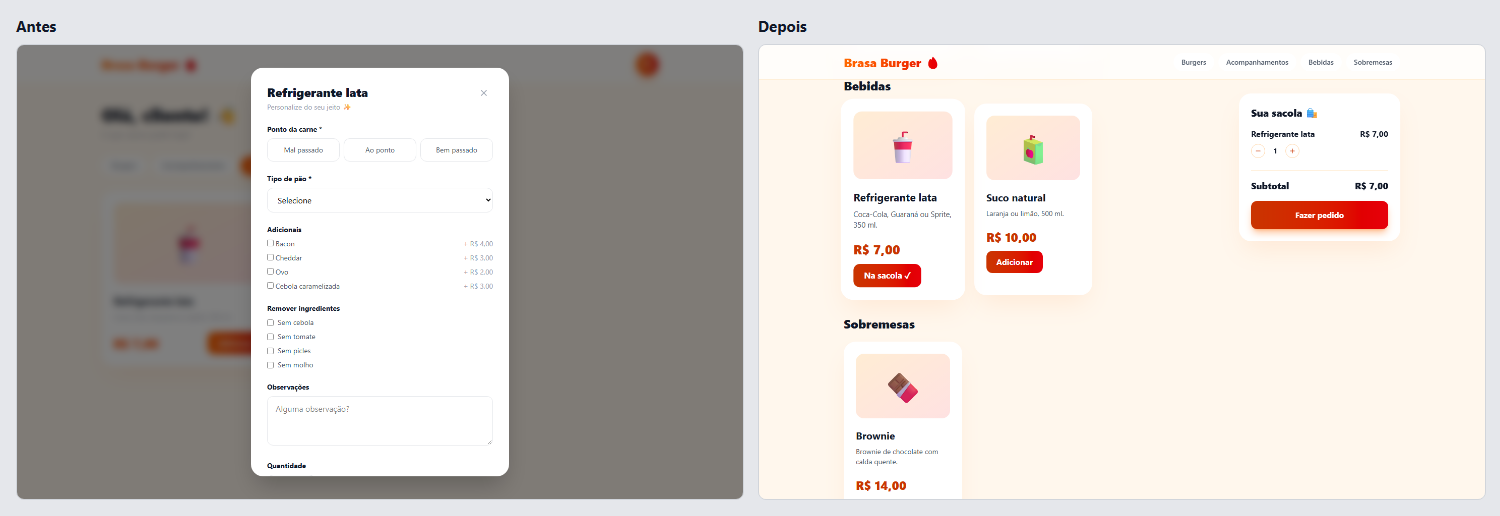
Every example folder has its review in review/report.md and more comparisons in screenshots/. examples/README.md explains how to run them.
What it catches
- Purpose. A first screen that does not say what the product does, a sales page in front of the tool, a dashboard of invented numbers for someone who just signed up.
- Flow. A login before the menu, a CPF to book a haircut, 39 fields for a quote, a modal for everything, buttons that do nothing, a "Success!" that leads nowhere.
- Actions. The main button far from the content it acts on, icon buttons with no name, delete without undo, actions that only appear on hover, choices the keyboard cannot reach.
- Look. Gray text below the contrast minimum, white text on bright orange buttons, layouts that break on a phone. Gradients, glass, emoji and centered heroes are listed as style notes and left as they are.
- Copy. "Supercharge your workflow", "Get Started", "Trusted by 10,000+", John Doe or João da Silva,
COMMENT_KEYWORDon screen, "Something went wrong". - States. Empty states that only say "No data", errors that only reach the console, a confirmation that shows someone else's appointment, invisible keyboard focus.
Each of these is one of 57 tells in Phyll's catalog. The catalog as data, with the detectors that find tells in source code, is in skills/phyll/data/tells.json, and the test suite checks every detector against real code and the four example apps.
How a review works
- Frame. Your agent works out who uses the product and the two or three jobs they come to do.
- Collect evidence. Phyll scans the source, captures every screen at laptop and phone sizes, and runs a probe in the page that measures contrast, button sizes and positions, and form fields. Then your agent walks each job as a first-time user and counts clicks, screens and dead ends.
- Judge. Findings are sorted into six dimensions, backed by principles such as Fitts's law, Nielsen's heuristics and WCAG, and ranked by how much they block the end user. For each job, the review also compares the fields and clicks it asks for with what the job needs, and marks what can get a default, wait until later or go.
- Report. Phyll's engine checks the report, scores it and keeps it with a link. You get
report.md, which opens with the three findings that block people most and a table of what can be cut. The report also gives an AI tell index from 0 to 100, which you can watch go down. - Fix, when you ask. Your agent applies the fixes one finding at a time, with a commit and a before and after screenshot for each. New buttons and messages reuse the product's own classes, so the design stays.
What a review costs
The review runs in your agent, on your plan. Measured on 2026-09-25 with Claude Code and Opus on two of the example apps: 11 and 16 minutes, 81 and 103 agent steps, 49,000 and 59,000 output tokens, and 6.8 and 9.8 million input tokens, almost all of them read from the prompt cache. At Claude API prices that is US$ 6.27 and US$ 7.84 a review; on a Claude or ChatGPT subscription it counts against the plan's usage like any long task. Codex has not been measured yet. The scanner uses no AI and no tokens.
The scanner, free and on its own
The scanner reads the source for AI tells, with no account and no AI:
Once the index is low, npx phyll scan . --format badge prints a badge with it for your README.
The repository is also a GitHub Action that scans every pull request and puts the AI tell index in the job summary:
fail-above is optional. Without it the job reports the index and never fails.
What leaves your computer
Your source code, your screenshots and your agent's conversation stay on your computer. When a review starts, the connector sends Phyll's engine the app's address, the project name, and a summary of the scan: which tells it found, how many times, and the paths of routes and forms. When the review ends, it sends report.json, the findings your agent wrote, which the engine keeps so the link works. Nothing else is sent, and the scanner sends nothing at all.
What is in this repository
Related MCP Servers
Reviews
No reviews yet — be the first to share how this listing worked for you.
Frequently Asked Questions about Phyll
AllMCPs Directory Badge
Showcase your server listing on GitHub or your project documentation. Embed this dynamic SVG badge to highlight official listing status and live engagement.
Badge Style:
Live Dynamic SVG Preview
Markdown (GitHub README)
[](https://allmcps.com/mcp/phyll)HTML Embed
<a href="https://allmcps.com/mcp/phyll"><img src="https://allmcps.com/api/badge/phyll?style=directory" alt="Phyll on AllMCPs" /></a>