
Perspective AI MCP Server
Forms are costing you business. An AI concierge turns them into conversations.
MCP server for Perspective AI. An AI Concierge replaces static forms with adaptive AI conversations that understand real situations, structure key information automatically, and trigger the right next step.
Rigid forms cause drop-off, weaken qualification, and strip away context. Perspective uses adaptive AI to capture structured data and trigger automation, so you understand what truly matters to your customers and can make decisions with conviction.
What this MCP server does
Once connected, your AI assistant can design conversation agents, analyze conversations, deploy embeds, and automate follow-ups directly from Claude Desktop, Claude Code, Cursor, or any MCP-compatible client. Try prompts like:
See Use cases for the full workflow and Available tools for the tool surface.
Connect via OAuth (recommended)
Add the MCP URL to your client and complete a one-time browser sign-in. Tokens stay out of config files; every connected app shows up under Settings → Connected Apps in your workspace, and you can revoke access anytime.
The MCP URL is the same for everyone:
Cursor (Marketplace - recommended)
Install the official Perspective AI plugin from the Cursor Marketplace:
- Open Customize in the Cursor sidebar
- Search for "Perspective AI" in the marketplace
- Click Install
- Complete the OAuth flow when prompted
The plugin includes the MCP server configuration and a skill that helps your AI assistant know when to use Perspective tools.
Cursor and VS Code (manual)
Add to your mcp.json:
Claude Code
Claude.ai (web and desktop)
Open the Add custom connector modal and fill:
| Field | Value |
|---|---|
| Name | Perspective AI |
| Remote MCP server URL | https://getperspective.ai/mcp |
Click Add, then complete the OAuth browser flow. (Manual path: Customize → Connectors → Add custom connector. See Anthropic's guide. Available on Free, Pro, Max, Team, and Enterprise plans.)
Other MCP clients
Stdio-only clients can use mcp-remote, which discovers OAuth metadata automatically:
The first time you call a Perspective tool, your client opens a browser window to complete OAuth. Subsequent requests reuse the token.
Connect with a personal access token
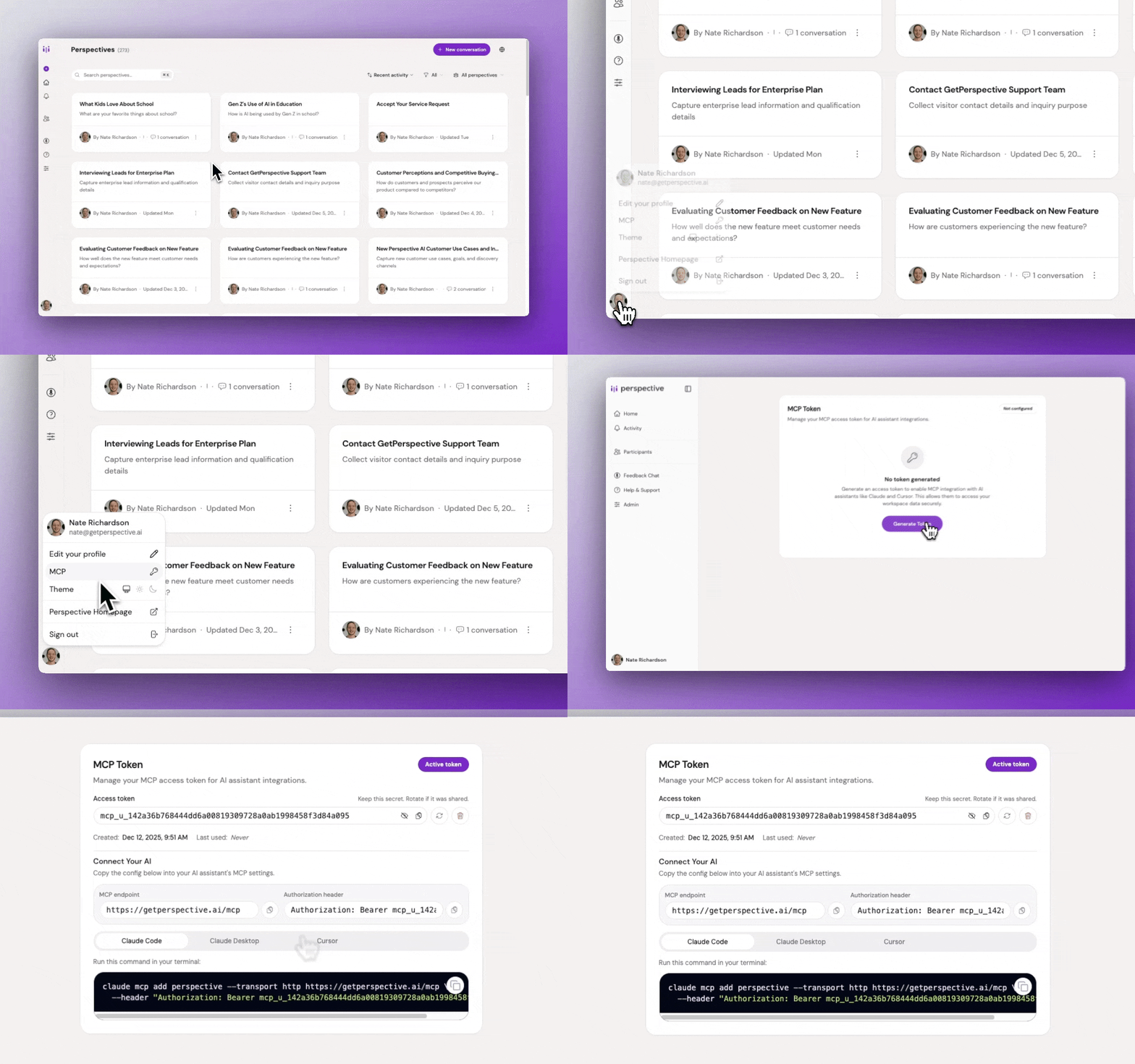
If your client doesn't support OAuth or you'd rather authenticate with a long-lived token, generate one at Perspective AI Settings → MCP.
Claude Desktop one-click install
- Download
perspective.mcpb - Double-click to open in Claude Desktop
- Click Install, then paste your token when prompted
Claude Code
Cursor and VS Code
Add to your mcp.json:
Other MCP clients
For stdio-only clients, use mcp-remote with an explicit Authorization header:
See the full MCP documentation for troubleshooting and advanced setup.
Available tools
Once connected, your AI assistant can call the following 22 tools, grouped by lifecycle stage:
Workspaces
- workspace_list: List all workspaces you can access
- workspace_get: Get details for a workspace
- workspace_get_default: Get your default workspace
Design & iterate
- perspective_list: List perspectives in a workspace, or search by name across all workspaces
- perspective_get: Get full configuration and stats for a perspective
- perspective_create: Create a new perspective from a natural-language brief
- perspective_respond: Answer a follow-up question during perspective design
- perspective_update: Refine a perspective with natural-language feedback
- perspective_await_job: Long-poll a perspective design job to completion
- perspective_get_preview_link: Get a shareable preview URL for testing before deployment
Deploy & distribute
- perspective_get_embed_options: Get embed snippets (fullpage, widget, popup, slider, float, card) and the SDK reference
- participant_invite: Create 48-hour magic-link invites, optionally sent via email
Analyze
- perspective_get_stats: Aggregate stats and distributions over a time period
- perspective_list_conversations: List conversations with filters (status, trust score, date)
- perspective_get_conversation: Get full conversation details, including transcript and trust assessment
- perspective_get_conversations: Token-efficient batch fetch of conversations for bulk analysis
Automate
- automation_list: List automations on a perspective with status, channel, and metadata
- automation_create: Create an automation (webhook, email, Slack, HubSpot)
- automation_update: Update fields on an existing automation
- automation_delete: Permanently delete an automation
- automation_test: Run an end-to-end test against a mock conversation
- integration_manage: List providers (Slack, HubSpot), connect them, and search their tools
Use cases
Once installed, ask your AI assistant to drive the full perspective lifecycle: design, deploy, analyze, and automate.
-
Design & iterate. Create any of four conversation agent types:
- Interviewer: Scales deep, qualitative interviews without losing quality
- Concierge: Replaces static forms with delightful conversational flow
- Evaluator: Turns boring surveys into engaging conversations
- Advocate: Listens first, then responds on behalf of a position, brand, or cause
Browse 180+ templates or use cases by role and industry for inspiration. Example prompts:
- "Design a Concierge that qualifies pricing-page leads by budget and timeline. Keep the tone warm, not salesy."
- "Build an Interviewer for churn research. Find out why customers left, what alternatives they chose, and what would have kept them."
- "Spin up an Evaluator for 30-day onboarding feedback. What's working and what's confusing?"
- "Set up an Advocate for our refund policy. Listen first, then explain the process without sounding defensive."
-
Deploy & distribute. Embed on your site or send personalized invites to specific participants:
- "Give me the popup embed snippet for my concierge and walk me through adding it to our pricing page in Next.js."
- "Invite our 20 design partners to my beta-feedback perspective, and prefill each person's name and email."
-
Analyze: "Why are people abandoning my lead-capture concierge this week? Pull the drop-off conversations and summarize the top reasons."
-
Automate: "Whenever a conversation scores above 80 on trust, push it to HubSpot as a contact and ping #sales in Slack."
Security & data
- OAuth: Tokens issued via OAuth are scoped to the workspace and tied to the connected client. Revoke anytime under Settings → Connected Apps.
- Personal access tokens: PATs are tied to your Perspective AI account and authorize the server to act on your behalf within your workspaces. Generate, rotate, or revoke at getperspective.ai/settings/mcp.
- Transport: All traffic is TLS-encrypted. Tokens are sent only in the
Authorizationheader tohttps://getperspective.ai/mcp. - Data residency: Conversation data stays inside your Perspective AI workspace. The
.mcpbbundle is a thin stdio-to-HTTP proxy; it does not store or cache responses locally.
Building from Source
Outputs perspective.mcpb in the current directory.
Releasing
Bumps version, commits, tags, and pushes. GitHub Action creates the release.
Links
Badges
