AllMCPs
BrowseBestCategoriesStackCompareToolsGuidesBlog Log in Submit MCP

Stay in the loop

Get new MCP servers and top picks in your inbox.

AllMCPs

The open directory for discovering and installing Model Context Protocol servers.

Explore

  • Browse servers
  • Best MCP servers
  • Categories
  • MCP clients
  • Agent prompts
  • Stack Builder
  • Compare servers
  • Tags index
  • Submit a server
  • Pricing

Learn

  • Guides hub
  • What is MCP?
  • Install guide
  • Troubleshooting
  • Security
  • Blog
  • Blog RSS

Tools

  • All tools
  • Config generator
  • Config validator
  • MCP playground
  • OpenAPI → MCP
  • Badge generator

For agents

  • API docs
  • Trust & traffic
  • llms.txt ↗ (opens in a new tab)
  • Catalog JSON ↗ (opens in a new tab)
  • Remote MCP ↗ (opens in a new tab)

Company

  • About
  • Contact
  • X (@AllMCPs) ↗ (opens in a new tab)
  • GitHub ↗ (opens in a new tab)
  • Terms
  • Privacy
AllMCPs VerifiedAllMCPs VerifiedFeatured on Nick LaunchesFeatured on Nick LaunchesLaunch Llama NewsletterLaunch Llama NewsletterVerified DR - allmcps.comVerified DR - allmcps.comFeatured on SaaSGrowFeatured on SaaSGrowFeatured on Twelve ToolsFeatured on Twelve ToolsFeatured on Saaspa.geFeatured on Saaspa.geFeatured on Findly.toolsFeatured on Findly.toolsFeatured on Startup FameFeatured on Startup FameFeatured on LaunchKiwiFeatured on LaunchKiwiFeatured on ScrollLaunchFeatured on ScrollLaunchFeatured on DailyPingsFeatured on DailyPingsFazier badgeFazier badgeFeatured on NewTool.siteFeatured on NewTool.siteFeatured on saasfame.comFeatured on saasfame.comDR Checker - Domain RatingDR Checker - Domain RatingListed on Turbo0Listed on Turbo0Launched on LaunchBoard - Product Launch PlatformLaunched on LaunchBoard - Product Launch PlatformList on SimilarlabsList on Similarlabshttps://codetrendy.comhttps://codetrendy.comListed on DevTool.ioFeatured on BuildlistFeatured on BuildlistAllMCPs VerifiedAllMCPs VerifiedFeatured on Nick LaunchesFeatured on Nick LaunchesLaunch Llama NewsletterLaunch Llama NewsletterVerified DR - allmcps.comVerified DR - allmcps.comFeatured on SaaSGrowFeatured on SaaSGrowFeatured on Twelve ToolsFeatured on Twelve ToolsFeatured on Saaspa.geFeatured on Saaspa.geFeatured on Findly.toolsFeatured on Findly.toolsFeatured on Startup FameFeatured on Startup FameFeatured on LaunchKiwiFeatured on LaunchKiwiFeatured on ScrollLaunchFeatured on ScrollLaunchFeatured on DailyPingsFeatured on DailyPingsFazier badgeFazier badgeFeatured on NewTool.siteFeatured on NewTool.siteFeatured on saasfame.comFeatured on saasfame.comDR Checker - Domain RatingDR Checker - Domain RatingListed on Turbo0Listed on Turbo0Launched on LaunchBoard - Product Launch PlatformLaunched on LaunchBoard - Product Launch PlatformList on SimilarlabsList on Similarlabshttps://codetrendy.comhttps://codetrendy.comListed on DevTool.ioFeatured on BuildlistFeatured on Buildlist
© 2026 Jackalope Digital LLC. All rights reserved.
  1. Home
  2. 🧠 Knowledge & Memory
  3. Persome
P
Health: Not checked yetWe have not completed a health check for this listing yet.Last checked 8/11/2026, 12:03:04 AM

Persome

Enrichment pendingWe haven’t run our AI enrichment pass on this listing yet, so the overview, use cases, and FAQ below may be sparse or missing. We work through the catalog over time — check back soon.
View Repository

Local-first personal memory and model server for trusted MCP agents on macOS.

Quick Install

Automated & IDE Setup

Copy the AI prompt to install this server into Claude Code, Cursor, or another agent — or use 1-click editor setup below.

Add to CursorAdd to VS Code
Manual Client & Custom JSON ConfigExpand JSON â–¾

Install Config Generator

Choose your client
claude_desktop_config.json
{
  "mcpServers": {
    "persome": {
      "command": "npx",
      "args": [
        "-y",
        "persome"
      ]
    }
  }
}

💡 Paste into ~/Library/Application Support/Claude/claude_desktop_config.json (macOS) or %APPDATA%\Claude\claude_desktop_config.json (Windows)

Install Directory Badge Claim listing Alternatives🧠 More in Knowledge & Memory

Documentation Overview

Personal Model: local-first AI memory for coding agents
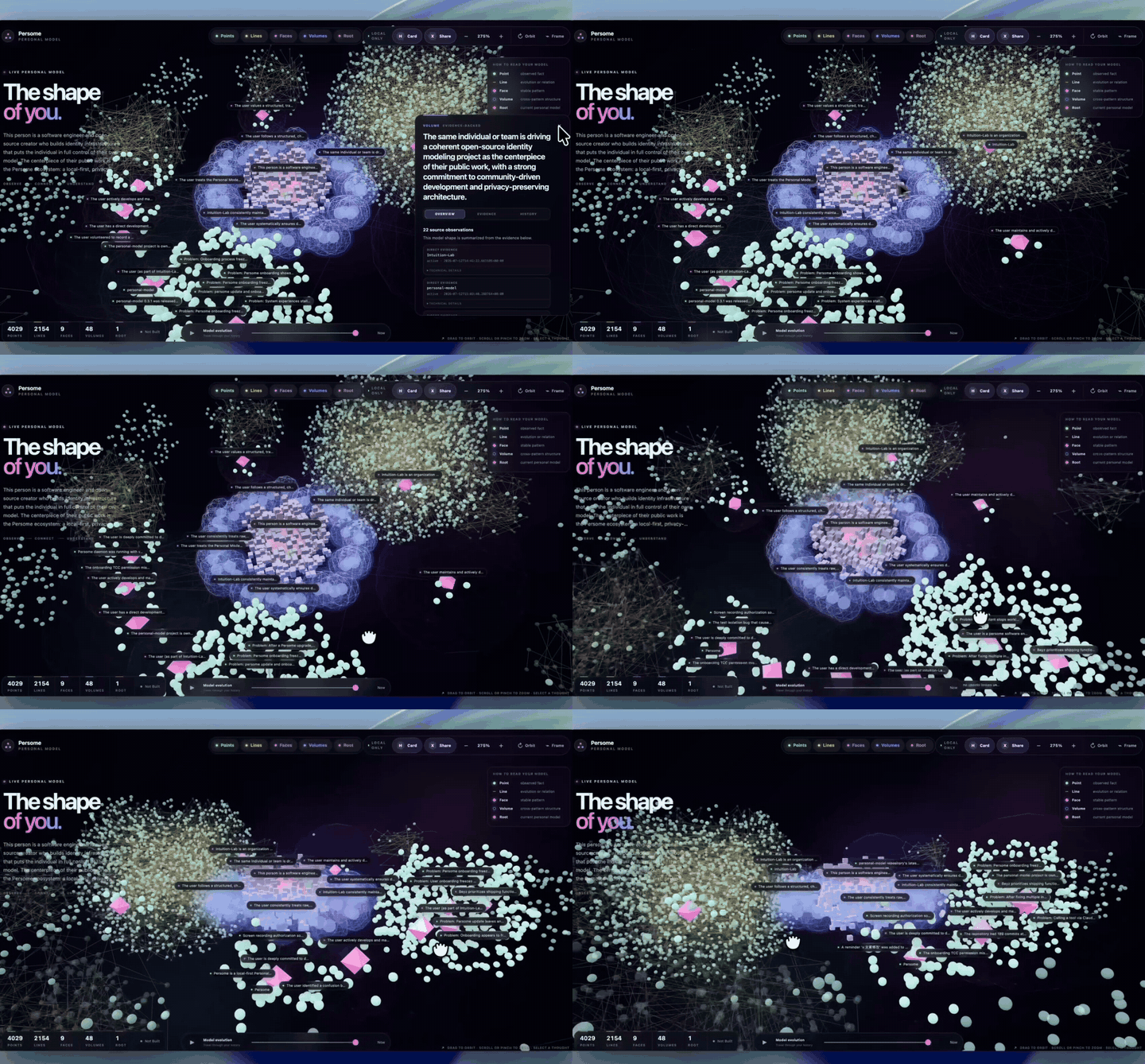
Looping 10-second preview of the Personal Model viewer orbiting an evidence-linked model

Auto-playing preview · Full-quality demo and v0.3.2 release notes
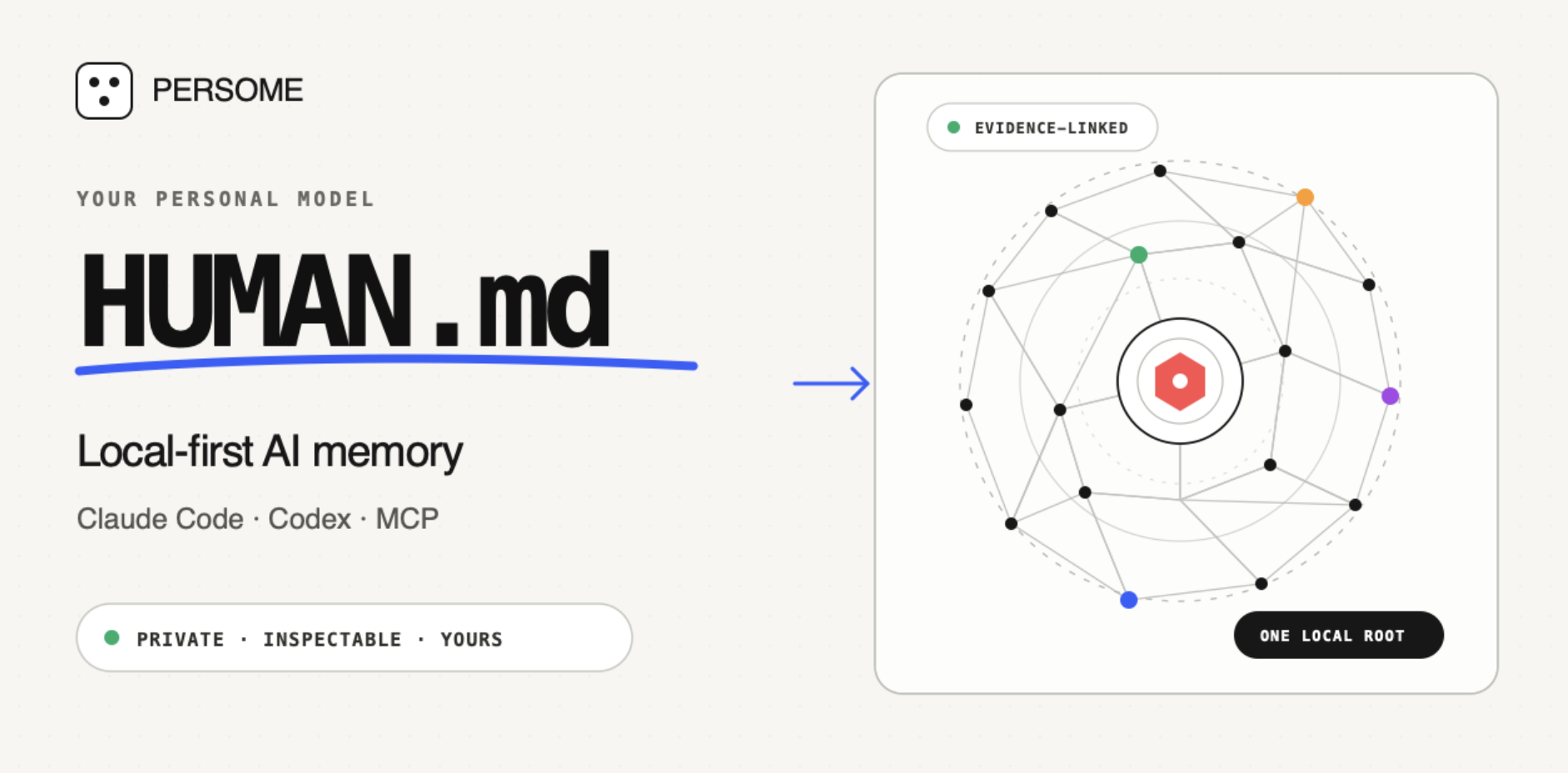
Build your HUMAN.md — local-first AI memory for Claude Code, Codex, and MCP

Build your HUMAN.md — one evidence-linked Personal Model for Claude Code, Codex, Cursor Agent, and other trusted MCP clients.

Personal Model is an open-source, local-first long-term memory Runtime. It learns how you think and work from focused activity captured on your Mac after you grant macOS permission, then gives your AI tools inspectable context to continue work and make grounded decisions.

Runs locally on your Mac. Private by default. Yours to inspect, correct, export, and delete.

CI Release GitHub stars License: Apache-2.0 macOS 13+ MCP Official MCP Registry

Install Personal Model · Connect your AI tool · Star Personal Model on GitHub
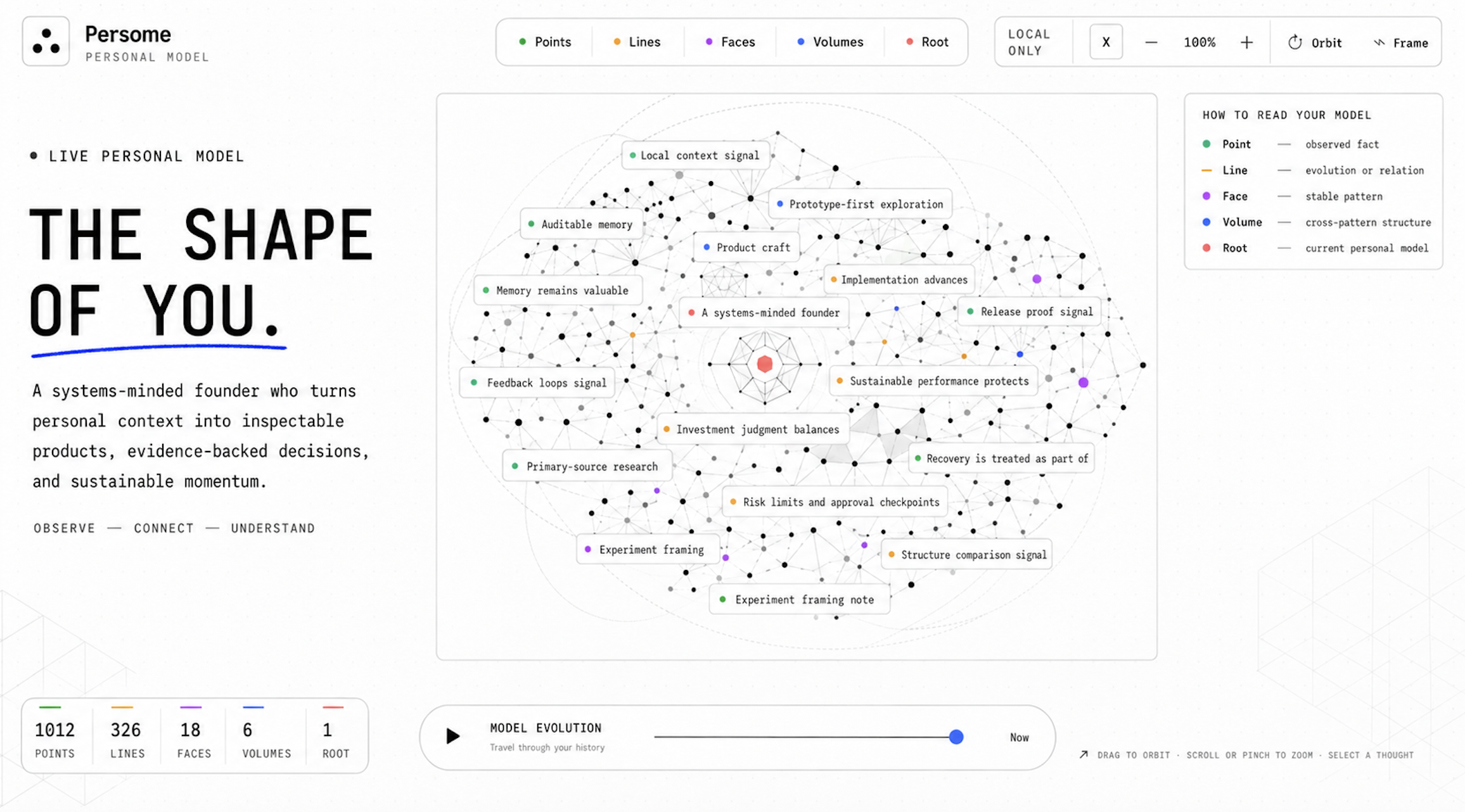
Illustration of a mature Personal Model with evidence-linked Points, Lines, Faces, Volumes, and a Root

Concept illustration of a mature Personal Model.


Why Personal Model

Personal Model turns focused activity from the apps you use into a portable context layer, keeps it on your Mac, and makes it available to the trusted AI clients you choose.

  • One memory across agents. Connect the same Personal Model to Claude Code, Codex, Cursor Agent, and other MCP-compatible clients.
  • Evidence, not hidden summaries. Important claims retain source receipts; new evidence can strengthen, revise, or overturn an earlier inference.
  • User-owned by design. Inspect, correct, export, or delete your model and data without depending on a hosted memory service.
  • More than chat history. Personal Model learns from focused activity after you explicitly grant macOS permissions.

Your Personal Model is your HUMAN.md

Personal Model connects activity into progressively deeper context:

LayerMeaning
PointA sourced observation or event
LineA relationship or change over time
FaceA pattern supported by related evidence
VolumeA higher-order structure across projects or areas of life
RootThe current integrated model of you

The result is a living model of what matters now, how you tend to decide, and where your attention is moving.

Works with Claude Code, Codex, Cursor Agent, and MCP clients

ClientConnectionSetup
Claude CodeNative Personal Model installerpersome install claude-code
Codex CLI and IDE extensionNative Personal Model installerpersome install codex
Cursor Agent CLINative Personal Model installerpersome install cursor-agent
Claude DesktopManaged stdio configpersome install claude-desktop
opencodeManaged local stdio configpersome install opencode
Other compatible clientsGenerated MCP JSONpersome install mcp-json --filename persome-mcp.json

The MCP client guide covers prerequisites, verification, the permission boundary, transport details, HTTP fallback, and troubleshooting.

Personal Model is an MCP server used by trusted MCP clients. Other MCP servers—such as Filesystem, GitHub, Slack, or Google Drive—are separate tools and are not Personal Model integrations unless that path is explicitly built and tested.

Use cases

These visuals show agent workflows enabled by Personal Model. The Runtime supplies evidence-linked local context through MCP; connected agents own task selection and execution, and external actions still require your authority.

1. One Root — A Model of You

Thousands of moments. One evolving model of you.

Personal Model turns sourced observations into relationships, patterns, higher-order structure, and one current Root: what matters now, how you tend to decide, and where your attention is moving.
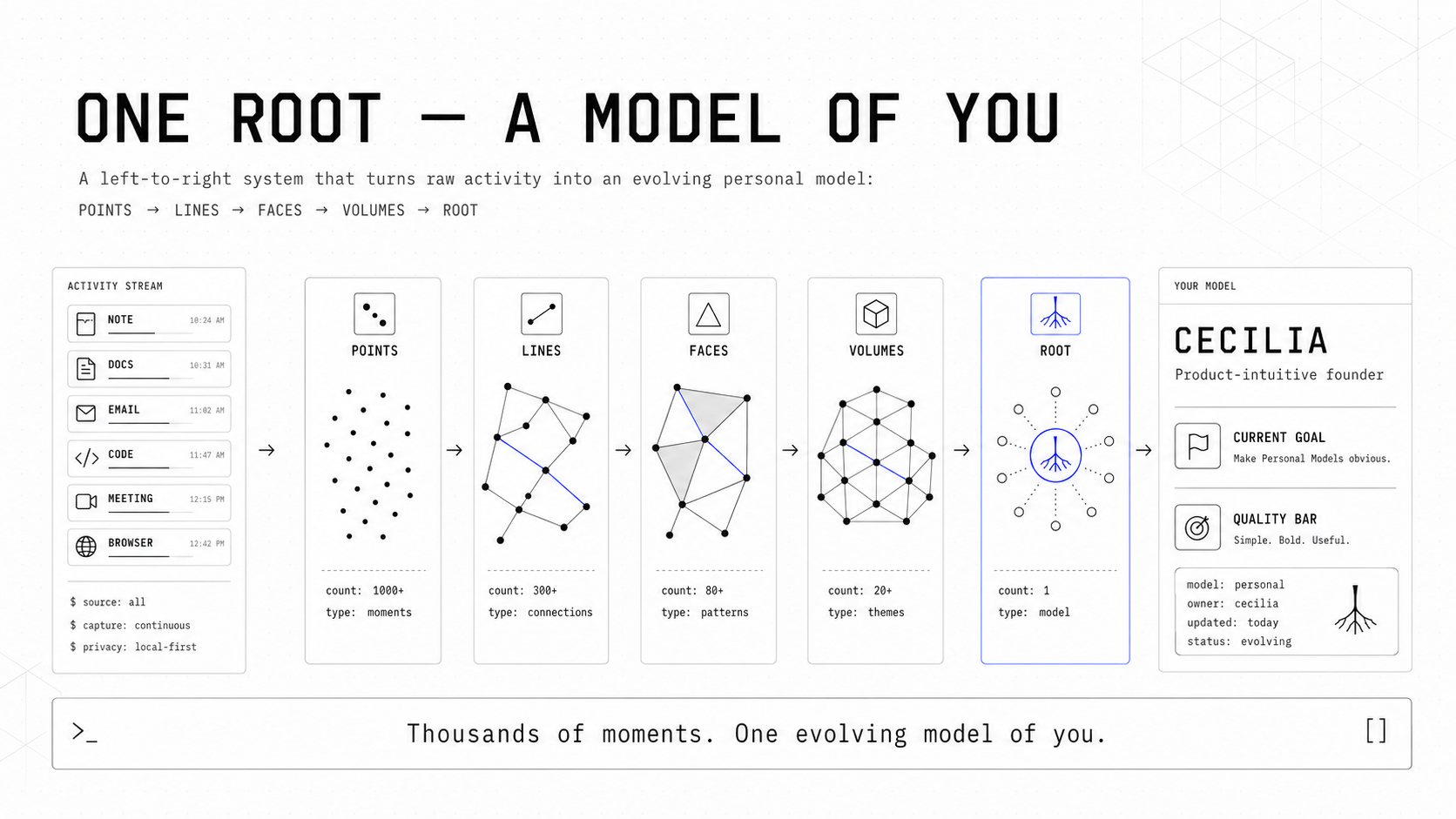
One Root — A Model of You. An activity stream becomes 1,000+ Points, 300+ Lines, 80+ Faces, 20+ Volumes, and one evolving model. A Personal Model example on the right shows current goals and quality standards.

From Points to Lines, Faces, Volumes, and one Root—a living model of who you are and what matters now.

2. Same AI. Different You.
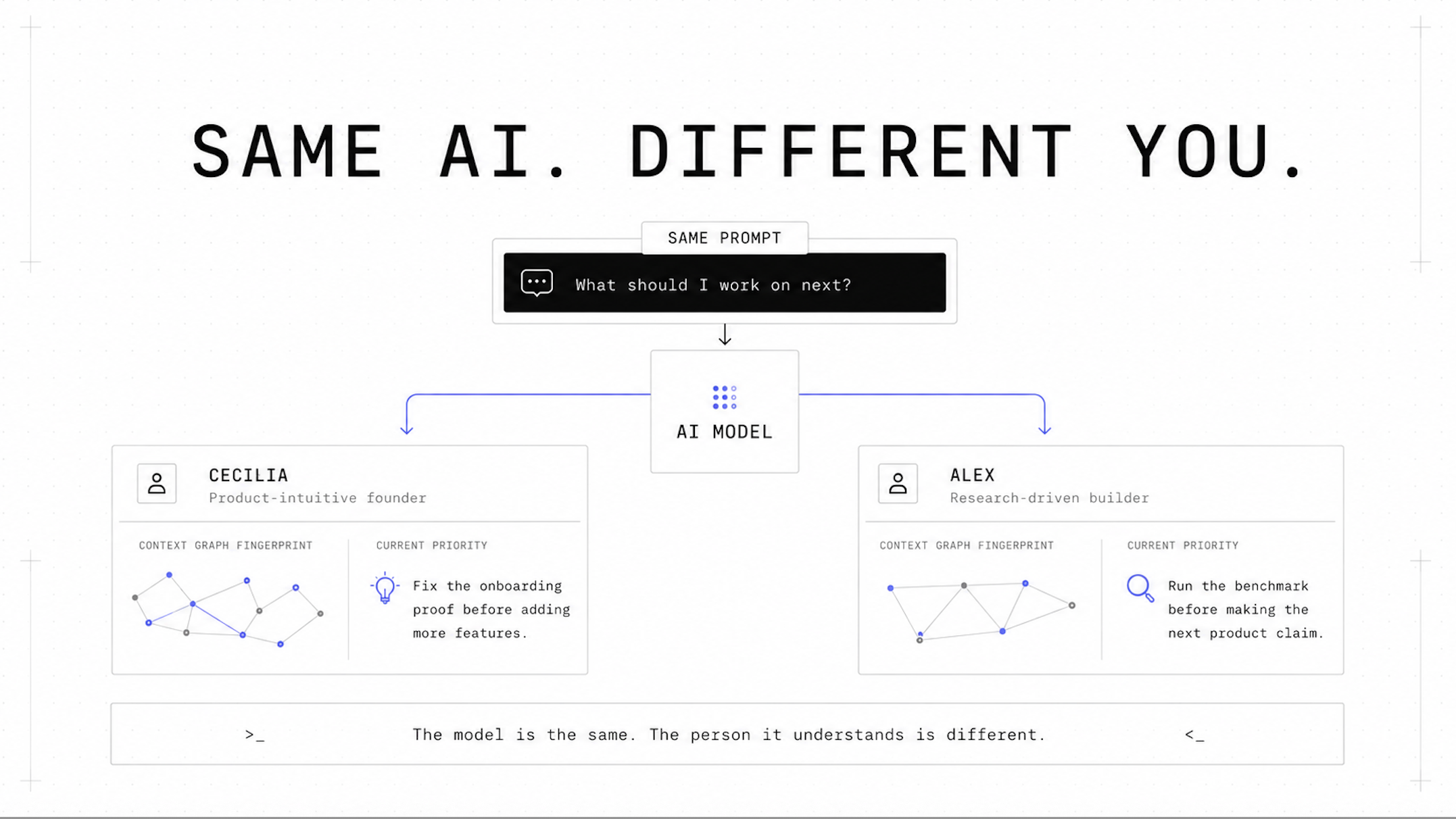
The same AI gives two people different answers by using each person's Personal Model.

The model is the same. The person it understands is different.

Two people can give the same AI the same prompt and deserve different answers. Your Personal Model changes how an agent prioritizes, decides, writes, and acts—because it understands who it is working for.

The same prompt should not produce the same answer for everyone. Give AI a model of you.

3. One MCP — Turn coding agents into proactive agents
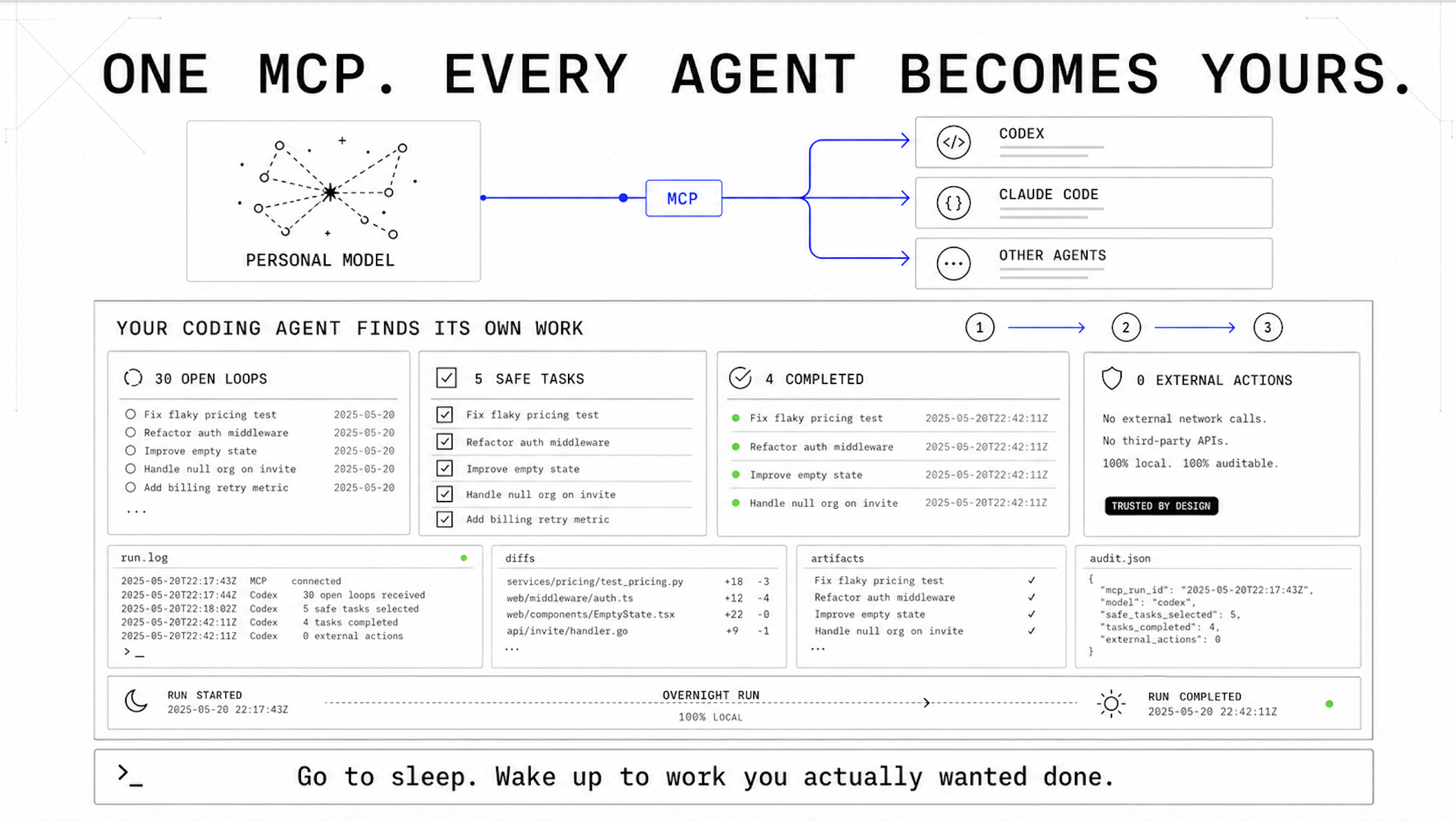
One Personal Model MCP connection gives trusted coding agents evidence-linked context.

Your coding agent finds its own work

Connect Personal Model once through MCP. Codex, Claude Code, and other trusted agents can use the same model of your goals, priorities, working patterns, and boundaries.

A connected agent can search Personal Model for unfinished work, rank proposed next steps against your priorities, and separate local implementation from external actions that need your approval.

Continue where you left off
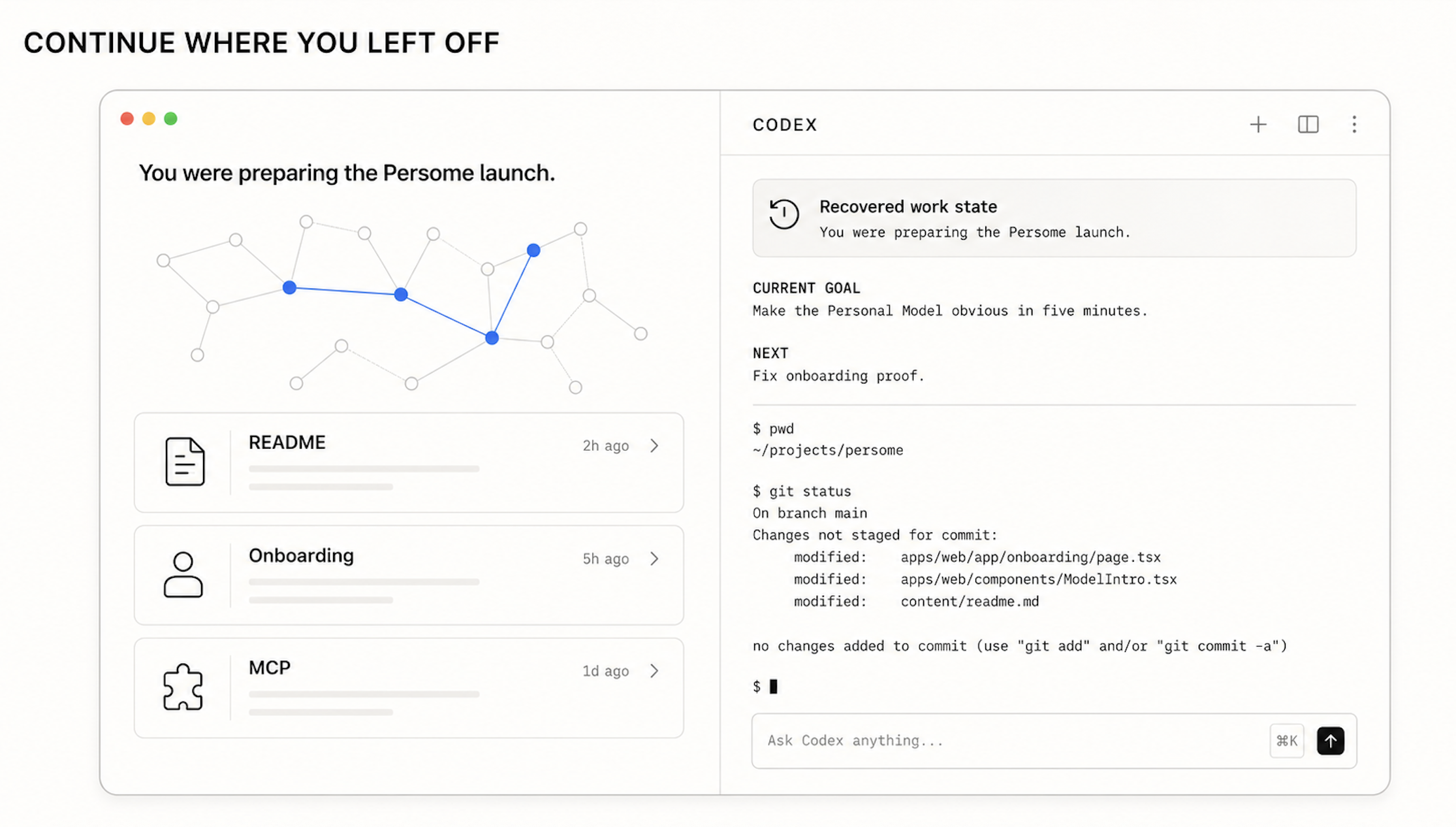
Concept illustration of a connected coding agent using Personal Model context to continue unfinished work. The panels show README, onboarding, and MCP tasks alongside restored work state, current goal, next step, project directory, Git status, and unstaged changes.

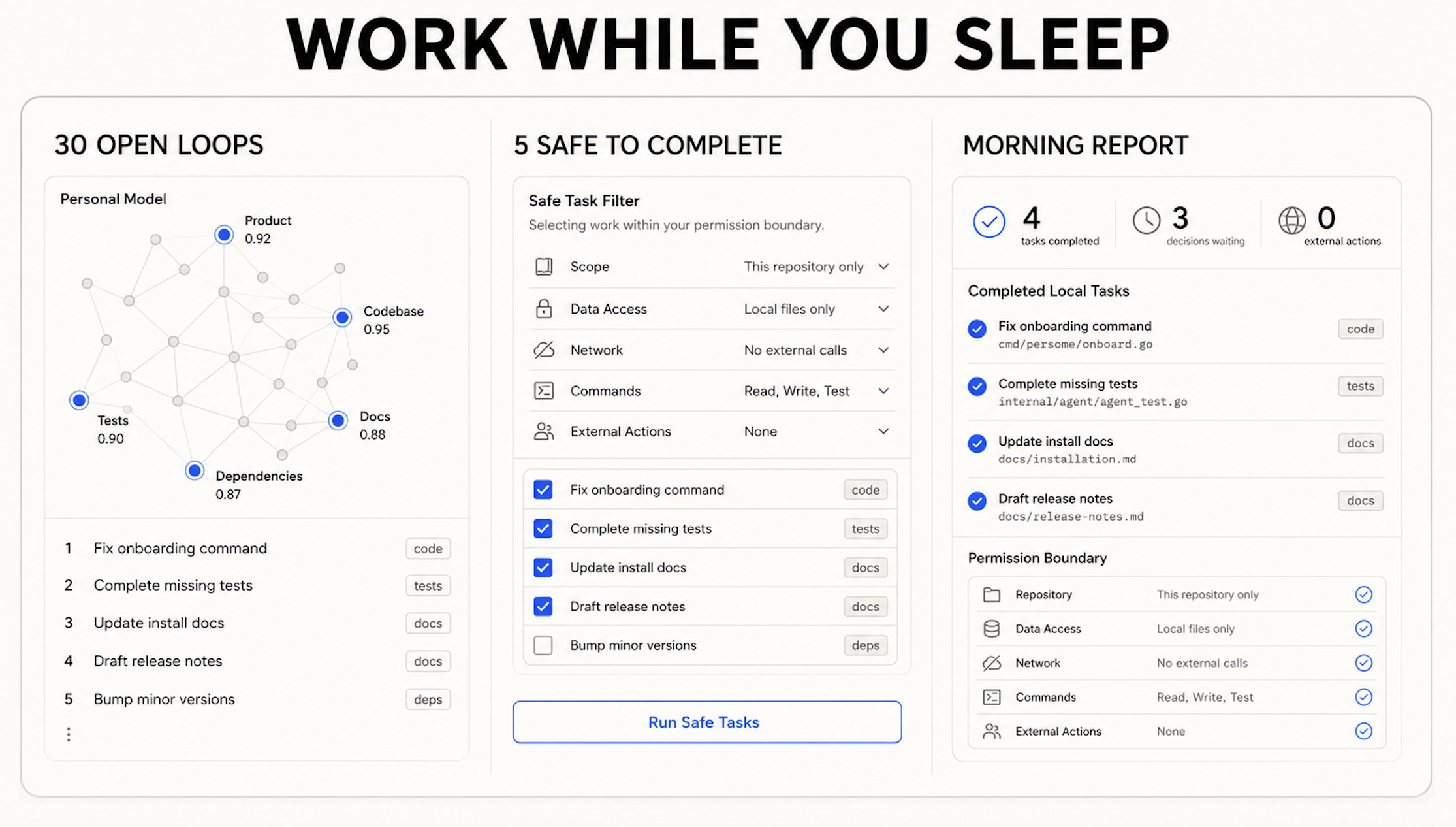
Work while you sleep

Concept illustration of a connected coding agent using Personal Model context to review open loops, filter proposed local work by permission scope, and prepare a morning report while leaving external actions for owner approval.

Install, connect, and verify

Install Personal Model, connect a trusted MCP client, then verify the local Runtime.

1. Install with your data

Requirements: macOS 13 or newer and Xcode Command Line Tools. For the shortest package-managed installation:

text
uv tool install personal-model
persome onboard
persome model open --after 30

The distribution is named personal-model; the installed CLI is persome.

For the most explicit source-based first run:

text
git clone https://github.com/Intuition-Lab/personal-model.git
cd personal-model
bash install.sh

After successful interactive onboarding, the source installer opens the unified local setup experience immediately.

What onboarding proves

  • persome onboard explains each macOS request before it appears.
  • Accessibility is granted to the versioned mac-ax-helper and, only when event-driven capture is enabled, mac-ax-watcher.
  • Screen Recording is requested only when the effective screenshot or local-OCR policy requires pixels. Personal Model never requires Full Disk Access.
  • On Apple Silicon, local OCR uses bundled PP-OCRv6; on Intel, it uses the macOS Apple Vision framework. Onboarding verifies the isolated worker on both architectures.
  • Unified localhost onboarding offers a read-only, multi-source import and builds the first model from existing Markdown history. Local folders are always available; Obsidian and Notion appear only when detected on the Mac. The same sources remain available through persome import-data; see the import guide.
  • It proves the final lifecycle owner and Runtime generation, then reports a fresh-capture receipt in standard daemon mode or an explicit readiness/privacy receipt for supported alternate modes such as trusted ingest.

An LLM is optional for collection and BM25 recall, but required for semantic modeling. You can configure a hosted/local provider for unattended processing:

text
persome llm setup
persome llm status --check

Alternatively, explicitly lend an existing coding-agent subscription to the background Runtime. The client CLI keeps and refreshes its own login; Personal Model stores only its executable path, routing policy, and a durable daily call cap:

text
persome llm agent setup --client codex --daily-call-limit 50 --check
# also supported: claude-code, cursor-agent
persome llm status

A trusted MCP client that supports Sampling with tools can still call process_pending_model_work for a one-request, 1–10-session batch. Both paths use the connected agent allowance without exposing its OAuth token to Personal Model; the CLI bridge is the opt-in path that also powers unattended stages.

2. Connect a trusted MCP client

Register whichever owner-local clients you use:

text
persome install claude-code
persome install codex
persome install cursor-agent
persome install claude-desktop
persome install opencode

The commands above install only the MCP server. To also give background semantic stages explicit consent to use a supported coding-agent subscription, add --fund-model; the default cap is 50 model invocations per local day:

text
persome install codex --fund-model --daily-call-limit 50
# also supported: claude-code, cursor-agent

persome llm agent disable revokes that consent without logging the client out or deleting a fallback provider profile.

These stdio registrations launch the MCP process on demand, so the daemon does not need to be running after onboarding has initialized the local database, and no HTTP bearer is copied into client configuration. Schema creation and migration remain daemon-owned; a brand-new or externally upgraded data root must run persome start once before stdio clients use it. Stdio writes remain available while the daemon is stopped, but WAL maintenance waits for the daemon; start it periodically if you use write tools in that mode so the WAL stays bounded.

For another Cursor-compatible setup, you can still generate a stdio object and merge mcpServers.persome manually:

text
persome install mcp-json --filename persome-mcp.json

MCP access is a personal-data capability; register only clients you trust.

3. Verify and ask grounded questions

text
persome status
persome model status
persome model open

# Only if you configured a semantic provider:
persome llm status --check

A sparse or degraded model can be valid early; Personal Model reports missing geometry instead of fabricating Faces, Volumes, or a Root.

After connecting an MCP client, try one of these recipes:

Search my Personal Model for [topic]. Use search, open the strongest result with read_receipt, and cite the source path, timestamp, and receipt ID. If the evidence is missing or conflicting, say so instead of guessing.

Help me continue where I left off on [project]. Search recent Personal Model context, distinguish observed facts from inferences, and show the receipts behind the proposed next step.

Review my current Personal Model with the default get_model_snapshot overview. Page only the specific model sections needed for the answer, cite supporting evidence, and call out anything sparse, stale, or conflicted.

Active work is reduced every five minutes by default. With valid capture and a working semantic provider, a first useful recall is operationally expected within about ten minutes—not guaranteed as a benchmark result.

4. Update Personal Model

For a uv tool installation, upgrade with the package manager and re-run Runtime proof:

text
uv tool upgrade --python 3.12 personal-model
persome onboard
persome model open --after 30

After any upgrade, restart editors that host a Personal Model stdio MCP process before resuming Runtime writes. A process loaded from the previous release cannot join the new cross-process SQLite maintenance gate until the editor reconnects it.

For an installation created by install.sh, run the transactional updater from any directory:

text
persome update

persome update preserves configuration, credentials, personal data, capture policy, and lifecycle intent, and performs its own mode-aware onboarding before committing the update. Do not use it to update a package-manager-managed installation.


Recipes

  • Use Personal Model with Claude Code
  • Use Personal Model with Codex CLI and the IDE extension
  • Use Personal Model with Cursor Agent
  • Use Personal Model with Claude Desktop
  • Use Personal Model with opencode
  • Connect any compatible MCP client

Use the client guide with the prompts above to install, prove the connection, test evidence-grounded retrieval, understand the permission boundary, and diagnose the most common failures.

Where Personal Model fits

Personal Model is an owner-local macOS Runtime, not a hosted multi-tenant memory service or only a graph library. It can coexist with product-native memory in ChatGPT or Claude and with developer memory infrastructure.

Read the Runtime boundary and evaluation limits before treating this as a hosted service or a benchmark claim.

Privacy, ownership, and evidence

  • Personal Model runs owner-locally on macOS and captures activity only after the relevant permissions are explained and granted.
  • Important memories and model objects retain provenance that trusted clients can inspect with read_receipt and resolve_evidence.
  • Corrections preserve audit history. Exports are redacted by default, and explicit erasure commands are available when history itself must be deleted.
  • MCP access is access to personal data. Register only clients you trust, and do not expose the localhost Runtime through a public tunnel.

Read the complete security and privacy model, model and evidence contract, and MCP tool contract.

Help us test more MCP clients

If your client is not listed above, start with the generic MCP setup. If it works, open an issue with the client name, version, transport, verification steps, and any permission caveats. A client moves into the verified table only after the path is reproducible.

See CONTRIBUTING.md for the development workflow and DCO requirements.


Star Personal Model on GitHub · Official MCP Registry · MCP client setup · Security & privacy

Contributors
Singularity   Singularity
  💻 Code
Li_Xufeng   Li_Xufeng
  💻 Code
Siyi   Siyi
  🎨 Design
Kevin   Kevin
  💻 Code
huachenjie238-oss   huachenjie238-oss
  📈 Growth
Jing@Meowy   Jing@Meowy
  📈 Growth
Zhiheng Chen   Zhiheng Chen
  💻 Code

Star History

Star history for Intuition-Lab/personal-model through July 31, 2026

Snapshot through July 31, 2026 · Open on Star History

Related MCP Servers

View all in Knowledge & Memory View all alternatives
  • Moxie Docs MCP logoMoxie Docs MCP
    ★ Featured

    MCP & Agent Skills for Automated Documentation, and codebase conventions + context

    🧠 Knowledge & Memory17 views
    Compare vs Moxie Docs MCP →
  • A
    Audrey

    Local-first biological memory for coding agents: recall, consolidation, and pre-action Guard checks.

    🧠 Knowledge & Memory0 views
    Compare vs Audrey →
  • Synap Memory logoSynap Memory

    Persistent memory for AI agents — log and recall conversation context over MCP.

    🧠 Knowledge & Memory0 views
    Compare vs Synap Memory →
  • Mnema logoMnema

    Local-first, formally verified memory for AI agents: consult/learn/related/list over MCP.

    🧠 Knowledge & Memory0 views
    Compare vs Mnema →

Frequently Asked Questions about Persome

Add the following block to your claude_desktop_config.json under mcpServers: "mcpServers": { "persome": { "command": "npx", "args": ["-y", "Persome"] } }

AllMCPs Directory Badge

Full Badge Customizer

Showcase your server listing on GitHub or your project documentation. Embed this dynamic SVG badge to highlight official listing status and live engagement.

Badge Style:
Live Dynamic SVG PreviewPersome AllMCPs Directory Badge

Markdown (GitHub README)
[![AllMCPs](https://allmcps.com/api/badge/persome?style=directory)](https://allmcps.com/mcp/persome)
HTML Embed
<a href="https://allmcps.com/mcp/persome"><img src="https://allmcps.com/api/badge/persome?style=directory" alt="Persome on AllMCPs" /></a>

Technical Specs & Signals

Category🧠Knowledge & Memory
More technical detailsExpand â–¾
TransportSTDIO
RuntimeNode.js
Views0
Unique ViewsTotal visits recorded for this listing page on AllMCPs.
Installs0
Installs & Copy ActionsTotal times users copied install commands or configuration snippets for this server.
27Quality signal: Emerging · 27/100How this signal is calculated ▾
Server availabilityNot measured

Not scored for repo-hosted servers — we can't reach the running server, only its GitHub page. Hosted MCP endpoints are health-checked live.

Verified ownership8/20
Documentation & tools11/30
Adoption & activity1/15
Community engagement0/10

A guidance signal from public completeness & health data — not a user rating. New listings start lower and rise as they add docs, get verified, and grow adoption. Signals we can't observe for a listing are skipped, not counted against it.

★ FeaturedMoxie Docs MCP logo

Moxie Docs MCP

MCP & Agent Skills for Automated Documentation, and codebase conventions + context

Explore Server →

Own this project?

This directory is pre-filled from public sources. Claim via GitHub README, site badge, or DNS TXT to get the verified badge and attach your website.

Free dofollow backlink: after claiming, verify your product site and place a dofollow AllMCPs badge — we recheck it stays live.

Claim & get free dofollow

Share & Embed

Add our SVG badge (dark/light directory styles) or embeddable widget to your site.

Explore more

More in 🧠 Knowledge & Memory →Best MCP servers for Memory & Knowledge →Alternatives to Persome →Install in Claude DesktopInstall in CursorInstall in VS Code