Local-first MCP server giving AI agents contextual knowledge about the people in your life
Quick Install
Automated & IDE SetupCopy the AI prompt to install this server into Claude Code, Cursor, or another agent — or use 1-click editor setup below.
Manual Client & Custom JSON ConfigExpand JSON ▾
Client Config & Setup
Choose your client or environment
Target File:
💡 Paste the JSON block into your client's configuration file under mcpServers, then restart the application.
Documentation Overview
people-context
Your agent already remembers your codebase. Now it can remember your people.
people-context is a local-first MCP server and CLI that gives AI agents
durable memory about the people in your life: who someone is, how you know them, what you last agreed, and how
they like to be talked to. One SQLite file on your machine. No account, no cloud, no network calls.





Why
Ask an assistant "how should I approach Priya about the reporting delay?" and it has nothing: it does not know which Priya, that she is your counterpart at a partner org, that you agreed a new deadline last week, or that she prefers a short email over a call. That knowledge lives in your head, your inbox, and a notes file the agent cannot see.
people-context keeps it in one place the agent can query through narrow tools:
- Who is this? Explainable name resolution over names, nicknames, aliases, and handles. Two Priyas come back as two candidates with a match reason, never a silent guess.
- What do I know? Relationships, organisations and roles, durable facts, concise interaction summaries, traits, reminders, and a per-person timeline, each disclosed only as far as the request needs.
- How do I talk to them? Communication guidance grounded in recorded traits, past friction, open follow-ups, and your own written philosophy.
- Who has gone quiet? Stale-relationship and upcoming-date reports over what is already stored.
- Get data in safely. Email, mbox, vCard, calendar, LinkedIn, Outlook, and WhatsApp exports are staged as reviewable candidates. You approve what gets recorded; raw source content is never kept.
It is opinionated about trust: writes are audited, forget is a real delete, sensitive records sit behind an
operator-only gate that a prompt cannot open, and ordinary commands never touch the network.
Demo
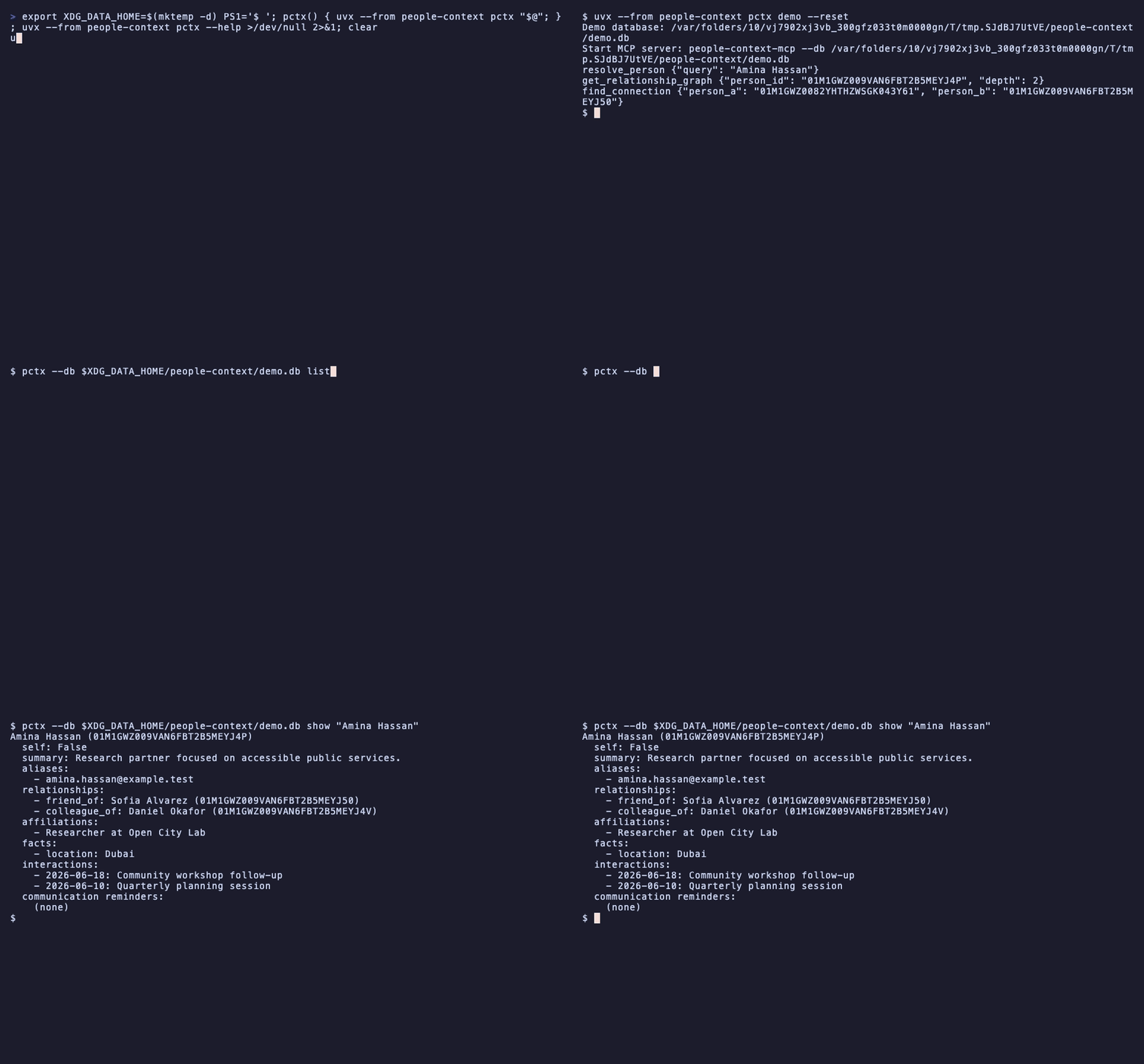
A packaged fictional dataset is the fastest way to see identity resolution, graph traversal, and bounded context without touching real data:
The demo always writes its own dedicated database at
{XDG_DATA_HOME or ~/.local/share}/people-context/demo.db. It ignores --db, PEOPLE_CONTEXT_DB, the config
file, and workspace discovery, and --reset replaces only that file plus its -wal/-shm companions, so a
real database is never read or modified. Seeding writes audited fictional people, handles, affiliations, facts,
interactions, and a connected relationship graph, then prints the path-targeted server command and concrete
tool calls that use the ids it just created:
Person ids are generated per seed, so the printed values differ from the placeholders above. Start the printed server command in an MCP client and run the printed calls verbatim. See docs/cli.md.
Quick start
Requires Python 3.11+ and uv. Pick your client; each is one step.
Claude Code
Restart Claude Code or run /reload-plugins. You get the server plus /people-context:who,
/people-context:remember, and /people-context:reminders. Details: docs/claude-code-plugin.md.
Claude Desktop
Download people-context.mcpb from the
latest release and open it. Claude Desktop
installs the pinned release with its own uv runtime. Details: docs/desktop-and-editors.md.
Codex
Start a new Codex session. Details: docs/codex-plugin.md.
Cursor, Windsurf, VS Code, or any MCP client
Add the stdio server to your client's MCP config (.cursor/mcp.json, ~/.codeium/windsurf/mcp_config.json,
.vscode/mcp.json, ...):
Or let the CLI write it: uvx --from people-context pctx setup cursor (also windsurf, vscode,
claude-desktop; add --dry-run to preview). VS Code uses a servers key with "type": "stdio". Per-editor
snippets: docs/desktop-and-editors.md.
OpenClaw
The native plugin talks to the opt-in loopback HTTP server. Details: docs/openclaw-plugin.md.
CLI only
people-context and people-context-mcp are the server commands; pctx is the human-operated CLI.
Then try, in your agent:
Who is Amina?
Remember that Amina from Open City Lab prefers short emails and hates surprise calls.
What should I know before my meeting with Daniel tomorrow?
The second one is a single remember tool call: the name is resolved, the person is created only if nobody
matches, and the affiliation and preference are recorded in one audited transaction. Ambiguous names come back
as candidates, never a guess.
Or, without an agent: pctx remember "Amina Hassan" "prefers short emails" --org "Open City Lab" and
pctx brief "Amina Hassan". Five worked scenarios live in docs/use-cases.
What it remembers, and what it never does
| It remembers | It never does |
|---|---|
| Names, nicknames, aliases, and handles | Upload anything, anywhere |
| Relationships with a canonical, extensible vocabulary | Store raw imported emails, chats, or files |
| Organisations, roles, and time-bounded affiliations | Let a model enable sensitive disclosure or full export |
| Durable facts, observations, and traits with evidence | Commit imported or agent-extracted data without your review |
| Concise interaction summaries and a per-person timeline | Log private values or keep a soft-deleted copy after forget |
| Reminders, follow-ups, and your communication philosophy | Make a network request outside pctx reindex --semantic |
How it compares
people-context | Assistant memory (ChatGPT, Claude) | Memory platforms (Mem0 and similar) | |
|---|---|---|---|
| Where data lives | One SQLite file you own | Vendor account | Vendor platform or your own deployment |
| Works offline | Yes | No | Self-hosted only |
| Knows people as first-class records | Identity, relationships, roles, graph, guidance | Free-text notes | Free-text or vector memories |
| Explains a match | Ranked candidates with a reason; ambiguity is surfaced | No | Similarity score |
| Import review gate | Stage, review, commit | n/a | Automatic extraction |
| Deletion | Hard delete plus audit redaction in one transaction | Request to vendor | API delete |
| Backup and move | pctx sync push / pull bundle | n/a | Deployment-specific |
The dated, sourced version with vendor documentation links is in docs/privacy-and-safety.md.
Security model
This project executes local Python with the launching user's filesystem permissions. Ordinary MCP discovery excludes elevated sensitive context and full export. Operator-gated tools require process environment flags; models cannot enable them through arguments. Vault export is intentionally CLI-only.
The database is plaintext SQLite by default. On Unix-like systems a new one is created 0600, so other local
accounts cannot read it. That is a boundary between accounts, not encryption, so pair it with full-disk
encryption or opt into SQLCipher at-rest encryption (uv sync --extra encrypted, key read only from
PEOPLE_CONTEXT_DB_KEY). See
database file permissions and
optional at-rest encryption.
Related MCP Servers
Reviews
No reviews yet — be the first to share how this listing worked for you.
Frequently Asked Questions about People Context
AllMCPs Directory Badge
Showcase your server listing on GitHub or your project documentation. Embed this dynamic SVG badge to highlight official listing status and live engagement.
Badge Style:
Live Dynamic SVG Preview
Markdown (GitHub README)
[](https://allmcps.com/mcp/people-context)HTML Embed
<a href="https://allmcps.com/mcp/people-context"><img src="https://allmcps.com/api/badge/people-context?style=directory" alt="People Context on AllMCPs" /></a>