AllMCPs
BrowseBestCategoriesStackCompareToolsGuidesBlog Log in Submit MCP

Stay in the loop

Get new MCP servers and top picks in your inbox.

AllMCPs

The open directory for discovering and installing Model Context Protocol servers.

Explore

  • Browse servers
  • Best MCP servers
  • Categories
  • MCP clients
  • Agent prompts
  • Stack Builder
  • Compare servers
  • Tags index
  • Submit a server
  • Pricing

Learn

  • Guides hub
  • What is MCP?
  • Install guide
  • Troubleshooting
  • Security
  • Blog
  • Blog RSS

Tools

  • All tools
  • Config generator
  • Config validator
  • MCP playground
  • OpenAPI β†’ MCP
  • Badge generator

For agents

  • API docs
  • Trust & traffic
  • llms.txt β†— (opens in a new tab)
  • Catalog JSON β†— (opens in a new tab)
  • Remote MCP β†— (opens in a new tab)

Company

  • About
  • Contact
  • X (@AllMCPs) β†— (opens in a new tab)
  • GitHub β†— (opens in a new tab)
  • Terms
  • Privacy
AllMCPs VerifiedAllMCPs VerifiedFeatured on Nick LaunchesFeatured on Nick LaunchesLaunch Llama NewsletterLaunch Llama NewsletterVerified DR - allmcps.comVerified DR - allmcps.comFeatured on SaaSGrowFeatured on SaaSGrowFeatured on Twelve ToolsFeatured on Twelve ToolsFeatured on Saaspa.geFeatured on Saaspa.geFeatured on Findly.toolsFeatured on Findly.toolsFeatured on Startup FameFeatured on Startup FameFeatured on LaunchKiwiFeatured on LaunchKiwiFeatured on ScrollLaunchFeatured on ScrollLaunchFeatured on DailyPingsFeatured on DailyPingsFazier badgeFazier badgeFeatured on NewTool.siteFeatured on NewTool.siteFeatured on saasfame.comFeatured on saasfame.comDR Checker - Domain RatingDR Checker - Domain RatingListed on Turbo0Listed on Turbo0Launched on LaunchBoard - Product Launch PlatformLaunched on LaunchBoard - Product Launch PlatformList on SimilarlabsList on Similarlabshttps://codetrendy.comhttps://codetrendy.comListed on DevTool.ioFeatured on BuildlistFeatured on BuildlistAllMCPs VerifiedAllMCPs VerifiedFeatured on Nick LaunchesFeatured on Nick LaunchesLaunch Llama NewsletterLaunch Llama NewsletterVerified DR - allmcps.comVerified DR - allmcps.comFeatured on SaaSGrowFeatured on SaaSGrowFeatured on Twelve ToolsFeatured on Twelve ToolsFeatured on Saaspa.geFeatured on Saaspa.geFeatured on Findly.toolsFeatured on Findly.toolsFeatured on Startup FameFeatured on Startup FameFeatured on LaunchKiwiFeatured on LaunchKiwiFeatured on ScrollLaunchFeatured on ScrollLaunchFeatured on DailyPingsFeatured on DailyPingsFazier badgeFazier badgeFeatured on NewTool.siteFeatured on NewTool.siteFeatured on saasfame.comFeatured on saasfame.comDR Checker - Domain RatingDR Checker - Domain RatingListed on Turbo0Listed on Turbo0Launched on LaunchBoard - Product Launch PlatformLaunched on LaunchBoard - Product Launch PlatformList on SimilarlabsList on Similarlabshttps://codetrendy.comhttps://codetrendy.comListed on DevTool.ioFeatured on BuildlistFeatured on Buildlist
Β© 2026 Jackalope Digital LLC. All rights reserved.
  1. Home
  2. 🧠 Knowledge & Memory
  3. Peon Mem
P
Health: Not checked yetWe have not completed a health check for this listing yet.Last checked 8/11/2026, 12:19:22 AM

Peon Mem

Enrichment pendingWe haven’t run our AI enrichment pass on this listing yet, so the overview, use cases, and FAQ below may be sparse or missing. We work through the catalog over time β€” check back soon.
View Repository

Local-first memory brain for AI coding agents: hooks capture sessions, beliefs injected per prompt.

Quick Install

Automated & IDE Setup

Copy the AI prompt to install this server into Claude Code, Cursor, or another agent β€” or use 1-click editor setup below.

Add to CursorAdd to VS Code
Manual Client & Custom JSON ConfigExpand JSON β–Ύ

Install Config Generator

Choose your client
claude_desktop_config.json
{
  "mcpServers": {
    "peon-mem": {
      "command": "npx",
      "args": [
        "-y",
        "peon-mem"
      ]
    }
  }
}

πŸ’‘ Paste into ~/Library/Application Support/Claude/claude_desktop_config.json (macOS) or %APPDATA%\Claude\claude_desktop_config.json (Windows)

Install Directory Badge Claim listing Alternatives🧠 More in Knowledge & Memory

Documentation Overview

🧠 Peon β€” a memory brain for your AI coding agents

npm license tests

Local-first, hierarchical, self-improving memory for Claude Code, Codex, and any MCP client.

Your AI forgets everything between sessions. Peon doesn't. It records your sessions, uses an LLM to consolidate them into typed beliefs, and injects the relevant ones back into every prompt. It runs as a daemon on your machine, and nothing leaves it.

Code
        PEON GLOBAL BRAIN            ← user-level facts & preferences, inherited everywhere
       /        |         \
  project A  project B  project C    ← rooted child brains (.peon/ in each project)

Why Peon

  • Hierarchical brains. One global parent brain holds who you are, your rules, and your tools. Each project gets an isolated child brain. Every injection carries both.
  • Two memory layers, honestly measured. Consolidated beliefs (decisions, preferences, facts, artifacts) give you the gist. An episodic verbatim layer recovers the exact details that lossy summaries drop. On LongMemEval, raw-episodic recall scored 61% where belief-only scored 17%.
  • Automatic capture and injection. Claude Code hooks record messages and events, then inject a query-ranked memory block (with an ⚠ MOST RELEVANT headline) into every prompt. You never have to remember to save anything.
  • Cost-gated consolidation. An LLM distills sessions into beliefs only once enough new memory accumulates. It can supersede, merge, and flag conflicts. Nothing is destructively deleted.
  • Hybrid retrieval. Lexical and semantic RRF fusion, MMR diversity, reinforcement, and recency. Query embeddings are cached to disk, so repeat prompts cost nothing.
  • The Neural Universe. A live monitor at localhost:3737/monitor renders every belief as a star. Projects are galaxies, search makes matches flare, and autonomous curation pulses.
  • A daily self-audit (STL). Peon checks itself every day: what it recorded, what it injected, what failed, what consolidation did. Then it files a report with a verdict.
  • Eval-gated development. A committed results ledger (git SHA, qrels, and brain fingerprint per row) means retrieval changes are proven, not asserted. Negative results stay documented.
  • Local-first and locked down. Plain JSONL you can read, a loopback-only daemon with DNS-rebinding protection, secret redaction at the injection boundary, and path-traversal guards.
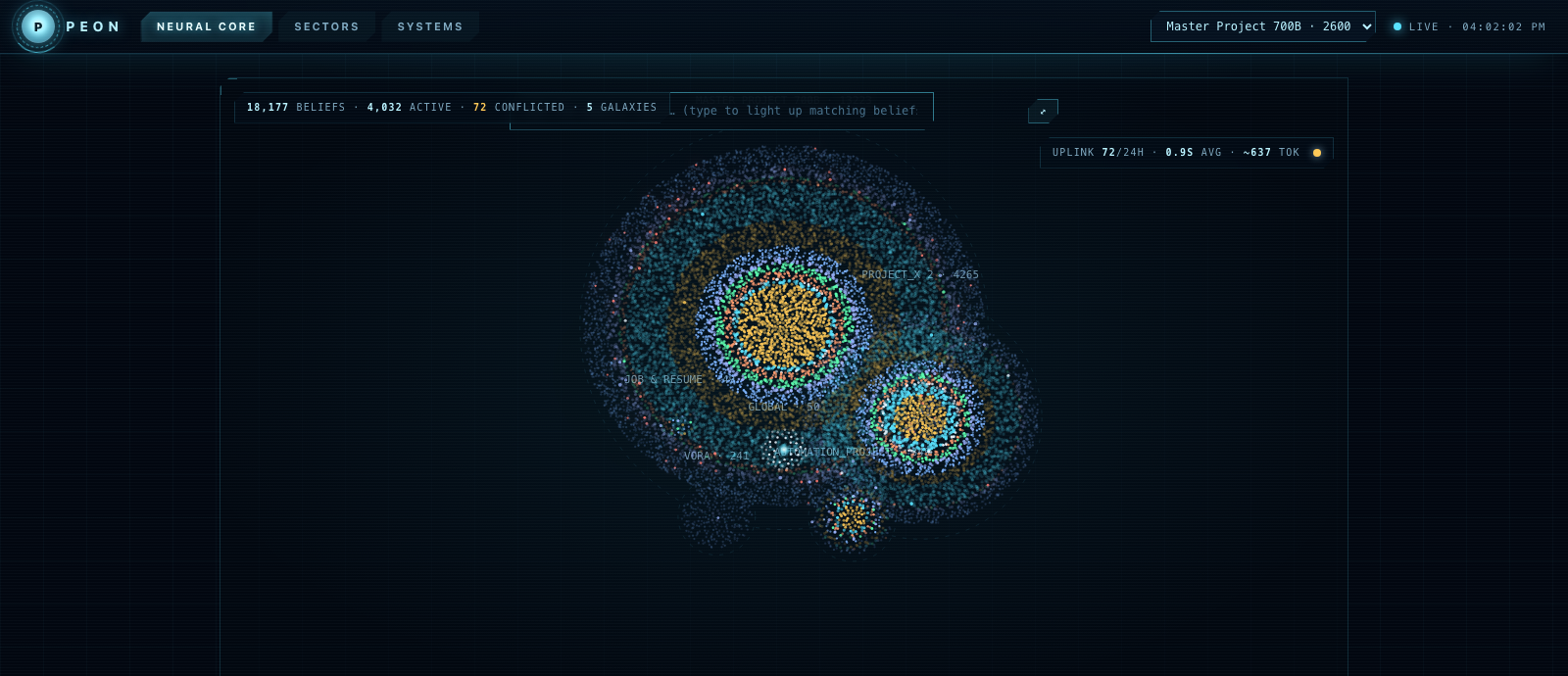
The Neural Universe β€” every belief is a star, projects are galaxies The live monitor: 18k real beliefs rendered as stars. Type to make matching beliefs flare; click one to inspect it.
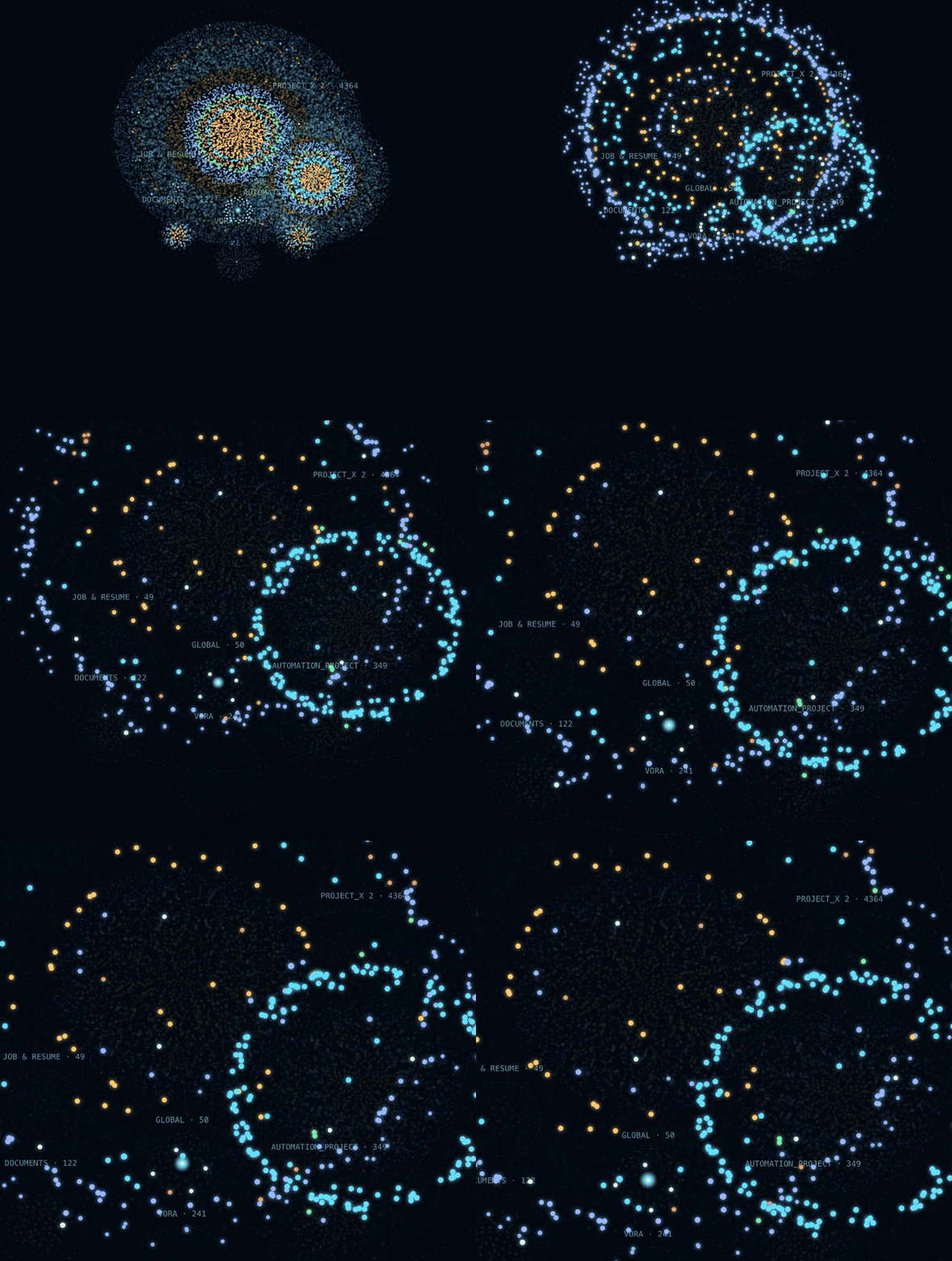
Search flare β€” type a query and matching beliefs light up across every galaxy

Ask the field: typing "wulver cluster" makes 400+ matching beliefs flare while the rest dim, and the camera flies to them.

Why "Peon"?

The name comes from Indian offices. Every office had a peon, the person who walked desk to desk all day: collect a file from this table, note who needs what, carry it to the next table, remember where everything is. He wasn't the boss or the star, but the whole office quietly ran on him. Nothing moved without him, and he never forgot where anything was.

That's this framework, with AI. Peon walks between your sessions and your projects. It collects what happened at one desk (a session), files it in the right cabinet (a project brain), carries the relevant papers to the next desk before you ask (injection), and keeps the master ledger upstairs (the global brain). Quiet clerk. Perfect memory. The office runs on him.

How Peon differs from existing memory tools

Peonmem0Letta/MemGPTZep/Graphitiflat memory files (MEMORY.md)
Runs100% local daemoncloud or self-hostservercloud/serverlocal
Storagehuman-readable JSONL you can catvector DBDBgraph DBmarkdown
Memory modelbeliefs + verbatim episodic layerextracted factsself-edited blockstemporal knowledge graphprose
Hierarchyglobal parent brain β†’ per-project child brains, inherited on every promptuser/agent/session scopesper-agentper-userper-project file
Captureautomatic via hooks (zero effort)SDK calls you writeagent-managedSDK callsagent must remember to write
Conflict handlingsupersede/merge, recoverable β€” never hard-deletesLLM may DELETEself-editinvalidationoverwrite
Exact recallepisodic layer regression-tested (61% vs 17% belief-only, LongMemEval)gist onlygist onlygraph factswhatever was written
Observabilitylive Neural Universe monitor + daily self-audit (STL) + serve telemetrydashboardβ€”β€”β€”
Verificationcommitted eval ledger; negative results keptvendor benchmarksβ€”vendor benchmarksβ€”

The short version: mem0 and Zep are memory platforms for products you build. Peon is memory for the coding agents you already use. It plugs into Claude Code or Codex in about five minutes, and you can watch it think and audit every number it claims.

Your agents share one brain

If you run more than one coding agent β€” Claude Code and Codex, say β€” they usually each live in their own bubble. Whatever you work out with one is gone when you switch to the other.

Point them at the same project and Peon dissolves that wall. Both agents resolve to the same .peon/ brain (Peon canonicalizes the project path, so the hook, a direct MCP call, and Codex all land on one store). So the memory flows between them:

  • Codex works out how your build pipeline runs and records it. Next time you open Claude Code in that repo, it's already in the injected context.
  • Claude Code hits a gotcha and files it. Codex sees it the moment it calls get_context or search_memory.
  • The global brain sits above both, so your preferences and rules follow you into every agent, in every project.

They aren't chatting in real time. It's a shared notebook both write in and both read from, so a decision made in one agent shows up in the other without you re-explaining it. One project, one memory, however many agents.

Quickstart

Requirements: Node 20+, macOS or Linux. An OpenRouter API key is recommended (consolidation + semantic embeddings); without one Peon still works lexical-only.

One line:

Terminal
npm install -g peon-mem && peon-mem install

(no Node? curl -fsSL https://raw.githubusercontent.com/VineetV2/peon-mem/main/install.sh | bash)

The guided setup asks four things:

  1. Where your global brain lives (default: ~/Library/Application Support/Peon)
  2. Which LLM: OpenRouter (one key, any model) Β· OpenAI Β· Anthropic Β· Ollama (100% local & free) Β· or skip
  3. Installs the daemon as an auto-start service (launchd on macOS, systemd user unit on Linux)
  4. Detects your AI apps and wires the MCP server (plus hooks for Claude Code) into the ones you pick. Auto-configured: Claude Code, Claude Desktop, Codex, Gemini CLI, Cursor, Windsurf, VS Code (Copilot MCP), Zed, LM Studio. Detected with in-app instructions: ChatGPT Desktop, Perplexity Desktop. Every touched config gets a .peon-backup.

That builds the package, starts the daemon as a service, wires your Claude Code hooks + MCP server (with a backup of your settings), and writes a config template. Then add your key to ~/Library/Application Support/Peon/.env and open the monitor. peon-mem install --dry-run shows every action first; peon-mem uninstall reverses it (memory data is never touched).

Or manually:

bash
git clone https://github.com/VineetV2/peon-mem && cd peon-mem
npm install && npm run build
node bin/peon-mem.mjs install --dry-run   # inspect, then run without --dry-run

Create .env in the repo root:

bash
OPENROUTER_API_KEY=sk-or-...
PEON_PROCESSING_MODEL=google/gemini-2.5-flash-lite   # cheap + good enough (measured)
PEON_EMBEDDING_MODEL=openai/text-embedding-3-small

Start the daemon (the installer prints a launchd/systemd recipe, or just):

bash
node dist/daemon-cli.js              # serves 127.0.0.1:3737

Then wire your agent (the installer prints these filled in for your paths):

  • Claude Code: add the hook to ~/.claude/settings.json (SessionStart / UserPromptSubmit / SessionEnd β†’ scripts/claude-peon-hook.mjs) and the MCP server (dist/index.js).
  • Codex / any MCP client: register dist/index.js as a stdio MCP server; 16 tools (start_session, get_context, search_memory, record_message, process_memory, …).

Open http://127.0.0.1:3737/monitor and watch your brain grow.

How it works

  1. Record. Hooks stream messages, events, and tool calls into <project>/.peon/raw/ (append-only).
  2. Consolidate. Past a size gate, an LLM turns the session delta into typed belief records in .peon/brain/memories.jsonl (importance/confidence scores, entities, provenance pointers), reconciling against existing beliefs: supersede, merge, conflict-flag. Recoverable, never deleted.
  3. Retrieve + inject. On every prompt, beliefs are ranked (RRF lexical+semantic, MMR, reinforcement) and injected alongside episodic verbatim matches and inherited global beliefs.
  4. Self-curate. A background brain pass reinforces recalled beliefs, compresses stale clusters, and resolves duplicates. Every action is logged and undoable.
  5. Self-audit (STL). A daily job reports what was recorded, what was injected, what went wrong, and whether consolidation behaved, with serve-latency telemetry and a health verdict.

Full install (copy-paste)

1. Daemon (always-on, macOS launchd)

bash
node scripts/install-peon.mjs           # prints everything below filled in for YOUR paths

Or manually β€” ~/Library/LaunchAgents/com.peon.daemon.plist:

xml
<?xml version="1.0" encoding="UTF-8"?>
<!DOCTYPE plist PUBLIC "-//Apple//DTD PLIST 1.0//EN" "http://www.apple.com/DTDs/PropertyList-1.0.dtd">
<plist version="1.0"><dict>
  <key>Label</key><string>com.peon.daemon</string>
  <key>ProgramArguments</key><array>
    <string>/opt/homebrew/bin/node</string>
    <string>/ABSOLUTE/PATH/TO/peon/dist/daemon-cli.js</string>
  </array>
  <key>RunAtLoad</key><true/>
  <key>KeepAlive</key><true/>
</dict></plist>
bash
launchctl load ~/Library/LaunchAgents/com.peon.daemon.plist
curl http://127.0.0.1:3737/health        # β†’ {"ok":true}

Linux: the installer writes ~/.config/systemd/user/peon-mem.service and enables it. Manual equivalent: systemctl --user enable --now peon-mem.service, plus loginctl enable-linger $USER so it survives logout. (Linux support is young β€” issue #1 tracks real-machine reports.)

2. Claude Code β€” hooks (auto capture + injection)

Merge into ~/.claude/settings.json (replace the path):

config.json
{
  "hooks": {
    "SessionStart": [{ "hooks": [{ "type": "command",
      "command": "node /ABSOLUTE/PATH/TO/peon/scripts/claude-peon-hook.mjs" }] }],
    "UserPromptSubmit": [{ "hooks": [{ "type": "command",
      "command": "node /ABSOLUTE/PATH/TO/peon/scripts/claude-peon-hook.mjs" }] }],
    "SessionEnd": [{ "hooks": [{ "type": "command",
      "command": "node /ABSOLUTE/PATH/TO/peon/scripts/claude-peon-hook.mjs" }] }]
  }
}

3. Claude Code β€” MCP server (search/inspect tools)

Terminal
claude mcp add peon -- node /ABSOLUTE/PATH/TO/peon/dist/index.js

4. Codex / any MCP client

~/.codex/config.toml:

toml
[mcp_servers.peon]
command = "node"
args = ["/ABSOLUTE/PATH/TO/peon/dist/index.js"]
[mcp_servers.peon.env]
PEON_DAEMON_URL = "http://127.0.0.1:3737"

Codex has no hooks, so add usage rules to ~/.codex/AGENTS.md telling it to call start_session + get_context at session start and record_message for durable facts (example block in docs/).

5. Verify

Terminal
curl "http://127.0.0.1:3737/context?projectPath=$PWD&query=test"   # JSON context
open http://127.0.0.1:3737/monitor                                  # the Neural Universe

Start a Claude Code session in any project, say something decision-shaped, and end the session. Within a minute the monitor shows the belief. The next session injects it.

MCP tools exposed

start_session Β· record_message Β· record_event Β· end_session Β· get_context Β· search_memory Β· inspect_brain Β· build_injection Β· query_projects (cross-project search) Β· quality_report Β· remember_global Β· search_global_memory Β· import_global_memory Β· evaluate_project Β· process_memory Β· maybe_process_memory

Uninstall

bash
launchctl unload ~/Library/LaunchAgents/com.peon.daemon.plist
# remove the hook entries + MCP server from your agent config
# your memory stays in <project>/.peon/ and ~/Library/Application\ Support/Peon/ β€” plain files, delete when ready

Troubleshooting / FAQ

  • No injection appearing? curl http://127.0.0.1:3737/health; check the hook is registered (run any prompt in claude, then look at the monitor's Systems page for the request).
  • 431 errors on huge prompts? Handled. The hook caps the retrieval query at 2k chars.
  • No OpenRouter key? Everything still runs; retrieval is lexical + episodic only (semantic ranking and consolidation need a model). PEON_EMBEDDING_MODE=ollama works too.
  • Cost? Consolidation is gated (default: fires per ~6k new chars, around cents/day with flash-lite). Query embeddings are cached to disk, so repeats are free.
  • Multiple machines? Brains are plain files in your repos. Commit .peon/ if you want memory to travel (redact first: the raw layer contains session text).
  • Is my data sent anywhere? Only consolidation/embedding calls to your configured model provider. No telemetry, no cloud store. The daemon rejects non-loopback callers.

Configuration (env)

VarDefaultPurpose
OPENROUTER_API_KEYβ€”consolidation + embeddings
PEON_PROCESSING_MODELgoogle/gemini-2.5-flash-liteconsolidation model
PEON_EMBEDDING_MODEautoapi / ollama / local / off
PEON_EMBEDDING_MODELβ€”e.g. openai/text-embedding-3-small or an Ollama model
PEON_OLLAMA_URLhttp://127.0.0.1:11434local embedding server
PEON_AI_MODEgatedoff disables all LLM calls
PEON_FLUSH_MIN_CHARS6000consolidation cost gate
PEON_MEMORY_DIR.peonper-project brain dir name
PEON_DAEMON_URLhttp://127.0.0.1:3737daemon address
PEON_CONSOLIDATION_MAX_DELTA_CHARS60000anti truncation-stall chunking
PEON_DISABLEDβ€”hard off-switch for A/B testing

Project brains

  • A brain lives in <project>/.peon/ as human-readable JSONL and markdown. Commit it or ignore it; your choice (.gitignore ships ignoring it).
  • .peon/root marks a brain boundary. New brains are born rooted, so a parent directory can never swallow a project's memory.
  • The global brain lives in ~/Library/Application Support/Peon/global/ (macOS).

Using Peon with NO AI at all

Some people want a memory system that never calls a model: no API keys, no local LLM, no embeddings. Peon supports that. Pick skip in the install wizard, or set two env vars in <memory-home>/.env:

Code
PEON_AI_MODE=off
PEON_EMBEDDING_MODE=off

The pipeline looks like this without a model. Hooks still capture everything you do into <project>/.peon/raw/ as plain JSONL. As each event arrives, rule-based extraction files it into readable brain files: a line that starts with "we decided" or "always use" lands in decisions.md, preferences land in preferences.md, file paths land in artifacts.md. No model reads it; it's pattern matching, and you can open the files to see exactly what it caught. At your next session start, the hook asks the daemon for context, the daemon ranks those records by keyword match, recency, and importance, and injects the best ones into your prompt. The only step that disappears entirely is consolidation, the nightly LLM pass that compresses raw history into deduplicated beliefs. Without it your memory is a well-indexed journal instead of a distilled one. Search still finds things; nothing summarizes them.

What still works (all of it deterministic code, no model anywhere):

  • Capture. Hooks record every prompt, tool call, and session event to plain JSONL in <project>/.peon/raw/.
  • Real-time brain files. Decisions, preferences, open questions, and artifacts are written live to readable .md files by rule-based extraction as events arrive.
  • Injection. Session-start context comes from those real-time files, query-focused and budgeted, same as always.
  • Search. Lexical retrieval (RRF over keyword rank, recency, importance, and type priors). No embeddings needed. This is the same degrade path the semantic stack falls back to, so it gets exercised constantly.
  • Episodic recall. Verbatim what-was-said lookup is lexical by design, so it is unaffected.
  • Monitor UI, token tracking, cross-project search, backups. All model-free.

What you give up: consolidation (raw events are never distilled into deduplicated beliefs, so memory grows as an append-only journal), semantic search (paraphrased queries need shared keywords), automatic entity extraction, and stale-shadow demotion (it compares embeddings).

Two escape hatches if you want curation without external AI:

  1. process_memory accepts a pre-built aiResult. The coding agent you already run (Claude Code, Codex) can do the distillation itself in-session and hand Peon the structured result. Memory stays curated, and Peon itself never spends a token.
  2. Everything is plain JSONL/Markdown on disk. You can edit beliefs by hand or through the monitor's memory endpoints, and Peon backs up before every mutation.

Measured: does memory actually save tokens?

A/B test with real claude -p sessions: one question per session, same repo, same model. ON means Peon hooks active (memory injected at session start). OFF means PEON_DISABLED=1, so the agent falls back to reading files. 20 questions across procedures, past results, decisions, and current-state facts; 15 clean ON/OFF pairs survived tooling issues. Token counts come from Claude Code's own session transcripts.

paired, n=15/armON (Peon)OFFdelta
avg tokens (in+out)511878βˆ’42%
median tokens2251,048βˆ’79%
cache-read tokens81.6k110.5k1.35Γ— less
cheaper armON wins 12/15

Answer quality, graded against repo ground truth: 8 ties, 1 clear Peon win, 5 baseline wins, 1 where both were weak. The Peon win is the interesting one. A rule that was only ever stated in a conversation (a professor's citation policy, from an email) got "no such rule found" from the baseline; Peon recited it exactly. Conversation-borne knowledge has no file to grep.

Honest caveats: the test repo has unusually good docs (a maintained research log), which makes the baseline strong, and most repos aren't like that. n=15 is small. Questions were picked to have known answers, not sampled from real usage. The test also exposed two real bugs in Peon itself: a stale superseded belief outranking the newer truth, and token rows getting lost when consolidation outlived the hook timeout. Both are fixed (stale-shadow demotion at retrieval; usage logged before consolidation).

Honesty section

Peon's development is eval-gated and keeps its negative results. An associative entity graph was built, measured (βˆ’2.9% Recall@10), and turned OFF by default. Consolidation is lossy by design; that's why the episodic layer exists and is regression-tested. The eval harness and committed ledger (npm run eval) let you verify retrieval changes on your own brain.

Security

  • The daemon binds 127.0.0.1 only and rejects non-loopback Host/Origin headers (DNS-rebinding defense).
  • Secrets (API keys, tokens, JWTs) are redacted at the injection boundary.
  • Path traversal is guarded. Writes use per-project locks and atomic tmp+rename, with automatic backups before anything destructive-adjacent. Nothing is hard-deleted.

License

MIT Β© Vineet Vora

Contributing β€” I'd love your help

Peon is built and maintained by one person, and I'm open to help making it better. Issues, PRs, ideas, criticism of the architecture, or just telling me where it broke on your machine: all of it is useful.

Where help would matter most right now:

  • Windows & Linux support. The daemon install is macOS launchd today. The systemd and Task Scheduler equivalents need real users to test them.
  • More agent integrations. The wizard covers 11 apps, but hooks-level capture (like the Claude Code integration) for Codex, Cursor, and others would make memory richer everywhere.
  • Retrieval quality. The eval harness (npm run eval) makes experiments cheap: better consolidation prompts, smarter staleness handling, local embedding models worth defaulting to.
  • Benchmarks. Run the token A/B on your repo and share the numbers, especially where Peon loses. Negative results are first-class here.
  • Docs and onboarding. If the README or the wizard confused you, that confusion is a bug report.

Open an issue at github.com/VineetV2/peon-mem/issues or send a PR directly.

Rules of the house: every retrieval/quality change ships with a test and an eval-ledger run (npm run eval); negative results get documented, not deleted; nothing may hard-delete user memory. npm test must stay green.

Related MCP Servers

View all in Knowledge & Memory View all alternatives
  • M
    Memorix

    Local-first persistent project memory for AI coding agents across MCP clients and sessions.

    🧠 Knowledge & Memory0 views
    Compare vs Memorix β†’
  • Agent Memory Bridge logoAgent Memory Bridge

    MCP-native, local-first memory for coding agents that turns coding sessions into reusable engineering memory: decisions, gotchas, and domain knowledge.

    🧠 Knowledge & Memory0 views
    Compare vs Agent Memory Bridge β†’
  • V
    Vibsync

    Shared brain for AI coding agents: team memory, async Q&A, and zero-collision coordination.

    🧠 Knowledge & Memory0 views
    Compare vs Vibsync β†’
  • V
    Vibsync

    Shared brain for AI coding agents: team memory, async Q&A, and zero-collision coordination.

    🧠 Knowledge & Memory0 views
    Compare vs Vibsync β†’

Frequently Asked Questions about Peon Mem

Add the following block to your claude_desktop_config.json under mcpServers: "mcpServers": { "peon-mem": { "command": "npx", "args": ["-y", "peon-mem"] } }

AllMCPs Directory Badge

Full Badge Customizer

Showcase your server listing on GitHub or your project documentation. Embed this dynamic SVG badge to highlight official listing status and live engagement.

Badge Style:
Live Dynamic SVG PreviewPeon Mem AllMCPs Directory Badge

Markdown (GitHub README)
[![AllMCPs](https://allmcps.com/api/badge/peon-mem?style=directory)](https://allmcps.com/mcp/peon-mem)
HTML Embed
<a href="https://allmcps.com/mcp/peon-mem"><img src="https://allmcps.com/api/badge/peon-mem?style=directory" alt="Peon Mem on AllMCPs" /></a>

Technical Specs & Signals

Category🧠Knowledge & Memory
More technical detailsExpand β–Ύ
TransportSTDIO
RuntimeNode.js
Views0
Unique ViewsTotal visits recorded for this listing page on AllMCPs.
Installs0
Installs & Copy ActionsTotal times users copied install commands or configuration snippets for this server.
28Quality signal: Emerging Β· 28/100How this signal is calculated β–Ύ
Server availabilityNot measured

Not scored for repo-hosted servers β€” we can't reach the running server, only its GitHub page. Hosted MCP endpoints are health-checked live.

Verified ownership8/20
Documentation & tools12/30
Adoption & activity1/15
Community engagement0/10

A guidance signal from public completeness & health data β€” not a user rating. New listings start lower and rise as they add docs, get verified, and grow adoption. Signals we can't observe for a listing are skipped, not counted against it.

β˜… Spotlight Slot

Feature Your MCP Server

Get maximum visibility for your server across our directory, search results, and detail pages.

Spotlight Your Server

Own this project?

This directory is pre-filled from public sources. Claim via GitHub README, site badge, or DNS TXT to get the verified badge and attach your website.

Free dofollow backlink: after claiming, verify your product site and place a dofollow AllMCPs badge β€” we recheck it stays live.

Claim & get free dofollow

Share & Embed

Add our SVG badge (dark/light directory styles) or embeddable widget to your site.

Explore more

More in 🧠 Knowledge & Memory β†’Best MCP servers for Memory & Knowledge β†’Alternatives to Peon Mem β†’Install in Claude DesktopInstall in CursorInstall in VS Code


