AllMCPs
BrowseBestCategoriesStackCompareToolsGuidesBlog Log in Submit MCP

Stay in the loop

Get new MCP servers and top picks in your inbox.

AllMCPs

The open directory for discovering and installing Model Context Protocol servers.

Explore

  • Browse servers
  • Best MCP servers
  • Categories
  • MCP clients
  • Agent prompts
  • Stack Builder
  • Compare servers
  • Tags index
  • Submit a server
  • Pricing

Learn

  • Guides hub
  • What is MCP?
  • Install guide
  • Troubleshooting
  • Security
  • Blog
  • Blog RSS

Tools

  • All tools
  • Config generator
  • Config validator
  • MCP playground
  • OpenAPI β†’ MCP
  • Badge generator

For agents

  • API docs
  • Trust & traffic
  • llms.txt β†— (opens in a new tab)
  • Catalog JSON β†— (opens in a new tab)
  • Remote MCP β†— (opens in a new tab)

Company

  • About
  • Contact
  • X (@AllMCPs) β†— (opens in a new tab)
  • GitHub β†— (opens in a new tab)
  • Terms
  • Privacy
AllMCPs VerifiedAllMCPs VerifiedFeatured on Nick LaunchesFeatured on Nick LaunchesLaunch Llama NewsletterLaunch Llama NewsletterVerified DR - allmcps.comVerified DR - allmcps.comFeatured on SaaSGrowFeatured on SaaSGrowFeatured on Twelve ToolsFeatured on Twelve ToolsFeatured on Saaspa.geFeatured on Saaspa.geFeatured on Findly.toolsFeatured on Findly.toolsFeatured on Startup FameFeatured on Startup FameFeatured on LaunchKiwiFeatured on LaunchKiwiFeatured on ScrollLaunchFeatured on ScrollLaunchFeatured on DailyPingsFeatured on DailyPingsFazier badgeFazier badgeFeatured on NewTool.siteFeatured on NewTool.siteFeatured on saasfame.comFeatured on saasfame.comDR Checker - Domain RatingDR Checker - Domain RatingListed on Turbo0Listed on Turbo0Launched on LaunchBoard - Product Launch PlatformLaunched on LaunchBoard - Product Launch PlatformList on SimilarlabsList on Similarlabshttps://codetrendy.comhttps://codetrendy.comListed on DevTool.ioFeatured on BuildlistFeatured on BuildlistAllMCPs VerifiedAllMCPs VerifiedFeatured on Nick LaunchesFeatured on Nick LaunchesLaunch Llama NewsletterLaunch Llama NewsletterVerified DR - allmcps.comVerified DR - allmcps.comFeatured on SaaSGrowFeatured on SaaSGrowFeatured on Twelve ToolsFeatured on Twelve ToolsFeatured on Saaspa.geFeatured on Saaspa.geFeatured on Findly.toolsFeatured on Findly.toolsFeatured on Startup FameFeatured on Startup FameFeatured on LaunchKiwiFeatured on LaunchKiwiFeatured on ScrollLaunchFeatured on ScrollLaunchFeatured on DailyPingsFeatured on DailyPingsFazier badgeFazier badgeFeatured on NewTool.siteFeatured on NewTool.siteFeatured on saasfame.comFeatured on saasfame.comDR Checker - Domain RatingDR Checker - Domain RatingListed on Turbo0Listed on Turbo0Launched on LaunchBoard - Product Launch PlatformLaunched on LaunchBoard - Product Launch PlatformList on SimilarlabsList on Similarlabshttps://codetrendy.comhttps://codetrendy.comListed on DevTool.ioFeatured on BuildlistFeatured on Buildlist
Β© 2026 Jackalope Digital LLC. All rights reserved.
  1. Home
  2. πŸ’» Developer Tools
  3. Peckish β€” DoorDash ordering
P
Health: ActiveRecent health check succeeded.Last checked 8/10/2026, 11:55:43 PM

Peckish β€” DoorDash ordering

Enrichment pendingWe haven’t run our AI enrichment pass on this listing yet, so the overview, use cases, and FAQ below may be sparse or missing. We work through the catalog over time β€” check back soon.
View RepositoryVisit Website

Order food on DoorDash β€” compare real fee-included totals; you approve every order.

Quick Install

Automated & IDE Setup

Copy the AI prompt to install this server into Claude Code, Cursor, or another agent β€” or use 1-click editor setup below.

Add to CursorAdd to VS Code
Not yet automatically verified

We haven't yet run this listing's install command through our automated sandbox check. This isn't a red flag β€” we're steadily working through the catalog.

Manual Client & Custom JSON ConfigExpand JSON β–Ύ

Install Config Generator

Choose your client
claude_desktop_config.json
{
  "mcpServers": {
    "peckish-doordash-ordering": {
      "command": "npx",
      "args": [
        "-y",
        "peckish-mcp"
      ]
    }
  }
}

πŸ’‘ Paste into ~/Library/Application Support/Claude/claude_desktop_config.json (macOS) or %APPDATA%\Claude\claude_desktop_config.json (Windows)

Install Directory Badge Claim listing AlternativesπŸ’» More in Developer Tools

Documentation Overview

Peckish 🍜

Feeling peckish? Just ask. An AI ordering agent for DoorDash β€” it searches, compares real totals (fees included), builds the cart, and you approve every order. Built on Claude and DoorDash's official dd-cli.

One tool layer, three surfaces:

SurfaceStartBest for
Terminal chatpeckishLiving in the terminal
Local web apppeckish-web β†’ http://localhost:4747Consumer-friendly UI: store cards, live quote, Stop button, order modal
MCP serverclaude mcp add peckish -- npx -y peckish-mcp, or the double-click .mcpbClaude Desktop / Claude Code users β€” no API key needed; your Claude subscription powers the model

Which one is for me?

  • Comfortable with a terminal? β†’ Terminal chat. Fastest, most informative.
  • Want something that feels like an app? β†’ Local web app. Cards, live quote, a proper Place-order button.
  • Already use Claude Desktop or Claude Code? β†’ MCP server. No API key, no separate chat window β€” Claude itself becomes your ordering agent, and order confirmation appears as a native dialog.
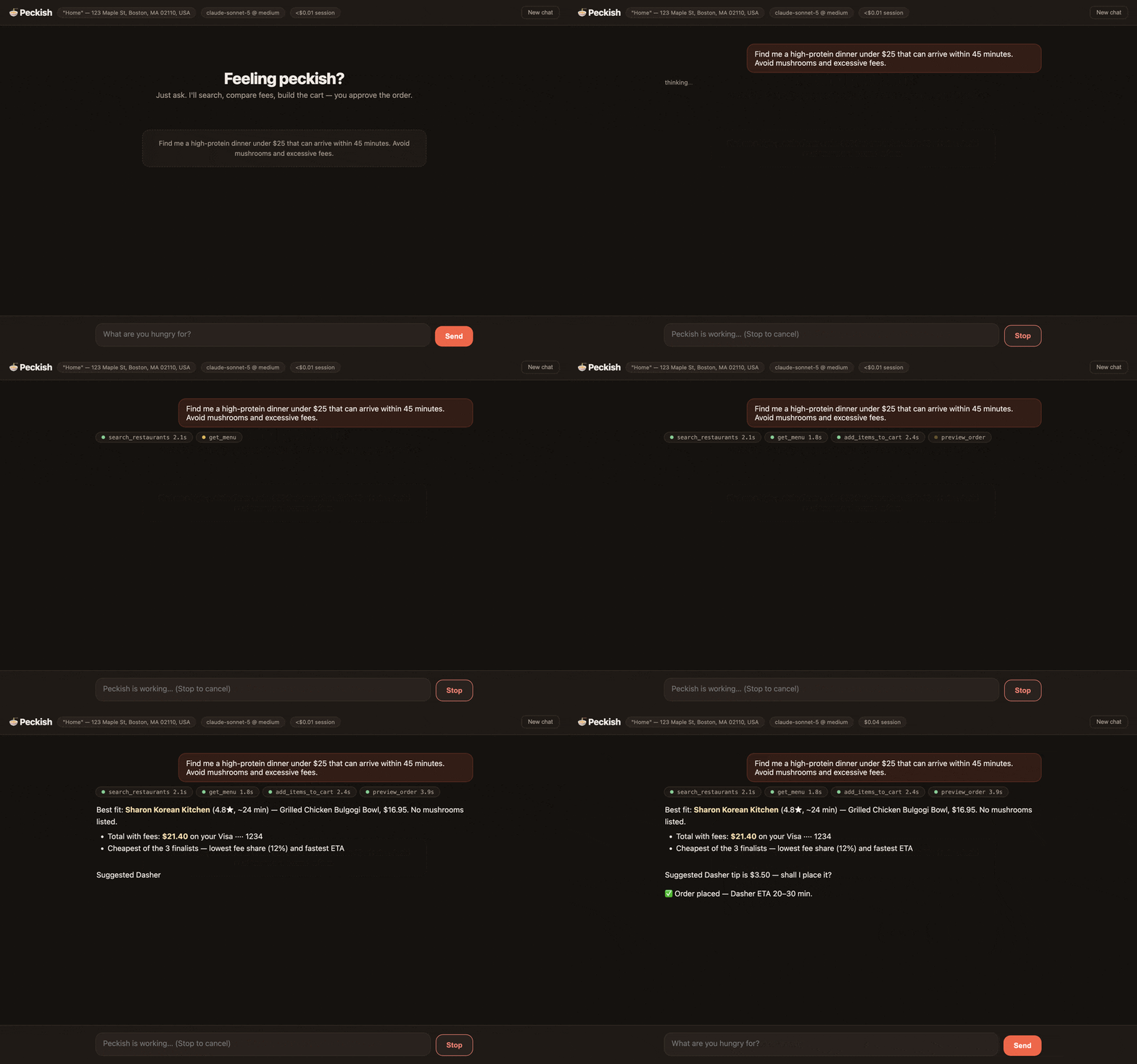
Peckish finding a dinner under $25: tool calls run, a recommendation streams in with the fee-included total, and an order-confirmation dialog asks for approval before anything is placed.
Scripted demo of the web app β€” store, prices and card are fictional; the interface and the approval gate are the real ones.

peckish on the web β†’

Updates: every release ships with full notes, all artifacts, and a SHA256SUMS.txt on Releases β€” see CHANGELOG.md for the history. Watch the repo (Releases only) to get notified.

Install in one line β€” no git clone:

Terminal
npm install -g peckish

Prefer an app? Download the Mac app (.dmg) β€” guided setup, no terminal at any step. See Mac app below. Everything runs on your own machine either way, because dd-cli holds your DoorDash session there β€” a Mac (Apple Silicon) or Linux x86_64, including containers and cloud sandboxes: see Linux, containers and headless hosts.

Code
you β€Ί Find me a high-protein dinner under $25 that can arrive within 45
      minutes. Avoid mushrooms and excessive fees.

βš™ search_restaurants {"query":"grilled chicken bowls","limit":8}  βœ“ 2.1s
βš™ get_menu {"store_id":"35406455","filter":"chicken"}             βœ“ 1.8s
βš™ list_carts {"store_id":"35406455"}                              βœ“ 1.2s
βš™ add_items_to_cart {…}                                           βœ“ 2.4s
βš™ preview_order {"cart_uuid":"…"}                                 βœ“ 3.9s

Best fit: Sharon Korean Kitchen (4.8β˜…, ~24 min) β€” Grilled Chicken Bulgogi
Bowl, $16.95. No mushrooms listed. Total with fees: $21.40 on your Visa
ending 1234. Suggested Dasher tip is $3.50 β€” that, another amount, or none?
~$0.04 turn Β· $0.04 session

Get started (user guide)

1. Prerequisites

  • A Mac with Apple Silicon (M1–M4) or Linux x86_64 β€” the two platforms dd-cli publishes builds for. Peckish is local-first: whichever machine you run it on is the backend on every surface, because that's where dd-cli holds your DoorDash session.
  • Node.js 20+ β€” node --version to check; install from nodejs.org or brew.
  • DoorDash CLI access (currently waitlist-gated by DoorDash). Peckish 0.4.0 requires dd-cli β‰₯ 0.2.1 β€” on Linux, β‰₯ 0.2.2, the first release with Linux builds. Download the release from doordash-oss/doordash-cli, verify the SHA256 checksum against the published value, then:
    sh
    # macOS (Apple Silicon)
    tar -xzf dd-cli-v*-darwin-arm64.tar.gz && cd dd-cli-v*-darwin-arm64
    # Linux (x86_64)
    tar -xzf dd-cli-v*-linux-amd64.tar.gz && cd dd-cli-v*-linux-amd64
    
    bash install.sh          # both platforms β€” installs to ~/.local/bin/dd-cli
    dd-cli login             # sign in to DoorDash in your browser
    
    No browser on that machine (container, VM, cloud sandbox)? See Linux, containers and headless hosts.
  • An Anthropic API key for the terminal/web surfaces (console.anthropic.com) β€” or skip the key entirely and use the MCP surface with your Claude subscription (step 4).

2. Install Peckish

Terminal
npm install -g peckish

That's it β€” you now have three commands: peckish (terminal chat), peckish-web (web app), and peckish-mcp (MCP server).

Or install from source (contributors)
sh
git clone https://github.com/CydVilla/peckish.git
cd peckish
npm install
npm test          # optional: 25 unit tests, no network needed
npm run dev       # terminal chat (or: npm run web / npm run mcp)

3. Run it β€” terminal or web

server.ts
export ANTHROPIC_API_KEY=sk-ant-…   # from console.anthropic.com

peckish         # terminal chat
peckish-web     # web app β†’ open http://localhost:4747

On boot Peckish verifies your DoorDash sign-in, shows your default delivery address, and flags any open carts you forgot about. If sign-in is missing or expired, Peckish offers to fix it for you: the terminal asks before launching dd-cli login (which opens your browser), the web app shows a sign-in card, and mid-conversation the agent can offer the same assist on any surface β€” you approve, sign in in the browser, and it picks up where it left off. On a machine with no browser, Peckish skips that offer and tells you how to inject a token instead β€” see below.

4. Or run it inside Claude β€” no API key

Claude itself becomes the ordering agent, and your Claude subscription pays for the model. Pick whichever fits your client:

Claude Code β€” one line:

Terminal
claude mcp add peckish -- npx -y peckish-mcp

Claude Desktop β€” download peckish-0.2.2.mcpb from Releases and double-click it. Claude Desktop installs it like a browser extension: no terminal, no Node install, no JSON editing.

Or configure Claude Desktop by hand

Add to ~/Library/Application Support/Claude/claude_desktop_config.json:

config.json
{
  "mcpServers": {
    "peckish": {
      "command": "npx",
      "args": ["-y", "peckish-mcp"]
    }
  }
}

If dd-cli isn't at ~/.local/bin/dd-cli, add "env": { "DD_CLI_PATH": "/your/path/to/dd-cli" } β€” desktop apps don't inherit your shell PATH.

Peckish is also listed in the MCP Registry as io.github.CydVilla/peckish, so clients that browse the registry can find it directly.

Restart Claude Desktop and ask it to find you dinner. Order confirmation appears as a native dialog; clients that can't render dialogs can browse and build carts but cannot place orders (fail closed).

5. Everyday use

Things to say:

  • "Find me a high-protein dinner under $25 that can arrive within 45 minutes. Avoid mushrooms and excessive fees."
  • "Compare the real totals at the top two β€” fees included."
  • "Reorder my usual from Sharon Korean."
  • "What did I spend on delivery last month?"
  • "Is this place actually good?" (checks web reviews)
  • "Never mushrooms, ever." β†’ saved permanently; applied automatically next time
  • "Get me milk, eggs, and a pound of ground beef from Whole Foods."

Placing an order always ends with an explicit confirmation you perform β€” typing yes in the terminal, clicking Place order in the web modal, or approving the dialog in Claude Desktop. Before that, Peckish must show you the itemized quote, confirm the tip, and name the card being charged. Decline anything and it backs off.

Controls & housekeeping

WhereWhat
Terminal/prefs saved preferences Β· /cost session spend Β· /reset new conversation Β· /quit Β· Ctrl+C stops a running turn
WebStop button cancels a turn Β· New chat resets Β· header chip shows session cost Β· click the address chip to switch your delivery address (editing an address's text happens on doordash.com β€” Peckish picks it up automatically)
BothPreferences live in ~/.peckish/preferences.json; a full audit log of every tool call and confirmation is written to ~/.peckish/logs/*.jsonl

Cost: defaults are tuned for low spend at decent quality β€” claude-sonnet-5 at medium effort, prompt caching on the system prefix and conversation tail, and server-side context editing that prunes stale menu payloads in long sessions. The cost meter shows the approximate spend per turn and per session. Max quality: DD_AGENT_MODEL=claude-opus-4-8 DD_AGENT_EFFORT=high. (On MCP, the client chooses and pays for the model.)

Troubleshooting

SymptomFix
DoorDash sign-in is missing or expiredAccept the built-in sign-in assist (it runs dd-cli login for you), or run it in a terminal yourself
The same, on a headless Linux boxThere's no browser to sign in with: dd-cli export-token on a machine that has one, then DD_CLI_ACCESS_TOKEN=… here (details)
Auth errors right after upgrading dd-cliNew CLI versions can need fresh scopes β€” sign in again (assist, dd-cli login, or a fresh export-token)
Anthropic authentication failedexport ANTHROPIC_API_KEY=… in the same shell, restart
dd-cli binary not foundInstall dd-cli (step 1) or set DD_CLI_PATH=/path/to/dd-cli
no dd-cli build for your machinedd-cli ships macOS arm64 and Linux x86_64 only β€” Intel Macs and Linux arm64 can't run Peckish
Web app port in usePECKISH_PORT=5757 peckish-web
A turn ran awayCtrl+C (terminal) / Stop (web) β€” history rolls back cleanly

Env vars: DD_AGENT_MODEL (default claude-sonnet-5), DD_AGENT_EFFORT (low–max, default medium), DD_CLI_PATH, PECKISH_PORT (default 4747), DD_CLI_ACCESS_TOKEN (read by dd-cli itself β€” browserless sign-in).


Mac app

A double-clickable app for people who never want to see a terminal: download Peckish-x.y.z-arm64.dmg from Releases, drag Peckish to Applications, and open it.

First launch (Gatekeeper): the app is ad-hoc signed but not notarized (no paid Apple Developer ID), so macOS won't open it on a plain double-click the first time. Right-click the app β†’ "Open" β†’ "Open" (or approve it under System Settings β†’ Privacy & Security). Only needed once.

If macOS instead says "Peckish is damaged and can't be opened", you have a build from before this was fixed, or the download quarantine got confused. Clear it once and it opens normally:

sh
xattr -cr /Applications/Peckish.app

First-run setup happens in the app β€” three buttons, no terminal:

  1. DoorDash CLI β€” one-click guided install (downloads the official release, verifies its SHA256 checksum before running anything). If you don't have dd-cli access yet, there's a waitlist link.
  2. Sign in to DoorDash β€” opens your browser; the app detects when you're done. Your sign-in lives in the macOS keychain.
  3. Anthropic API key β€” paste it once; it's stored encrypted with Electron safeStorage (keychain-backed), never in plain text.

Then Open Peckish β€” same web app, same order-confirmation modal, same safety gates; the app is just a shell that runs the local server for you on a random localhost-only port. Requires Apple Silicon; Node.js is not required (the app bundles its own runtime).

Building it yourself: cd desktop && npm install && npm run dist β†’ desktop/dist/Peckish-*.dmg.

The .dmg is the one Mac-only surface. The terminal, web and MCP surfaces all run on Linux too:


Linux, containers and headless hosts

dd-cli v0.2.2 added Linux (amd64) builds, so all three Peckish surfaces run on Linux x86_64 unchanged β€” same tools, same order gate, same audit log. Install dd-cli from the same release page (asset dd-cli-v<version>-linux-amd64.tar.gz, verify its SHA256, bash install.sh), then npm install -g peckish. If you put the binary somewhere other than ~/.local/bin/dd-cli, set DD_CLI_PATH β€” Peckish also checks /usr/local/bin/dd-cli and your PATH.

With a desktop session (DISPLAY or WAYLAND_DISPLAY set), nothing changes: dd-cli login opens your browser and the built-in sign-in assist works exactly as it does on a Mac.

Without one β€” a container, a VM, a cloud sandbox, SSH with no forwarding β€” the browser flow cannot complete, so Peckish stops offering it (no spawned login that hangs forever, no "run dd-cli login" advice that can't work) and points at the token path instead:

server.ts
# 1. on a machine that HAS a browser (dd-cli β‰₯ 0.2.2)
dd-cli export-token

# 2. in the environment that runs Peckish
export DD_CLI_ACCESS_TOKEN='<the token>'
peckish            # or peckish-web / peckish-mcp

dd-cli picks the token up from the environment Peckish passes down, so every surface authenticates without a keychain or a browser.

  • That token is live access to your DoorDash account β€” it can place real orders. Treat it like a password: keep it in your runtime's secret store, not in an image layer, a docker run -e in your shell history, or a committed .env. Mint a fresh one with dd-cli export-token when it expires.
  • The order gate does not change. Placing an order still needs your explicit approval on the surface you're using (typed yes, the web modal, or the MCP dialog) β€” headless means no browser, not unattended ordering.
  • peckish-web in a container binds 127.0.0.1 inside the container by design, so a published port (-p 4747:4747) can't reach it. Run the container with --network host (Linux), or use the terminal or MCP surface, which need no port at all.
  • Not supported: Linux arm64 and Intel Macs β€” dd-cli publishes no build for either, and Peckish says so explicitly instead of failing obscurely.

What it does

  • Search β†’ menus β†’ cart β†’ preview β†’ confirm β†’ submit, with the real fee/ETA quote (order preview) driving every recommendation.
  • Comparison shopping: builds carts at up to 3 finalists, compares true totals + fee share + ETA, recommends one, deletes the losers.
  • Fee tactics: promo scanning with consent, pickup-vs-delivery comparison, DoorDash credits surfaced, DashPass status shown.
  • Memory: dietary rules and habits persist across sessions and surfaces.
  • History: "my usual" from order frequency, honest spend breakdowns from receipts, reorders with silent-drop detection.
  • Web reviews via Claude's server-side web search (never used for prices β€” dd-cli is the only source of truth for ordering data).
  • Group carts (new in 0.4.0): "start a group order for the team, $25 each" β€” creates a shareable cart link, optional per-person spend limit, host reviews and submits when everyone's in.
  • Express delivery (new): asks for Priority when you want it fastest β€” offered per-cart, priced into the quote before you approve.
  • Credits control (new): DoorDash credits apply by default; say "don't use my credits" to opt out for an order.
  • Enterprise chains (new): Domino's, Sweetgreen, Dave's Hot Chicken and other big chains are now orderable (dd-cli β‰₯ 0.2.1).
  • Work benefits (company budgets + expense codes), scheduled delivery, pickup, groceries/retail/pets/alcohol.

Architecture

Code
terminal REPL          local web app           MCP client (Claude Desktop…)
 src/index.ts           src/web.ts + public/    src/mcp.ts
      β””β”€β”€β”€β”€β”€β”€β”€β”€β”€β”€β”€β”€β”¬β”€β”€β”€β”€β”€β”€β”€β”€β”€β”˜                       β”‚  (client's model reasons;
                   ↓                                 β”‚   server instructions guide it)
     Claude agent loop, streaming                    β”‚
     src/agent.ts Β· claude-sonnet-5 Β· strict tools   β”‚
     Β· adaptive thinking Β· context editing           β”‚
     Β· prompt caching Β· web_search Β· cost meter      β”‚
                   β””β”€β”€β”€β”€β”€β”€β”€β”€β”€β”€β”€β”€β”€β”€β”€β”¬β”€β”€β”€β”€β”€β”€β”€β”€β”€β”€β”€β”€β”€β”€β”€β”€β”€β”˜
                                   ↓
                 28 typed tools β€” src/tools.ts (strict: true)
                                   ↓
                 sanitizing wrapper β€” src/ddcli.ts
                                   ↓
                 dd-cli --json-output  β†’  DoorDash

Safety model

Placing an order always requires an explicit human approval rendered by the surface, not by the model:

SurfaceThe gate
TerminalType yes at a prompt
Web"Place order" modal (declines automatically after 5 min)
MCPClient elicitation dialog; clients without elicitation cannot place orders (fail closed)

Also on every surface:

  • Strict tool schemas β€” the API guarantees tool arguments validate before any handler runs (no malformed-argument class).
  • Abortable turns β€” Ctrl+C / Stop rolls history back to the turn start.
  • Audit log β€” every tool call, argument set, duration, confirmation outcome, and submit result in ~/.peckish/logs/*.jsonl.
  • Tip confirmed + card named before any submit ask; submit never auto-retries (not idempotent); success reported only after order status confirms.
  • Merchant text treated as data (widget/assistant-instruction fields stripped); read-only CLI calls retry once on transient errors, mutations never do.
  • Web server is localhost-only (Host + Origin checks).

What Peckish shares with DoorDash

dd-cli β‰₯ 0.2.1 requires an --intent note on every command, which DoorDash says it may review for research and product improvement. DoorDash's documented format asks for your verbatim prompt β€” but food prompts routinely contain dietary, health, and religious signals, which DoorDash's own guidance says to avoid. So Peckish defaults to privacy:

  • What is sent: a one-line goal summary authored by the model at generic altitude (e.g. Summary: Help the user order dinner), plus an explicit user prompt/purpose: "(not shared β€” Peckish privacy default)" marker.
  • What is never sent by default: your verbatim words, dietary rules, budgets, names, saved preferences, or conversation content.
  • Opt in to the full format: set PECKISH_INTENT_VERBATIM=1 and the intent will include your opening request verbatim, as DoorDash's docs ask.

Independent of intent, DoorDash necessarily sees the API traffic itself (searches, carts, orders) β€” that's inherent to ordering.

Repo map

FileWhat it is
src/index.tsTerminal REPL surface (abort, cost lines, /cost)
src/web.ts + public/index.htmlWeb surface: SSE streaming, cards, Stop, confirm modal, Origin guard
src/mcp.tsMCP stdio server: 28 tools + session context, instructions, elicitation gates
src/agent.tsSystem prompt + streaming tool loop (beta: context editing; web_search; usage)
src/tools.tsTool schemas (strictified) + handlers; menu trimming/filtering
src/ddcli.tsexecFile wrapper: envelope parsing, UI-field stripping, error mapping, bounded read-only retry
src/platform.tsSupported dd-cli targets + whether sign-in can use a browser here or needs an injected token
src/confirm.tsPluggable confirmation gates (fail closed)
src/costs.ts / src/logger.tsCost accounting Β· JSONL audit log
src/prefs.tsPreference persistence (~/.peckish/)
tests/unit.test.ts25 unit tests (npm test), no network needed
desktop/Electron shell for the Mac app (.dmg): onboarding + server launcher, no agent logic
packages/mcp/The peckish-mcp npm package β€” a launcher so npx -y peckish-mcp starts the MCP server
extension/Claude Desktop extension (.mcpb): manifest + vendored server. node build-manifest.mjs && mcpb pack . peckish.mcpb
server.jsonMCP Registry metadata (io.github.cydvilla/peckish)

Releasing

Everything ships from one tag. .github/workflows/release.yml publishes both npm packages, registers the MCP Registry entry, builds the .mcpb and the .dmg, and attaches both to the GitHub release:

Terminal
npm version patch          # or edit the versions by hand
git push && git push --tags

Every publish step is skip-if-already-published, so re-running a tag after a failure is safe. .github/workflows/ci.yml runs typecheck, tests, a metadata consistency check, and a real MCP handshake on every push.

scripts/check-consistency.mjs guards the metadata that spans files and drifts silently β€” the registry namespace casing, matching server.json name and mcpName, the 100-character registry description cap, and the extension's advertised tool list. Run it locally before tagging.

One-time setup for the automation

npm β€” either configure trusted publishing on npmjs.com for both peckish and peckish-mcp (provider: GitHub Actions, repo CydVilla/peckish, workflow release.yml) so no secret is needed, or add an NPM_TOKEN repository secret using a granular access token with "bypass 2FA" enabled.

MCP Registry β€” nothing to configure. The workflow authenticates with mcp-publisher login github-oidc, and GitHub's OIDC token proves the repo owner is CydVilla, which grants the io.github.CydVilla/* namespace.

Mac app signing β€” the .dmg is built unsigned. Notarized builds would need an Apple Developer ID plus CSC_LINK/CSC_KEY_PASSWORD and notarization secrets.

Notes & limitations

  • Local-first by design: hosted delivery (SMS bots, voice) would require DoorDash's partner API β€” your own machine is the backend here.
  • One open cart per store (DoorDash rule) β€” Peckish collision-checks and asks.
  • payment-method list sees cards only; wallet defaults (Apple Pay etc.) are confirmed generically or via the browser checkout URL.
  • Age-restricted items can't be submitted by an agent β€” checkout URL fallback.
  • Popularity data is deliberately unused (per dd-cli guidance); web reviews fill that gap with attribution.
  • Cost figures are close estimates from token usage at list prices.

Related MCP Servers

View all in Developer Tools View all alternatives
  • A
    Ai Netcafe

    Compare LLM cost & latency on one prompt, translate PDF keeping layout, cited research, make PPTX

    πŸ’» Developer Tools0 views
    Compare vs Ai Netcafe β†’
  • Claude Task Master logoClaude Task Master

    AI-powered task management system for AI-driven development. Features PRD parsing, task expansion, multi-provider support (Claude, OpenAI, Gemini, Perplexity, xAI), and selective tool loading for optimized context usage.

    πŸ’» Developer Tools7 views
    Compare vs Claude Task Master β†’
  • M
    Mcp

    Give your AI assistant real meeting context via Fathom so every output grounded in your work

    πŸ’» Developer Tools0 views
    Compare vs Mcp β†’
  • Shadcn Ui Mcp Server logoShadcn Ui Mcp Server

    MCP server that gives AI assistants seamless access to shadcn/ui v4 components, blocks, demos, and metadata.

    πŸ’» Developer Tools2 views
    Compare vs Shadcn Ui Mcp Server β†’

Frequently Asked Questions about Peckish β€” DoorDash ordering

Add the following block to your claude_desktop_config.json under mcpServers: "mcpServers": { "peckish-doordash-ordering": { "command": "npx", "args": ["-y", "Peckish β€” DoorDash ordering"] } }

AllMCPs Directory Badge

Full Badge Customizer

Showcase your server listing on GitHub or your project documentation. Embed this dynamic SVG badge to highlight official listing status and live engagement.

Badge Style:
Live Dynamic SVG PreviewPeckish β€” DoorDash ordering AllMCPs Directory Badge

Markdown (GitHub README)
[![AllMCPs](https://allmcps.com/api/badge/peckish-doordash-ordering?style=directory)](https://allmcps.com/mcp/peckish-doordash-ordering)
HTML Embed
<a href="https://allmcps.com/mcp/peckish-doordash-ordering"><img src="https://allmcps.com/api/badge/peckish-doordash-ordering?style=directory" alt="Peckish β€” DoorDash ordering on AllMCPs" /></a>

Technical Specs & Signals

CategoryπŸ’»Developer Tools
More technical detailsExpand β–Ύ
TransportSTDIO
RuntimeNode.js
Views0
Unique ViewsTotal visits recorded for this listing page on AllMCPs.
Installs0
Installs & Copy ActionsTotal times users copied install commands or configuration snippets for this server.
GitHub stars0
GitHub Star CountTotal stargazers on GitHub representing community popularity (0 stars).
Last commitToday
Last Repository CommitThe most recent commit or push recorded for this server's GitHub repository.Last commit on Aug 10, 2026
40Quality signal: Fair Β· 40/100How this signal is calculated β–Ύ
Server availabilityNot measured

Not scored for repo-hosted servers β€” we can't reach the running server, only its GitHub page. Hosted MCP endpoints are health-checked live.

Verified ownership10/20
Documentation & tools16/30
Adoption & activity4/15
Community engagement0/10

A guidance signal from public completeness & health data β€” not a user rating. New listings start lower and rise as they add docs, get verified, and grow adoption. Signals we can't observe for a listing are skipped, not counted against it.

β˜… FeaturedAllMCPs Server logo

AllMCPs Server

The official MCP server for AllMCPs.com - submit and manage tools directly from your AI. The open directory for MCP servers. Connect Claude, Cursor, Windsurf, and AI agents to databases, tools, files, and APIs. Explore 3,181+ servers. AllMCPs is the premier, open directory for discovering, evaluating, and installing Model Context Protocol (MCP) servers to equip AI agents and LLMs with real-world superpowers.

Explore Server β†’

Own this project?

This directory is pre-filled from public sources. Claim via GitHub README, site badge, or DNS TXT to get the verified badge.

Free dofollow backlink: after claiming, verify your product site and place a dofollow AllMCPs badge β€” we recheck it stays live.

Claim & get free dofollow

Share & Embed

Add our SVG badge (dark/light directory styles) or embeddable widget to your site.

Explore more

More in πŸ’» Developer Tools β†’Best MCP servers for Developers β†’Alternatives to Peckish β€” DoorDash ordering β†’Install in Claude DesktopInstall in CursorInstall in VS Code
