PDFCrowd PDF Export README
The full upstream README, mirrored here for reference. Install config, tool schemas, adoption signals, and an original overview live on the PDFCrowd PDF Export listing page.




PDF Export for AI Agents
Well-designed PDFs from a single prompt. Describe what you need, get a professional document.
Powered by PDFCrowd. Learn more →
Example
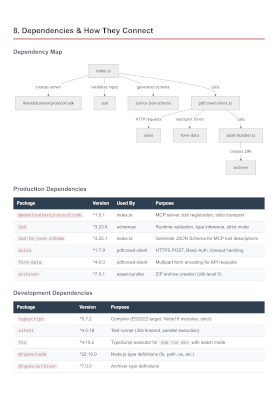
Configuration
Prerequisites: Node.js 18 or later.
Claude Code
Option A — Install as a plugin (Recommended):
Option B — Register the MCP server:
Or add the equivalent JSON to ~/.claude.json (user scope) or .mcp.json (project scope):
Codex CLI
Or add manually to ~/.codex/config.toml:
Gemini CLI
Or add manually to ~/.gemini/settings.json:
Notes
- Restart your CLI after configuration to load the server
Personal Credentials
Get started right away — no credentials or signup needed. Output includes a watermark. For watermark-free PDFs, sign up for personal credentials.
Personal credentials can be set in:
- Config file
~/.pdfcrowd-mcp: - Environment variables
PDFCROWD_USERNAMEandPDFCROWD_API_KEY.
Privacy
Your source code never leaves your machine — only the rendered document is sent to PDFCrowd for PDF conversion.