maya3dmodelingmcpautomation
MCP server enabling AI clients to control Autodesk Maya scenes and models via natural language commands.
Quick Install
Automated & IDE SetupCopy the AI prompt to install this server into Claude Code, Cursor, or another agent — or use 1-click editor setup below.
One-click editor setup isn’t available for this listing yet — we don’t have a confirmed install command, and we’d rather show nothing than point your editor at the wrong package or host. Follow the project’s own setup instructions, linked above.
Manual Client & Custom JSON ConfigExpand JSON ▾
No confirmed setup config for this listing yet. We only publish a config block when the install details come from the project itself — its README, its docs, or a verified owner. We haven’t found those for PatrickPalmer/MayaMCP, and we’d rather show nothing than a guess you’d paste into your client. Follow the project’s own setup instructions for the current steps.
Overview
Use cases
List and filter objects in a Maya scene
Create and modify 3D objects and materials
Perform advanced modeling operations like extrude and boolean
Generate complex 3D scenes with multiple objects
Control scene loading, saving, and selection programmatically
Key features
Basic tools for object listing, creation, attribute management, and scene control
Advanced modeling tools including mesh operations and curve-based modeling
Material creation with various types like lambert, phong, and glass
Scene generation with predefined environments like city, forest, and office
Communication via Maya's MEL command port without requiring Maya-side installation
Capabilities & Tool Schemas
Inspect callable tools, capabilities, and parameters exposed to AI agents by MayaMCP.
Extracted Tool Capabilities
Basic tools for object listing, creation, attribute management, and scene control
Advanced modeling tools including mesh operations and curve-based modeling
Material creation with various types like lambert, phong, and glass
Scene generation with predefined environments like city, forest, and office
Communication via Maya's MEL command port without requiring Maya-side installation
Documentation Overview
Maya MCP
Model Context Protocol (MCP) server implementation for Autodesk Maya
Tested with Maya 2023, 2025.
v0.2.0
This project enables AI assistant clients like Claude Desktop to control Autodesk Maya through natural language using the Model Context Protocol (MCP).
This is early days for Maya MCP server and has a minimal set of functionality. It's really the architecture design and simplicity that has been the initial focus.
Here is a list of some of the tools registered with Maya MCP.
Basic Tools
| Tool | Description |
|---|---|
| list_objects_by_type | Get a list of objects in the scene. Use filter_by to filter for certain objects such as "cameras", "lights", "materials", or "shapes". |
| create_object | Create an object in the Maya scene. Object types available are cube, cone, sphere, cylinder, camera, spotLight, pointLight, directionalLight. |
| get_object_attributes | Get a list of attributes on a Maya object. |
| set_object_attributes | Set an object's attribute with a specific value. |
| scene_new | Create a new scene in Maya. Use the force argument to force a new scene when an existing scene is loaded and has been modified. |
| scene_open | Load in a scene into Maya. |
| scene_save | Save the current scene. If the filename is not specified, it will save it as its current name. |
| select_object | Select an object in the scene. |
Advanced Modeling Tools
| Tool | Description |
|---|---|
| create_advanced_model | Create complex 3D models like cars, trees, buildings, cups, and chairs with detailed parameters. |
| mesh_operations | Perform modeling operations such as extrude, bevel, subdivide, boolean, combine, bridge, and split. |
| create_material | Create and assign materials with various types (lambert, phong, wood, marble, chrome, glass, etc.) |
| create_curve | Generate NURBS curves for various shapes (line, circle, spiral, helix, star, gear, etc.) |
| curve_modeling | Create geometry using curve-based modeling techniques (extrude, loft, revolve, sweep, etc.) |
| organize_objects | Organize objects through grouping, parenting, layout, alignment, and distribution. |
| generate_scene | Generate complete 3D scenes with multiple objects (city, forest, living room, office, park) |
Installation
Maya MCP server is designed so there is only an MCP server and doesn't require anything to be installed within Maya. This is helpful since you can easily use different versions of Maya and not have to worry about coordinating version changes. This is done by taking advantage of the default Command Port Maya opens up for MEL scripting.
MCP requires Python 3.10 or greater. Currently using pip as the package requirements are minimal. To install the virtual environment:
- download this project
- Create a virtual env using Python 3.10+ in the project directory.
python -m venv .venv - activate the virtual environment
- Windows:
.venv\Scripts\activate.bat - Mac/Linux:
source .venv\bin\activate.sh
- Windows:
pip install -r requirements.txt
As stated, there is nothing to install for Maya.
MCP Client Configuration
Depending on which MCP Client you're using, the configuration file location differs. For Anthopic Claude Desktop, go to File -> Settings -> Developer Tab and press the Edit Config button. This will bring up the file finder in the directory location of the JSON config file.
Next you need to edit the config JSON file by hand using a text editor. Make sure to use full file paths.
Once the changes have been made, restart Claude Desktop (use Exit menu item instead of just closing the window). In the Developers Tab, you will now see the Maya MCP server listed.
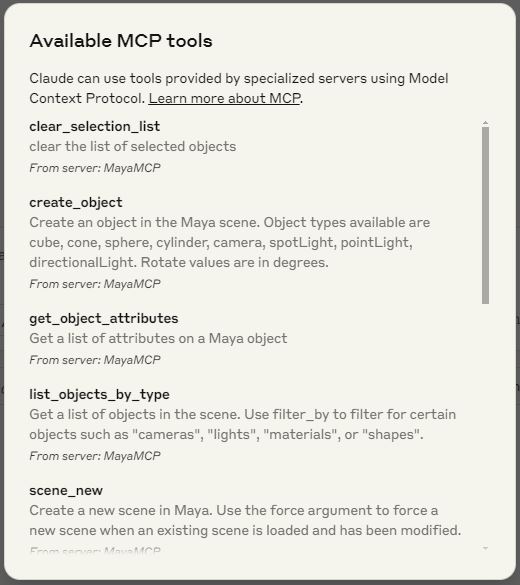
In Claude Desktop, you can verify the Maya MCP tools are available. Press the  button and a detailed popup will appear.
Maya Communications
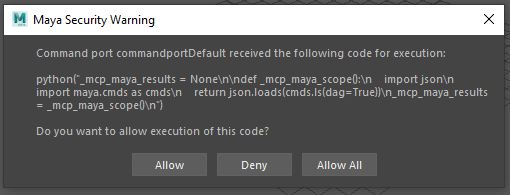
When the Maya MCP server first attempts to communicate with Maya, you will get this popup within Maya. Please click "Allow All" to allow for ongoing communication between the MCP server and Maya. This will need to be done each Maya session.
Developer Notes
The Maya MCP Server module was designed to be easily modified in a non-intrusive way. This is done by having the Maya Python code reside in the MCP server and sent to Maya's command port for execution. The results are sent back to the server and processed.
The default Maya command port runs MEL so the Python code is modified to run within MEL function call to the Python interpreter. There is also some limits such as multi-line Python code can't have any returned results. So, each command creates two connections to Maya. First to run the operation and save the results. The second connection then to read back the results.
To help minimize populating the namespace in the Maya global Python interpreter, functions and variables sent to Maya will be scoped to start with mcp_maya*. Each of the Maya tools are scoped into a function named _mcp_maya_scope(). The results are assigned to the variable _mcp_maya_results. This way should significantly reduce the possibility of name collisions.
There is a bit of elegance to this design. You basically can just add the Python file, restart the MCP Client and Maya MCP server and go. You don't need to integrate the operations on both the Maya MCP server and Maya itself. The code you add is only Maya specific Python and doesn't need to add any MCP decorators. This is a much better design to grow and adapt to different installations instead of having a fixed set of tools.
The Maya MCP server was built using the low-level Python MCP module. This was necessary to allow for dynamically defining all of the tools at run time. The tool function signatures are captured dynamically at the start of the server.
Adding New Tools
It is easy to add new tools to Maya MCP. You don't need to change any of the existing code. All you need to do is add a single tool command Python file to the mayatools/thirdparty directory. The tool itself will run in Maya so it will have access to all of the Maya Python modules. There are a few programmer notes in the design of the tool.
- The name of the Python file and the function name must be the same. Make sure it is unique.
- The Python function will be loaded by both the server and Maya. Any code outside of the function must be able to be loaded into standalone Python. Meaning any imports such as maya.cmds should be done in the scope of the function. The MCP server loads the function so it can inspect the function signature to send the information to MCP Client via JSON-RPC.
- The function signature will be parsed and must include any types in the function argument annotation.
- When your function is sent to Maya, it will be scoped within am _mcp_maya_scope function. This provides a number of benefits. The functions sent to Maya will not polute the Python global space too much running in Maya. Plus, any exceptions thrown will be caught and returned back to the MCP Client as errors.
- Generally, you want to return either a list or dictionary or throw an exception when there is an error.
- Name your function and arguments appropriately so the LLM can understand the operation. Include a function doc string.
- Default arguments are good.
- Error checking is good so error messages can provide better failed explanations.
I recommend looking at the existing Maya tools in this project as examples.
Testing
Currently Maya MCP has only been tested on Windows. Should work on both Linux and Mac as everything is using standard Python.
Future Ideas
It's early days for MCP and there is a lot to improve. Here are some ideas.
- Expose more functionality.
- Improve using prompt engineering, particularly describing Maya's usage and data relationships.
- Everything is registered as tools, allow for resources and prompts.
- It could be possible to find any plugins within Maya that has MCP tools. Maybe something like looking at the PYTHONPATH within Maya with any directory named MCP. All of those could be inspected and then provided back to the MCP Client.
License
MIT
Links
Important Note
This project was done on my personal time and equipment to learn about MCP. The project is not affiliated with my current employer and does not represent their work or interests.
Related MCP Servers
Adoption & maintenance
Factual signals from GitHub, npm, and our automated checks — not a rating.
GitHub stars
101
Stargazers on the source repository.
Last commit
1y ago
Most recent push to the default branch.
Directory activity
2 views
Config copies, upvotes, and views on AllMCPs.
Reviews
No reviews yet — be the first to share how this listing worked for you.
Frequently Asked Questions about MayaMCP
AllMCPs Directory Badge
Showcase your server listing on GitHub or your project documentation. Embed this dynamic SVG badge to highlight official listing status and live engagement.
Badge Style:
Live Dynamic SVG Preview
Markdown (GitHub README)
[](https://allmcps.com/mcp/patrickpalmer-mayamcp)HTML Embed
<a href="https://allmcps.com/mcp/patrickpalmer-mayamcp"><img src="https://allmcps.com/api/badge/patrickpalmer-mayamcp?style=directory" alt="MayaMCP on AllMCPs" /></a>Technical Specs & Signals
CategoryArt & Culture
PricingFree
9/13 checks healthy over the last 32d
33Quality signal: Emerging · 33/100How this signal is calculated ▾
Server availabilityNot measured
Not scored for repo-hosted servers — we can't reach the running server, only its GitHub page. Hosted MCP endpoints are health-checked live.
Verified ownership10/20
Documentation & tools12/30
Adoption & activity3/15
Community engagement0/10
A guidance signal from public completeness & health data — not a user rating. New listings start lower and rise as they add docs, get verified, and grow adoption. Signals we can't observe for a listing are skipped, not counted against it.
Own this project?
This directory is pre-filled from public sources. Claim via GitHub README, site badge, or DNS TXT to unlock edit access and the Official badge — proof is checked automatically, then reviewed by our team.
Free dofollow backlink: add your website and place the AllMCPs badge on it — no claim needed. We detect it automatically and keep it verified as long as the badge stays live.
Claim & get free dofollowShare & Embed
Add our SVG badge (dark/light directory styles) or embeddable widget to your site.