Local-first user identity layer syncing preferences and lessons across MCP-compatible AI coding tools with user-controlled governance.
Quick Install
Automated & IDE SetupCopy the AI prompt to install this server into Claude Code, Cursor, or another agent — or use 1-click editor setup below.
Not yet automatically verified
We haven't yet run this listing's install command through our automated sandbox check. This isn't a red flag — we're steadily working through the catalog.
Manual Client & Custom JSON ConfigExpand JSON ▾
Client Config & Setup
Choose your client or environment
Target File:
💡 Paste the JSON block into your client's configuration file under mcpServers, then restart the application.
Overview
Use cases
Synchronize user preferences and coding standards across AI tools
Maintain a portable, editable AI work identity on local files
Enforce user approval workflows for sensitive AI-generated knowledge
Provide consistent project context and lessons learned to multiple agents
Audit and preview exactly what AI tools receive before sharing
Key features
Local storage of identity and knowledge as JSON/Markdown files
Cross-tool synchronization for MCP-compatible coding agents
User-governed knowledge staging and verification process
AES-256-GCM encryption for sensitive data
Configurable write approval levels including strict gating
Memory Lens tool for read-only preview of exposed vs withheld data
Capabilities & Tool Schemas (58)
Inspect callable tools, capabilities, and parameters exposed to AI agents by Piia Engram.
get_user_contextStartup** — Load identity + knowledge at session start (supports `token_budget` for context size control)
wrap_up_sessionSession end** — Save insights + sync at session end
memory_storeWriteback** — Unified write endpoint: routes to add_lesson / add_decision / add_playbook by `kind
add_lessonStore a reusable lesson learned
add_decisionRecord a key decision with reasoning
add_playbookRecord an operational playbook (multi-step procedure with trigger keywords)
Documentation Overview
Piia Engram
Local-first AI work identity you can see, edit, and override — portable across your MCP coding tools.
Tell AI once who you are, how you work, and what "good" means. Claude Code, Codex, Cursor, Windsurf, and other MCP-compatible tools can start from the same AI work identity layer — local files you own, no cloud account, no hidden memory you cannot inspect.
Install · See It in Action · Supported Tools · MCP Tools · FAQ







Listed in:



Also listed in: awesome-agents · Awesome-MCP-ZH · mcpservers.org · Cursor Directory · ModelScope · PulseMCP
TL;DR: piia-engram is a local-first personal AI identity layer. It helps multiple coding agents start from the same understanding of you: your preferences, quality bar, lessons learned, decisions, and project context. It is not an agent memory database; it is the user-owned layer above your tools.
Why not just use native memory? Claude Code, Codex, Cursor, and Windsurf are adding their own memories and rules. Those are useful, but they are scoped to one tool or workspace. piia-engram gives you one portable identity layer above them: local files you own, AI-proposed knowledge you review, and context that can follow you across tools.
Trust model in four lines:
- No cloud account: install with
pip, keep the core store on your machine. - Local files: identity and knowledge live under
~/.engram/as JSON/Markdown. - User approval: AI writes locally; high-risk items (credentials, shell commands, MCP config, permission rules) wait for your review, while low/medium writes are auto-absorbed but fully auditable and reversible. Set
ENGRAM_APPROVAL=strictto gate every write. - Documented boundaries: see Trust model, Privacy, and Security.
Want proof? See the live cross-tool continuity proof — a memory written by Claude Code, read back by Codex through one local store — or the one-command reproducible code demo.
See It in Action
And you never have to take that on faith — Memory Lens (engram preview --html) shows exactly what any AI caller would receive, and what governance withheld, before anything is sent:
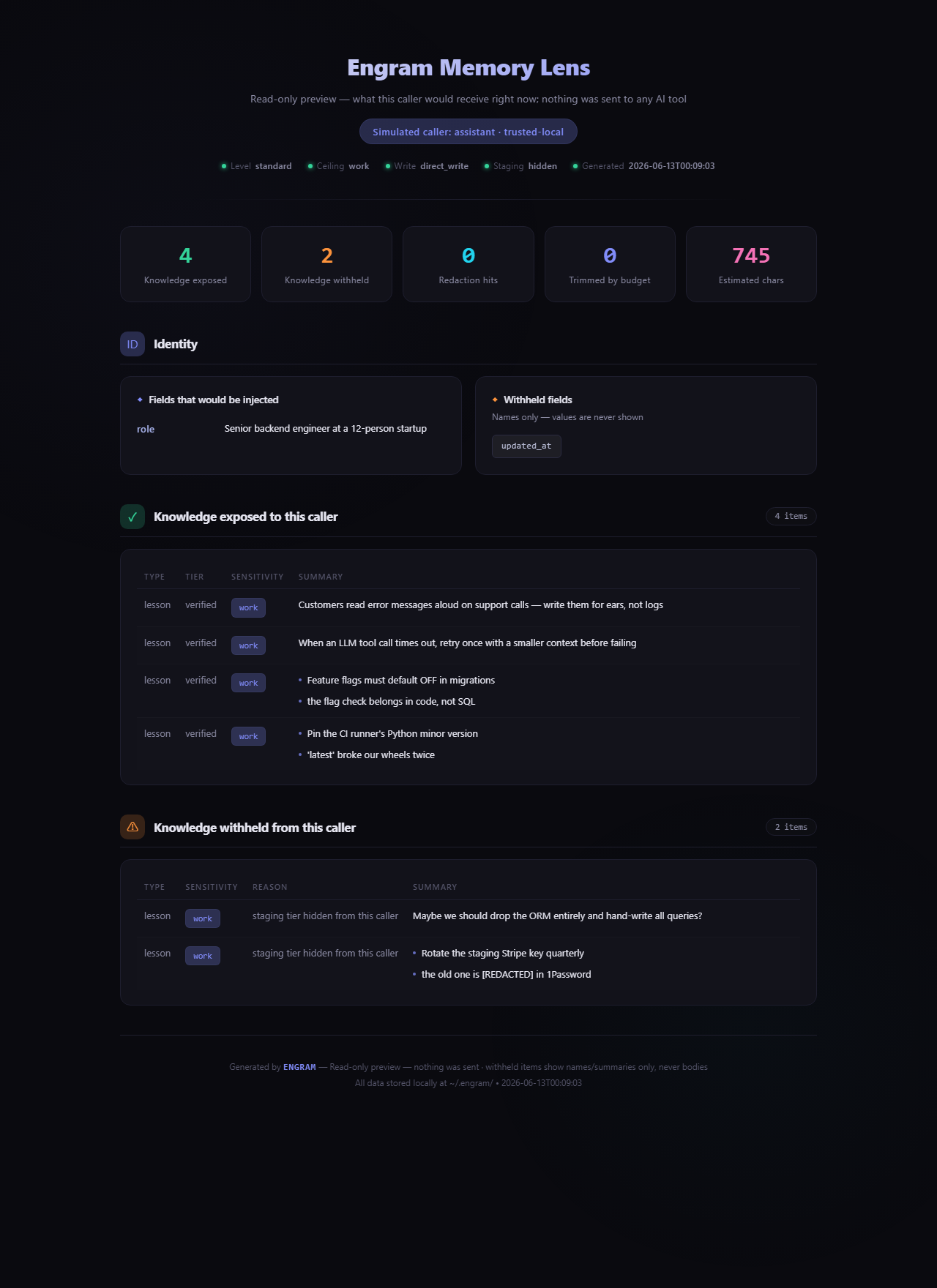
Above: a real report from a demo store — 4 items exposed; an unreviewed staging note and a lesson containing a credential are withheld, with the secret shown as [REDACTED].
Install
The wizard auto-detects your AI tools — Claude Code, Cursor, Codex, Claude Desktop — lists the exact config files it will touch, and writes the MCP connection after a one-keystroke confirm (every write is backed up first; decline and nothing changes). It previews your identity card, then you restart your configured tool; the first conversation can load your approved context through startup or search tools. (full walkthrough ↓)
Supported Tools
Evidence levels follow the agent client validation runbook: L0 = untested, L1 = installed, L2 = read/search observed, L3 = static file bridge, L4 = cross-client continuity.
| Tool | Integration | Evidence status |
|---|---|---|
| Claude Code | MCP over stdio | L4 partial continuity proof (Claude Code -> Codex) |
| Codex | MCP over stdio | L4 partial continuity proof (Claude Code -> Codex) |
| Cursor | MCP over stdio | L2 setup/read-search evidence path |
| Claude Desktop | MCP over stdio | L1/L2 setup path; client-specific evidence pending |
| Hermes | MCP over stdio | L2 end-to-end verified (hermes-agent 0.15.2, 2026-06-03) |
| OpenClaw | SOUL.md / MEMORY.md / USER.md import and export | L3 static file-bridge evidence |
| ChatGPT / Gemini / Kimi | Markdown identity card fallback | Usable |
| Windsurf | MCP over stdio | Expected to work |
| GitHub Copilot | MCP over stdio | Expected to work |
| Cline | MCP over stdio | Expected to work |
| Roo Code | MCP over stdio | Expected to work |
| Amazon Q | MCP over stdio | Expected to work |
| Augment | MCP over stdio | Expected to work |
| Zed | MCP over stdio | Expected to work |
| Trae | MCP over stdio | Expected to work |
| Tencent CodeBuddy | MCP over stdio | Expected to work |
By the numbers
These are current repository facts from docs/public-facts.json. Public registries and package badges update only during release/publish.
| Current repo / development facts | |
|---|---|
| Version frame | v4.20.0 (verified 2026-09-01; check PyPI and GitHub Releases for the latest published package) |
| Supported AI tools | 16 (evidence level varies by client; see Supported Tools and the validation runbook) |
| MCP tools | 19 Core (loaded by default) + 40 Advanced (opt-in via ENGRAM_TOOLS=all) |
| Knowledge types | 3 (lessons, decisions, playbooks) |
| Test suite | Unit + integration; run pytest tests/ to verify |
Lines in core.py | 1770 (facade; domain logic now lives in focused mixins — see architecture.md) |
| PBKDF2 iterations | 600,000 (OWASP 2023+ floor; legacy 100k still decrypts) |
| Encryption | Optional field-level AES-256-GCM for supported profile fields; local files are plaintext JSON/Markdown by default |
| Cold-start time | < 100 ms typical (local JSON, no network) |
| Network calls by default | 0 for identity and knowledge tools — except optional read_web_content; remote telemetry and feedback require separate explicit opt-in and send counts only (see privacy details) |
Your AI forgets you every time you switch tools or start a new chat. piia-engram fixes the handoff.
Every time you open a new chat window, switch from Claude Code to Codex, update your AI tool, or move into a different project, you're back to zero:
- your communication preferences — gone
- your code standards and quality bar — forgotten
- which mistakes you've already learned from — lost
- why you made that architecture decision last month — erased
This happens because AI memory today is locked inside each platform. It belongs to the tool, not to you. The tool updates, resets, or gets replaced — and your context disappears with it.
piia-engram gives you a personal identity layer that lives on your machine, independent of any AI tool. You tell it once who you are, how you work, and what you've learned. MCP-compatible tools can read the same approved context. New chat, new tool, new version — your identity stays portable.
piia-engram is not an agent memory database. Tools like Mem0, Zep, and Letta store task context and session history for AI agents. piia-engram stores who you are as a person — your identity, preferences, hard-won lessons, and key decisions. It's a different layer: not what happened in a task, but who is behind every task.
Why piia-engram?
| Without piia-engram | With piia-engram |
|---|---|
| New chat window = start from zero | Configured conversations can load your approved context |
| AI tool updates and your preferences vanish | Your identity lives on your machine, survives any update |
| Switching tools loses accumulated context | Claude Code, Codex, and Cursor read the same memory |
| Past mistakes get repeated | Lessons learned follow you across tools and sessions |
| Memory is locked inside one product | Data stays local, editable, and portable |
Who Uses piia-engram
Related MCP Servers
Adoption & maintenance
Factual signals from GitHub, npm, and our automated checks — not a rating.
GitHub stars
160
Stargazers on the source repository.
Last commit
10d ago
Most recent push to the default branch.
Tools exposed
58
Callable tools this server registers over MCP.
Directory activity
1 views
Config copies, upvotes, and views on AllMCPs.
Reviews
No reviews yet — be the first to share how this listing worked for you.
Frequently Asked Questions about Piia Engram
AllMCPs Directory Badge
Showcase your server listing on GitHub or your project documentation. Embed this dynamic SVG badge to highlight official listing status and live engagement.
Badge Style:
Live Dynamic SVG Preview
Markdown (GitHub README)
[](https://allmcps.com/mcp/patdolitse-piia-engram)HTML Embed
<a href="https://allmcps.com/mcp/patdolitse-piia-engram"><img src="https://allmcps.com/api/badge/patdolitse-piia-engram?style=directory" alt="Piia Engram on AllMCPs" /></a>