pairtask
Codex and Claude, working together in a sandbox. pairtask pairs a Claude and a Codex agent as a duo that shares tasks, messages and a workspace.
- Real-time collaboration with durable messages and automatic delivery.
- An isolated Incus workspace with persistent projects and agent memory.
- Token usage visibility and soft caps for managed Codex; shared caps are not yet available.
MIT or Apache 2.0 licensed · First install · Troubleshooting · Renamed from collab
Set up a sandbox
Provision once, then use the block below each day. Tools are installed by the rollout—no compilation needed. The image is small; the rollout fetches the pinned agent tools once and keeps them across upgrades. Provisioning runs OpenTofu in a disposable container; no host Terraform/OpenTofu install is needed. Dev has network access; optional control stays offline. Host credentials and conversations are not imported.
Host prerequisites: Python, Git, OpenSSH and Incus; macOS also needs Colima.
Install commands. No gh or browser download needed.
# First install or upgrade (Incus must be running; upgrades end active sessions)
python3 scripts/sandbox-provision.py rollout
# Pin a version: add --release workspace-vX.Y.Z
Run host commands from your provisioning checkout. On Linux, skip Colima commands
and use local: / --remote local. For host mounts, see the
mounts.json example.
# HOST: run from your provisioning checkout
# Start the Mac VM, then the containers
python3 scripts/sandbox-host.py apply
incus --project pairtask start colima-pairtask:secured   # if secured_runtime = true
incus --project pairtask start colima-pairtask:workspace

# Check: expect workspace (and secured, if enabled) to show RUNNING
incus --project pairtask list colima-pairtask:

# Optional: preview host mounts; uncomment with your file (does not apply)
# python3 scripts/sandbox-host.py mounts-plan --mounts-file /path/to/mounts.json

# Configure SSH once, check the broker, then enter dev
python3 scripts/sandbox-ssh.py --remote colima-pairtask
ssh -F infra/incus/ssh/config workspace pairtask status
ssh -F infra/incus/ssh/config workspace

# CONTAINER: all commands below until exit run inside your SSH session
# First use only: uncomment to sign in before starting agents
# Codex: open the printed URL on your host and enter the device code
# command codex login --device-auth
# command claude auth login
# gh auth login --web --git-protocol https  # optional GitHub CLI login
# pairtask-codescene-login                  # optional CodeScene token; hidden prompt

# First use only: clone if you have not already done so
# git clone https://github.com/pairtask/pairtask.git /workspace/collab-ai
tmux new -A -s collab

# In each tmux window: enter the project, then choose one agent or dashboard
# Ctrl+B then C opens another window
cd /workspace/collab-ai
codex                         # new managed Codex conversation
# codex resume                # choose a saved sandbox conversation
# codex resume SESSION_ID     # resume a specific sandbox conversation
# claude                      # Claude with collaboration channels enabled
# claude --resume             # resume Claude
# dashboard                   # broker status and agent inboxes
# rtk gain                    # estimated shell-output token savings
# docker info                 # rootless Docker inside workspace
# docker compose up -d        # run your project's compose.yaml

# Disconnect: Ctrl+B then D detaches tmux; exit leaves SSH
exit

# HOST AGAIN: optional shutdown; stops agents, keeps persistent files
# incus --project pairtask stop colima-pairtask:workspace
# incus --project pairtask stop colima-pairtask:secured   # if secured_runtime = true
# colima stop pairtask
Expect Broker: ready. Run one Codex and one Claude session; additional sessions
need distinct agent IDs. Login help.
Both agents should read /usr/local/share/pairtask/SKILL.md.
Mount directories · Mac writable sharing · Docker and Compose · Bundled MCP tools · Upgrade or reprovision · Back up · Stop or remove
Dashboards
Run on your host:
# Agent connections and pending messages (terminal UI)
ssh -t -F infra/incus/ssh/config workspace pairtask dashboard

# Containers, resources and logs (browser UI)
incus webui colima-pairtask:  # Linux: incus webui local:
For Incus, open the printed URL and select project pairtask.
The collaboration dashboard is read-only; prompts and approvals stay in agent
terminals. Controls · UI help.
How it fits together
With secured_runtime = true, Codex, Claude and the read-only dashboard run in
workspace; secured owns one broker and SQLite database.
The shared Unix socket connects them.
/workspace and /home/agent persist across container replacement.
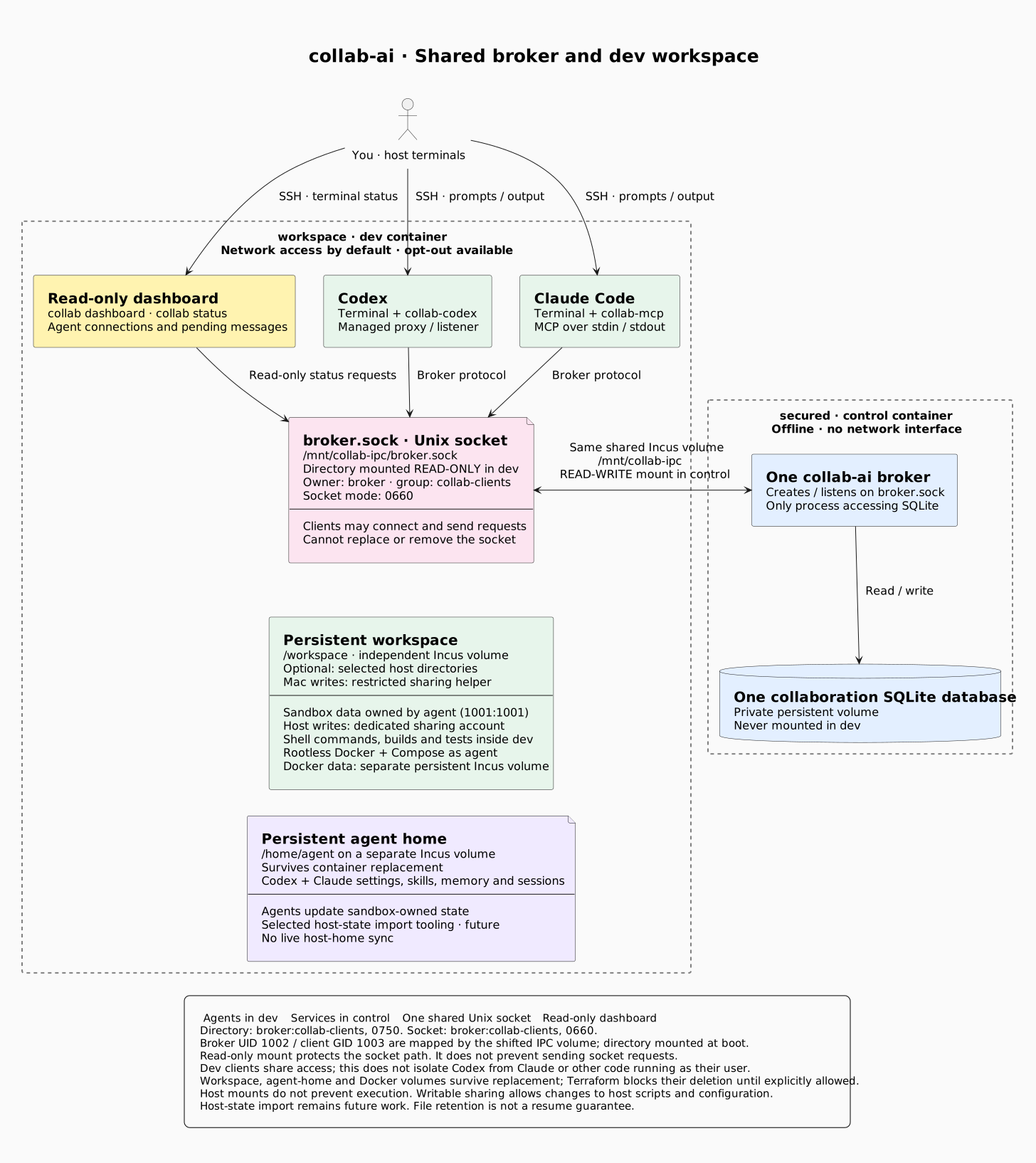
Architecture source · Control setup
macOS and Linux layouts
| macOS: Colima hosts Incus | Linux: Incus runs directly |
|---|---|
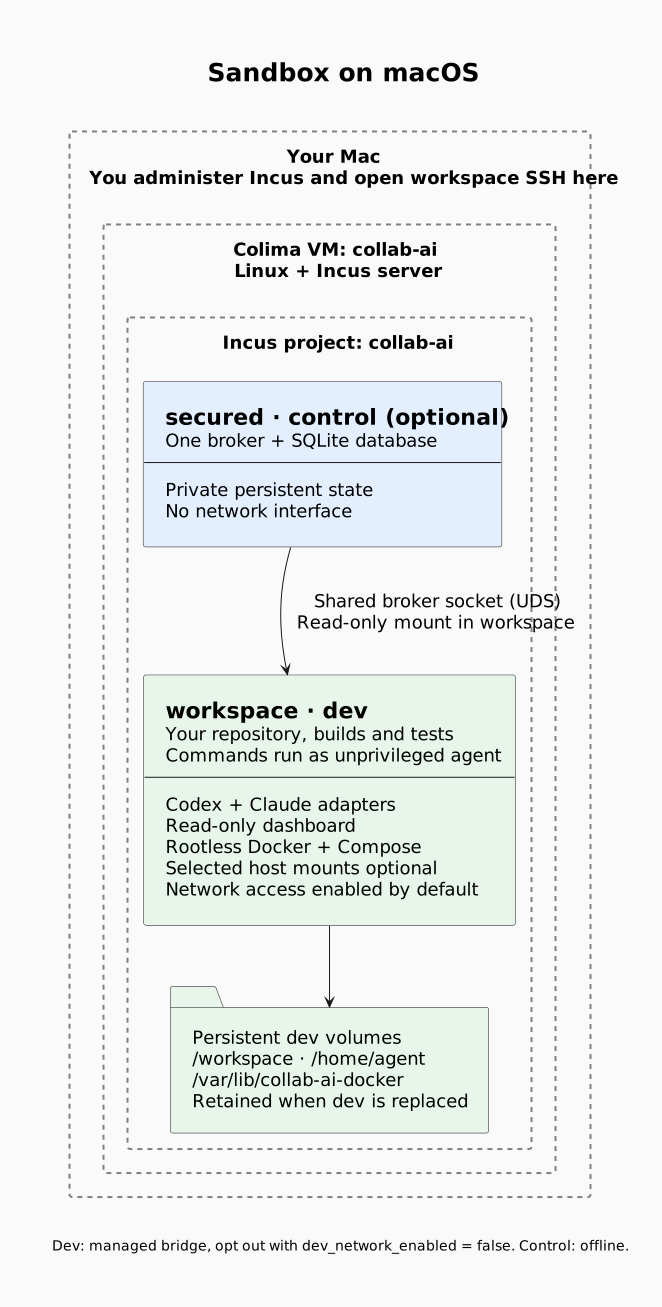 | 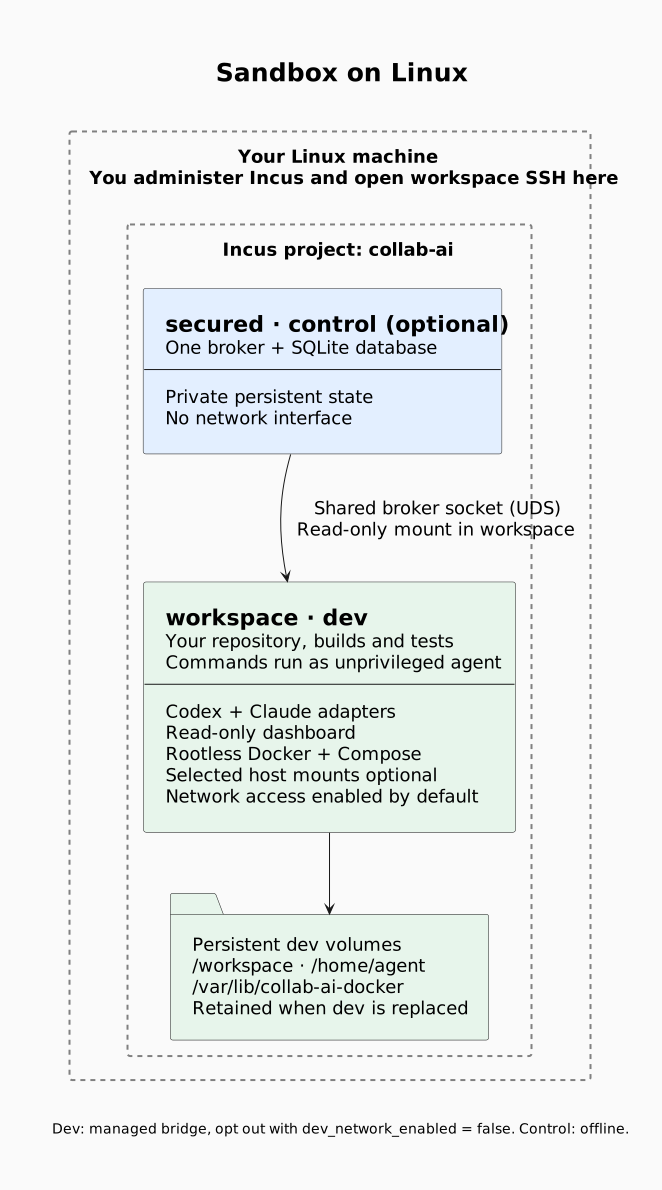 |
| Diagram source | Diagram source |
Security
Agent commands run inside the container. Host mounts default to read-only; writes require a dedicated sharing identity. Writable sharing lets agents change files that you or host automation may later execute. Boundaries.
Run on your host
No Incus? Follow the host quick start to build and run locally. These agents have no Incus isolation.
Resume or fork
Host commands and compatibility. Sandbox start/resume commands are in the daily block above.
Set a Codex soft cap
The sandbox aliases are uncapped by default. Use a named budget for one managed Codex launcher. Reports can arrive late; overshoot is possible. Claude and shared budgets are not yet covered.
Claude Code
The sandbox alias is preconfigured. For host sessions, use the dedicated channel config. Claude requires channel consent and account/organization support.
Reference and contributing
Protocol · Manual MCP · Status API · Agent skill
Report an issue. Run checks with:
go test -race ./... -timeout=30s