MCP server for Cisco Packet Tracer 9 — live IOS, OSPF, BGP, NAT, VLAN, VoIP, QoS, IPv6, wireless.
Quick Install
Automated & IDE SetupCopy the AI prompt to install this server into Claude Code, Cursor, or another agent — or use 1-click editor setup below.
One-click editor setup isn’t available for this listing yet — we don’t have a confirmed install command, and we’d rather show nothing than point your editor at the wrong package or host. Follow the project’s own setup instructions, linked above.
Manual Client & Custom JSON ConfigExpand JSON ▾
No confirmed setup config for this listing yet. We only publish a config block when the install details come from the project itself — its README, its docs, or a verified owner. We haven’t found those for packet-tracer-mcp, and we’d rather show nothing than a guess you’d paste into your client. Follow the project’s own setup instructions for the current steps.
Documentation Overview
packet-tracer-mcp












Servidor Model Context Protocol para controlar Cisco Packet Tracer 9.0 desde fuera. Una extensión propia se cuelga del editor de PT, abre un bridge HTTP local y desde ahí el servidor MCP llama a la API IPC nativa de PT para crear topologías, configurar routers, lanzar simulaciones, etc. Escrito en TypeScript sobre Bun.
[!WARNING] Proyecto experimental. Es la versión 0.1.0, hecha en mis ratos libres como experimento personal. Funciona contra PT 9.0.0.0810 en mi PC y pasa los smoke tests, pero no la consideres lista para producción. Espera bugs, cambios de API y cosas que se rompen al actualizar PT. Si te animas a probarla, abre issues con lo que veas.
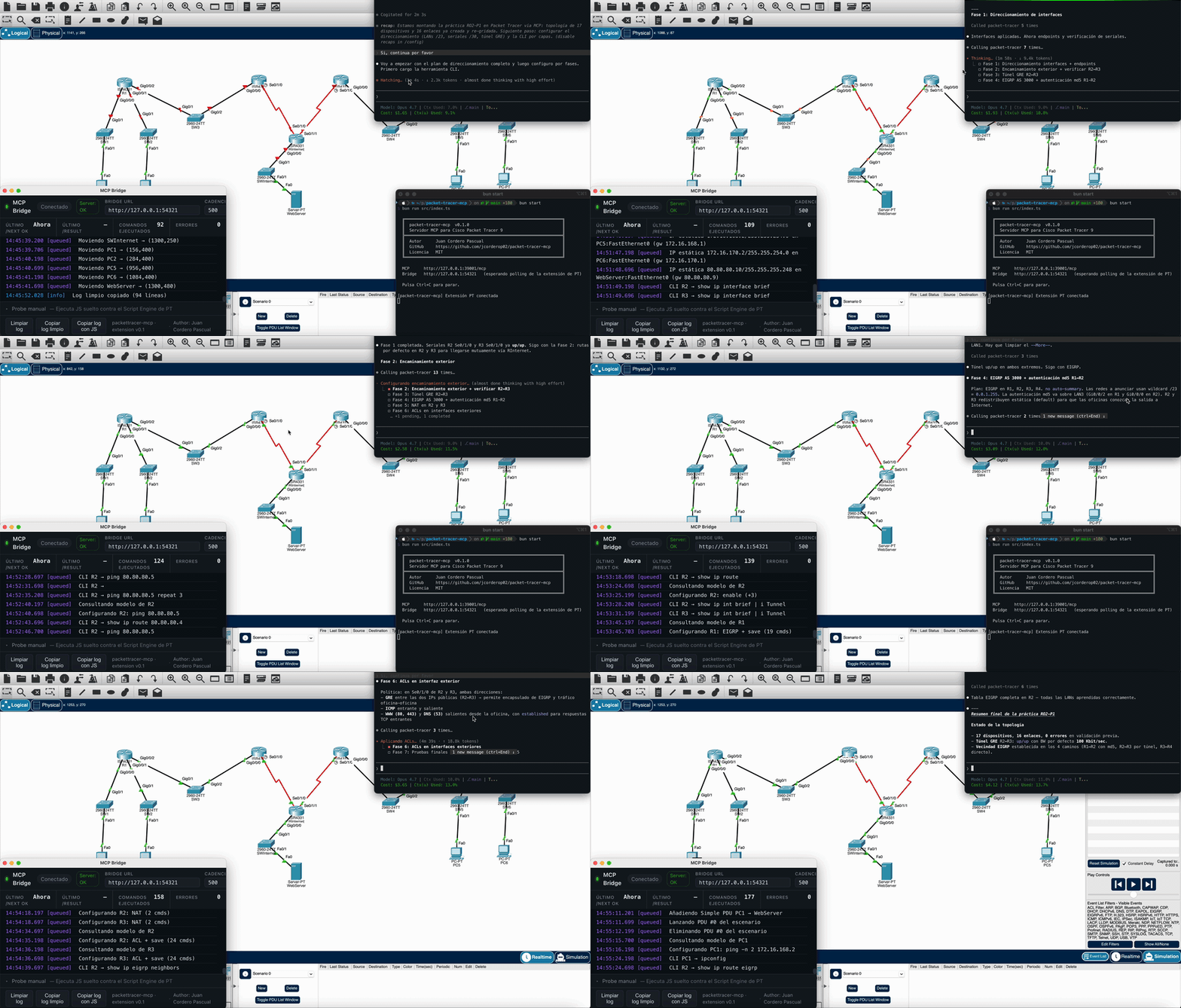
Demo acelerada x15: el cliente MCP lanza una receta y el canvas de Packet Tracer 9 se va llenando solo (devices, cableado, configuración).
Autor: Juan Cordero Pascual · Licencia: MIT Idiomas: español (este archivo) · English
Tabla de contenidos
- Por qué otro MCP de Packet Tracer
- Filosofía: canvas-first
- Requisitos
- Arranque rápido
- Capacidades
- Recetas incluidas
- Configuración
- Documentación
- FAQ
- Estructura del proyecto
- Estado
Por qué otro MCP de Packet Tracer
Los proyectos para PT 6.x–8.x se apoyaban en librerías JS cargadas por
una extensión firmada de terceros. PT 9.0 cerró ese camino: los
App Meta Files (.pta) ahora tienen que ir firmados con ECDSA por
Cisco, así que ningún proyecto open-source puede entregar uno. La
alternativa que queda es hablar con la webview de PT desde fuera, y eso
es lo que hace este servidor:
- Hay una extensión
.ptspropia que se instala desde el menú Extensions de PT. Lo único que hace es arrancar un bucle de polling contra el bridge HTTP local. - Cuando el servidor MCP necesita escribir, llama a la API IPC nativa
de PT directamente: cosas como
ipc.appWindow().getActiveWorkspace().getLogicalWorkspace().addDevice(...)ogetDevice(...).getCommandLine().enterCommand(...). Sin librerías intermedias, sin JS opaco copiado de otros sitios. - Todo el JS que termina ejecutándose en el Script Engine de PT lo
genera este repo. Si quieres saber qué se está mandando, está en
src/ipc/.
Filosofía: canvas-first
Otras herramientas mantienen un objeto "plan" en memoria, lo validan y al final lo vuelcan al simulador. Aquí no funciona así:
- No hay ningún
TopologyPlanen memoria. Lo que hay en PT es lo que hay; el plan es el canvas. - Cada receta vuelve a leer un snapshot del canvas antes de actuar. Si la lanzas dos veces sobre un canvas a medio construir, la segunda vez termina lo que faltaba en lugar de duplicar dispositivos. Sale idempotente sin tener que pensarlo.
- La validación se hace contra el canvas vivo, no contra una estructura interna. Cuando algo falla (IPs duplicadas, peers en subredes distintas, un router apagado) lo ves directamente en PT, no en un grafo abstracto.
- La persistencia guarda snapshots, no planes. Volver atrás significa comparar el canvas actual con un dump anterior y ver qué ha cambiado. No hay rehidratación mágica.
Si quieres el detalle, está en docs/ARCHITECTURE.md.
Requisitos
- Cisco Packet Tracer 9.0 (macOS, Windows o Linux).
- Bun
>=1.2. Con Node solo no vale: el código es TypeScript y se ejecuta directamente con Bun, sin paso previo de compilación. - La extensión
mcp-bridge.ptsinstalada en PT. Viene en el repo enextension/dist/.
[!TIP] ¿Por qué Bun y no Node? Bun ejecuta
.tsnativamente, arranca en milisegundos y trae fetch, HTTP y test runner de serie sin instalar dependencias. Si solo tienes Node, puedes instalar Bun concurl -fsSL https://bun.sh/install | bash(obrew install bunen macOS). Convive con Node sin pisarse.
Arranque rápido
En Packet Tracer 9:
Extensions > Scripting > Configure PT Script Modules > Addy seleccionaextension/dist/mcp-bridge.pts.- Marca la extensión como activa.
- Abre la ventana desde
Extensions > MCP Bridgeuna vez por sesión.
El polling arranca solo en cuanto la ventana se carga. Para comprobar
que todo está bien, lanza pt_bridge_status: en menos de un segundo
debería responder connected: true.
El proceso completo de instalación está en
docs/BOOTSTRAP.md.
El endpoint MCP queda en:
[!NOTE] Por qué
:39001. PT 9 ya tiene su propio IPC nativo (no documentado, con handshake firmado por Cisco) escuchando en:39000. Para no chocar y dejar claro que el servidor MCP es algo aparte, este escucha en:39001. Si te molesta, cámbialo con la variable de entornoPACKETTRACER_MCP_PORT.
Conectar un cliente MCP
Claude Code (CLI, recomendado)
Una sola línea, sin tocar JSON:
Verifica con /mcp dentro de Claude Code: debe aparecer packet-tracer
con sus 57 tools.
Claude Desktop
Edita ~/Library/Application Support/Claude/claude_desktop_config.json
(macOS) o el equivalente en tu SO y reinicia Claude Desktop:
Cursor
Settings → MCP → Add new MCP server → pega la URL
http://127.0.0.1:39001/mcp con transporte http.
VS Code (Continue / Cline)
En el config.json del cliente:
Gemini CLI
Edita ~/.gemini/settings.json:
Verifica con /mcp list.
Codex CLI
Edita ~/.codex/config.toml:
Smoke con curl (sin cliente)
Para confirmar que el server responde antes de configurar nada:
Debe devolver un result con serverInfo.name = "packet-tracer-mcp". Un
segundo POST con "method":"tools/list" devuelve las 57 tools con su
inputSchema.
Compilar a binario único
Tests
La suite unitaria cubre la aritmética de subnetting, la inspección del canvas, el parser de snapshots, los diffs, la validación de blueprints y los builders CLI de cada receta. No hace falta PT corriendo para ejecutarla.
Recorrido end-to-end
Con el bridge conectado (pt_bridge_status → connected: true), una
sesión completa más o menos se ve así:
Related MCP Servers
Adoption & maintenance
Factual signals from GitHub, npm, and our automated checks — not a rating.
GitHub stars
11
Stargazers on the source repository.
Last commit
2mo ago
Most recent push to the default branch.
Reviews
No reviews yet — be the first to share how this listing worked for you.
Frequently Asked Questions about Packet Tracer MCP
AllMCPs Directory Badge
Showcase your server listing on GitHub or your project documentation. Embed this dynamic SVG badge to highlight official listing status and live engagement.
Badge Style:
Live Dynamic SVG Preview
Markdown (GitHub README)
[](https://allmcps.com/mcp/packet-tracer-mcp)HTML Embed
<a href="https://allmcps.com/mcp/packet-tracer-mcp"><img src="https://allmcps.com/api/badge/packet-tracer-mcp?style=directory" alt="Packet Tracer MCP on AllMCPs" /></a>Technical Specs & Signals
CategoryDeveloper Tools
4/8 checks healthy over the last 46d
33Quality signal: Emerging · 33/100How this signal is calculated ▾
Server availabilityNot measured
Not scored for repo-hosted servers — we can't reach the running server, only its GitHub page. Hosted MCP endpoints are health-checked live.
Verified ownership10/20
Documentation & tools11/30
Adoption & activity4/15
Community engagement0/10
A guidance signal from public completeness & health data — not a user rating. New listings start lower and rise as they add docs, get verified, and grow adoption. Signals we can't observe for a listing are skipped, not counted against it.
Own this project?
This directory is pre-filled from public sources. Claim via GitHub README, site badge, or DNS TXT to unlock edit access and the Official badge — proof is checked automatically, then reviewed by our team.
Free dofollow backlink: add your website and place the AllMCPs badge on it — no claim needed. We detect it automatically and keep it verified as long as the badge stays live.
Claim & get free dofollowShare & Embed
Add our SVG badge (dark/light directory styles) or embeddable widget to your site.