MCP server that lets AI clients read and safely edit Overleaf projects over the Overleaf Git bridge.
Quick Install
Automated & IDE SetupCopy the AI prompt to install this server into Claude Code, Cursor, or another agent — or use 1-click editor setup below.
One-click editor setup isn’t available for this listing yet — we don’t have a confirmed install command, and we’d rather show nothing than point your editor at the wrong package or host. Follow the project’s own setup instructions, linked above.
Manual Client & Custom JSON ConfigExpand JSON ▾
No confirmed setup config for this listing yet. We only publish a config block when the install details come from the project itself — its README, its docs, or a verified owner. We haven’t found those for Overleaf, and we’d rather show nothing than a guess you’d paste into your client. Follow the project’s own setup instructions for the current steps.
Documentation Overview
Overleaf MCP Server — Safe AI Editing for LaTeX Papers




Connect Claude Code, Claude Desktop, Codex, ChatGPT, Cursor, VS Code, or any MCP client to Overleaf. Read, search, edit, compile, and review real LaTeX projects without copy-pasting your paper into a chat window.
Edits stay in a local clone until you explicitly publish them. Before every read and every push, this Overleaf MCP server checks what your collaborators changed. If both of you touch the same lines, it stops the push and shows both versions instead of choosing a winner.
With an optional Overleaf session cookie, edits can also arrive as tracked-change suggestions for co-authors to accept or reject, and the existing review panel becomes readable. A plain Git push cannot express either.
Download the one-click Claude Desktop bundle or use the setup command above for Claude Code, Codex, Cursor, and other local AI clients.
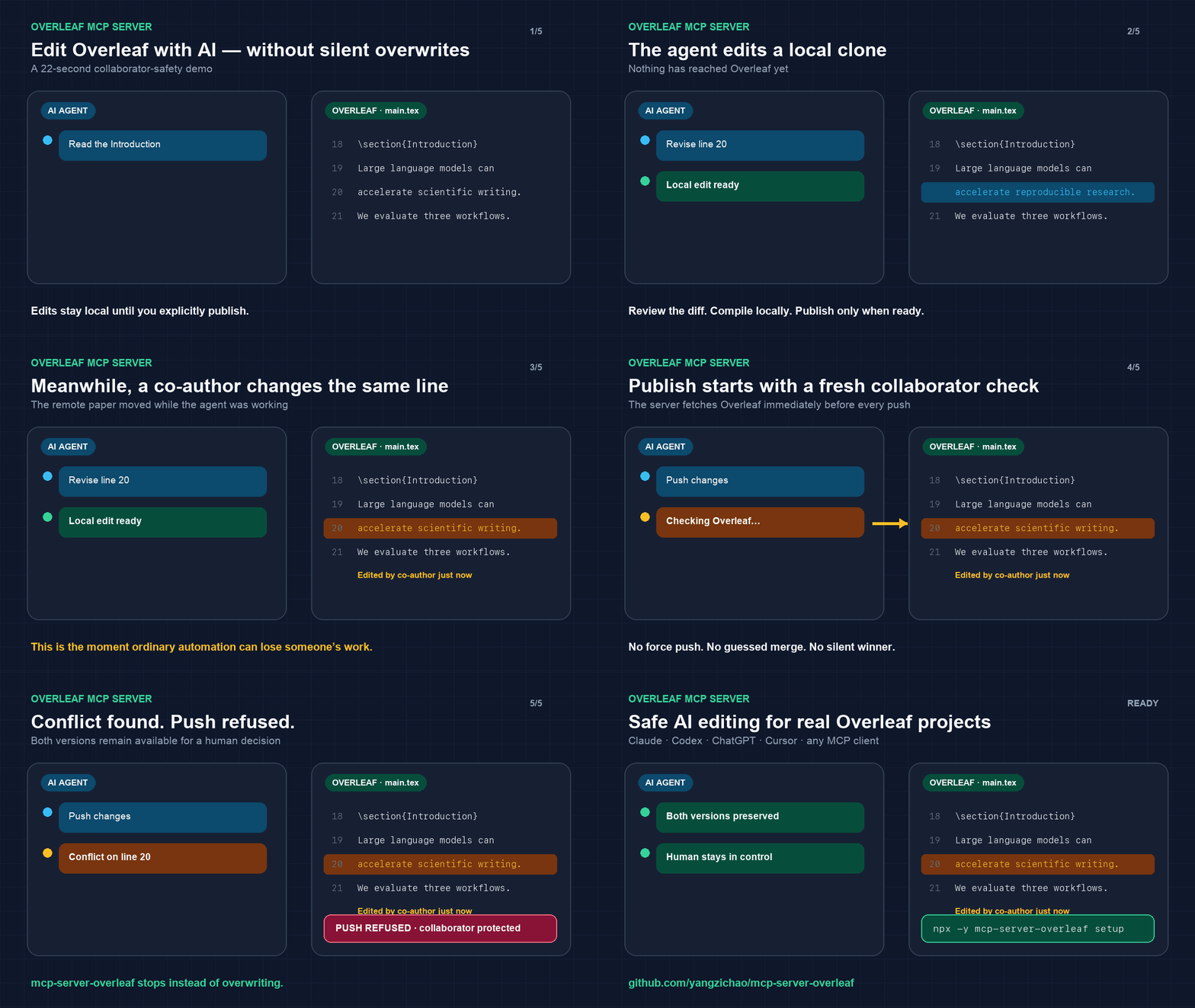
Independent community project; not affiliated with or endorsed by Overleaf.
Why choose this Overleaf MCP server?
Several Overleaf MCP servers exist. Of the ones built on Overleaf's official Git bridge, this is the most complete, and it is the only one that stops instead of overwriting when a co-author has already changed the lines you are editing.
- A conflict ends the push, not your co-author's paragraph. Every read and every push
first checks what changed on Overleaf. When two edits touch the same lines,
push_changesrefuses and shows you both versions. - 18 tools, and nothing reaches Overleaf until you say so. Read, search, and edit by section or by exact text, add, rename and remove files, compile locally, inspect the diff, then publish deliberately.
- An edit can arrive as a suggestion, not as finished text. Three optional tools talk to Overleaf's editor rather than the Git bridge, so a change lands in the review panel for a co-author to accept or reject. A Git push cannot express that. Tracked changes
- No terminal, if you do not want one. Claude Desktop installs it from a downloaded bundle; Claude Code and Codex install it as a plugin.
- The token is written once, to one file, at mode 600. No client configuration holds it, and the published plugin declares no environment variables at all.
Related projects compares the alternatives tool by tool, and is equally direct about the things this server cannot do.
Common workflows include revising an academic paper by section, searching a large LaTeX project, checking a bibliography, compiling before publication, reviewing the exact diff, and sending an edit to Overleaf as a tracked suggestion.
Where it installs
Every route below reaches the same server and the same 18 tools, and every one of them keeps edits local until an explicit push. Pick the row for your client. The three tracked-changes tools are extra, and appear only once a session cookie is configured.
| Client | How to install it |
|---|---|
| Claude Desktop | Download the bundle and double-click it. One click |
| Claude Code | Add this repository as a plugin marketplace. Two commands |
| Codex CLI, desktop, and IDE extension | The same, with the Codex commands. Two commands |
| Cursor | npx --yes mcp-server-overleaf setup. One command |
| Visual Studio Code | A .vscode/mcp.json entry. Guide |
| ChatGPT on the web and desktop | An outbound-only Secure MCP Tunnel, no public endpoint and no open port. Guide |
| A catalogue that reads the MCP registry | Already listed as io.github.yangzichao/mcp-server-overleaf. Details |
| Any other MCP client | npx --yes mcp-server-overleaf --stdio, or Streamable HTTP. By hand |
| A machine you are developing on | A source checkout. From source |
Claude Desktop takes a packaged bundle; Claude Code and Codex each take a plugin.
Everywhere else setup does the equivalent. All four routes end the same way: the token is
verified against Overleaf, written to one file at mode 600, and no client configuration
holds the secret.
Guides
- Project configuration and efficient reads covers independent credentials, sparse checkout, revision reads, and guarded edits.
- Related projects describes existing alternatives and this project's focus on collaborator safety and recovery.
- Release process and verification describes the tested artifact, provenance, first publication, and subsequent trusted publishing.
- Install the Claude Desktop bundle covers the
one-click
.mcpbextension: what is inside it, how to build it, and how to remove it. - Install the Claude Code and Codex plugins covers the two marketplace entries: what the plugin contains, how it gets a token without holding one, and how to update, remove, or build it.
- Connect local MCP clients to Overleaf covers Codex desktop and CLI, Claude Code, Claude Desktop, Cursor, Visual Studio Code, local stdio, verification, and troubleshooting.
- Connect ChatGPT to Overleaf with Secure MCP Tunnel covers the complete private connection from a local stdio server to ChatGPT desktop and web, including workspace association, least-privilege credentials, validation, and troubleshooting.
What you are installing
An MCP server exposing 18 tools over stdio or Streamable HTTP, plus 3 more when a session
cookie turns on tracked changes. One core, two transports;
the tool implementations are identical and only the framing differs. setup connects it
to the AI clients on this computer and is the only command most people need.
Requires Node 22.14+ and git on PATH; Node 24 LTS is recommended. compile_project additionally needs latexmk and a TeX
distribution; every other tool works without them.
The release test matrix covers macOS and Linux. Windows Git and TeX workflows are not yet validated. This server is a command-line application, not an importable JavaScript library.
Git integration has to be available for the project. Overleaf documents it as a premium feature gated on the project owner's subscription, so a free account invited to a project owned by someone with a subscription can still use it, and that subscription can be individual, group, or institutional. Do not tell a user their own plan disqualifies them. Verify it directly in step 3 instead.
Install into Claude Desktop with one click
Download mcp-server-overleaf.mcpb and double-click it. Claude Desktop opens an install panel, asks for the two values below, and starts the server itself. No terminal, no Node installation, no build.
- Overleaf project address — open the project in Overleaf and copy the whole URL from the address bar.
- Overleaf Git token — generate one at https://www.overleaf.com/user/settings under Git integration. Claude Desktop stores it in the operating system keychain.
The bundle carries the same server npm publishes, with its locked runtime dependencies and nothing else. It is macOS and Windows only, because that is where Claude Desktop runs. For any other client, use the command below. Details in Install the Claude Desktop bundle.
Install as a Claude Code or Codex plugin
Store the token once:
Then, in Claude Code:
Or in Codex:
Restart the client, then ask it to list the files in your project.
Until this local MCP server is accepted into a public directory, both clients install it
from this repository's marketplace: Claude Code reads .claude-plugin/marketplace.json and
Codex reads .agents/plugins/marketplace.json, and both point at the same
plugins/overleaf directory. That plugin holds no token and sets no environment variable,
because the first command writes the token to ~/.config/overleaf-mcp/projects.json and the
server finds it there. Public directory review is separate from this repository-based
installation. Details in
Install the Claude Code and Codex plugins.
Install with one command
Related MCP Servers
Reviews
No reviews yet — be the first to share how this listing worked for you.
Frequently Asked Questions about Overleaf
AllMCPs Directory Badge
Showcase your server listing on GitHub or your project documentation. Embed this dynamic SVG badge to highlight official listing status and live engagement.
Badge Style:
Live Dynamic SVG Preview
Markdown (GitHub README)
[](https://allmcps.com/mcp/overleaf)HTML Embed
<a href="https://allmcps.com/mcp/overleaf"><img src="https://allmcps.com/api/badge/overleaf?style=directory" alt="Overleaf on AllMCPs" /></a>