Compress large OCR-heavy PDFs into dense packed images for agent workflows.
Quick Install
Automated & IDE SetupCopy the AI prompt to install this server into Claude Code, Cursor, or another agent — or use 1-click editor setup below.
Not yet automatically verified
We haven't yet run this listing's install command through our automated sandbox check. This isn't a red flag — we're steadily working through the catalog.
Manual Client & Custom JSON ConfigExpand JSON ▾
Client Config & Setup
Choose your client or environment
Target File:
💡 Paste the JSON block into your client's configuration file under mcpServers, then restart the application.
Capabilities & Tool Schemas (3)
Inspect callable tools, capabilities, and parameters exposed to AI agents by Optical Context MCP.
compress_pdfrun OCR plus recomposition and create a stored job
get_job_manifestload metadata for an existing job
get_packed_imagesfetch one or more packed PNGs from an existing job
Documentation Overview
Optical Context MCP
Compress OCR-heavy PDFs into dense packed images so agents can work with long visual documents.


Optical Context MCP is built for one specific job: turning large, visually structured PDFs into a smaller set of retrievable packed images for agent workflows.
It reads a local PDF, runs OCR with Mistral, recomposes the extracted text and figures into dense PNGs, and exposes those artifacts over MCP for batch retrieval.
What It Does
- reads a local PDF from the MCP host machine
- extracts page markdown and embedded images with Mistral OCR
- packs that content into dense PNGs that preserve visual grouping
- optionally sizes embedded figures with a bundled technical-document model
- stores a manifest and temp job artifacts for follow-up retrieval
- lets an agent pull only the packed images it needs
Where It Fits
Use it for:
- operating manuals
- scanned handbooks
- product catalogs
- PDF slide decks
- visually structured OCR-heavy documents
Skip it for:
- tiny PDFs
- clean text-native PDFs where normal extraction is enough
- workflows that require exact page-faithful rendering
- cases where OCR cost is not justified
Example Result
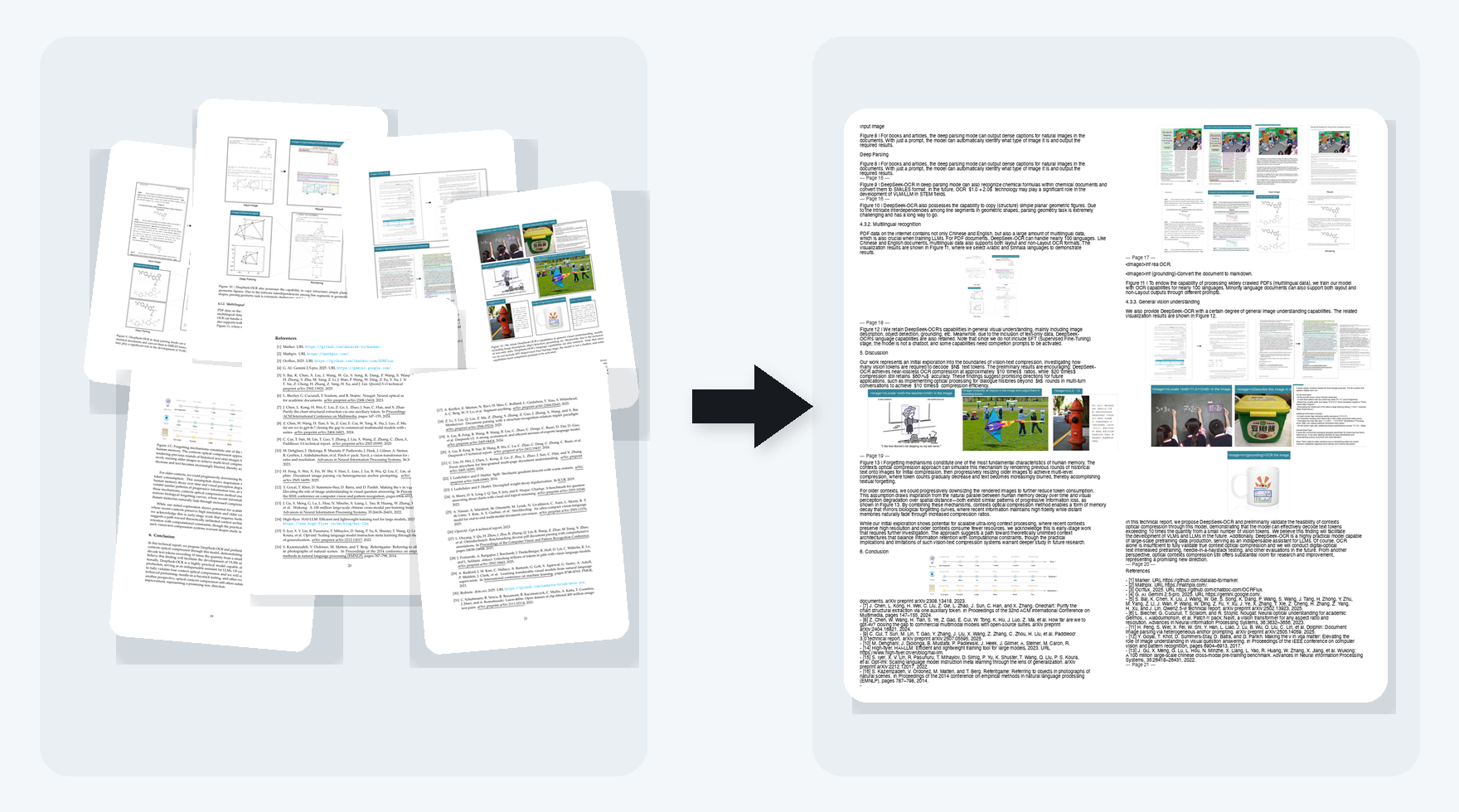
The image below shows a real local validation run on a public research paper with dense text, figures, charts, and page-level visual structure. The packed image on the right consolidates the seven source pages shown on the left.
Example local run facts from the generated manifest:
- source paper pages: 22
- previewed source page range: 15 to 21
- extracted images: 30
- packed output images: 6
- example packed image size:
986x1084 - example packed image file size:
536,697 bytes
This example shows the intended workflow: take a long, visually structured PDF and compress it into a smaller set of retrievable packed images that still preserve the visual structure of the source.
Install
Install with the adaptive sizing runtime:
Run without installing:
MISTRAL_API_KEYis required forcompress_pdf- packed images are always stored locally under the system temp directory
compress_pdfreturns up to30packed images inline by default- the adaptive sizing checkpoint is bundled with the package
- adaptive sizing activates automatically when
torchandtorchvisionare available - set
OPTICAL_CONTEXT_DISABLE_ADAPTIVE_SIZING=1to force the legacy fixed sizing - set
OPTICAL_CONTEXT_ADAPTIVE_MODEL_PATH=/path/to/model.ptto override the bundled checkpoint
For pinned shared setups:
Run
Default transport is stdio:
Claude Code
Register the server in a project:
Typical use:
- call
compress_pdf - inspect the returned manifest
- fetch packed images with
get_packed_images
MCP Tools
compress_pdf: run OCR plus recomposition and create a stored jobget_job_manifest: load metadata for an existing jobget_packed_images: fetch one or more packed PNGs from an existing job
How It Works
Why Packed Images Instead Of Just OCR Text
- section grouping
- table-like layout
- captions near figures
- visual adjacency between text and embedded graphics
For many vision-capable agents, that is a better intermediate format than a plain OCR dump.
Current Scope
- depends on Mistral OCR
- currently handles local file paths, not remote uploads
- stores artifacts in the local system temp directory by default
- optimized for compression and retrieval, not final polished markdown generation
- quality depends on OCR quality and the visual density of the source document
- adaptive sizing falls back safely to fixed medium image sizing when the ML runtime is absent
Roadmap
- make the OCR layer provider-agnostic so different OCR backends can be swapped behind the same MCP workflow
Development
Related MCP Servers
Adoption & maintenance
Factual signals from GitHub, npm, and our automated checks — not a rating.
GitHub stars
1
Stargazers on the source repository.
Last commit
5mo ago
Most recent push to the default branch.
Tools exposed
3
Callable tools this server registers over MCP.
Directory activity
1 views
Config copies, upvotes, and views on AllMCPs.
Reviews
No reviews yet — be the first to share how this listing worked for you.
Frequently Asked Questions about Optical Context MCP
AllMCPs Directory Badge
Showcase your server listing on GitHub or your project documentation. Embed this dynamic SVG badge to highlight official listing status and live engagement.
Badge Style:
Live Dynamic SVG Preview
Markdown (GitHub README)
[](https://allmcps.com/mcp/optical-context-mcp)HTML Embed
<a href="https://allmcps.com/mcp/optical-context-mcp"><img src="https://allmcps.com/api/badge/optical-context-mcp?style=directory" alt="Optical Context MCP on AllMCPs" /></a>Technical Specs & Signals
CategoryDeveloper Tools
8/8 checks healthy over the last 45d
47Quality signal: Fair · 47/100How this signal is calculated ▾
Server availabilityNot measured
Not scored for repo-hosted servers — we can't reach the running server, only its GitHub page. Hosted MCP endpoints are health-checked live.
Verified ownership10/20
Documentation & tools24/30
Adoption & activity1/15
Community engagement0/10
A guidance signal from public completeness & health data — not a user rating. New listings start lower and rise as they add docs, get verified, and grow adoption. Signals we can't observe for a listing are skipped, not counted against it.
Supply-chain signal
No high-severity advisories surfaced by our automated scan.
Critical 0High 0Medium 0Low 0
Scanned 5d ago via OSV.dev · optical-context-mcp (PyPI)
Own this project?
This directory is pre-filled from public sources. Claim via GitHub README, site badge, or DNS TXT to unlock edit access and the Official badge — proof is checked automatically, then reviewed by our team.
Free dofollow backlink: add your website and place the AllMCPs badge on it — no claim needed. We detect it automatically and keep it verified as long as the badge stays live.
Claim & get free dofollowShare & Embed
Add our SVG badge (dark/light directory styles) or embeddable widget to your site.