AllMCPs
BrowseBestCategoriesStackCompareToolsGuidesBlog
Log in Submit MCP

Stay in the loop

Get new MCP servers and top picks in your inbox.

AllMCPs

The open directory for discovering and installing Model Context Protocol servers.

AllMCPs on GitHub (opens in a new tab)
Launched onTiny Startupstinystartups.com
Explore
  • Browse servers
  • Best MCP servers
  • Categories
  • MCP clients
  • Agent prompts
  • Stack Builder
  • Compare servers
  • Random discovery New
  • Submit a server
  • Pricing & Boost Boost
Learn
  • Guides hub
  • What is MCP?
  • Install guide
  • Build an MCP server
  • Deploy an MCP server
  • Security guide
  • Troubleshooting
  • MCP for SEO & AEO
  • Protocol versioning
  • Blog & updates
Tools
  • All developer tools
  • Config generator
  • Config validator
  • Config auditor
  • MCP playground
  • Token calculator
  • OpenAPI β†’ MCP
  • Badge generator
For agents
  • REST API docs
  • Trust & traffic Live
  • Remote MCP server SSE β†— (opens in a new tab)
  • llms.txt β†— (opens in a new tab)
  • Catalog JSON β†— (opens in a new tab)
Company
  • About
  • Advertise Sponsor
  • Contact
  • GitHub β†— (opens in a new tab)
  • Terms
  • Privacy
AllMCPs VerifiedAllMCPs VerifiedFeatured on Nick LaunchesFeatured on Nick LaunchesLaunch Llama NewsletterLaunch Llama NewsletterVerified DR - allmcps.comVerified DR - allmcps.comFeatured on SaaSGrowFeatured on SaaSGrowFeatured on Twelve ToolsFeatured on Twelve ToolsFeatured on Saaspa.geFeatured on Saaspa.geFeatured on Findly.toolsFeatured on Findly.toolsFeatured on Startup FameFeatured on Startup FameFeatured on LaunchKiwiFeatured on LaunchKiwiFeatured on ScrollLaunchFeatured on ScrollLaunchFeatured on DailyPingsFeatured on DailyPingsFazier badgeFazier badgeFeatured on NewTool.siteFeatured on NewTool.siteFeatured on saasfame.comFeatured on saasfame.comDR Checker - Domain RatingDR Checker - Domain RatingListed on Turbo0Listed on Turbo0Launched on LaunchBoard - Product Launch PlatformLaunched on LaunchBoard - Product Launch PlatformList on SimilarlabsList on Similarlabshttps://codetrendy.comhttps://codetrendy.comListed on DevTool.ioFeatured on BuildlistFeatured on BuildlistLaunched on Tiny StartupsFeatured on ShowMeBestAIFeatured on ShowMeBestAIFind us on LaunchZoneFind us on LaunchZoneAllMCPs VerifiedAllMCPs VerifiedFeatured on Nick LaunchesFeatured on Nick LaunchesLaunch Llama NewsletterLaunch Llama NewsletterVerified DR - allmcps.comVerified DR - allmcps.comFeatured on SaaSGrowFeatured on SaaSGrowFeatured on Twelve ToolsFeatured on Twelve ToolsFeatured on Saaspa.geFeatured on Saaspa.geFeatured on Findly.toolsFeatured on Findly.toolsFeatured on Startup FameFeatured on Startup FameFeatured on LaunchKiwiFeatured on LaunchKiwiFeatured on ScrollLaunchFeatured on ScrollLaunchFeatured on DailyPingsFeatured on DailyPingsFazier badgeFazier badgeFeatured on NewTool.siteFeatured on NewTool.siteFeatured on saasfame.comFeatured on saasfame.comDR Checker - Domain RatingDR Checker - Domain RatingListed on Turbo0Listed on Turbo0Launched on LaunchBoard - Product Launch PlatformLaunched on LaunchBoard - Product Launch PlatformList on SimilarlabsList on Similarlabshttps://codetrendy.comhttps://codetrendy.comListed on DevTool.ioFeatured on BuildlistFeatured on BuildlistLaunched on Tiny StartupsFeatured on ShowMeBestAIFeatured on ShowMeBestAIFind us on LaunchZoneFind us on LaunchZone
Β© 2026 Jackalope Digital LLC. All rights reserved.
  1. Home
  2. πŸ’» Developer Tools
  3. OpenZiti Network Management
O
Health: ActiveRecent health check succeeded.Last checked 9/8/2026, 12:01:37 AM

OpenZiti Network Management

User RatingsBe the first to rate and review this MCP server! Enrichment pendingWe haven’t run our AI enrichment pass on this listing yet, so the overview, use cases, and FAQ below may be sparse or missing. We work through the catalog over time β€” check back soon.
View Repository3 GitHub StarsTotal stargazers on GitHub for the source repository (3 stars).

Manage OpenZiti zero-trust networks β€” through natural language

Quick Install

Automated & IDE Setup

Copy the AI prompt to install this server into Claude Code, Cursor, or another agent β€” or use 1-click editor setup below.

Add to CursorAdd to VS Code
Manual Client & Custom JSON ConfigExpand JSON β–Ύ

Client Config & Setup

Remote HTTP
Choose your client or environment
Target File:~/Library/Application Support/Claude/claude_desktop_config.json
claude_desktop_config.json
{
  "mcpServers": {
    "openziti-network-management": {
      "url": "https://img.shields.io/badge/License-Apache%202.0-blue.svg)](https://opensource.org/licenses/Apache-2.0"
    }
  }
}

πŸ’‘ Paste the JSON block into your client's configuration file under mcpServers, then restart the application.

Install Directory Badge Claim listing AlternativesπŸ’» More in Developer Tools

Documentation Overview

OpenZiti MCP Server Banner

License Go Version

πŸš€ Getting Started β€’ πŸ•ΈοΈ Architecture β€’ πŸ” Authentication β€’ πŸ› οΈ Supported Tools β€’ πŸ”’ Security β€’ 🩺 Troubleshooting β€’ πŸ“‹ Debug Logs β€’ πŸ‘¨β€πŸ’» Development

The Ziti MCP Server is sponsored by NetFoundry as part of its portfolio of solutions for secure workloads and agentic computing. NetFoundry is the creator of OpenZiti and zrok.

MCP (Model Context Protocol) is an open protocol introduced by Anthropic that standardizes how large language models communicate with external tools, resources or remote services.

The Ziti MCP Server integrates with LLMs and AI agents, allowing you to perform various Ziti network management operations using natural language. For instance, you could simply ask Claude Desktop to perform Ziti management operations:

  • List which identities exist

  • Tell me if there are any exposures in the network

  • Do you see potential misconfigurations?

  • Which identities have access to the Demo1 service?

  • Create a new Ziti identity named "Demo" and get its ID

  • Log into my prod Ziti network using UPDB

  • Switch to the staging network

  • etc.


πŸš€ Getting Started

Prerequisites:

  • Claude Desktop or any other MCP Client
  • OpenZiti network
  • Go 1.24+ (only if building from source)

Install

Download a pre-built binary

Pre-built binaries are available for macOS, Linux, and Windows (amd64 and arm64) on the releases page.

macOS (Apple Silicon)

Terminal
curl -sL https://github.com/openziti/ziti-mcp-server/releases/latest/download/ziti-mcp-server_darwin_arm64.tar.gz | tar xz
sudo mv ziti-mcp-server /usr/local/bin/

macOS (Intel)

Terminal
curl -sL https://github.com/openziti/ziti-mcp-server/releases/latest/download/ziti-mcp-server_darwin_amd64.tar.gz | tar xz
sudo mv ziti-mcp-server /usr/local/bin/

Linux (amd64)

Terminal
curl -sL https://github.com/openziti/ziti-mcp-server/releases/latest/download/ziti-mcp-server_linux_amd64.tar.gz | tar xz
sudo mv ziti-mcp-server /usr/local/bin/

Linux (arm64)

Terminal
curl -sL https://github.com/openziti/ziti-mcp-server/releases/latest/download/ziti-mcp-server_linux_arm64.tar.gz | tar xz
sudo mv ziti-mcp-server /usr/local/bin/

Windows

Download the appropriate .zip from the releases page and add the extracted ziti-mcp-server.exe to your PATH.

Build from source

bash
go install github.com/openziti/ziti-mcp-server/cmd/ziti-mcp-server@latest

Register with your AI Client

Use install to register the Ziti MCP Server with your AI client. This only updates the client's configuration file β€” it does not authenticate. Use the runtime login tools or init for that.

bash
# Register with Claude Desktop (default)
ziti-mcp-server install

# Register with a specific client
ziti-mcp-server install --client claude-code
ziti-mcp-server install --client cursor
ziti-mcp-server install --client windsurf
ziti-mcp-server install --client vscode
ziti-mcp-server install --client warp

# Register with read-only tools only
ziti-mcp-server install --read-only

# Register with specific tool patterns
ziti-mcp-server install --tools '*Identit*,list*'

After installing, restart your AI client and use the runtime login tools to authenticate (e.g., ask: "Log into my Ziti network at ctrl.example.com with username admin").

Start and Log In

The server can start with no prior configuration. The AI agent can log into networks at runtime using the built-in login tools:

bash
ziti-mcp-server run

Then in your AI client, simply ask:

Log into my Ziti network at 192.168.1.100:1280 with username admin and password admin

For non-interactive or automated setups, use init to pre-configure credentials before starting:

bash
ziti-mcp-server init \
  --auth-mode updb \
  --ziti-controller-host <your-controller-host> \
  --username <username> \
  --password <password> \
  --profile prod

See Authentication for all supported modes (UPDB, device auth, client credentials, identity file).

Manual Client Configuration

The install command handles client configuration automatically. If you need to configure an MCP client manually, add this to its configuration and restart:

config.json
{
  "mcpServers": {
    "ziti": {
      "command": "/path/to/ziti-mcp-server",
      "args": ["run"],
      "capabilities": ["tools"],
      "env": {
        "OPENZITI_MCP_DEBUG": "true"
      }
    }
  }
}

You can add --tools '<pattern>' and/or --read-only to the args array to control which tools are available. See Restricting Tool Access.

Verify your integration

Restart your MCP Client (Claude Desktop, Windsurf, Cursor, Warp, etc.) and ask it to help you manage your Ziti network.

πŸ•ΈοΈ Architecture

The Ziti MCP Server implements the Model Context Protocol, allowing clients (like Claude) to:

  1. Request a list of available Ziti tools
  2. Call specific tools with parameters
  3. Receive structured responses from the Ziti Management API

The server handles authentication, request validation, and secure communication with the Ziti Management API.
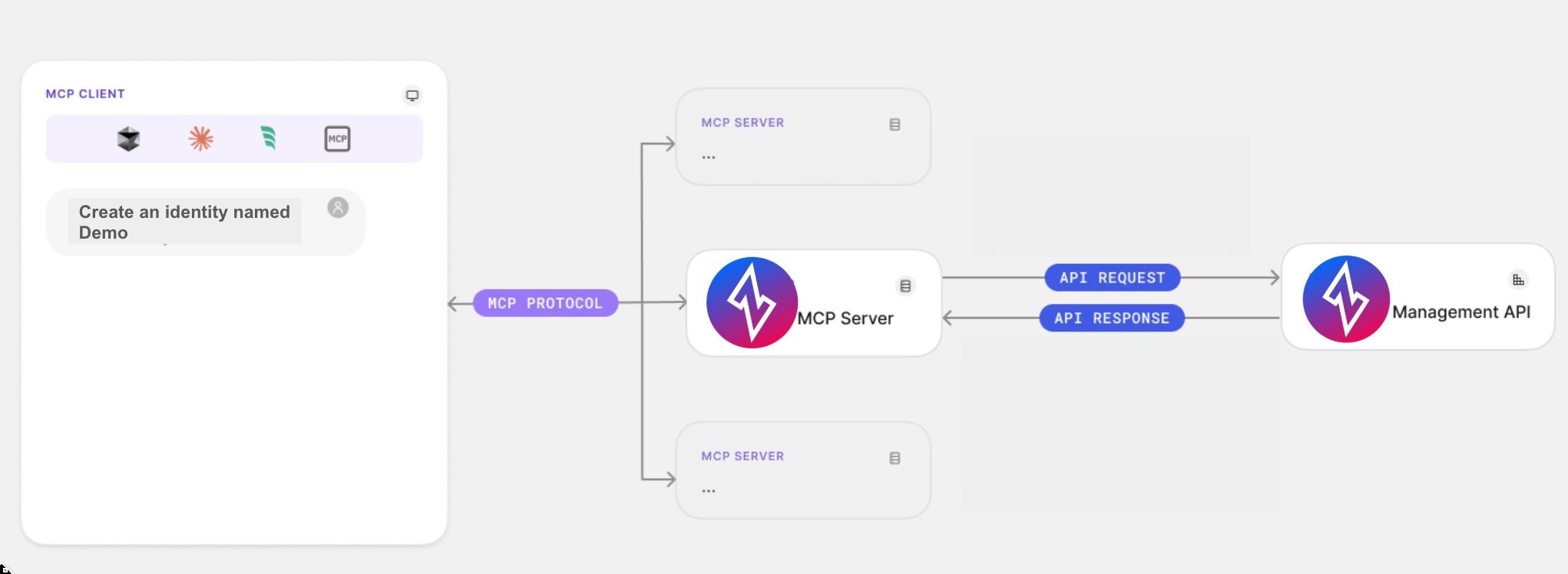
Ziti MCP Server

[!NOTE] The server operates as a local process that connects to Claude Desktop, enabling secure communication without exposing your Ziti credentials.

πŸ” Authentication

The Ziti MCP Server uses the Ziti Management API and requires authentication to access your Ziti network.

Authentication Modes

The server supports four authentication modes:

UPDB Mode (Username/Password)

Use this mode for direct username/password authentication against the Ziti controller:

bash
ziti-mcp-server init \
  --auth-mode updb \
  --ziti-controller-host <your-controller-host> \
  --username <username> \
  --password <password>

Or at runtime via the AI agent using the loginUpdb tool.

Device Auth Mode (Interactive Login)

Use this mode for interactive browser-based login. Recommended for development and user-facing scenarios:

bash
ziti-mcp-server init \
  --auth-mode device-auth \
  --ziti-controller-host <your-controller-host> \
  --idp-domain <your-idp-domain> \
  --idp-client-id <your-client-id> \
  --idp-audience <your-audience>

Or at runtime via the loginDeviceAuth tool (returns a verification URL for the user, then completeLogin to finish).

Client Credentials Mode (Service Account)

Use this mode for service accounts and automation. Recommended for production environments:

[!NOTE] Keep the token lifetime as minimal as possible to reduce security risks. See more

bash
ziti-mcp-server init \
  --auth-mode client-credentials \
  --ziti-controller-host <your-controller-host> \
  --idp-domain <your-idp-domain> \
  --idp-client-id <your-client-id> \
  --idp-client-secret <your-client-secret>

Identity File Mode (mTLS Certificate)

Use this mode for certificate-based authentication with a Ziti identity JSON file. No IdP configuration is needed:

bash
ziti-mcp-server init \
  --auth-mode identity \
  --identity-file <path-to-identity.json>

The identity file is a standard Ziti identity JSON file containing ztAPI, id.cert, id.key, and id.ca fields. The certificate material is extracted and stored in the config file. The identity file may be deleted after a successful init (for additional security, if desired).

[!IMPORTANT]

When using CLI init, it needs to be run whenever:

  • You're setting up the MCP Server for the first time
  • You've logged out from a previous session
  • You want to switch to a different Ziti network
  • Your token has expired

Alternatively, use the runtime login tools (loginUpdb, etc.) to authenticate without restarting the server.

Multi-Profile Support

The server supports multiple named network profiles, allowing you to manage several Ziti networks simultaneously:

bash
# Pre-configure two profiles
ziti-mcp-server init --auth-mode updb --profile prod ...
ziti-mcp-server init --auth-mode updb --profile staging ...

# Start with a specific profile active
ziti-mcp-server run --profile prod

At runtime, the AI agent can:

  • Log into additional networks using loginUpdb, loginIdentity, etc.
  • List all networks using listNetworks
  • Switch between networks using selectNetwork
  • Log out from a network using logout

Credentials are stored in ~/.config/ziti-mcp-server/config.json with 0600 permissions.

Session Management

To see information about your current authentication session:

bash
ziti-mcp-server session
ziti-mcp-server session --profile prod

Logging Out

bash
ziti-mcp-server logout
ziti-mcp-server logout --profile prod

Or at runtime via the AI agent using the logout tool.

πŸ› οΈ Supported MCP Tools

Read the full README β†’View source on GitHub β†’

Related MCP Servers

View all in Developer Tools View all alternatives
  • Awx MCP Server logoAwx MCP Server

    Control AWX/Ansible Tower through natural language - 49 tools for automation

    πŸ’» Developer Tools0 views
    Compare vs Awx MCP Server β†’
  • Airweave Search logoAirweave Search

    MCP server for searching Airweave collections with natural language queries.

    πŸ’» Developer Tools0 views
    Compare vs Airweave Search β†’
  • Marzban MCP logoMarzban MCP

    Manage Marzban panels through the Model Context Protocol.

    πŸ’» Developer Tools0 views
    Compare vs Marzban MCP β†’
  • PraisonAI logoPraisonAI

    AI Agents Framework with Self Reflection and MCP support

    πŸ’» Developer Tools1 views
    Compare vs PraisonAI β†’

Adoption & maintenance

Factual signals from GitHub, npm, and our automated checks β€” not a rating.

GitHub stars
3
Stargazers on the source repository.
Last commit
2mo ago
Most recent push to the default branch.

Reviews

No reviews yet β€” be the first to share how this listing worked for you.

Frequently Asked Questions about OpenZiti Network Management

Add the following block to your claude_desktop_config.json under mcpServers: "mcpServers": { "openziti-network-management": { "command": "npx", "args": ["-y", "OpenZiti Network Management"] } }

AllMCPs Directory Badge

Full Badge Customizer

Showcase your server listing on GitHub or your project documentation. Embed this dynamic SVG badge to highlight official listing status and live engagement.

Badge Style:
Live Dynamic SVG PreviewOpenZiti Network Management AllMCPs Directory Badge
Markdown (GitHub README)
[![AllMCPs](https://allmcps.com/api/badge/openziti-network-management?style=directory)](https://allmcps.com/mcp/openziti-network-management)
HTML Embed
<a href="https://allmcps.com/mcp/openziti-network-management"><img src="https://allmcps.com/api/badge/openziti-network-management?style=directory" alt="OpenZiti Network Management on AllMCPs" /></a>

Technical Specs & Signals

CategoryπŸ’»Developer Tools
More technical detailsExpand β–Ύ
TransportSSE (Remote)
RuntimeNode.js
Last updatedJul 3, 2026
Views0
Unique ViewsTotal visits recorded for this listing page on AllMCPs.
Installs0
Installs & Copy ActionsTotal times users copied install commands or configuration snippets for this server.
GitHub stars3
GitHub Star CountTotal stargazers on GitHub representing community popularity (3 stars).
Last commit2mo ago
Last Repository CommitThe most recent commit or push recorded for this server's GitHub repository.Last commit on Jul 3, 2026
37Quality signal: Fair Β· 37/100How this signal is calculated β–Ύ
Server availabilityNot measured

Not scored for repo-hosted servers β€” we can't reach the running server, only its GitHub page. Hosted MCP endpoints are health-checked live.

Verified ownership10/20
Documentation & tools15/30
Adoption & activity3/15
Community engagement0/10

A guidance signal from public completeness & health data β€” not a user rating. New listings start lower and rise as they add docs, get verified, and grow adoption. Signals we can't observe for a listing are skipped, not counted against it.

β˜… FeaturedMoxie Docs MCP logo

Moxie Docs MCP

MCP & Agent Skills for Automated Documentation, and codebase conventions + context

Explore Server β†’

Own this project?

This directory is pre-filled from public sources. Claim via GitHub README, site badge, or DNS TXT to unlock edit access and the Official badge and attach your website β€” proof is checked automatically, then reviewed by our team.

Free dofollow backlink: add your website and place the AllMCPs badge on it β€” no claim needed. We detect it automatically and keep it verified as long as the badge stays live.

Claim & get free dofollow

Share & Embed

Add our SVG badge (dark/light directory styles) or embeddable widget to your site.

Explore more

More in πŸ’» Developer Tools β†’Best MCP servers for Developers β†’Alternatives to OpenZiti Network Management β†’Install in Claude DesktopInstall in CursorInstall in VS Code